The ICPHREG Procedure
PROC ICPHREG Statement
PROC ICPHREG <options>;
The PROC ICPHREG statement invokes the ICPHREG procedure. Table 2 summarizes the options available in the PROC ICPHREG statement.
Table 2: PROC ICPHREG Statement Options
| Option | Description |
|---|---|
| ALPHA= | Specifies the level for confidence limits |
| DATA= | Names the SAS data set to be analyzed |
| ITHISTORY | Displays the iteration history, final gradient, and second derivative matrix |
| NAMELEN= | Specifies the length of effect names |
| NLOPTIONS | Specifies optimization parameters for fitting the specified model |
| NOPRINT | Suppresses all displayed output |
| NOTHREADS | Requests a single-threaded mode for the computation |
| PLOTS= | Controls the plots that are produced through ODS Graphics |
| SINGULAR= | Specifies the singularity tolerance |
| THREADS= | Specifies the number of threads for the computation |
You can specify the following options in the PROC ICPHREG statement.
- ALPHA=number
specifies the
 level for
  % confidence limits. The number must be between 0 and 1; the default value is 0.05, which results in 95% intervals. This value is used as the default level for confidence limits that are computed by the BASELINE, HAZARDRATIO, and MODEL statements. You can override this default by specifying the ALPHA= option in these statements.
 - DATA=SAS-data-set
names the SAS data set that contains the data to be analyzed. If you omit this option, the procedure uses the most recently created SAS data set.
- ITHISTORY
displays the iteration history for computing maximum likelihood estimates, the final evaluation of the gradient, and the final evaluation of the negative of the second derivative matrix (that is, the negative of the Hessian).
- NAMELEN=n
specifies the maximum length of effect names in tables and output data sets to be n characters, where n is a value between 20 and 200. By default, NAMELEN=20.
- NLOPTIONS(options)
-
specifies options for the nonlinear optimization methods that are used for fitting the specified model. You can specify the following options:
-
ABSCONV=r
ABSTOL=r specifies an absolute function convergence criterion by which minimization stops when
 , where
  is the vector of parameters in the optimization and
  is the objective function. The default value of r is the negative square root of the largest double-precision value, which serves only as a protection against overflows.
 -
ABSFCONV=r
ABSFTOL=r -
specifies an absolute function difference convergence criterion. For all techniques except NMSIMP, termination requires a small change of the function value in successive iterations,

where
denotes the vector of parameters that participate in the optimization and is the objective function. The same formula is used for the NMSIMP technique, but  is defined as the vertex that has the lowest function value, and
  is defined as the vertex that has the highest function value in the simplex. By default, ABSFCONV=0.
 -
ABSGCONV=r
ABSGTOL=r -
specifies an absolute gradient convergence criterion. Termination requires the maximum absolute gradient element to be small,
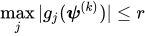
where
denotes the vector of parameters that participate in the optimization and  is the gradient of the objective function with respect to the jth parameter. This criterion is not used by the NMSIMP technique. The default value is r = 1E–5.
 -
FCONV=r
FTOL=r -
specifies a relative function convergence criterion. For all techniques except NMSIMP, termination requires a small relative change of the function value in successive iterations,
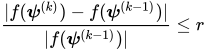
where
denotes the vector of parameters that participate in the optimization and is the objective function. The same formula is used for the NMSIMP technique, but is defined as the vertex that has the lowest function value, and is defined as the vertex that has the highest function value in the simplex. The default is r  , where FDIGITS is by default
  and
and  is the machine precision.
 -
GCONV=r
GTOL=r -
specifies a relative gradient convergence criterion. For all techniques except CONGRA and NMSIMP, termination requires the normalized predicted function reduction to be small,

where
denotes the vector of parameters that participate in the optimization, is the objective function, and  is the gradient. For the CONGRA technique (in which a reliable Hessian estimate
  is not available), the following criterion is used:
This criterion is not used by the NMSIMP technique. The default value is r = 1E–8.
-
MAXFUNC=n
MAXFU=n -
specifies the maximum number of function calls in the optimization process. The default values are as follows, depending on the optimization technique (which you can specify in the TECHNIQUE= option):
TRUREG, NRRIDG, and NEWRAP: 125
QUANEW and DBLDOG: 500
CONGRA: 1000
NMSIMP: 3000
The optimization can terminate only after completing a full iteration. Therefore, the number of function calls that are actually performed can exceed n.
-
MAXITER=n
MAXIT=n -
specifies the maximum number of iterations in the optimization process. The default values are as follows, depending on the optimization technique (which you can specify in the TECHNIQUE= option):
TRUREG, NRRIDG, and NEWRAP: 50
QUANEW and DBLDOG: 200
CONGRA: 400
NMSIMP: 1000
These default values also apply when n is specified as a missing value.
- MAXTIME=r
specifies an upper limit of r seconds of CPU time for the optimization process. The time is checked only at the end of each iteration. Therefore, the actual run time might be longer than r. By default, CPU time is not limited.
-
MINITER=n
MINIT=n specifies the minimum number of iterations. If you request more iterations than are actually needed for convergence to a stationary point, the optimization algorithms can behave strangely. For example, the effect of rounding errors can prevent the algorithm from continuing for the required number of iterations. By default, MINITER=0.
-
TECHNIQUE=keyword
TECH=keyword -
specifies the optimization technique to obtain maximum likelihood estimates. You can choose from the following techniques:
- CONGRA
performs a conjugate-gradient optimization.
- DBLDOG
performs a version of double-dogleg optimization.
- EM
fits the model by using the expectation-maximization (EM) algorithm.
- EMICM
fits the model by using the EMICM algorithm, which is an extension of the EM algorithm that also uses the iterative convex minorant (ICM) algorithm.
- NEWRAP
performs a Newton-Raphson optimization that combines a line-search algorithm with ridging.
- NMSIMP
performs a Nelder-Mead simplex optimization.
- NONE
performs no optimization.
- NRRIDG
performs a Newton-Raphson optimization with ridging.
- QUANEW
performs a dual quasi-Newton optimization.
- TRUREG
performs a trust-region optimization.
For models other than the semiparametric model, the default is TECHNIQUE=NEWRAP. For the semiparametric model, only the EM and EMICM methods are supported and the default optimization method is EMICM.
For more information about these optimization methods, see the section Choosing an Optimization Algorithm in Chapter 20, Shared Concepts and Topics.
For more information about the EM and EMICM methods, see the section EM Algorithm and Extensions.
-
ABSCONV=r
- NOPRINT
suppresses all displayed output. This option temporarily disables the Output Delivery System (ODS); For more information, see Chapter 23, Using the Output Delivery System.
- NOTHREADS
forces single-threaded execution of the analytic computations. This option overrides the SAS system option THREADS | NOTHREADS. Specifying this option is equivalent to specifying the THREADS=1 option.
-
PLOTS<(global-plot-options)> = plot-request
PLOTS<(global-plot-options)> = (plot-request <…<plot-request>>) -
specifies plots to be created using ODS Graphics. You can request plots of survival functions and cumulative hazard functions. Also, many of the observation statistics in the output data set can be plotted using this option. You are not required to create an output data set in order to produce a plot. When you specify only one plot-request, you can omit the parentheses around it.
You can specify the following global-plot-options:
You can specify the following plot-requests:
Each observation in the data set that is specified in the COVARIATES= option in the BASELINE statement provides a set of covariates for which a plot is produced for each plot-request. You can use the ROWID= option in the BASELINE statement to specify a variable in the COVARIATES= data set for identifying the functions that are plotted for the covariate sets. If the ROWID= option is not specified, the plots are identified by the covariate values if there is only a single covariate or by the observation numbers of the COVARIATES= data set if the model has two or more covariates. If the COVARIATES= data set is not specified, a reference set of covariates that consists of the reference levels for the CLASS variables and the average values for the continuous variables is used. When plotting more than one function, you can use the OVERLAY= option to group the functions. When you specify only one plot-request, you can omit the parentheses around the plot request. Here are some examples:
plots=survival
plots=(survival cumhaz)
ODS Graphics must be enabled before plots can be requested. For example:
ods graphics on;
proc icphreg plots(cl)=survival;
   model (Left, Right)=X1-X5;
   baseline covariates=One;
run;
For more information about enabling and disabling ODS Graphics, see the section Enabling and Disabling ODS Graphics in Chapter 24, Statistical Graphics Using ODS.
-
SINGULAR=number
EPSILON=number specifies the tolerance for testing the singularity of the
 matrix that is formed from the design matrix
  and for testing the singularity of the Hessian matrix upon convergence of the optimization algorithm. Appropriately, the test requires that a pivot be at least this number times the original diagonal value. By default, number is
  times the machine epsilon. On most machines, the default number is approximately
  .
. -
THREADS=n
NTHREADS=n specifies the number of threads for analytic computations and overrides the SAS system option THREADS | NOTHREADS. If you do not specify the THREADS= option or if you specify THREADS=0, the number of threads is determined based on the data size and the number of CPUs on the host on which the analytic computations execute.