The LOGISTIC Procedure
Receiver Operating Characteristic Curves
Receiver operating characteristic (ROC) curves are used to evaluate and compare the performance of diagnostic tests; they can also be used to evaluate model fit. An ROC curve is just a plot of the proportion of true positives (events predicted to be events) versus the proportion of false positives (nonevents predicted to be events).
In a sample of n individuals, suppose that  individuals are observed to have a certain condition or event, indicated by Y = 1; denote this group as
  . Let the remaining
  individuals who do not have the condition be indicated by Y = 2, and denote this group as
  . Risk factors are identified for the sample, and a logistic regression model is fitted to the data. For the jth individual, an estimated probability
  of the event of interest is calculated. By default, the are computed as shown in the section Linear Predictor, Predicted Probability, and Confidence Limits; you can use the cross validated probabilities (discussed in the section Classification Table) by specifying the CROSSVALIDATE suboption of the ROCOPTIONS option.
Suppose that the n individuals undergo a test for predicting the event and that the test is based on the estimated probability of the event. Higher values of this estimated probability are assumed to be associated with the event. Define this test as a decision rule, D, which classifies an observation as an event when  ; D = 1 indicates that the observation is classified as an event, and D = 2 indicates that the observation is classified as a nonevent. You can construct an ROC curve by varying the cutpoint z that determines which estimated event probabilities are considered to predict the event. For a given cutpoint, the resulting
  classification table is shown in Table 13, where
  is the total number of observations that are observed to have Y = i and are classified into D = j.
Table 13: Classification Matrix for Cutpoint z
( ) ) |
 ( ( ) ) |
Total | |
|---|---|---|---|
 (event) (event) |
 |
 |
|
 (nonevent) (nonevent) |
 |
 |
 |
For each cutpoint z, you can output the measures in Table 14 to a data set by specifying the OUTROC= option in the MODEL statement or the OUTROC= option in the SCORE statement.
Table 14: Statistics from the Classification Matrix with Cutpoint z
| Statistic | Equation | Description |
|---|---|---|
| _PROB_ | z | Cutpoint |
| _POS_ | |
Number of correctly predicted event responses |
| _NEG_ | |
Number of correctly predicted nonevent responses |
| _FALPOS_ | |
Number of falsely predicted event responses |
| _FALNEG_ | |
Number of falsely predicted nonevent responses |
| _SENSIT_ |  |
Sensitivity of the test |
| _1MSPEC_ |  |
One minus the specificity of the test |
The ROC curve is a plot of sensitivity (_SENSIT_) against 1–specificity (_1MSPEC_). The plot can be produced by using the PLOTS option or by using the GPLOT or SGPLOT procedure with the OUTROC= data set. See Example 79.7 for an illustration. The area under the ROC curve, as determined by the trapezoidal rule, is estimated by the concordance index, c, in the "Association of Predicted Probabilities and Observed Responses" table.
Comparing ROC Curves
ROC curves can be created from each model fit in a selection routine, from the specified model in the MODEL statement, from specified models in ROC statements, or from input variables which act as  in the preceding discussion. Association statistics are computed for these models, and the models are compared when the ROCCONTRAST statement is specified. The ROC comparisons are performed by using a contrast matrix to take differences of the areas under the empirical ROC curves (DeLong, DeLong, and Clarke-Pearson 1988). For example, if you have three curves and the second curve is the reference, the contrast used for the overall test is
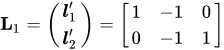
and you can optionally estimate and test each row of this contrast, in order to test the difference between the reference curve and each of the other curves. If you do not want to use a reference curve, the global test optionally uses the following contrast:
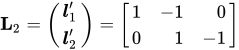
You can also specify your own contrast matrix. Instead of estimating the rows of these contrasts, you can request that the difference between every pair of ROC curves be estimated and tested. Demler, Pencina, and D’Agostino (2012) caution that testing the difference in the AUC between two nested models is not a valid approach if the added predictor is not significantly associated with the response; in any case, if you use this approach, you are more likely to fail to reject the null.
By default for the reference contrast, the specified or selected model is used as the reference unless the NOFIT option is specified in the MODEL statement, in which case the first ROC model is the reference.
In order to label the contrasts, a name is attached to every model. The name for the specified or selected model is the MODEL statement label, or "Model" if the MODEL label is not present. The ROC statement models are named with their labels, or as "ROCi" for the ith ROC statement if a label is not specified. The contrast  is labeled as "Reference = ModelName", where ModelName is the reference model name, while
  is labeled "Adjacent Pairwise Differences". The estimated rows of the contrast matrix are labeled "ModelName1 – ModelName2". In particular, for the rows of , ModelName2 is the reference model name. If you specify your own contrast matrix, then the contrast is labeled "Specified" and the ith contrast row estimates are labeled "Rowi".
If ODS Graphics is enabled, then all ROC curves are displayed individually and are also overlaid in a final display. If a selection method is specified, then the curves produced in each step of the model selection process are overlaid onto a single plot and are labeled "Stepi", and the selected model is displayed on a separate plot and on a plot with curves from specified ROC statements. See Example 79.8 for an example.
ROC Computations
The trapezoidal area under an empirical ROC curve is equal to the Mann-Whitney two-sample rank measure of association statistic (a generalized U-statistic) applied to two samples,  , in and
  , in . PROC LOGISTIC uses the predicted probabilities in place of
  and
and  ; however, in general any criterion could be used. Denote the frequency of observation i in
  as
as  , and denote the total frequency in as
  . The WEIGHTED option replaces with
  , where
  is the weight of observation i in group . The trapezoidal area under the curve is computed as
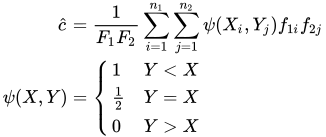
so that  . Note that the concordance index, c, in the "Association of Predicted Probabilities and Observed Responses" table does not use weights unless both the WEIGHTED and BINWIDTH=0 options are in effect.
To compare K empirical ROC curves, first compute the trapezoidal areas. Asymptotic normality of the estimated area follows from U-statistic theory, and a covariance matrix  can be computed; For more information, see DeLong, DeLong, and Clarke-Pearson (1988). A Wald confidence interval for the rth area,
  , can be constructed as
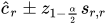
where  is the rth diagonal of .
For a contrast of ROC curve areas,  , the statistic

has a chi-square distribution with df=rank( ). For a row of the contrast,
  ,
,

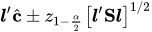
has a standard normal distribution. The corresponding confidence interval is