The ROBUSTREG Procedure
Leverage-Point and Outlier Detection
The regular variable LEVERAGE is defined as

where 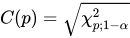 is the cutoff value.
  can be set by using the leverage CUTOFF= option, and
  can be set by using the leverage CUTOFFALPHA= option.
If projected robust distances are computed for a data set that has a low-dimensional structure, the default cutoff value is 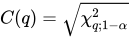 , where q is the dimensionality of the low-dimensional space. LEVERAGE is then defined as

where POD is the projected off-plane distance and PRD denotes the projected robust distance. You can specify a cutoff value by using the CUTOFF= or CUTOFFALPHA= suboption of the LEVERAGE option in the MODEL statement.
Residuals  , based on robust regression estimates are used to detect vertical outliers. The variable OUTLIER is defined as

where  is the estimated scale in the model and the multiplier
  of the cutoff value is specified by the CUTOFF= option in the MODEL statement. By default, k = 3.
An ODS table called Diagnostics contains the LEVERAGE and OUTLIER variables.