The BCHOICE Procedure
PROC BCHOICE Statement
PROC BCHOICE <options>;
The PROC BCHOICE statement invokes the BCHOICE procedure.
Table 2 summarizes the options available in the PROC BCHOICE statement.
Table 2: PROC BCHOICE Statement Options
| Option | Description |
|---|---|
| Basic Options | |
| DATA= | Names the input data set |
| NBI= | Specifies the number of burn-in iterations |
| NMC= | Specifies the number of iterations, excluding the burn-in iterations |
| NTHREADS= | Specifies the number of threads to use |
| NTU= | Specifies the number of tuning iterations for the random walk sampler |
| OUTPOST= | Names the output data set to contain posterior samples of parameters |
| SEED= | Specifies the random seed for simulation |
| THIN= | Specifies the thinning rate |
| Sampling, Summary, Diagnostics, and Plotting options | |
| ALGORITHM= | Specifies the algorithm to use to sample the posterior distribution |
| DIAGNOSTICS= | Controls the convergence diagnostics |
| DIC | Computes the deviance information criterion (DIC) |
| HITPROB | Outputs the average of estimated probabilities of chosen alternatives in the input data |
| PLOTS= | Controls plotting |
| STATISTICS= | Controls posterior statistics |
| Other Options | |
| ACCEPTTOL= | Specifies the acceptance rate tolerance for the random walk sampler |
| INF= | Specifies the machine numerical limit for infinity |
| LOGPOST | Calculates the logarithm of the posterior density and likelihood |
| MAXTUNE= | Specifies the maximum number of tuning loops for the random walk sampler |
| MCHISTORY= | Displays Markov chain sampling history |
| MINTUNE= | Specifies the minimum number of tuning loops for the random walk sampler |
| NOCLPRINT | Suppresses the "Class Level Information" table completely or partially |
| SCALE= | Specifies the initial scale applied to the proposal distribution for the random walk sampler |
| TARGACCEPT= | Specifies the target acceptance rate for the random walk sampler |
| TUNEWT= | Specifies the weight used in covariance updating for the random walk sampler |
You can specify the following options.
- ACCEPTTOL=n
specifies a tolerance for acceptance probabilities for the random walk sampler. By default, ACCEPTTOL=0.075. You can specify this option for logit models.
-
ALGORITHM=GAMERMAN | RWM | LATENT
ALG=GAMERMAN | RWM | LATENT -
specifies the algorithm to use to sample the posterior distribution for the regression coefficients. You can specify the following algorithms:
When possible, PROC BCHOICE samples directly from the full conditional distribution. Otherwise, the default sampling algorithm is the Gamerman algorithm for standard logit models, the random walk Metropolis algorithm for nested logit models, and the latent variables via the data augmentation method for probit models. Standard logit models can also use random walk Metropolis sampling algorithm if specified, while the other two types of models, nested logit models and probit models, have only their own default sampling algorithm.
- DATA=SAS-data-set
-
DIAGNOSTICS=NONE | (keyword-list)
DIAG=NONE | (keyword-list) -
specifies options for convergence diagnostics. By default, PROC BCHOICE computes the effective sample sizes. The sample autocorrelations, Monte Carlo errors, Geweke test, Raftery-Lewis test, and Heidelberger-Welch test are also available. For more information about convergence diagnostics, see the section Assessing Markov Chain Convergence in Chapter 8, Introduction to Bayesian Analysis Procedures. You can request all the diagnostic tests by specifying DIAGNOSTICS=ALL. You can suppress all the diagnostic tests by specifying DIAGNOSTICS=NONE.
You can specify one or more of the following keyword-list options:
- ALL
computes all diagnostic tests and statistics. You can combine the option ALL with any other specific tests to modify test options. For example, DIAGNOSTICS=(ALL AUTOCORR(LAGS=(1 5 35))) computes all tests by using default settings and autocorrelations at lags 1, 5, and 35.
-
AUTOCORR <(autocorrelation-options)>
AC <(autocorrelation-options)> -
computes default autocorrelations at lags 1, 5, 10, and 50 for each variable. You can choose other lags by using the following autocorrelation-option:
- ESS
computes the effective sample sizes (Kass et al. 1998) of the posterior samples of each parameter. It also computes the correlation time and the efficiency of the chain for each parameter. Small values of ESS might indicate a lack of convergence. For more information, see the section Effective Sample Size in Chapter 8, Introduction to Bayesian Analysis Procedures.
- GEWEKE <(Geweke-options)>
-
computes the Geweke spectral density diagnostics; this is a two-sample t-test between the first
 portion (as specified by the FRAC1= option) and the last
  portion (as specified by the FRAC2= option) of the chain. For more information, see the section Geweke Diagnostics in Chapter 8, Introduction to Bayesian Analysis Procedures. By default, FRAC1=0.1 and FRAC2=0.5, but you can choose other fractions by using the following Geweke-options:
 -
HEIDELBERGER <(Heidel-options)>
HEIDEL <(Heidel-options)> -
computes the Heidelberger-Welch diagnostic (which consists of a stationarity test and a half-width test) for each variable. The stationary diagnostic test tests the null hypothesis that the posterior samples are generated from a stationary process. If the stationarity test is passed, a half-width test is then carried out. For more information, see the section Heidelberger and Welch Diagnostics in Chapter 8, Introduction to Bayesian Analysis Procedures.
You can also specify suboptions, such as DIAGNOSTICS=HEIDELBERGER(EPS=0.05), as follows:
- EPS=value
specifies a small positive number
 such that if the half-width is less than times the sample mean of the retaining iterations, the half-width test is passed. By default, EPS=0.1.
 - HALPHA=value
specifies the
 level
level  for the half-width test. By default, HALPHA=0.05.
 - SALPHA=value
specifies the
level for the stationarity test. By default, SALPHA=0.05.
- MAXLAG=n
specifies the maximum number of autocorrelation lags to use to compute the effective sample size; for more information, see the section Effective Sample Size in Chapter 8, Introduction to Bayesian Analysis Procedures. The value of n is also used in the calculation of the Monte Carlo standard error; see the section Standard Error of the Mean Estimate in Chapter 8, Introduction to Bayesian Analysis Procedures. By default, MAXLAG=MIN(500, MCsample/4), where MCsample is the Markov chain sample size that is kept after thinning—that is, MCsample
 . If n is too low, you might observe significant lags and the effective sample size cannot be calculated accurately. A warning message appears in the SAS log, and you can increase either the MAXLAG= option or the NMC= option, accordingly. Specifying this option implies the ESS and MCSE options.
 -
MCSE
MCERROR computes the Monte Carlo standard error for the posterior samples of each parameter.
- NONE
suppresses all the diagnostic tests and statistics. This option is not recommended.
-
RAFTERY <(Raftery-options)>
RL <(Raftery-options)> -
computes the Raftery-Lewis diagnostic, which evaluates the accuracy of the estimated quantile (
 for a given Q
  ) of a chain. can achieve any degree of accuracy when the chain is allowed to run for a long time. The algorithm stops when the estimated probability
  reaches within
  of the value Q with probability S; that is,
  . For more information, see the section Raftery and Lewis Diagnostics in Chapter 8, Introduction to Bayesian Analysis Procedures.
 You can specify Q, R, S, and a precision level
for a stationary test by specifying the following Raftery-options—for example, DIAGNOSTICS=RAFTERY(QUANTILE=0.05):
- DIC
computes the deviance information criterion (DIC). DIC is calculated by using the posterior mean estimates of the parameters. For more information, see the section Deviance Information Criterion (DIC) in Chapter 8, Introduction to Bayesian Analysis Procedures.
-
HITPROB
HITPROBABILITY calculates the average of estimated probabilities of all chosen alternatives in the input data set. You can use this average as a measure of goodness of fit.
- INF=value
specifies the numerical definition of infinity in PROC BCHOICE. By default, INF=1E15. For example, PROC BCHOICE considers 1E16 to be outside the support of the normal distribution and assigns a missing value to the log density evaluation. The minimum value that is allowed is 1E10, and the maximum value that is allowed is 1E27.
- LOGPOST
calculates the logarithm of the posterior density of the parameters and the likelihood at each iteration. As a result, the OUTPOST= data set will contain the LOGLIKE and LOGPOST variables. You can specify this option for logit models and nested logit models, but not probit models.
- MAXTUNE=n
specifies an upper limit for the number of proposal tuning loops for the random walk sampler. You can specify this option for logit models; it is ignored for other models. By default, MAXTUNE=6.
-
MCHISTORY=BRIEF | DETAILED | NONE
MCHIST=BRIEF | DETAILED | NONE -
controls the display of the Metropolis sampling history. This option is ignored for nested logit and probit models. You can specify the following values:
By default, MCHISTORY=BRIEF.
- MINTUNE=n
specifies a lower limit for the number of proposal tuning loops for the random walk sampler. You can specify this option for logit models; it is ignored for other models. By default, MINTUNE=2.
- NBI=n
specifies the number of burn-in iterations to perform before beginning to save parameter estimate chains. By default, NBI=500. For more information, see the section Burn-In, Thinning, and Markov Chain Samples in Chapter 8, Introduction to Bayesian Analysis Procedures.
- NMC=n
specifies the number of iterations in the main simulation loop. If you specify a data set in the OUTPOST= option, this is the number of posterior samples that will be saved for each parameter. This is the MCMC sample size if THIN=1. By default, NMC=5000.
- NOCLPRINT<=n>
suppresses the display of the "Class Level Information" table if you do not specify n. If you specify n, the values of the classification variables are displayed for only those variables whose number of levels is less than n. Specifying n helps reduce the size of the "Class Level Information" table if some classification variables have a large number of levels.
-
NTHREADS=n
NTHREAD=n -
specifies the number of threads(CPUs) for analytic computations and simulation to run simultaneously on. Multi-threading is the concurrent execution of threads. When multi-threading is possible, you can realize substantial performance gains compared to the performance you get from sequential (single-threaded) execution. The more threads there are, the faster the computation runs. But do not specify a number that is more than the number of CPUs on the host where the analytic computations execute.
PROC BCHOICE performs two types of threading. In sampling fixed-effects parameters, PROC BCHOICE allocates data to different threads and accumulates values from each thread; in sampling of random-effects parameters, each thread generates a subset of these parameters simultaneously at each iteration. Most sampling algorithms are threaded. If you do not specify the NTHREADS= option or if you specify NTHREADS=0, the default number of threads is 1.
- NTU=n
specifies the number of iterations to use in each proposal tuning phase for the random walk sampler. You can specify this option for logit models; it is ignored for other models. By default, NTU=500.
-
OUTPOST=SAS-data-set
OUT=SAS-data-set specifies an output data set to contain the posterior samples of all parameters and the iteration numbers. It contains the log of the posterior density (LOGPOST) and the log likelihood (LOGLIKE) if you specify the LOGPOST option. By default, no OUTPOST= data set is created.
-
PLOTS <(global-plot-options)> <= plot-request <(options)>>
PLOTS <(global-plot-options)> <= (plot-request <(options)> <…plot-request <(options)>>)> -
controls the display of diagnostic plots. You can request three types of plots: trace plots, autocorrelation function plots, and kernel density plots. By default, the plots are displayed in panels unless you specify the global-plot-option UNPACK. Also, when you specify more than one type of plot, the plots are grouped by parameter unless you specify the global-plot-option GROUPBY=TYPE. When you specify only one plot-request, you can omit the parentheses around it, as shown in the following example:
   plots=none
   plots(unpack)=trace
   plots=(trace density)
If ODS Graphics is enabled but you do not specify the PLOTS= option, then PROC BCHOICE produces, for each parameter, a panel that contains the trace plot, the autocorrelation function plot, and the density plot. This is equivalent to specifying PLOTS=(TRACE AUTOCORR DENSITY).
You can specify the following global-plot-options:
You can specify the following plot-requests:
Consider a model that has four parameters, X1–X4. The following list shows which plots are produced for various option settings:
-
PLOTS=(TRACE AUTOCORR) displays the trace and autocorrelation plots for each parameter side by side, with two parameters per panel:
Display 1 Trace(X1) Autocorr(X1) Trace(X2) Autocorr(X2) Display 2 Trace(X3) Autocorr(X3) Trace(X4) Autocorr(X4) -
PLOTS(GROUPBY=TYPE)=(TRACE AUTOCORR) displays all the paneled trace plots, followed by panels of autocorrelation plots:
Display 1 Trace(X1) Trace(X2) Display 2 Trace(X3) Trace(X4) Display 3 Autocorr(X1) Autocorr(X2) Autocorr(X3) Autocorr(X4) -
PLOTS(UNPACK)=(TRACE AUTOCORR) displays a separate trace plot and a separate correlation plot, parameter by parameter:
Display 1 Trace(X1) Display 2 Autocorr(X1) Display 3 Trace(X2) Display 4 Autocorr(X2) Display 5 Trace(X3) Display 6 Autocorr(X3) Display 7 Trace(X4) Display 8 Autocorr(X4) -
PLOTS(UNPACK GROUPBY=TYPE)=(TRACE AUTOCORR) displays all the separate trace plots, followed by the separate autocorrelation plots:
Display 1 Trace(X1) Display 2 Trace(X2) Display 3 Trace(X3) Display 4 Trace(X4) Display 5 Autocorr(X1) Display 6 Autocorr(X2) Display 7 Autocorr(X3) Display 8 Autocorr(X4)
-
- SCALE=value
controls the initial multiplicative scale to the covariance matrix of the proposal distribution for the random walk–based Metropolis algorithm for logit models. By default, SCALE=2.93. For more information, see the section Scale Tuning.
- SEED=n
specifies the random number seed. By default, SEED=0, and PROC BCHOICE gets a random number seed from the system clock. Negative seed values are treated as the default. The largest possible value for the seed is
 . Analyses that use the same nonzero seed are reproducible. The seed value is reported in the "Model Information" table.
 -
STATISTICS <(global-stats-options)> = NONE | ALL | stats-request
STATS <(global-stats-options)> = NONE | ALL | stats-request -
specifies options for posterior statistics. By default, PROC BCHOICE computes the posterior mean, standard deviation, quantiles, and two 95% credible intervals: equal-tail and highest posterior density (HPD). Other available statistics include the posterior correlation and covariance. For more information, see the section Summary Statistics in Chapter 8, Introduction to Bayesian Analysis Procedures. You can request all the posterior statistics by specifying STATS=ALL. You can suppress all the calculations by specifying STATS=NONE.
You can specify the following global-stats-options:
- ALPHA=numeric-list
specifies the
level for the equal-tail and HPD intervals. The value of must be between 0 and 0.5. By default, ALPHA=0.05. -
PERCENT=numeric-list
PERCENTAGE=numeric-list calculates the posterior percentages. The numeric-list contains values between 0 and 100. By default, PERCENTAGE=(25 50 75).
You can specify the following stats-requests:
- ALL
computes all posterior statistics. You can combine the ALL option with any other options. For example, STATS(ALPHA=(0.02 0.05 0.1))=ALL computes all statistics by using the default settings and intervals at
levels of 0.02, 0.05, and 0.1. - BRIEF
computes the posterior means, standard deviations, and
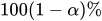 HPD credible interval for each variable. By default, ALPHA=0.05, but you can use the global ALPHA= option to request other values. This is the default output for posterior statistics.
 - CORR
computes the posterior correlation matrix.
- COV
computes the posterior covariance matrix.
-
INTERVAL
INT computes the
equal-tail and HPD credible intervals for each variable. For more information, see the sections Equal-Tail Credible Interval and Highest Posterior Density (HPD) Interval in Chapter 8, Introduction to Bayesian Analysis Procedures. By default, ALPHA=0.05, but you can use the global ALPHA= option to request other intervals of any probabilities. - NONE
suppresses all the statistics.
-
SUMMARY
SUM computes the posterior means, standard deviations, and percentile points for each variable. By default, the 25th, 50th, and 75th percentile points are produced, but you can use the global PERCENT= option to request specific percentile points.
- TARGACCEPT=value
specifies the target acceptance rate for the random walk–based Metropolis algorithm for logit models. For more information, see the section Metropolis and Metropolis-Hastings Algorithms in Chapter 8, Introduction to Bayesian Analysis Procedures. The numeric value must be between 0.01 and 0.99. By default, TARGACCEPT=0.45 for one parameter; TARGACCEPT=0.35 for two, three, or four parameters; and TARGACCEPT=0.234 for more than four parameters (Roberts, Gelman, and Gilks; 1997; Roberts and Rosenthal; 2001).
-
THIN=n
NTHIN=n controls the thinning rate of the simulation. PROC BCHOICE keeps every nth simulation sample and discards the rest. All posterior statistics and diagnostics are calculated by using the thinned samples. By default, THIN=1. For more information, see the section Burn-In, Thinning, and Markov Chain Samples in Chapter 8, Introduction to Bayesian Analysis Procedures.
- TUNEWT=value
specifies the multiplicative weight used in updating the covariance matrix of the proposal distribution for the random walk sampler for logit models. The numeric value must be between 0 and 1. By default, TUNEWT=0.75. For more information, see the section Covariance Tuning.