The BOXPLOT Procedure
INSET Statement
INSET keywords </ options>;
A PLOT statement in the BOXPLOT procedure can be followed by a series of INSET and INSETGROUP statements. Each INSET statement in that series produces one inset in the box plot produced by the preceding PLOT statement. If the box plot occupies multiple panels, the inset appears on each panel.
The data requested by using the keywords are displayed in the order in which they are specified. Summary statistics that are requested with an INSET statement are calculated by using the observations in all groups.
- keywords
-
identify summary statistics or other data to be displayed in the inset. By default, inset statistics are identified with appropriate labels, and numeric values are printed using appropriate formats. However, you can provide customized labels and formats. You provide the customized label by specifying the keyword for that statistic followed by an equal sign (=) and the label in quotes. Labels can have up to 24 characters. You provide the numeric format in parentheses after the keyword. Note that if you specify both a label and a format for a statistic, the label must appear before the format.
The available keywords are listed in Table 2.
- options
control the appearance of the inset. Most of these options apply only to traditional graphics and are ignored when ODS Graphics is enabled. Table 3 summarizes the options available in the INSET statement. It also lists options and identifies those that are valid when ODS Graphics is enabled. Complete descriptions for each option follow.
Table 2: INSET Statement Keywords
| Keyword | Description |
|---|---|
| DATA= | (Label, value) pairs from SAS-data-set |
| MEAN | Mean of all observations |
| MIN | Minimum observed value |
| MAX | Maximum observed value |
| NMIN | Minimum group size |
| NMAX | Maximum group size |
| NOBS | Number of observations in box plot |
| STDDEV | Pooled standard deviation |
The DATA= keyword specifies a SAS data set that contains (label, value) pairs to be displayed in an inset. The data set must contain the variables _LABEL_ and _VALUE_. _LABEL_ is a character variable of up to 24 characters whose values provide labels for inset entries. _VALUE_ can be character or numeric, and provides values displayed in the inset. The label and value from each observation in the DATA= data set occupy one line in the inset.
The pooled standard deviation requested with the STDDEV keyword is defined as
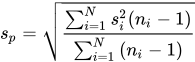
where N is the number of groups,  is the size of the ith group, and
  is the variance of the ith group.
Table 3: INSET Statement Options
| Option | Description | ODS Graphics |
|---|---|---|
| CFILL= | Specifies color of inset background | |
| CFILLH= | Specifies color of inset header background | |
| CFRAME= | Specifies color of inset frame | |
| CHEADER= | Specifies color of inset header text | |
| CSHADOW= | Specifies color of inset drop shadow | |
| CTEXT= | Specifies color of inset text | |
| DATA | Specifies data units for POSITION= coordinates coordinates |
|
| FONT= | Specifies font of inset text | |
| FORMAT= | Specifies format of values in inset | ✓ |
| HEADER= | Specifies inset header text | ✓ |
| HEIGHT= | Specifies height of inset and header text | |
| NOFRAME | Suppresses frame around inset | ✓ |
| POSITION= | Specifies position of inset | ✓ |
| REFPOINT= | Specifies reference point of inset positioned with POSITION= coordinates |
Following are descriptions of the options that you can specify in the INSET statement after a slash (/). Only those options marked with † are applicable when ODS Graphics is enabled.
- CFILL=color | BLANK
-
specifies the color of the inset background (including the header background if you do not specify the CFILLH= option).
If you do not specify the CFILL= option, then by default the background is empty. This means that items that overlap the inset (such as box-and-whiskers plots or reference lines) show through the inset. If you specify any value for the CFILL= option, then overlapping items no longer show through the inset. Specify CFILL=BLANK to leave the background uncolored and also to prevent items from showing through the inset.
- CFILLH=color
specifies the color of the header background. By default, if you do not specify a CFILLH= color, the CFILL= color is used.
- CFRAME=color
specifies the color of the frame around the inset. By default, the frame is the same color as the axis of the plot.
- CHEADER=color
specifies the color of the header text. By default, if you do not specify a CHEADER= color, the INSET statement CTEXT= color is used.
-
CSHADOW=color
CS=color specifies the color of the drop shadow. If you do not specify the CSHADOW= option, a drop shadow is not displayed.
-
CTEXT=color
CT=color specifies the color of the text in the inset. By default, the inset text color is the same as the other text in the box plot.
- DATA
specifies that data coordinates be used to position the inset with the POSITION= option. The DATA option is available only when you specify POSITION
 , and it must be placed immediately after the coordinates . See the entry for the POSITION= option.
 - FONT=font
- † FORMAT=format
specifies a format for all the values displayed in an inset. If you specify a format for a particular statistic, then this format overrides the format you specified with the FORMAT= option.
- † HEADER='string'
specifies the header text. The string can be up to 40 characters. If you do not specify the HEADER= option, no header line appears in the inset.
- HEIGHT=value
- † NOFRAME
-
† POSITION=position
† POS=position determines the position of the inset. The position can be a compass point keyword, a margin keyword, or (for traditional graphics) a pair of coordinates
. You can specify coordinates in axis percent units or axis data units. For more information, see the section Positioning Insets. By default, POSITION=NW, which positions the inset in the upper-left (northwest) corner of the plot. -
REFPOINT=BR | BL | TR | TL
RP=BR | BL | TR | TL -
specifies the reference point for an inset that is positioned by a pair of coordinates with the POSITION= option. Use the REFPOINT= option with POSITION= coordinates. The REFPOINT= option specifies which corner of the inset frame you want positioned at coordinates
. The keywords BL, BR, TL, and TR represent bottom left, bottom right, top left, and top right, respectively. The default is REFPOINT=BL. If you specify the position of the inset as a compass point or margin keyword, the REFPOINT= option is ignored.