The CANDISC Procedure
PROC CANDISC Statement
PROC CANDISC <options>;
The PROC CANDISC statement invokes the CANDISC procedure. Table 1 summarizes the options available in the PROC CANDISC statement.
Table 1: CANDISC Procedure Options
| Option | Description |
|---|---|
| Input Data Set | |
| DATA= | Specifies the input SAS data set |
| Output Data Sets | |
| OUT= | Specifies the output data set that contains the canonical scores |
| OUTSTAT= | Specifies the output statistics data set |
| Method Details | |
| NCAN= | Specifies the number of canonical variables |
| PREFIX= | Specifies a prefix for naming the canonical variables |
| SINGULAR= | Specifies the singularity criterion |
| Control Displayed Output | |
| ALL | Displays all output |
| ANOVA | Displays univariate statistics |
| BCORR | Displays between correlations |
| BCOV | Displays between covariances |
| BSSCP | Displays between SSCPs |
| DISTANCE | Displays squared Mahalanobis distances |
| NOPRINT | Suppresses all displayed output |
| PCORR | Displays pooled correlations |
| PCOV | Displays pooled covariances |
| PSSCP | Displays pooled SSCPs |
| SHORT | Suppresses some displayed output |
| SIMPLE | Displays simple descriptive statistics |
| STDMEAN | Displays standardized class means |
| TCORR | Displays total correlations |
| TCOV | Displays total covariances |
| TSSCP | Displays total SSCPs |
| WCORR | Displays within correlations |
| WCOV | Displays within covariances |
| WSSCP | Displays within SSCPs |
- ALL
- ANOVA
displays univariate statistics for testing the hypothesis that the class means are equal in the population for each variable.
- BCORR
- BCOV
displays between-class covariances. The between-class covariance matrix equals the between-class SSCP matrix divided by
 , where n is the number of observations and c is the number of classes. The between-class covariances should be interpreted in comparison with the total-sample and within-class covariances, not as formal estimates of population parameters.
 - BSSCP
- DATA=SAS-data-set
specifies the data set to be analyzed. The data set can be an ordinary SAS data set or one of several specially structured data sets created by SAS statistical procedures. These specially structured data sets include TYPE=CORR, TYPE=COV, TYPE=CSSCP, and TYPE=SSCP. If you omit the DATA= option, PROC CANDISC uses the most recently created SAS data set.
-
DISTANCE
MAHALANOBIS displays squared Mahalanobis distances between the group means, the F statistics, and the corresponding probabilities of greater squared Mahalanobis distances between the group means.
- NCAN=n
specifies the number of canonical variables to be computed. The value of n must be less than or equal to the number of variables. If you specify NCAN=0, the procedure displays the canonical correlations but not the canonical coefficients, structures, or means. A negative value suppresses the canonical analysis entirely. Let v be the number of variables in the VAR statement, and let c be the number of classes. If you omit the NCAN= option, only
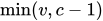 canonical variables are generated; if you also specify an OUT= output data set, v canonical variables are generated, and the last
  canonical variables have missing values.
 - NOPRINT
suppresses the normal display of results. This option temporarily disables the Output Delivery System (ODS). For more information about ODS, see Chapter 23, Using the Output Delivery System.
- OUT=SAS-data-set
creates an output SAS data set to contain the original data and the canonical variable scores. If you want to create a SAS data set in a permanent library, you must specify a two-level name. For more information about permanent libraries and SAS data sets, see SAS Programmers Guide: Essentials.
- OUTSTAT=SAS-data-set
creates a TYPE=CORR output SAS data set to contain various statistics, including class means, standard deviations, correlations, canonical correlations, canonical structures, canonical coefficients, and means of canonical variables for each class. If you want to create a SAS data set in a permanent library, you must specify a two-level name. For more information about permanent libraries and SAS data sets, see SAS Programmers Guide: Essentials.
- PCORR
displays pooled within-class correlations (partial correlations based on the pooled within-class covariances).
- PCOV
- PREFIX=name
specifies a prefix for naming the canonical variables. By default the names are
Can1,Can2,Can3, and so on. If you specify PREFIX=Abc, the components are namedAbc1,Abc2, and so on. The number of characters in the prefix plus the number of digits required to designate the canonical variables should not exceed the length defined by the VALIDVARNAME= system option (for example, 32 for VALIDVARNAME=V7). The prefix is truncated if the combined length exceeds the maximum.- PSSCP
- SHORT
suppresses the display of canonical structures, canonical coefficients, and class means on canonical variables; only tables of canonical correlations and multivariate test statistics are displayed.
- SIMPLE
displays simple descriptive statistics for the total sample and within each class.
- SINGULAR=p
-
specifies the criterion for determining the singularity of the total-sample correlation matrix and the pooled within-class covariance matrix, where 0 < p < 1. The default is SINGULAR=1E–8.
Let
 be the total-sample correlation matrix. If the R square for predicting a quantitative variable in the VAR statement from the variables that precede it exceeds 1 – p, then is considered singular. If is singular, the probability levels for the multivariate test statistics and canonical correlations are adjusted for the number of variables whose R square exceeds 1 – p.
 If
is considered singular and the inverse of (squared Mahalanobis distances) is required, a quasi inverse is used instead. For more information, see the section Quasi-inverse in Chapter 42, The DISCRIM Procedure. - STDMEAN
displays total-sample and pooled within-class standardized class means.
- TCORR
- TCOV
- TSSCP
- WCORR
- WCOV
- WSSCP
displays the within-class corrected SSCP matrix for each class level.