The FACTOR Procedure
PROC FACTOR Statement
PROC FACTOR <options>;
The PROC FACTOR statement invokes the FACTOR procedure. The options listed in Table 1 are available in the PROC FACTOR statement.
Table 1: Options Available in the PROC FACTOR Statement
| Option | Description |
|---|---|
| Data Set Options | |
| DATA= | Specifies input SAS data set |
| OUT= | Specifies output SAS data set |
| OUTSTAT= | Specifies output data set containing statistical results |
| TARGET= | Specifies input data set containing the target pattern for rotation |
| Factor Extraction and Communalities | |
| HEYWOOD | Sets to 1 any communality greater than 1 |
| METHOD= | Specifies the estimation method |
| PRIORS= | Specifies the method for computing prior communality estimates |
| RANDOM= | Specifies the seed for pseudo-random number generation |
| ULTRAHEYWOOD | Allows communalities to exceed 1 |
| Number of Factors | |
| MINEIGEN= | Specifies the smallest eigenvalue for retaining a factor |
| NFACTORS= | Specifies the number of factors to retain or the factor extraction criterion to use |
| PROPORTION= | Specifies the proportion of common variance in extracted factors |
| Data Analysis Options | |
| ALPHA= | Specifies the confidence level for interval construction |
| COVARIANCE | Requests factoring of the covariance matrix |
| COVER= | Computes the confidence interval and specifies the coverage reference point |
| MAP | Requests a minimum average partial (MAP) correlation analysis |
| NOINT | Omits the intercept from computing covariances or correlations |
| PARALLEL | Requests a parallel analysis |
| SE | Requests the standard error estimates in ML estimation |
| VARDEF= | Specifies the divisor used in calculating covariances or correlations |
| WEIGHT | Factors a weighted correlation or covariance matrix |
| Rotation Method and Properties | |
| GAMMA= | Specifies the orthomax weight |
| HKPOWER= | Specifies the power in Harris-Kaiser rotation |
| NORM= | Specifies the method for row normalization in rotation |
| NOPROMAXNORM | Turns off row normalization in promax rotation |
| POWER= | Specifies the power to be used in promax rotation |
| PREROTATE= | Specifies the prerotation method in promax rotation |
| RCONVERGE= | Specifies the convergence criterion for rotation cycles |
| RITER= | Specifies the maximum number of cycles for rotation |
| ROTATE= | Specifies the rotation method |
| TAU= | Specifies the oblimin weight |
| ODS Graphics | |
| PLOTS= | Specifies ODS Graphics selection |
| Control Display Output | |
| ALL | Displays all optional output except plots |
| CORR | Displays the (partial) correlation matrix |
| EIGENVECTORS | Displays the eigenvectors of the reduced correlation matrix |
| FLAG= | Specifies the minimum absolute value to be flagged in the correlation and loading matrices |
| FUZZ= | Specifies the maximum absolute value to be displayed as missing in the correlation and loading matrices |
| MSA | Computes Kaiser’s measure of sampling adequacy and the related partial correlations |
| NOPRINT | Suppresses the display of all output |
| NPLOTS= | Specifies the number of factors to be plotted |
| PLOT | Plots the rotated factor pattern |
| PLOTREF | Plots the reference structure |
| PREPLOT | Plots the factor pattern before rotation |
| Displays the input factor pattern or scoring coefficients and related statistics | |
| REORDER | Reorders the rows (variables) of various factor matrices |
| RESIDUALS | Displays the residual correlation matrix and the associated partial correlation matrix |
| ROUND | Prints correlation and loading matrices with rounded values |
| SCORE | Displays the factor scoring coefficients |
| SCREE | Displays the scree plot of the eigenvalues |
| SIMPLE | Displays means, standard deviations, and number of observations |
| Numerical Properties | |
| CONVERGE= | Specifies the convergence criterion |
| MAXITER= | Specifies the maximum number of iterations |
| NTHREADS= | Specifies the maximum number of simultaneous computational threads available to the procedure |
| SINGULAR= | Specifies the singularity criterion |
| Miscellaneous | |
| NOCORR | Excludes the correlation matrix from the OUTSTAT= data set |
| NOBS= | Specifies the number of observations |
| PARPREFIX= | Specifies the prefix for the residual variables in the output data sets |
| PREFIX= | Specifies the prefix for naming factors |
- ALL
displays all optional output except plots. When the input data set is TYPE=CORR, TYPE=UCORR, TYPE=COV, TYPE=UCOV, or TYPE=FACTOR, simple statistics, correlations, and MSA are not displayed.
- ALPHA=p
specifies the level of confidence 1 – p for interval construction. By default, p = 0.05, corresponding to 1 – p = 95% confidence intervals. If p is greater than one, it is interpreted as a percentage and divided by 100. With multiple confidence intervals to be constructed, the ALPHA= value is applied to each interval construction one at a time. This will not control the coverage probability of the intervals simultaneously. To control familywise coverage probability, you might consider supplying a nonconventional p by using methods such as Bonferroni adjustment.
-
CONVERGE=p
CONV=p specifies the convergence criterion for the METHOD=PRINIT, METHOD=ULS, METHOD=ALPHA, or METHOD=ML option. Iteration stops when the maximum change in the communalities is less than the value of the CONVERGE= option. The default value is 0.001. Negative values are not allowed.
-
CORR
C displays the correlation matrix or partial correlation matrix.
-
COVARIANCE
COV requests factoring of the covariance matrix instead of the correlation matrix. The COV option is effective only with the METHOD=PRINCIPAL, METHOD=PRINIT, METHOD=ULS, or METHOD=IMAGE option. For other methods, PROC FACTOR produces the same results with or without the COV option.
-
COVER <=p>
CI <=p> computes the confidence intervals and optionally specifies the value of factor loading for coverage detection. By default, p = 0. The specified value is represented by an asterisk (*) in the coverage display. This is useful for determining the salience of loadings. For example, if COVER=0.4, a display ‘0*[ ]’ indicates that the entire confidence interval is above 0.4, implying strong evidence for the salience of the loading. See the section Confidence Intervals and the Salience of Factor Loadings for more details.
- DATA=SAS-data-set
specifies the input data set, which can be an ordinary SAS data set or a specially structured SAS data set as described in the section Input Data Set. If the DATA= option is omitted, the most recently created SAS data set is used.
-
EIGENVECTORS
EV displays the eigenvectors of the reduced correlation matrix, of which the diagonal elements are replaced with the communality estimates. When METHOD=ML, the eigenvectors are for the weighted reduced correlation matrix. PROC FACTOR chooses the solution that makes the sum of the elements of each eigenvector nonnegative. If the sum of the elements is equal to zero, then the sign depends on how the number is rounded off.
- FLAG=p
flags absolute values larger than p with an asterisk in the correlation and loading matrices. Negative values are not allowed for p. Values printed in the matrices are multiplied by 100 and rounded to the nearest integer (see the ROUND option). The FLAG= option has no effect when standard errors or confidence intervals are also printed.
- FUZZ=p
prints correlations and factor loadings with absolute values less than p printed as missing. For partial correlations, the FUZZ= value is divided by 2. For residual correlations, the FUZZ= value is divided by 4. The exact values in any matrix can be obtained from the OUTSTAT= and ODS output data sets. Negative values are not allowed. The FUZZ= option has no effect when standard errors or confidence intervals are also printed.
- GAMMA=p
specifies the orthomax weight used with the option ROTATE=ORTHOMAX or PREROTATE=ORTHOMAX. Alternatively, you can use ROTATE=ORTHOMAX(p) with p representing the orthomax weight. There is no restriction on valid values for the orthomax weight, although the most common values are between zero and the number of variables. The default GAMMA= value is one, resulting in the varimax rotation. See the section Simplicity Functions for Rotations for more details.
-
HEYWOOD
HEY sets to 1 any communality greater than 1, allowing iterations to proceed. See the section Heywood Cases and Other Anomalies about Communality Estimates for a discussion of Heywood cases.
-
HKPOWER=p
HKP=p -
specifies the power of the square roots of the eigenvalues to use to rescale the eigenvectors for Harris-Kaiser rotation (ROTATE=HK), assuming that the factors are extracted by the principal factor method. If the principal factor method is not used for factor extraction, the eigenvectors are replaced by the normalized columns of the unrotated factor matrix and the eigenvalues are replaced by the column normalizing constants.
Values of p between 0.0 and 1.0 are reasonable; a value of 1.0 is equivalent to an orthogonal rotation, with the varimax rotation as the default. You can also specify this option with an orthogonal rotation, such as ROTATE=QUARTIMAX, ROTATE=BIQUARTIMAX, ROTATE=EQUAMAX, or ROTATE=ORTHOMAX, and so on. Such a combination specifies a Harris-Kaiser case II orthoblique rotation that produces an oblique factor solution in general. By default, HKPOWER=0.0, which yields the independent cluster solution, in which each variable tends to have a large loading on only one factor.
- MAP
requests a minimum average partial (MAP) correlation analysis that uses squared (Velicer 1976) and fourth-powered (Velicer, Eaton, and Fava 2000) partial correlations. Although you can use MAP analysis to suggest the number of factors, this option merely performs MAP analysis and does not affect the number of factors that are extracted. To use the MAP criterion for determining the number of factors, specify NFACTORS=MAP2 or NFACTORS=MAP4 in the PROC FACTOR statement. To obtain a graphical summary of the MAP analysis, specify PLOTS=MAP, PLOTS=MAP2, or PLOTS=MAP4. You cannot use the MAP option if METHOD=IMAGE, PATTERN, or SCORE, or if the number of observations is smaller than the number of variables.
- MAXITER=n
specifies the maximum number of iterations for factor extraction. You can use the MAXITER= option with the PRINIT, ULS, ALPHA, or ML method. The default is 30.
-
METHOD=name
M=name -
specifies the method for extracting factors. The default is METHOD=PRINCIPAL unless the DATA= data set is TYPE=FACTOR, in which case the default is METHOD=PATTERN. Valid values for name are as follows:
- ALPHA | A
- HARRIS | H
yields Harris component analysis of
 (Harris 1962), a noniterative approximation to canonical component analysis.
 - IMAGE | I
yields principal component analysis of the image covariance matrix, not the image analysis of Kaiser (1963, 1970) or Kaiser and Rice (1974). A nonsingular correlation matrix is required.
- ML | M
performs maximum likelihood factor analysis with an algorithm due, except for minor details, to Fuller (1987). The option METHOD=ML requires a nonsingular correlation matrix.
- PATTERN
reads a factor pattern from a TYPE=FACTOR, TYPE=CORR, TYPE=UCORR, TYPE=COV, or TYPE=UCOV data set. If you create a TYPE=FACTOR data set in a DATA step, only observations containing the factor pattern (
_TYPE_=’PATTERN’) and, if the factors are correlated, the interfactor correlations (_TYPE_=’FCORR’) are required.- PRINCIPAL | PRIN | P
yields principal component analysis if no PRIORS option or statement is used or if you specify PRIORS=ONE; if you specify a PRIORS statement or a PRIORS= value other than PRIORS=ONE, a principal factor analysis is performed.
- PRINIT
yields iterated principal factor analysis.
- SCORE
reads scoring coefficients (
_TYPE_=’SCORE’) from a TYPE=FACTOR, TYPE=CORR, TYPE=UCORR, TYPE=COV, or TYPE=UCOV data set. The data set must also contain either a correlation or a covariance matrix. Scoring coefficients are also displayed if you specify the OUT= option.- ULS | U
produces unweighted least squares factor analysis.
-
MINEIGEN=p
MIN=p -
specifies the smallest eigenvalue for which to retain a factor. If you specify two or more of the MINEIGEN=, NFACTORS=n, and PROPORTION= options, the number of factors retained is the minimum number that satisfies any of the criteria. The MINEIGEN= option cannot be used with either the METHOD=PATTERN option or the METHOD=SCORE option. Negative values of p are not allowed. By default, MINEIGEN=0 unless you omit both the NFACTORS=n and the PROPORTION= options and one of the following conditions holds:
- MSA
produces the partial correlations between each pair of variables controlling for all other variables (the negative anti-image correlations) and Kaiser’s measure of sampling adequacy (Kaiser 1970; Kaiser and Rice 1974; Cerny and Kaiser 1977). This option is ignored if METHOD=IMAGE.
-
NFACTORS=n | name
NFACT=n | name
N=n | name -
specifies either the maximum number of factors (n) or a name that represents a specific factor extraction criterion.
NFACTORS=n specifies the maximum number of factors to be extracted and determines the amount of memory to be allocated for factor matrices. This is the default option, with n equal to the number of variables. Specifying a number that is small relative to the number of variables can substantially decrease the amount of memory required to run PROC FACTOR, especially with oblique rotations. If you specify two or more of the NFACTORS=n, MINEIGEN=, and PROPORTION= options, the retained number of factors is the minimum number that satisfies any of the criteria. If you specify the option NFACTORS=0, eigenvalues are computed but no factors are extracted. If you specify the option NFACTORS=–1, neither eigenvalues nor factors are computed. You can use the NFACTORS=n option with the METHOD=PATTERN or METHOD=SCORE option to specify a smaller number of factors than are present in the data set.
Alternatively, you can specify one of the following as the name for the factor extraction criterion:
- MAP | MAP2
-
requests a minimum average partial (MAP) correlation analysis (Velicer 1976) to determine the number of factors to extract. All other criteria for determining the number of factors are ignored. This criterion selects the number of factors that results in the smallest average squared partial correlations among variables. You cannot use this criterion if METHOD=IMAGE, PATTERN, or SCORE, or if the number of observations is smaller than the number of variables.
To request a minimum average partial correlation analysis without using the MAP criterion for determining the number of extracted factors, use the MAP option in the PROC FACTOR statement.
- MAP4
requests a minimum average partial (MAP) correlation analysis similar to the NFACTORS=MAP option, but using the smallest average fourth-powered partial correlations among variables (Velicer, Eaton, and Fava 2000). You cannot use this criterion if METHOD=IMAGE, PATTERN, or SCORE, or if the number of observations is smaller than the number of variables.
- PARALLEL<(suboptions)>
-
requests a parallel analysis (Glorfeld 1995; Horn 1965) to determine the number of factors to extract. All other criteria for determining the number of factors are ignored. To request a parallel analysis without using its criterion for determining the number of extracted factors, use the PARALLEL option in the PROC FACTOR statement. You cannot use this criterion if METHOD=IMAGE, PATTERN, or SCORE, or if the number of observations is smaller than the number of variables.
This criterion selects the number of factors that corresponds to the first n consecutive eigenvalues of the sample correlation matrix that are significantly greater than the corresponding eigenvalues of random correlation matrices. PROC FACTOR generates these random correlation matrices by simulation from a multivariate standard normal distribution. A factor is accepted if an observed eigenvalue is greater than the critical value at a specified one-sided
 -level, with reference to the corresponding simulated distribution of random eigenvalues. As soon as an observed eigenvalue is less than or equal to the corresponding critical value, no more factors are counted. To obtain a graphical summary of the results of the parallel analysis, specify PLOTS=PARALLEL.
 To fine-tune the parallel analysis, the NFACTORS=PARALLEL option accepts the same suboptions as those described for the PARALLEL option.
- NOBS=n
specifies the number of observations. If the DATA= input data set is a raw data set, nobs is defined by default to be the number of observations in the raw data set. The NOBS= option overrides this default definition. If the DATA= input data set contains a covariance, correlation, or scalar product matrix, the number of observations can be specified either by using the NOBS= option in the PROC FACTOR statement or by including a
_TYPE_=’N’ observation in the DATA= input data set.- NOCORR
prevents the correlation matrix from being transferred to the OUTSTAT= data set when you specify the METHOD=PATTERN option. The NOCORR option greatly reduces memory requirements when there are many variables but few factors. The NOCORR option is not effective if the correlation matrix is required for other requested output; for example, if the scores or the residual correlations are displayed (for example, by using the SCORE, RESIDUALS, or ALL option).
- NOINT
omits the intercept from the analysis; covariances or correlations are not corrected for the mean.
- NOPRINT
suppresses the display of all output. Note that this option temporarily disables the Output Delivery System (ODS). For more information, see Chapter 23, Using the Output Delivery System.
-
NOPROMAXNORM
NOPMAXNORM turns off the default row normalization of the prerotated factor pattern, which is used in computing the promax target matrix.
- NORM=COV | KAISER | NONE | RAW | WEIGHT
specifies the method for normalizing the rows of the factor pattern for rotation. If you specify the option NORM=KAISER, Kaiser’s normalization is used
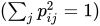 . If you specify the option NORM=WEIGHT, the rows are weighted by the Cureton-Mulaik technique (Cureton and Mulaik 1975). If you specify the option NORM=COV, the rows of the pattern matrix are rescaled to represent covariances instead of correlations. If you specify the option NORM=NONE or NORM=RAW, normalization is not performed. The default is NORM=KAISER.
 -
NPLOTS=n
NPLOT=n specifies the number of factors to be plotted. The default is to plot all factors. The smallest allowable value is 2. If you specify the option NPLOTS=n, all pairs of the first n factors are plotted, producing a total of
 plots.
 -
NTHREADS=n
THREADS=n -
specifies the maximum number of simultaneous computational threads available to the procedure. By default, the procedure uses the values of the THREADS and CPUCOUNT system variables to determine the number of computational threads. To explicitly request this default behavior, specify n < 1. To disable multithreading within PROC FACTOR, specify NTHREADS=1.
Multithreading is available only for parallel analysis and the generalized Crawford-Ferguson family of factor rotations. For parallel analysis, multithreading is enabled by default. For generalized Crawford-Ferguson rotations, multithreading is enabled by default only if the number of factors is 20 or greater. You can enable multithreading for rotation (for any number of factors) by specifying n > 1.
- OUT=SAS-data-set
creates a data set containing all the data from the DATA= data set plus variables called
Factor1,Factor2, and so on, containing estimated factor scores. The DATA= data set must contain multivariate data, not correlations or covariances. You must also specify the NFACTORS=n option to determine the number of factor score variables. If you specify partial variables in the PARTIAL statement, the OUT= data set will also contain the residual variables that are used for factor analysis. The output data set is described in detail in the section Output Data Sets. If you want to create a SAS data set in a permanent library, you must specify a two-level name. For more information about permanent libraries and SAS data sets, see SAS Programmers Guide: Essentials.- OUTSTAT=SAS-data-set
specifies an output data set containing most of the results of the analysis. The output data set is described in detail in the section Output Data Sets. If you want to create a SAS data set in a permanent library, you must specify a two-level name. For more information about permanent libraries and SAS data sets, see SAS Programmers Guide: Essentials.
- PARALLEL <(suboptions)>
-
requests a parallel analysis as described by Glorfeld (1995) and Horn (1965). Although you can use parallel analysis to suggest the number of factors, this option merely performs the parallel analysis and does not affect the number of factors that are extracted. To use the parallel analysis criterion for determining the number of factors, specify NFACTORS=PARALLEL in the PROC FACTOR statement. To obtain a graphical summary of the results of the parallel analysis, specify PLOTS=PARALLEL. You cannot use the PARALLEL option if METHOD=IMAGE, PATTERN, or SCORE, or if the number of observations is smaller than the number of variables.
To conduct a parallel analysis, PROC FACTOR compares the eigenvalues of the sample correlation matrix to the corresponding eigenvalues of random correlation matrices. These random correlation matrices are simulated from a multivariate standard normal distribution. A factor is accepted if an observed eigenvalue is greater than the critical value at a specified one-sided
-level, with reference to the corresponding simulated distribution of random eigenvalues. As soon as an observed eigenvalue is less than or equal to the corresponding critical value, no more factors are counted. To fine-tune the parallel analysis, you can specify any of the following suboptions:
- ALPHA=p
specifies the one-sided
-level for computing the critical value at the upper-end of the simulated distribution of eigenvalues, where p must be between 0 and 1. By default, ALPHA=0.05. - NSIMS=n
specifies the number of simulations to use to construct an empirical distribution of eigenvalues for the parallel analysis, where n must be greater than 200. By default, NSIMS=1000.
- SEED=n
specifies a positive integer as a starting value for the pseudorandom number generator that is used to simulate correlation matrices for the parallel analysis, where n must be an integer
 . If you do not specify the SEED= suboption, the time of day is used to initialize the pseudorandom number sequence.
- PARPREFIX=name
specifies the prefix for the residual variables in the OUT= and the OUTSTAT= data sets when partial variables are specified in the PARTIAL statement.
- PLOT
plots the factor pattern after rotation. This option produces printer plots. High-quality ODS graphical plots for factor patterns can be requested with the PLOTS=LOADINGS or PLOTS=INITLOADINGS option.
- PLOTREF
plots the reference structure instead of the default factor pattern after oblique rotation.
-
PLOTS <(global-plot-options)> = plot-request <(options)>
PLOTS <(global-plot-options)> = (plot-request <(options)> <…plot-request <(options)> > ) -
specifies one or more ODS graphical plots in PROC FACTOR. When you specify only one plot-request, you can omit the parentheses around the plot-request. Here are some examples:
plots=all
plots(flip)=loadings
plots=(loadings(flip) scree(unpack))
ODS Graphics must be enabled before plots can be requested. For example:
ods graphics on;
proc factor plots=all;
run;
ods graphics off;
For more information about enabling and disabling ODS Graphics, see the section Enabling and Disabling ODS Graphics in Chapter 24, Statistical Graphics Using ODS.
For an example containing graphical displays of factor analysis results, see Example 44.2.
The following table shows the available plot-requests and their available options:
Plot-Request Plot Description Suboptions ALL All available plots All INITLOADINGS Unrotated factor loadings CIRCLE=, FLIP, NPLOTS=, PLOTREF, and VECTOR LOADINGS Rotated factor loadings CIRCLE=, FLIP, NPLOTS=, PLOTREF, and VECTOR MAP MAP2 and MAP4 MAP2 Average squared partial correlations MAP4 Average fourth-powered partial correlations NONE No ODS graphical plots PARALLEL Parallel analysis PATHDIAGRAM Path diagram PRELOADINGS Prerotated factor loadings CIRCLE=, FLIP, NPLOTS=, PLOTREF, and VECTOR SCREE Scree and variance explained UNPACK The following are the available global-plot-options or options for plots:
- CIRCLE < = numbers > | CIRCLES < = numbers >
-
draws circular reference lines in scatter plots or vector plots of factor loadings. You can specify the locations of the circular reference lines in the numbers list. Each number indicates the proportion or percentage of area of the unit circle that is enclosed by the specified circle. Each of the numbers must lie between 0 and 100, inclusively. When a number is between 0 and 1 (inclusively), it is interpreted as a proportion; otherwise, it is interpreted as a percentage. The maximum number of circles is 5.
The CIRCLE option applies to the scatter or vector plots requested by the INITLOADINGS, LOADINGS, and PRELOADINGS options. By default, a unit-circle, which represents 100% of the total area, is drawn for the vector plots. However, no circle will be drawn for scatter plots unless the CIRCLE option is specified. Two special cases for this option are: (1) With no numbers following the CIRCLE option, a 100% circle will be drawn. (2) With CIRCLE=0, no circle will be drawn. This special case is primarily used to turn off the default unit-circle in vector plots.
- FLIP
switches the X and Y axes. It applies to the INITLOADINGS, LOADINGS, and PRELOADINGS plot-requests.
- NPLOTS=n | NPLOT=n
-
specifies the number of factors n (n
 ) to be plotted. It applies to the INITLOADINGS, LOADINGS, and PRELOADINGS plot-requests. Since this option can also be specified in the PROC FACTOR statement, the final value of n is determined by the following steps. The NPLOTS= value of the PROC FACTOR is read first. If the NPLOTS= option is specified as a global-plot-option, the value of n will be updated. Then, if the NPLOTS= option is again specified in an individual plot-request, the value will be updated again for that individual plot-request. For example, in the following statement, four factors are extracted with the N=4 option:
 proc factor n=4 nplots=3 plots(nplots=4)= (loadings preloadings(nplots=2));Initially, plots of the first three factors are specified with the NPLOTS=3 option. When you are producing ODS graphical plots, the global-plot-option NPLOTS=4 is used. As a result, the LOADINGS plot-request will produce plots for all pairs of the first 4 factors. However, because the NPLOTS=2 is specified locally for the PRELOADINGS plot-request, it will produce a prerotated factor loading plot for the first two factors only.
The default NPLOTS= value is 5 or the total number of factors (m), whichever is smaller. If you specify an NPLOTS= value that is greater than m, NPLOTS=m will be used.
- PATHDIAGRAM
-
creates a path diagram for the last factor model. The last factor model refers to the initial factor solution if you do not specify any rotations. It refers to the rotated factor solution if you use the ROTATE= option. The path diagram shows the links between factors and variables, the factor correlations, and the error variances in the model.
The path diagram does not display all non-zero directed links between factors and variables. It displays only those directed links that have factor loading estimates at 0.3 or bigger in magnitude. PROC FACTOR uses this 0.3-criterion by default. You can set your own criterion by using the FUZZ= option in the PROC FACTOR statement.
If you use both the METHOD=ML and SE options in the PROC FACTOR statement, the statistical significance of the factor loading estimate is also required for displaying the corresponding directed link between a variable and a factor. The default level of significance is 0.05. You can set your own level of significance by using the ALPHA= option in the PROC FACTOR statement.
Alternatively, you can produce path diagrams by using the PATHDIAGRAM Statement, which provides many options that enables you to create highly customized path diagrams.
- PLOTREF
plots the reference structures rather than the factor pattern loadings. It applies to the INITLOADINGS, LOADINGS, and PRELOADINGS plot-requests when the factor solution is oblique. This option can also be set globally as an option in the PROC FACTOR statement.
- UNPACK
plots component graphs separately. It applies to the SCREE plot-request only.
- VECTOR
plots loadings in vector form. It applies to the INITLOADINGS, LOADINGS, and PRELOADINGS plot-requests when the factor solution is orthogonal. For oblique solutions, the VECTOR option is ignored and the default scatter plots for factor loadings or reference structures are displayed.
Be aware that the PLOT option in the PROC FACTOR statement requests only the printer plots of factor loadings. The current option PLOTS= or PLOT=, however, is for ODS graphical plots.
You can specify options for the requested ODS graphical plots as global-plot-options or as local options. Global-plot-options apply to all appropriate individual plot-requests specified. For example, because the SCREE plot is not subject to axes flipping, the following two specifications are equivalent:
plots(flip)=(loadings preloadings scree)
plots=(loadings(flip) preloadings(flip) scree)
Options specified locally after each plot-request apply to that plot-request only. For example, consider the following specification:
plots=(scree(unpack) loadings(plotref) preloadings(flip))The FLIP option applies to the PRELOADINGS plot-request but not the LOADINGS plot-request; the PLOTREF option applies to the LOADINGS plot-request but not the PRELOADINGS plot-request; and the UNPACK option applies to the SCREE plot-request only.
- POWER=n
specifies the power to be used in computing the target pattern for the option ROTATE=PROMAX. Valid values must be integers
. The default value is 3. You can also specify the POWER= value in the ROTATE= option—for example, ROTATE=PROMAX(4). - PREFIX=name
specifies a prefix for naming the factors. By default, the names are Factor1, Factor2, …, Factorn. If you specify PREFIX=ABC, the factors are named ABC1, ABC2, ABC3, and so on. The number of characters in the prefix plus the number of digits required to designate the variables should not exceed the current name length defined by the VALIDVARNAME= system option.
- PREPLOT
plots the factor pattern before rotation. This option produces printer plots. High-quality ODS graphical plots for factor patterns can be requested with the PLOTS=PRELOADINGS option.
-
PREROTATE=name
PRE=name specifies the prerotation method for the option ROTATE=PROMAX. Any rotation method other than PROMAX or PROCRUSTES can be used. The default is PREROTATE=VARIMAX. If a previously rotated pattern is read using the option METHOD=PATTERN, you should specify the PREROTATE=NONE option.
displays the input factor pattern or scoring coefficients and related statistics. In oblique cases, the reference and factor structures are computed and displayed. The PRINT option is effective only with the option METHOD=PATTERN or METHOD=SCORE.
- PRIORS=name
-
specifies a method for computing prior communality estimates. You can specify numeric values for the prior communality estimates by using the PRIORS statement. Valid values for name are as follows:
- ASMC | A
sets the prior communality estimates proportional to the squared multiple correlations but adjusted so that their sum is equal to that of the maximum absolute correlations (Cureton 1968).
- INPUT | I
reads the prior communality estimates from the first observation with either
_TYPE_=’PRIORS’ or_TYPE_=’COMMUNAL’ in the DATA= data set (which cannot be TYPE=DATA).- MAX | M
sets the prior communality estimate for each variable to its maximum absolute correlation with any other variable.
- ONE | O
sets all prior communalities to 1.0.
- RANDOM | R
sets the prior communality estimates to pseudo-random numbers uniformly distributed between 0 and 1.
- SMC | S
sets the prior communality estimate for each variable to its squared multiple correlation with all other variables.
The default prior communality estimates are as follows:
METHOD= PRIORS= PRINCIPAL ONE PRINIT ONE ALPHA SMC ULS SMC ML SMC HARRIS SMC IMAGE SMC PATTERN (not applicable) SCORE (not applicable) Because the use of SMC as prior communalities is a defining feature of the HARRIS and IMAGE methods, you cannot set any prior communalities other than SMC for these two methods. The PRIORS= option is not applicable to the PATTERN and SCORE methods because these methods do not use any prior communalities.
By default, the options METHOD=PRINIT, METHOD=ULS, METHOD=ALPHA, and METHOD=ML stop iterating and set the number of factors to 0 if an estimated communality exceeds 1. The options HEYWOOD and ULTRAHEYWOOD allow processing to continue.
-
PROPORTION=p
PERCENT=p
P=p specifies the proportion of common variance to be accounted for by the retained factors. The proportion of common variance is computed using the total prior communality estimates as the basis. If the value is greater than one, it is interpreted as a percentage and divided by 100. The options PROPORTION=0.75 and PERCENT=75 are equivalent. The default value is 1.0 or 100%. You cannot specify the PROPORTION= option with the METHOD=PATTERN or METHOD=SCORE option. If you specify two or more of the PROPORTION=, NFACTORS=n , and MINEIGEN= options, the number of factors retained is the minimum number satisfying any of the criteria.
- RANDOM=n
specifies a positive integer as a starting value for the pseudo-random number generator for use with the option PRIORS=RANDOM. If you do not specify the RANDOM= option, the time of day is used to initialize the pseudo-random number sequence. Valid values must be integers
. -
RCONVERGE=p
RCONV=p -
specifies the convergence criterion value p (p
 ) for rotation cycles. Rotation stops when the scaled change of the simplicity function value is less than p. Mathematically, the convergence criterion is
where
 and
and  are simplicity function values
of the current cycle and the previous cycle, respectively,
are simplicity function values
of the current cycle and the previous cycle, respectively,  is a scaling factor, and p is 1E–9 by default.
 -
REORDER
RE causes the rows (variables) of various factor matrices to be reordered on the output. Variables with their highest absolute loading (reference structure loading for oblique rotations) on the first factor are displayed first, from largest to smallest loading, followed by variables with their highest absolute loading on the second factor, and so on. The order of the variables in the output data set is not affected. The factors are not reordered.
-
RESIDUALS
RES displays the residual correlation matrix and the associated partial correlation matrix. The diagonal elements of the residual correlation matrix are the unique variances.
- RITER=n
specifies the maximum number of cycles n for factor rotation. Except for promax and Procrustes, you can use the RITER= option with all rotation methods. The default n is the maximum between 10 times the number of variables and 100.
-
ROTATE=name
R=name -
specifies the rotation method. The default is ROTATE=NONE.
Valid names for orthogonal rotations are as follows:
- BIQUARTIMAX | BIQMAX
specifies orthogonal biquartimax rotation. This corresponds to the specification ROTATE=ORTHOMAX(.5).
- EQUAMAX | E
specifies orthogonal equamax rotation. This corresponds to the specification ROTATE=ORTHOMAX with GAMMA=number of factors/2.
- FACTORPARSIMAX | FPA
specifies orthogonal factor parsimax rotation. This corresponds to the specification ROTATE=ORTHOMAX with GAMMA=number of variables.
- NONE | N
specifies that no rotation be performed, leaving the original orthogonal solution.
- ORTHCF(p1,p2) | ORCF(p1,p2)
specifies the orthogonal Crawford-Ferguson rotation with the weights p1 and p2 for variable parsimony and factor parsimony, respectively. See the definitions of weights in the section Simplicity Functions for Rotations.
- ORTHGENCF(p1,p2,p3,p4) | ORGENCF(p1,p2,p3,p4)
specifies the orthogonal generalized Crawford-Ferguson rotation with the four weights p1, p2, p3, and p4. See the definitions of weights in the section Simplicity Functions for Rotations.
- ORTHOMAX<(p)> | ORMAX<(p)>
specifies the orthomax rotation with orthomax weight p. If ROTATE=ORTHOMAX is used, the default p value is 1 unless specified otherwise in the GAMMA= option. Alternatively, ROTATE=ORTHOMAX(p) specifies p as the orthomax weight or the GAMMA= value. See the definition of the orthomax weight in the section Simplicity Functions for Rotations.
- PARSIMAX | PA
-
specifies orthogonal parsimax rotation. This corresponds to the specification ROTATE=ORTHOMAX with

where nvar is the number of variables and nfact is the number of factors.
- QUARTIMAX | QMAX | Q
specifies orthogonal quartimax rotation. This corresponds to the specification ROTATE=ORTHOMAX(0).
- VARIMAX | V
specifies orthogonal varimax rotation. This corresponds to the specification ROTATE=ORTHOMAX with GAMMA=1.
Valid names for oblique rotations are as follows:
- BIQUARTIMIN | BIQMIN
specifies biquartimin rotation. It corresponds to the specification ROTATE=OBLIMIN(.5) or ROTATE=OBLIMIN with TAU=0.5.
- COVARIMIN | CVMIN
specifies covarimin rotation. It corresponds to the specification ROTATE=OBLIMIN(1) or ROTATE=OBLIMIN with TAU=1.
- HK<(p)> | H<(p)>
specifies Harris-Kaiser case II orthoblique rotation. The Harris-Kaiser rotation makes use of the orthogonal rotation algorithm to produce factor solutions that are, in general, oblique. When specifying this option, you can use the HKPOWER= option to specify the power of the square roots of the eigenvalues by which the eigenvectors are scaled, assuming that the factors are extracted by the principal factor method. For other extraction methods, the unrotated factor pattern is column normalized. The power is then applied to the column normalizing constants, instead of the eigenvalues. You can also use ROTATE=HK(p), with p representing the HKPOWER= value. The default associated orthogonal rotation with ROTATE=HK is the varimax rotation without Kaiser normalization. You might associate the Harris-Kaiser with other orthogonal rotations by using the ROTATE= option together with the HKPOWER= option.
- OBBIQUARTIMAX | OBIQMAX
- OBEQUAMAX | OE
- OBFACTORPARSIMAX | OFPA
- OBLICF(p1,p2) | OBCF(p1,p2)
specifies the oblique Crawford-Ferguson rotation with the weights p1 and p2 for variable parsimony and factor parsimony, respectively. See the definitions of weights in the section Simplicity Functions for Rotations.
- OBLIGENCF(p1,p2,p3,p4) | OBGENCF(p1,p2,p3,p4)
specifies the oblique generalized Crawford-Ferguson rotation with the four weights p1, p2, p3, and p4. See the definitions of weights in the section Simplicity Functions for Rotations.
- OBLIMIN<(p)> | OBMIN<(p)>
specifies the oblimin rotation with oblimin weight p. If ROTATE=OBLIMIN is used, the default p value is zero unless specified otherwise in the TAU= option. Alternatively, ROTATE=OBLIMIN(p) specifies p as the oblimin weight or the TAU= value. See the definition of the oblimin weight in the section Simplicity Functions for Rotations.
- OBPARSIMAX | OPA
- OBQUARTIMAX | OQMAX
specifies oblique quartimax rotation. This is the same as the QUARTIMIN method.
- OBVARIMAX | OV
- PROCRUSTES
specifies oblique Procrustes rotation with the target pattern provided by the TARGET= data set. The unrestricted least squares method is used with factors scaled to unit variance after rotation.
- PROMAX<(p)> | P<(p)>
specifies oblique promax rotation. You can use the PREROTATE= option to set the desirable prerotation method, orthogonal or oblique. When used with ROTATE=PROMAX, the POWER= option lets you specify the power for forming the target. You can also use ROTATE=PROMAX(p), where p represents the POWER= value.
- QUARTIMIN | QMIN
specifies quartimin rotation. It is the same as the oblique quartimax method. It also corresponds to the specification ROTATE=OBLIMIN(0) or ROTATE=OBLIMIN with TAU=0.
- ROUND
prints correlation and loading matrices with entries multiplied by 100 and rounded to the nearest integer. The exact values can be obtained from the OUTSTAT= and ODS output data sets. The ROUND option also flags absolute values larger than the FLAG= value with an asterisk in correlation and loading matrices (see the FLAG= option). If the FLAG= option is not specified, the root mean square of all the values in the matrix printed is used as the default FLAG= value. The ROUND option has no effect when standard errors or confidence intervals are also printed.
- SCORE
displays the factor scoring coefficients. The squared multiple correlation of each factor with the variables is also displayed except in the case of unrotated principal components. The SCORE option also outputs the factor scoring coefficients in the
_TYPE_=SCORE or_TYPE_=USCORE observations in the OUTSTAT= data set. Unless you specify the NOINT option in PROC FACTOR, the scoring coefficients should be applied to standardized variables—variables that are centered by subtracting the original variable means and then divided by the original variable standard deviations. With the NOINT option, the scoring coefficients should be applied to data without centering.- SCREE
displays a scree plot of the eigenvalues (Cattell 1966, 1978; Cattell and Vogelman 1977; Horn and Engstrom 1979). This option produces printer plots. High-quality scree plots can be requested with the PLOTS=SCREE option.
-
SE
STDERR computes standard errors for various classes of unrotated and rotated solutions under the maximum likelihood estimation.
-
SIMPLE
S displays means, standard deviations, and the number of observations.
-
SINGULAR=p
SING=p specifies the singularity criterion, where
 . The default value is 1E–8.
 - TARGET=SAS-data-set
specifies an input data set containing the target pattern for Procrustes rotation (see the description of the ROTATE= option). The TARGET= data set must contain variables with the same names as those being factored. Each observation in the TARGET= data set becomes one column of the target factor pattern. Missing values are treated as zeros. The
_NAME_and_TYPE_variables are not required and are ignored if present.- TAU=p
specifies the oblimin weight used with the option ROTATE=OBLIMIN or PREROTATE=OBLIMIN. Alternatively, you can use ROTATE=OBLIMIN(p) with p representing the oblimin weight. There is no restriction on valid values for the oblimin weight, although for practical purposes a negative or zero value is recommended. The default TAU= value is 0, resulting in the quartimin rotation. See the section Simplicity Functions for Rotations for more details.
-
ULTRAHEYWOOD
ULTRA allows communalities to exceed 1. The ULTRAHEYWOOD option can cause convergence problems because communalities can become extremely large, and ill-conditioned Hessians might occur. See the section Heywood Cases and Other Anomalies about Communality Estimates for a discussion of Heywood cases.
- VARDEF=DF | N | WDF | WEIGHT | WGT
-
specifies the divisor used in the calculation of variances and covariances. The default value is VARDEF=DF. The values and associated divisors are displayed in the following table where i=0 if the NOINT option is used and i=1 otherwise, and where k is the number of partial variables specified in the PARTIAL statement.
Value Description Divisor DF Degrees of freedom 
N Number of observations 
WDF Sum of weights DF 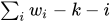
WEIGHT | WGT Sum of weights 
- WEIGHT
factors a weighted correlation or covariance matrix. The WEIGHT option can be used only with the METHOD=PRINCIPAL, METHOD=PRINIT, METHOD=ULS, or METHOD=IMAGE option. The input data set must be of type CORR, UCORR, COV, UCOV, or FACTOR, and the variable weights are obtained from an observation with
_TYPE_=’WEIGHT’.

