The GLIMMIX Procedure
Example 52.17 Linear Inference Based on Summary Data
(View the complete code for this example.)
The GLIMMIX procedure has facilities for multiplicity-adjusted inference through the ADJUST= and STEPDOWN options in the ESTIMATE, LSMEANS, and LSMESTIMATE statements. You can employ these facilities to test linear hypotheses among parameters even in situations where the quantities were obtained outside the GLIMMIX procedure. This example demonstrates the process. The basic idea is to prepare a data set containing the estimates of interest and a data set containing their covariance matrix. These are then passed to the GLIMMIX procedure, preventing updating of the parameters, essentially moving directly into the post-processing stage as if estimates with this covariance matrix had been produced by the GLIMMIX procedure.
The final documentation example in Chapter 88, The NLIN Procedure, discusses a nonlinear first-order compartment pharmacokinetic model for theophylline concentration. The data are derived by collapsing and averaging the subject-specific data from Pinheiro and Bates (1995) in a particular—yet unimportant—way that leads to two groups for comparisons. The following DATA step creates these data:
data theop;
   input time dose conc @@;
   if (dose = 4) then group=1; else group=2;
   datalines;
 0.00   4  0.1633  0.25   4   2.045
 0.27   4     4.4  0.30   4    7.37
 0.35   4    1.89  0.37   4    2.89
 0.50   4    3.96  0.57   4    6.57
 0.58   4     6.9  0.60   4     4.6
 0.63   4    9.03  0.77   4    5.22
 1.00   4    7.82  1.02   4   7.305
 1.05   4    7.14  1.07   4     8.6
 1.12   4    10.5  2.00   4    9.72
 2.02   4    7.93  2.05   4    7.83
 2.13   4    8.38  3.50   4    7.54
 3.52   4    9.75  3.53   4    5.66
 3.55   4   10.21  3.62   4     7.5
 3.82   4    8.58  5.02   4   6.275
 5.05   4    9.18  5.07   4    8.57
 5.08   4     6.2  5.10   4    8.36
 7.02   4    5.78  7.03   4    7.47
 7.07   4   5.945  7.08   4    8.02
 7.17   4    4.24  8.80   4    4.11
 9.00   4     4.9  9.02   4    5.33
 9.03   4    6.11  9.05   4    6.89
 9.38   4    7.14 11.60   4    3.16
11.98   4    4.19 12.05   4    4.57
12.10   4    5.68 12.12   4    5.94
12.15   4     3.7 23.70   4    2.42
24.15   4    1.17 24.17   4    1.05
24.37   4    3.28 24.43   4    1.12
24.65   4    1.15  0.00   5   0.025
 0.25   5    2.92  0.27   5   1.505
 0.30   5    2.02  0.50   5   4.795
 0.52   5    5.53  0.58   5    3.08
 0.98   5   7.655  1.00   5   9.855
 1.02   5    5.02  1.15   5    6.44
 1.92   5    8.33  1.98   5    6.81
 2.02   5  7.8233  2.03   5    6.32
 3.48   5    7.09  3.50   5   7.795
 3.53   5    6.59  3.57   5    5.53
 3.60   5    5.87  5.00   5     5.8
 5.02   5  6.2867  5.05   5    5.88
 6.98   5    5.25  7.00   5    4.02
 7.02   5    7.09  7.03   5   4.925
 7.15   5    4.73  9.00   5    4.47
 9.03   5    3.62  9.07   5    4.57
 9.10   5     5.9  9.22   5    3.46
12.00   5    3.69 12.05   5    3.53
12.10   5    2.89 12.12   5    2.69
23.85   5    0.92 24.08   5    0.86
24.12   5    1.25 24.22   5    1.15
24.30   5     0.9 24.35   5    1.57
;
In terms of two fixed treatment groups, the nonlinear model for these data can be written as

where  is the observed concentration in group i at time t, D is the dose of theophylline,
  is the elimination rate constant in group i,
  is the absorption rate in group i,
  is the clearance in group i, and
  denotes the model error. Because the rates and the clearance must be positive, you can parameterize the model in terms of log rates and the log clearance:
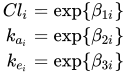
In this parameterization the model contains six parameters, and the rates and clearance vary by group. The following PROC NLIN statements fit the model and obtain the group-specific parameter estimates:
proc nlin data=theop outest=cov;
   parms beta1_1=-3.22 beta2_1=0.47 beta3_1=-2.45
         beta1_2=-3.22 beta2_2=0.47 beta3_2=-2.45;
   if (group=1) then do;
      cl   = exp(beta1_1);
      ka   = exp(beta2_1);
      ke   = exp(beta3_1);
   end; else do;
      cl   = exp(beta1_2);
      ka   = exp(beta2_2);
      ke   = exp(beta3_2);
   end;
   mean = dose*ke*ka*(exp(-ke*time)-exp(-ka*time))/cl/(ka-ke);
   model conc = mean;
   ods output ParameterEstimates=ests;
run;
The conditional programming statements determine the clearance, elimination, and absorption rates depending on the value of the group variable. The OUTEST= option in the PROC NLIN statement saves estimates and their covariance matrix to the data set cov. The ODS OUTPUT statement saves the "Parameter Estimates" table to the data set ests.
Figure 130 displays the analysis of variance table and the parameter estimates from this NLIN run. Note that the confidence levels in the "Parameter Estimates" table are based on 92 degrees of freedom, corresponding to the residual degrees of freedom in the analysis of variance table.
Figure 130: Analysis of Variance and Parameter Estimates for Nonlinear Model
| Note: | An intercept was not specified for this model. |
| Source | DF | Sum of Squares | Mean Square | F Value | Approx Pr > F |
|---|---|---|---|---|---|
| Model | 6 | 3247.9 | 541.3 | 358.56 | <.0001 |
| Error | 92 | 138.9 | 1.5097 | ||
| Uncorrected Total | 98 | 3386.8 |
| Parameter | Estimate | Approx Std Error |
Approximate 95% Confidence Limits |
|
|---|---|---|---|---|
| beta1_1 | -3.5671 | 0.0864 | -3.7387 | -3.3956 |
| beta2_1 | 0.4421 | 0.1349 | 0.1742 | 0.7101 |
| beta3_1 | -2.6230 | 0.1265 | -2.8742 | -2.3718 |
| beta1_2 | -3.0111 | 0.1061 | -3.2219 | -2.8003 |
| beta2_2 | 0.3977 | 0.1987 | 0.00305 | 0.7924 |
| beta3_2 | -2.4442 | 0.1618 | -2.7655 | -2.1229 |
The following DATA step extracts the part of the cov data set that contains the covariance matrix of the parameter estimates in Figure 130 and renames the variables as Col1–Col6. Figure 131 shows the result of the DATA step.
data covb;
   set cov(where=(_type_='COVB'));
   rename beta1_1=col1 beta2_1=col2 beta3_1=col3
          beta1_2=col4 beta2_2=col5 beta3_2=col6;
   row = _n_;
   Parm = 1;
   keep parm row beta:;
run;
proc print data=covb;
run;
Figure 131: Covariance Matrix of NLIN Parameter Estimates
| Obs | col1 | col2 | col3 | col4 | col5 | col6 | row | Parm |
|---|---|---|---|---|---|---|---|---|
| 1 | 0.007462 | -0.005222 | 0.010234 | 0.000000 | 0.000000 | 0.000000 | 1 | 1 |
| 2 | -0.005222 | 0.018197 | -0.010590 | 0.000000 | 0.000000 | 0.000000 | 2 | 1 |
| 3 | 0.010234 | -0.010590 | 0.015999 | 0.000000 | 0.000000 | 0.000000 | 3 | 1 |
| 4 | 0.000000 | 0.000000 | 0.000000 | 0.011261 | -0.009096 | 0.015785 | 4 | 1 |
| 5 | 0.000000 | 0.000000 | 0.000000 | -0.009096 | 0.039487 | -0.019996 | 5 | 1 |
| 6 | 0.000000 | 0.000000 | 0.000000 | 0.015785 | -0.019996 | 0.026172 | 6 | 1 |
The reason for this transformation of the data is to use the resulting data set to define a covariance structure in PROC GLIMMIX. The following statements reconstitute a model in which the parameter estimates from PROC NLIN are the observations and in which the covariance matrix of the "observations" matches the covariance matrix of the NLIN parameter estimates:
proc glimmix data=ests order=data;
   class Parameter;
   model Estimate = Parameter / noint df=92 s;
   random _residual_ / type=lin(1) ldata=covb v;
   parms (1) / noiter;
   lsmeans parameter / cl;
   lsmestimate Parameter
               'beta1 eq. across groups' 1 0 0 -1,
               'beta2 eq. across groups' 0 1 0  0 -1,
               'beta3 eq. across groups' 0 0 1  0  0  -1 /
               adjust=bon stepdown ftest(label='Homogeneity');
run;
In other words, you are using PROC GLIMMIX to set up a linear statistical model
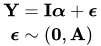
where the covariance matrix  is given by
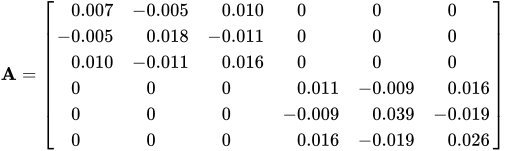
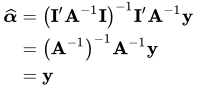
The generalized least squares estimate for  in this saturated model reproduces the observations:
The ORDER=DATA option in the PROC GLIMMIX statement requests that the sort order of the Parameter variable be identical to the order in which it appeared in the "Parameter Estimates" table of the NLIN procedure (Figure 130). The MODEL statement uses the Estimate and Parameter variables from that table to form a model in which the  matrix is the identity; hence the NOINT option. The DF=92 option sets the degrees of freedom equal to the value used in the NLIN procedure. The RANDOM statement specifies a linear covariance structure with a single component and supplies the values for the structure through the LDATA= data set. This structure models the covariance matrix as
  , where the
  matrix is given previously. Essentially, the TYPE=LIN(1) structure forces an unstructured covariance matrix onto the data. To make this work, the parameter
  is held fixed at 1 in the PARMS statement.
Figure 132 displays the parameter estimates and least squares means for this model. Note that estimates and least squares means are identical, since the matrix is the identity. Also, the confidence limits agree with the values reported by PROC NLIN (see Figure 130).
Figure 132: Parameter Estimates and LS-Means from Summary Data
| Solutions for Fixed Effects | ||||||
|---|---|---|---|---|---|---|
| Effect | Parameter | Estimate | Standard Error |
DF | t Value | Pr > |t| |
| Parameter | beta1_1 | -3.5671 | 0.08638 | 92 | -41.29 | <.0001 |
| Parameter | beta2_1 | 0.4421 | 0.1349 | 92 | 3.28 | 0.0015 |
| Parameter | beta3_1 | -2.6230 | 0.1265 | 92 | -20.74 | <.0001 |
| Parameter | beta1_2 | -3.0111 | 0.1061 | 92 | -28.37 | <.0001 |
| Parameter | beta2_2 | 0.3977 | 0.1987 | 92 | 2.00 | 0.0483 |
| Parameter | beta3_2 | -2.4442 | 0.1618 | 92 | -15.11 | <.0001 |
| Parameter Least Squares Means | ||||||||
|---|---|---|---|---|---|---|---|---|
| Parameter | Estimate | Standard Error |
DF | t Value | Pr > |t| | Alpha | Lower | Upper |
| beta1_1 | -3.5671 | 0.08638 | 92 | -41.29 | <.0001 | 0.05 | -3.7387 | -3.3956 |
| beta2_1 | 0.4421 | 0.1349 | 92 | 3.28 | 0.0015 | 0.05 | 0.1742 | 0.7101 |
| beta3_1 | -2.6230 | 0.1265 | 92 | -20.74 | <.0001 | 0.05 | -2.8742 | -2.3718 |
| beta1_2 | -3.0111 | 0.1061 | 92 | -28.37 | <.0001 | 0.05 | -3.2219 | -2.8003 |
| beta2_2 | 0.3977 | 0.1987 | 92 | 2.00 | 0.0483 | 0.05 | 0.003050 | 0.7924 |
| beta3_2 | -2.4442 | 0.1618 | 92 | -15.11 | <.0001 | 0.05 | -2.7655 | -2.1229 |
The (marginal) covariance matrix of the data is shown in Figure 133 to confirm that it matches the matrix given earlier.
Figure 133: R-Side Covariance Matrix
| Estimated V Matrix for Subject 1 | ||||||
|---|---|---|---|---|---|---|
| Row | Col1 | Col2 | Col3 | Col4 | Col5 | Col6 |
| 1 | 0.007462 | -0.00522 | 0.01023 | |||
| 2 | -0.00522 | 0.01820 | -0.01059 | |||
| 3 | 0.01023 | -0.01059 | 0.01600 | |||
| 4 | 0.01126 | -0.00910 | 0.01579 | |||
| 5 | -0.00910 | 0.03949 | -0.02000 | |||
| 6 | 0.01579 | -0.02000 | 0.02617 | |||
The LSMESTIMATE statement specifies three linear functions. These set equal the  parameters from the groups. The step-down Bonferroni adjustment requests a multiplicity adjustment for the family of three tests. The FTEST option requests a joint test of the three estimable functions; it is a global test of parameter homogeneity across groups.
Figure 134 displays the result from the LSMESTIMATE statement. The joint test is highly significant (F = 30.52, p < 0.0001). From the p-values associated with the individual rows of the estimates, you can see that the lack of homogeneity is due to group differences for  , the log clearance.
Figure 134: Test of Parameter Homogeneity across Groups
| Least Squares Means Estimates Adjustment for Multiplicity: Holm |
|||||||
|---|---|---|---|---|---|---|---|
| Effect | Label | Estimate | Standard Error |
DF | t Value | Pr > |t| | Adj P |
| Parameter | beta1 eq. across groups | -0.5560 | 0.1368 | 92 | -4.06 | 0.0001 | 0.0003 |
| Parameter | beta2 eq. across groups | 0.04443 | 0.2402 | 92 | 0.18 | 0.8537 | 0.8537 |
| Parameter | beta3 eq. across groups | -0.1788 | 0.2054 | 92 | -0.87 | 0.3862 | 0.7725 |
| F Test for Least Squares Means Estimates | ||||
|---|---|---|---|---|
| Label | Num DF | Den DF | F Value | Pr > F |
| Homogeneity | 3 | 92 | 30.52 | <.0001 |
An alternative method of setting up this model is given by the following statements, where the data set pdata contains the covariance parameters:
random _residual_ / type=un;
parms / pdata=pdata noiter
The following DATA step creates an appropriate PDATA= data set from the data set covb, which was constructed earlier:
data pdata;
   set covb;
   array col{6};
   do i=1 to _n_;
      estimate = col{i};
      output;
   end;
   keep estimate;
run;