The GLIMMIX Procedure
MARGINS Statement
MARGINS fixed-effects </ options>;
The MARGINS statement computes predictive margins of fixed effects. Predictive margins can be computed for any effect in the MODEL statement that involves only classification variables.
The predictive margin for a specific level (group) of a fixed effect represents the average predicted response if all the observations in the data set had been in that group (Lane and Nelder 1982; Chang, Gelman, and Pagano 1982). You compute the predictive margin by fixing this effect at the specified level for all observations and averaging the predicted responses. The standard error of the predictive margin is computed by using the delta method.
For example, consider the logistic regression  , where
  is the effect of the ith level of the classification effect
  ,
,  , and
, and  is the covariate for the jth observation in the ith level of the effect ,
  . Then the predictive margin for level r of effect is

where 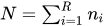 .
.
By definition, predictive margins are covariate-adjusted marginal means, as are LS-means. These two approaches are discussed in the section Predictive Margins Compared with LS-Means.
You can specify multiple effects in one or multiple MARGINS statements, and all MARGINS statements must appear after the MODEL statement. Predictive margin computations are not supported for t, lognormal, or multinomial distributions or for constructed effects.
PROC GLIMMIX constructs an approximate t test to test the null hypothesis that the associated population quantity equals zero. By default, the denominator degrees of freedom for this test are the same as those displayed for the effect in the "Type III Tests of Fixed Effects" table. Table 11 summarizes options available in the MARGINS statement. All options for the MARGINS statement are discussed in alphabetical order after the table.
Table 11: MARGINS Statement Options
| Option | Description |
|---|---|
| Construction and Computation of Predictive Margins | |
| AT | Modifies covariate value in computing predictive margins |
| DIFF | Requests differences of predictive margins |
| SLICEBY= | Partitions F tests |
| SLICEDIFF= | Requests differences of sliced predictive margins and determines the type of differences |
| Degrees of Freedom and p-Values | |
| ADJUST= | Determines the method of multiple comparison adjustment of predictive margin differences |
|
ALPHA=
|
Determines the confidence level ( ) ) |
| DF= | Assigns specific value to degrees of freedom for tests and confidence limits |
| STEPDOWN | Adjusts multiple comparison p-values further in a step-down fashion |
| Statistical Output | |
| CL | Constructs confidence limits for predictive margins and/or predictive margin differences |
You can specify the following options in the MARGINS statement after a slash (/).
-
ADJUST=BON
ADJUST=DUNNETT
ADJUST=SCHEFFE
ADJUST=SIDAK
ADJUST=SIMULATE<(simoptions)>
ADJUST=SMM | GT2
ADJUST=TUKEY -
requests a multiple comparison adjustment for the p-values and confidence limits for the differences of predictive margins. The adjusted quantities are produced in addition to the unadjusted quantities. By default, PROC GLIMMIX performs all pairwise differences. If you specify ADJUST=DUNNETT, the procedure analyzes all differences with a control level. The ADJUST= option does not imply the DIFF option.
The BON (Bonferroni) and SIDAK adjustments involve correction factors described in Chapter 53, The GLM Procedure, and Chapter 86, The MULTTEST Procedure; also see Westfall and Young (1993) and Westfall et al. (1999). When you specify ADJUST=TUKEY and your data are unbalanced, PROC GLIMMIX uses the approximation described in Kramer (1956) and identifies the adjustment as "Tukey-Kramer" in the results. Similarly, when you specify ADJUST=DUNNETT and the predictive margins are correlated, the GLIMMIX procedure uses the factor-analytic covariance approximation described in Hsu (1992) and identifies the adjustment in the results as "Dunnett-Hsu". The approximation derives an approximate "effective sample sizes" for which exact critical values are computed. Note that computing the exact adjusted p-values and critical values for unbalanced designs can be computationally intensive. A simulation-based approach, as specified by the ADJUST=SIM option, while nondeterministic, can provide inferences that are sufficiently accurate in much less time. The preceding references also describe the SCHEFFE and SMM adjustments.
The SIMULATE adjustment computes adjusted p-values and confidence limits from the simulated distribution of the maximum or maximum absolute value of a multivariate t random vector. All covariance parameters, except the residual scale parameter, are fixed at their estimated values throughout the simulation, potentially resulting in some underdispersion. The simulation estimates q, the true
 quantile, where
  is the confidence coefficient. The default is 0.05, and you can change this value with the ALPHA= option in the MARGINS statement.
 The number of samples is set so that the tail area for the simulated q is within
 of with
  % confidence. In equation form,
where
 is the simulated q and F is the true distribution function of the maximum; see Edwards and Berry (1987) for details. By default, = 0.005 and
  = 0.01, placing the tail area of within 0.005 of 0.95 with 99% confidence. The ACC= and EPS= —simoptions reset and , respectively, the NSAMP= simoption sets the sample size directly, and the SEED= simoption specifies an integer used to start the pseudo-random number generator for the simulation. If you do not specify a seed, or if you specify a value less than or equal to zero, the seed is generated from reading the time of day from the computer clock. For additional descriptions of these and other simulation options, see the section LSMEANS Statement in Chapter 53, The GLM Procedure.
 If the STEPDOWN option is in effect, the p-values are further adjusted in a step-down fashion. For certain options and data, this adjustment is exact under an iid
 model for the dependent variable, in particular for the following:
 for ADJUST=DUNNETT when the means are uncorrelated
for ADJUST=TUKEY with STEPDOWN(TYPE=LOGICAL) when the means are balanced and uncorrelated.
The first case is a consequence of the nature of the successive step-down hypotheses for comparisons with a control; the second employs an extension of the maximum studentized range distribution appropriate for partition hypotheses (Royen 1989). Finally, for STEPDOWN(TYPE=FREE), ADJUST=TUKEY employs the Royen (1989) extension in such a way that the resulting p-values are conservative.
- ALPHA=number
requests that a t-type confidence interval be constructed for each of the predictive margins with confidence level 1 – number. The value of number must be between 0 and 1; the default is 0.05.
-
AT variable=value
AT (variable-list)=(value-list)
AT MEANS -
enables you to modify the values of the covariates used in computing predictive margins. By default, all covariate effects are set equal to their observed values for computation of predictive margins. The AT option enables you to assign arbitrary values to the covariates. Additional columns in the output table indicate the values of the covariates.
If there is an effect containing two or more covariates, the AT MEANS option sets the effect equal to the product of the individual means rather than the mean of the product.
As an example, consider the following invocation of PROC GLIMMIX:
proc glimmix;
   class A;
   model Y = A x1 x2 x1*x2;
   margins A;
   margins A / at means;
   margins A / at x1=1.2;
   margins A / at (x1 x2)=(1.2 0.3);
run;
The first two MARGINS statements sets
x1andx2to their observed values for each observation. For the second MARGINS statement,x1is set to (the mean of
 x1) andx2is set to (the mean of
 x2). Their interaction is set to . The third MARGINS statement sets
 x1to 1.2, and the final MARGINS statement sets these variables to 1.2 and 0.3, respectively. - CL
requests that t-type confidence limits be constructed for each of the predictive margins. If DDFM=NONE, then PROC GLIMMIX uses infinite degrees of freedom for this test, essentially computing a z interval. The confidence level is 0.95 by default; this can be changed with the ALPHA= option. If you specify an ADJUST= option, then the confidence limits are adjusted for multiplicity, but if you also specify STEPDOWN, then only p-values are step-down adjusted, not the confidence limits.
- DF=number
specifies the degrees of freedom for the t test and confidence limits. The default is the denominator degrees of freedom taken from the "Type III Tests of Fixed Effects" table corresponding to the margins effect.
-
DIFF<=difftype>
PDIFF<=difftype> -
requests that differences of the predictive margins be displayed. The optional difftype specifies which differences to produce, with possible values ALL, CONTROL, CONTROLL, and CONTROLU. The ALL value requests all pairwise differences, and it is the default. The CONTROL difftype requests differences with a control, which, by default, is the first level of each of the specified MARGINS effects.
To specify which levels of the effects are the controls, list the quoted formatted values in parentheses after the CONTROL keyword. For example, for CLASS variables
A,B, andC, each having two levels, 1 and 2, the following MARGINS statement specifies the (1,2) level ofA*Band the (2,1) level ofB*Cas controls:margins A*B B*C / diff=control('1' '2', '2' '1');For an effect that has multiple class variables, the quoted formatted values are assigned to the class variables in the order they appear in the CLASS statement.
Two-tailed tests and confidence limits are associated with the CONTROL difftype. For one-tailed results, use either the CONTROLL or CONTROLU difftype. The CONTROLL difftype tests whether the noncontrol levels are significantly smaller than the control; the upper confidence limits for the control minus the noncontrol levels are considered to be infinity and are displayed as missing. Conversely, the CONTROLU difftype tests whether the noncontrol levels are significantly larger than the control; the upper confidence limits for the noncontrol levels minus the control are considered to be infinity and are displayed as missing.
If you want to perform multiple comparison adjustments on the differences of predictive margins, you must specify the ADJUST= option.
- SLICEBY=fixed-effect | (fixed-effects)
-
specifies effects by which to partition interaction MARGINS effects. This produces tests of margins for each level of the specified slice effect.
For example, suppose that the margins effect is
A*B. To test the margins ofA*Bfor each level ofA, you can specify the following statementmargins A*B / sliceby=A;The SLICEBY option produces an F tests that test the simultaneous equality of the margins at a fixed level of the slice effect
A. You can request differences of the margins while holding one or more factors at a fixed level with the SLICEDIFF= option. - SLICEDIFF<=difftype>
-
requests that the specified type of differences be constructed for the sliced margins and tested against zero. The possible values for the difftype are ALL, CONTROL, CONTROLL, and CONTROLU. The difftype ALL requests all pairwise differences, and it is the default. The difftype CONTROL, CONTROLL, and CONTROLU request the differences with a control. Whereas the SLICEBY option tests the simultaneous equality of the margins at a fixed level of the slice effect, the SLICEDIFF option tests pairwise differences of these margins. This enables you to perform multiple comparisons among the levels of one factor at a fixed level of the other factor.
For example, assume that, in a certain design, factors
AandBhave a = 4 and b = 3 levels, respectively. Consider the following statements:proc glimmix; class A B; model y = A B A*B; margins A*B / sliceby=A; margins A*B / sliceby=A slicediff=all; run;The first MARGINS statement produces four F tests, one per level of
A. Denote the three margins that correspond to the first level ofA ,
,  , and
, and  . Then the first F test tests the two-degrees-of-freedom hypothesis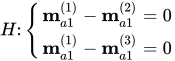
The SLICEDIFF option performs tests of the difference between all pairs of these three margins. In the example this corresponds to tests of the form
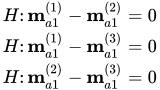
In the example, with a = 4 and b = 3, the second MARGINS statement produces four sets of predictive margins differences. Within each set, factor
Ais held fixed at a particular level and each set consists of three comparisons.For differences with a control, the default control is the first level of each of the specified MARGINS effect. To specify which levels of the effects are the controls, list the quoted formatted values in parentheses after the keyword CONTROL.
For example, if the effects
A,B, andCare classification variables, each having three levels (1, 2, and 3), the following MARGINS statement specifies the (1,3) level ofA*Bas the control:margins A*B / sliceby=(A B) slicediff=control('1' '3');This MARGINS statement first produces predictive margins differences holding the levels of
Afixed, and then it produces predictive margins differences holding the levels ofBfixed. In the former case, level ’3’ ofBserves as the control level. In the latter case, level ’1’ ofAserves as the control.For an effect that has multiple class variables, the quoted formatted values are assigned to the class variables in the order they appear in the CLASS statement.
Two-tailed tests and confidence limits are associated with the CONTROL difftype. For one-tailed results, use either the CONTROLL or CONTROLU difftype. The CONTROLL difftype tests whether the noncontrol levels are significantly smaller than the control; the upper confidence limits for the control minus the noncontrol levels are considered to be infinity and are displayed as missing. Conversely, the CONTROLU difftype tests whether the noncontrol levels are significantly larger than the control; the upper confidence limits for the noncontrol levels minus the control are considered to be infinity and are displayed as missing.
When the ADJUST= option is specified, the GLIMMIX procedure also adjusts the tests for multiplicity. The adjustment is based on the number of comparisons within each level of the SLICEBY= effect.
- STEPDOWN<(step-down options)>
-
requests that multiple comparison adjustments for the p-values of predictive margins differences be further adjusted in a step-down fashion. Step-down methods increase the power of multiple comparisons by taking advantage of the fact that a p-value will never be declared significant unless all smaller p-values are also declared significant. Note that the STEPDOWN adjustment combined with ADJUST=BON corresponds to the methods of Holm (1979) and "Method 2" of Shaffer (1986); this is the default. Using step-down-adjusted p-values combined with ADJUST=SIMULATE corresponds to the method of Westfall (1997).
STEPDOWN affects only p-values, not confidence limits. For ADJUST=SIMULATE, the generalized least squares hybrid approach of Westfall (1997) is employed to increase Monte Carlo accuracy.
You can specify the following step-down options in parentheses: