The HPFMM Procedure
PROC HPFMM Statement
PROC HPFMM <options>;
The PROC HPFMM statement invokes the HPFMM procedure. Table 2 summarizes the options available in the PROC HPFMM statement. These and other options in the PROC HPFMM statement are then described fully in alphabetical order.
Table 2: PROC HPFMM Statement Options
| Option | Description |
|---|---|
| Basic Options | |
| DATA= | Specifies the input data set |
| EXCLUSION= | Specifies how the procedure responds to support violations in the data |
| NAMELEN= | Specifies the length of effect names |
| SEED= | Specifies the random number seed for analyses that require random number draws |
| Displayed Output | |
| COMPONENTINFO | Displays information about the mixture components |
| CORR | Displays the asymptotic correlation matrix of the maximum likelihood parameter estimates or the empirical correlation matrix of the Bayesian posterior estimates |
| COV | Displays the asymptotic covariance matrix of the maximum likelihood parameter estimates or the empirical covariance matrix of the Bayesian posterior estimates |
| COVI | Displays the inverse of the covariance matrix of the parameter estimates |
| FITDETAILS | Displays fit information for all examined models |
| ITDETAILS | Adds estimates and gradients to the "Iteration History" table |
| NOCLPRINT | Suppresses the "Class Level Information" table completely or partially |
| NOITPRINT | Suppresses the "Iteration History Information" table |
| NOPRINT | Suppresses tabular and graphical output |
| PARMSTYLE= | Specifies how parameters are displayed in ODS tables |
| PLOTS | Produces ODS statistical graphics |
| Computational Options | |
| CRITERION= | Specifies the criterion used in model selection |
| NOCENTER | Prevents centering and scaling of the regressor variables |
| PARTIAL= | Specifies a variable that defines a partial classification |
| Options Related to Optimization | |
| ABSCONV= | Tunes an absolute function convergence criterion |
| ABSFCONV= | Tunes an absolute function difference convergence criterion |
| ABSGCONV= | Tunes the absolute gradient convergence criterion |
| FCONV= | Specifies a relative function convergence criterion that is based on a relative change of the function value |
| FCONV2= | Specifies a relative function convergence criterion that is based on a predicted reduction of the objective function |
| GCONV= | Tunes the relative gradient convergence criterion |
| MAXITER= | Specifies the maximum number of iterations in any optimization |
| MAXFUNC= | Specifies the maximum number of function evaluations in any optimization |
| MAXTIME= | Specifies the upper limit of CPU time in seconds for any optimization |
| MINITER= | Specifies the minimum number of iterations in any optimization |
| TECHNIQUE= | Selects the optimization technique |
| Singularity Tolerances | |
| INVALIDLOGL= | Tunes the value assigned to an invalid component log likelihood |
| SINGCHOL= | Tunes singularity for Cholesky decompositions |
| SINGRES= | Tunes singularity for the residual variance |
| SINGULAR= | Tunes general singularity criterion |
You can specify the following options in the PROC HPFMM statement.
-
ABSCONV=r
ABSTOL=r specifies an absolute function convergence criterion. For minimization, the termination criterion is
 , where
  is the vector of parameters in the optimization and
  is the objective function. The default value of r is the negative square root of the largest double-precision value, which serves only as a protection against overflows.
 -
ABSFCONV=r
ABSFTOL=r -
specifies an absolute function difference convergence criterion. For all techniques except NMSIMP, the termination criterion is a small change of the function value in successive iterations:

Here,
denotes the vector of parameters that participate in the optimization, and is the objective function. The same formula is used for the NMSIMP technique, but  is defined as the vertex with the lowest function value, and
  is defined as the vertex with the highest function value in the simplex. The default value is r=0.
 -
ABSGCONV=r
ABSGTOL=r -
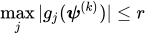
specifies an absolute gradient convergence criterion. The termination criterion is a small maximum absolute gradient element:
Here,
denotes the vector of parameters that participate in the optimization, and  is the gradient of the objective function with respect to the jth parameter. This criterion is not used by the NMSIMP technique. The default value is r=1E–5.
 -
COMPONENTINFO
COMPINFO
CINFO produces a table with additional details about the fitted model components.
- COV
produces the covariance matrix of the parameter estimates. For maximum likelihood estimation, this matrix is based on the inverse (projected) Hessian matrix. For Bayesian estimation, it is the empirical covariance matrix of the posterior estimates. The covariance matrix is shown for all parameters, even if they did not participate in the optimization or sampling.
- COVI
produces the inverse of the covariance matrix of the parameter estimates. For maximum likelihood estimation, the covariance matrix is based on the inverse (projected) Hessian matrix. For Bayesian estimation, it is the empirical covariance matrix of the posterior estimates. This matrix is then inverted by sweeping, and rows and columns that correspond to linear dependencies or singularities are zeroed.
- CORR
produces the correlation matrix of the parameter estimates. For maximum likelihood estimation this matrix is based on the inverse (projected) Hessian matrix. For Bayesian estimation, it is based on the empirical covariance matrix of the posterior estimates.
-
CRITERION=keyword
CRIT=keyword -
specifies the criterion by which the HPFMM procedure ranks models when multiple models are evaluated during maximum likelihood estimation. You can choose from the following keywords to rank models:
- AIC
based on Akaike’s information criterion
- AICC
based on the bias-corrected AIC criterion
- BIC
based on the Bayesian information criterion
- GRADIENT
based on the largest element of the gradient (in absolute value)
- LOGL | LL
based on the mixture log likelihood
- PEARSON
based on the Pearson statistic
The default is CRITERION=BIC.
- DATA=SAS-data-set
names the SAS data set to be used by PROC HPFMM. The default is the most recently created data set.
-
EXCLUSION=NONE | ANY | ALL
EXCLUDE=NONE | ANY | ALL -
specifies how the HPFMM procedure handles support violations of observations. For example, in a mixture of two Poisson variables, negative response values are not possible. However, in a mixture of a Poisson and a normal variable, negative values are possible, and their likelihood contribution to the Poisson component is zero. An observation that violates the support of one component distribution of the model might be a valid response with respect to one or more other component distributions. This requires some nuanced handling of support violations in mixture models.
The default exclusion technique, EXCLUSION=ALL, removes an observation from the analysis only if it violates the support of all component distributions. The other extreme, EXCLUSION=NONE, permits an observation into the analysis regardless of support violations. EXCLUSION=ANY removes observations from the analysis if the response violates the support of any component distributions. In the single-component case, EXCLUSION=ALL and EXCLUSION=ANY are identical.
-
FCONV=r
FTOL=r -
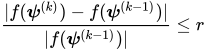
specifies a relative function convergence criterion that is based on the relative change of the function value. For all techniques except NMSIMP, PROC HPFMM terminates when there is a small relative change of the function value in successive iterations:
Here,
denotes the vector of parameters that participate in the optimization, and is the objective function. The same formula is used for the NMSIMP technique, but  is defined as the vertex with the lowest function value, and is defined as the vertex with the highest function value in the simplex.
 The default is
 , where FDIGITS is by default
  , and
, and  is the machine precision.
 -
FCONV2=r
FTOL2=r -
specifies a relative function convergence criterion that is based on the predicted reduction of the objective function. For all techniques except NMSIMP, the termination criterion is a small predicted reduction

of the objective function. The predicted reduction
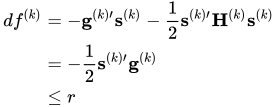
is computed by approximating the objective function f by the first two terms of the Taylor series and substituting the Newton step:

For the NMSIMP technique, the termination criterion is a small standard deviation of the function values of the
 simplex vertices
  ,
,  ,
, 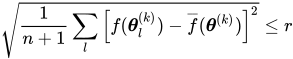
where
 . If there are
  boundary constraints active at
  , the mean and standard deviation are computed only for the
  unconstrained vertices.
 The default value is r = 1E–6 for the NMSIMP technique and r = 0 otherwise.
- FITDETAILS
-
requests that the "Optimization Information," "Iteration History," and "Fit Statistics" tables be produced for all optimizations when models with different number of components are evaluated. For example, the following statements fit a binomial regression model with up to three components and produces fit and optimization information for all three:
proc hpfmm fitdetails;
   model y/n  = x / kmax=3;
run;
Without the FITDETAILS option, only the "Fit Statistics" table for the selected model is displayed.
In Bayesian estimation, the FITDETAILS option displays the following tables for each model that the procedure fits: "Bayes Information," "Iteration History," "Prior Information," "Fit Statistics," "Posterior Summaries," "Posterior Intervals," and any requested diagnostics tables. The "Iteration History" table appears only if the BAYES statement includes the INITIAL=MLE option.
Without the FITDETAILS option, these tables are listed only for the selected model.
-
GCONV=r
GTOL=r -
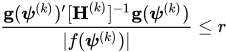
specifies a relative gradient convergence criterion. For all techniques except CONGRA and NMSIMP, the termination criterion is a small normalized predicted function reduction:
Here,
denotes the vector of parameters that participate in the optimization, is the objective function, and  is the gradient. For the CONGRA technique (where a reliable Hessian estimate
  is not available), the following criterion is used:
This criterion is not used by the NMSIMP technique. The default value is r=1E–8.
- HESSIAN
displays the Hessian matrix of the model. This option is not available for Bayesian estimation.
- INVALIDLOGL=r
specifies the value assumed by the HPFMM procedure if a log likelihood cannot be computed (for example, because the value of the response variable falls outside of the response distribution’s support). The default value is –1E20.
- ITDETAILS
adds parameter estimates and gradients to the "Iteration History" table. If the HPFMM procedure centers or scales the model variables (or both), the parameter estimates and gradients reported during the iteration refer to that scale. You can suppress centering and scaling with the NOCENTER option.
-
MAXFUNC=n
MAXFU=n -
specifies the maximum number of function calls in the optimization process. The default values are as follows, depending on the optimization technique:
TRUREG, NRRIDG, and NEWRAP: 125
QUANEW and DBLDOG: 500
CONGRA: 1000
NMSIMP: 3000
The optimization can terminate only after completing a full iteration. Therefore, the number of function calls that are actually performed can exceed the number that is specified by the MAXFUNC= option. You can choose the optimization technique with the TECHNIQUE= option.
-
MAXITER=n
MAXIT=n -
specifies the maximum number of iterations in the optimization process. The default values are as follows, depending on the optimization technique:
TRUREG, NRRIDG, and NEWRAP: 50
QUANEW and DBLDOG: 200
CONGRA: 400
NMSIMP: 1000
These default values also apply when n is specified as a missing value. You can choose the optimization technique with the TECHNIQUE= option.
- MAXTIME=r
specifies an upper limit of r seconds of CPU time for the optimization process. The time is checked only at the end of each iteration. Therefore, the actual run time might be longer than the specified time. By default, CPU time is not limited.
-
MINITER=n
MINIT=n specifies the minimum number of iterations. The default value is 0. If you request more iterations than are actually needed for convergence to a stationary point, the optimization algorithms can behave strangely. For example, the effect of rounding errors can prevent the algorithm from continuing for the required number of iterations.
- NAMELEN=number
specifies the length to which long effect names are shortened. The default and minimum value is 20.
- NOCENTER
requests that regressor variables not be centered or scaled. By default the HPFMM procedure centers and scales columns of the
 matrix if the models contain intercepts. If NOINT options in MODEL statements are in effect, the columns of are scaled but not centered. Centering and scaling can help with the stability of estimation and sampling algorithms. The HPFMM procedure does not produce a table of the centered and scaled coefficients and provides no user control over the type of centering and scaling that is applied. The NOCENTER option turns any centering and scaling off and processes the raw values of the continuous variables.
 - NOCLPRINT<=number>
suppresses the display of the "Class Level Information" table if you do not specify number. If you specify number, the values of the classification variables are displayed for only those variables whose number of levels is less than number. Specifying a number helps to reduce the size of the "Class Level Information" table if some classification variables have a large number of levels.
- NOITPRINT
suppresses the display of the "Iteration History Information" table.
- NOPRINT
suppresses the normal display of tabular and graphical results. The NOPRINT option is useful when you want to create only one or more output data sets with the procedure. This option temporarily disables the Output Delivery System (ODS); see Chapter 23, Using the Output Delivery System, for more information.
- PARMSTYLE=EFFECT | LABEL
-
specifies the display style for parameters and effects. The HPFMM procedure can display parameters in two styles:
The EFFECT style (which is used by the MIXED and GLIMMIX procedure, for example) identifies a parameter with an "Effect" column and adds separate columns for the CLASS variables in the model.
The LABEL style creates one column, named Parameter, that combines the relevant information about a parameter into a single column. If your model contains multiple CLASS variables, the LABEL style might use space more economically.
The EFFECT style is the default for models that contain effects; otherwise the LABEL style is used (for example, in homogeneous mixtures). You can change the display style with the PARMSTYLE= option. Regardless of the display style, ODS output data sets that contain information about parameter estimates contain columns for both styles.
-
PARTIAL=variable
MEMBERSHIP=variable -
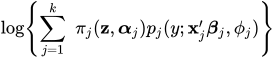
specifies a variable in the input data set that identifies component membership. You can specify missing values for observations whose component membership is undetermined; this is known as a partial classification (McLachlan and Peel 2000, p. 75). For observations with known membership, the likelihood contribution is no longer a mixture. If observation i is known to be a member of component m, then its log likelihood contribution is

Otherwise, if membership is undetermined, it is
The
variablespecified in the PARTIAL= option can be numeric or character. In case of a character variable, the variable must appear in the CLASS statement. If the PARTIAL= variable appears in the CLASS statement, the membership assignment is made based on the levelized values of the variable, as shown in the "Class Level Information" table. Invalid values of the PARTIAL= variable are ignored.In a model in which label switching is a problem, the switching can sometimes be avoided by assigning just a few observations to categories. For example, in a three-component model, switches might be prevented by assigning the observation with the smallest response value to the first component and the observation with the largest response value to the last component.
-
PLOTS <(global-plot-options)> <=plot-request <(options)>>
PLOTS <(global-plot-options)> <=(plot-request <(options)> <…plot-request <(options)>>)> -
controls the plots produced through ODS Graphics.
ODS Graphics must be enabled before plots can be requested. For example:
ods graphics on;
proc hpfmm data=yeast seed=12345;
   model count/n = / k=2;
   freq f;
   performance nthreads=2;
   bayes;
run;
ods graphics off;
For more information about enabling and disabling ODS Graphics, see the section Enabling and Disabling ODS Graphics in Chapter 24, Statistical Graphics Using ODS.
Global Plot Options
The global-plot-options apply to all relevant plots generated by the HPFMM procedure. The global-plot-options supported by the HPFMM procedure are as follows:
Specific Plot Options
The following listing describes the specific plots and their options.
- SEED=n
-
determines the random number seed for analyses that depend on a random number stream. If you do not specify a seed or if you specify a value less than or equal to zero, the seed is generated from reading the time of day from the computer clock. The largest possible value for the seed is
 . The seed value is reported in the "Model Information" table.
 You can use the SYSRANDOM and SYSRANEND macro variables after a PROC HPFMM run to query the initial and final seed values. However, using the final seed value as the starting seed for a subsequent analysis does not continue the random number stream where the previous analysis left off. The SYSRANEND macro variable provides a mechanism to pass on seed values to ensure that the sequence of random numbers is the same every time you run an entire program.
Analyses that use the same (nonzero) seed are not completely reproducible if they are executed with a different number of threads since the random number streams in separate threads are independent. You can control the number of threads used by the HPFMM procedure with system options or through the PERFORMANCE statement in the HPFMM procedure.
- SINGCHOL=number
tunes the singularity criterion in Cholesky decompositions. The default is 1E4 times the machine epsilon; this product is approximately 1E–12 on most computers.
- SINGRES=number
sets the tolerance for which the residual variance or scale parameter is considered to be zero. The default is 1E4 times the machine epsilon; this product is approximately 1E–12 on most computers.
- SINGULAR=number
tunes the general singularity criterion applied by the HPFMM procedure in sweeps and inversions. The default is 1E4 times the machine epsilon; this product is approximately 1E–12 on most computers.
-
TECHNIQUE=keyword
TECH=keyword -
specifies the optimization technique to obtain maximum likelihood estimates. You can choose from the following techniques by specifying the appropriate keyword:
- CONGRA
performs a conjugate-gradient optimization.
- DBLDOG
performs a version of double-dogleg optimization.
- NEWRAP
performs a Newton-Raphson optimization combining a line-search algorithm with ridging.
- NMSIMP
performs a Nelder-Mead simplex optimization.
- NONE
performs no optimization.
- NRRIDG
performs a Newton-Raphson optimization with ridging.
- QUANEW
performs a dual quasi-Newton optimization.
- TRUREG
performs a trust-region optimization.
The default is TECH=QUANEW.
For more details about these optimization methods, see the section Choosing an Optimization Algorithm.
- ZEROPROB=number
tunes the threshold (a value between 0 and 1) below which the HPFMM procedure considers a component mixing probability to be zero. This affects the calculation of the number of effective components. The default is the square root of the machine epsilon; this is approximately 1E–8 on most computers.