The IRT Procedure
PROC IRT Statement
PROC IRT <options>;
The PROC IRT statement invokes the IRT procedure. Table 1 summarizes the options available in the PROC IRT statement. The sections that follow the table describe the PROC IRT statement options and then describe the other statements in alphabetical order.
Table 1: PROC IRT Statement Options
| Option | Description |
|---|---|
| Data Set Options | |
| DATA= | Specifies the input data set |
| INMODEL= | Inputs the model specifications |
| OUT= | Specifies the output data set for factor scores |
| OUTMODEL= | Outputs the model specifications |
| Analysis Options | |
| ITEMFIT | Computes the item fit statistics and displays them in a table |
| ITEMSTAT | Computes the classical item statistics and displays them in a table |
| SCOREMETHOD= | Specifies the factor score estimation method |
| Model Options | |
| CEILPRIOR= | Specifies prior information for ceiling parameters |
| DESCENDING | Reverses the sort order of the levels of the response variable |
| GUESSPRIOR= | Specifies prior information for guessing parameters |
| LINK= | Specifies the link function |
| NFACTOR= | Specifies the number of factors |
| RESFUNC= | Specifies the response function |
| RORDER= | Specifies the sort order of the response variables |
| SLOPEPRIOR= | Specifies prior information for slope parameters |
| Technical Options | |
| ABSFCONV= | Specifies an absolute function difference convergence criterion |
| ABSGCONV= | Specifies an absolute gradient convergence criterion |
| ABSPCONV= | Specifies a maximum absolute parameter difference convergence criterion |
| FCONV= | Specifies a relative function convergence criterion |
| GCONV= | Specifies a relative gradient convergence criterion |
| MAXFUNC= | Specifies the maximum number of function calls in the optimization process |
| MAXITER= | Specifies the maximum number of iterations in the optimization process |
| MAXMITER= | Specifies the maximum number of iterations in the maximization step of the EM algorithm |
| NOAD | Specifies nonadaptive quadrature |
| QPOINTS= | Specifies the number of quadrature points per dimension |
| TECHNIQUE= | Specifies the optimization technique to obtain maximum likelihood estimates |
| Display Options | |
| NOITPRINT | Suppresses the display of the "Iteration History" table |
| NOPRINT | Suppresses all ODS output |
| PINITIAL | Displays initial parameter estimates |
| POLYCHORIC | Displays the polychoric correlation matrix |
| PLOTS= | Controls plots that are produced through ODS Graphics |
| Rotation Method and Properties | |
| RCONVERGE= | Specifies the convergence criterion for rotation cycles |
| RITER= | Specifies the maximum number of rotation cycles |
| ROTATE= | Specifies the rotation method |
PROC IRT Statement Options
-
ABSFCONV=r
ABSFTOL=r -
specifies an absolute function difference convergence criterion. Termination requires a small change of the function value in successive iterations,

where
 denotes the vector of parameters that participate in the optimization and
  is the objective function. This criterion is not used by the expectation-maximization (EM) algorithm. By default, r = 0.
 -
ABSGCONV=r
ABSGTOL=r -
specifies an absolute gradient convergence criterion. Termination requires the maximum absolute gradient element to be small,
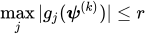
where
denotes the vector of parameters that participate in the optimization and  is the gradient of the objective function with respect to the jth parameter. This criterion is not used by the EM algorithm. By default, r = 1E–5.
 -
ABSPCONV=r
ABSPTOL=r -
specifies a maximum absolute parameter difference convergence criterion. This criterion is used only by the EM algorithm. Termination requires the maximum absolute parameter change in successive iterations to be small,
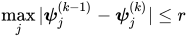
where
 denotes the jth parameter that participates in the optimization. By default, r = 1E–4.
 - CEILPRIOR=(<r1>, <r2>)
-
specifies the mean (r1) and weight (r2) of the beta prior distribution for the ceiling parameters. The r1 value corresponds to the mean of the beta distribution, and it reflects your prior estimation of the ceiling parameter. The weight, r2, represents your confidence about this prior estimation. PROC IRT uses these values to define the beta prior distribution for all ceiling parameters of the items that are fit by the four-parameter model (that is, when RESFUNC=FOURP). If you want to specify different prior information for different items, use the CEILPRIOR= option in the MODEL statement. For more information, see the section Prior Distributions for Parameters.
The following example specifies the mean and weight to be 0.8 and 10, respectively, for the prior distribution of the ceiling parameters:
proc irt ceilprior=(0.8,10);
run;
By default, r1 = 0.9 and r2 = 20.
- DATA=SAS-data-set
specifies the SAS-data-set to be read by PROC IRT. The default value is the most recently created data set.
-
DESCENDING
DESC reverses the sorting order for the levels of the response variables. If you specify both the DESCENDING and RORDER= options, PROC IRT orders the levels according to the RORDER= option and then reverses that order.
-
FCONV=r
FTOL=r -
specifies a relative function convergence criterion. Termination requires a small relative change of the function value in successive iterations,
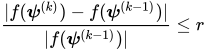
where
denotes the vector of parameters that participate in the optimization and is the objective function. This criterion is not used by the EM algorithm. By default, r  , where FDIGITS is, by default,
  and
and  is the machine precision.
 -
GCONV=r
GTOL=r -
specifies a relative gradient convergence criterion. For all techniques except CONGRA, termination requires the normalized predicted function reduction to be small,
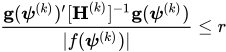
where
denotes the vector of parameters that participate in the optimization, is the objective function, and  is the gradient. For the CONGRA technique (for which a reliable Hessian estimate
  is not available), the following criterion is used:
This criterion is not used by the EM algorithm. By default, r = 1E–8.
- GUESSPRIOR=(<r1>, <r2>)
-
specifies the mean (r1) and weight (r2) of the beta prior distribution for the guessing parameters. The r1 value corresponds to the mean of the beta distribution, and it reflects your prior estimation of the guessing parameter. The weight, r2, represents your confidence about this prior estimation. PROC IRT uses these values to define the beta prior distribution for all the guessing parameters of the items that are fit by a three- or four-parameter model (that is, when RESFUNC=THREEP or FOURP). If you want to specify different prior information for different items, use the GUESSPRIOR= option in the MODEL statement. For more information, see the section Prior Distributions for Parameters.
The following example specifies the mean and weight to be 0.1 and 10, respectively, for the prior distribution of the guessing parameters:
proc irt guessprior=(0.1,10);
run;
By default, r1 = 0.2 and r2 = 20.
- INMODEL<(SCORE)>=SAS-data-set
-
specifies an input data set that contains information about the analysis model. Instead of specifying and running the model in a new run, you can use the INMODEL= option to input the model specification saved as an OUTMODEL= data set in a previous PROC IRT run.
Sometimes, you might want to create an INMODEL= data set by modifying an existing OUTMODEL= data set. However, editing and modifying OUTMODEL= data sets requires a good understanding of the formats and contents of the OUTMODEL= data sets. This process could be difficult for novice users. For more information about the format of INMODEL= and OUTMODEL= data sets, see the section Output Data Sets.
When you specify the INMODEL= option, the VAR, MODEL, GROUP, FACTOR, VARIANCE, COV, and EQUALITY statements are ignored. The DESCENDING, LINK, NFACTOR, RESFUNC, and RORDER options in the PROC IRT statement are also ignored. When there are duplicated specifications, the first specification is used.
Specify the SCORE suboption if you want to use the model specifications and parameter estimates from the INMODEL= data set to score a new subject without refitting the model.
You can use the INMODEL= option along with the SCORE suboption for many different purposes, including the following:
If you specify the INMODEL= option, PROC IRT fits an IRT model to the DATA= data set based on the model specifications in the INMODEL= data set and uses the parameter estimates in the INMODEL= data set as initial values.
If you specify the INMODEL= option and the OUT= option, PROC IRT fits an IRT model to the DATA= data set based on the model specifications in the INMODEL= data set and uses the parameter estimates in the INMODEL= data set as initial values. Then PROC IRT scores the DATA= data set by using the new parameter estimates obtained in the previous step.
If you specify the INMODEL(SCORE)= option and the OUT= option, PROC IRT scores the DATA= data set by using the model specifications and parameter estimates in the INMODEL= data set without refitting the model.
- ITEMFIT
displays the item fit statistics. These item fit statistics apply only to binary items that have one latent factor.
- ITEMSTAT <(itemstat-options )>
-
displays the classical item statistics, which include the item means, item-total correlations, adjusted item-total correlations, and item means for i ordered groups of observations or individuals. You can specify the following itemstat-options:
- NPARTITION=i
-
specifies the number of groups, where i must be an integer between 2 and 5, inclusive. By default NPARTITION=4.
The i ordered groups are formed by partitioning subjects based on the rank of their sum scores. By default, there are four groups, labeled G1, G2, G3, and G4, representing four ascending ranges of sum scores. The formula for calculating group values is

where floor is the floor function, rank is the sum score’s order rank, i is the value of the NPARTITION= option, and n is the number of observations that have nonmissing values of sum scores for TIES=LOW, TIES=MEAN, and TIES=HIGH. For TIES=DENSE, n is the number of observations that have unique nonmissing sum scores. If the number of observations is evenly divisible by the number of groups, each group has the same number of observations, provided that there are no tied sum scores at the boundaries of the groups. Sum scores with many tied values can create unbalanced groups because observations that have the same sum scores are assigned to the same group.
- TIES=HIGH | LOW | MEAN | DENSE
-
specifies how to compute normal scores or ranks for tied data values.
- HIGH
assigns the largest of the corresponding ranks.
- LOW
assigns the smallest of the corresponding ranks.
- MEAN
assigns the mean of the corresponding rank.
- DENSE
computes scores and ranks by treating tied values as a single-order statistic. For the default method, ranks are consecutive integers that begin with the number 1 and end with the number of unique, nonmissing values of the variable that is being ranked. Tied values are assigned the same rank.
By default, TIES=MEAN.
Observations (subjects) that have missing values are excluded from the computations of the classical item statistics.
- LINK=name
-
specifies the link function. You can specify the following names:
- LOGIT
requests the logistic link function.
- PROBIT
requests the probit link function.
By default, LINK=LOGIT.
-
MAXFUNC=n
MAXFU=n -
specifies the maximum number of function calls in the optimization process. This option is not used by the EM algorithm. The default values are as follows, depending on which optimization technique is specified in the TECHNIQUE= option:
NRRIDG: 125
QUANEW: 500
CONGRA: 1000
The optimization can terminate only after completing a full iteration. Therefore, the number of function calls that are actually performed can exceed the number that this option specifies.
-
MAXITER=n
MAXIT=n -
specifies the maximum number of iterations in the optimization process. The default values are as follows, depending on which optimization technique is specified in the TECHNIQUE= option:
NRRIDG: 50
QUANEW: 200
CONGRA: 400
EM: 500
-
MAXMITER=n
MAXMIT=n specifies the maximum number of iterations in the maximization step of the EM algorithm. By default, MAXMITER=1.
-
NFACTOR=i
NFACT=i specifies the number of factors, i, in the model. You must specify the number of factors only for exploratory analysis, in which all the slope parameters of the items are freely estimated without being explicitly constrained by using the FACTOR statement. By default, NFACTOR=1. When you use the FACTOR statement to specify the confirmatory factor pattern, the number of factors is implicitly defined by the number of distinctive factor names that you specify in the statement.
- NOAD
- NOITPRINT
- NOPRINT
- OUT=SAS-data-set
-
creates an output data set that contains all the data in the DATA= data set plus estimated factor scores. For exploratory analysis, the factor scores are named
_Factor1,_Factor2, and so on. For confirmatory analysis, user-specified factor names are used.PROC IRT provides three estimation methods for factor scores. You can specify a method by using the SCOREMETHOD option. The default estimation method, maximum a posteriori (MAP), is used if the SCOREMETHOD option is not specified.
- OUTMODEL=SAS-data-set
-
creates an output data set that contains the model specification, the parameter estimates, and their standard errors. You can use an OUTMODEL= data set as an input INMODEL= data set in a subsequent analysis by PROC IRT.
If you want to create a SAS data set in a permanent library, you must specify a two-level name. For more information about permanent libraries and SAS data sets, see SAS Programmers Guide: Essentials.
- PINITIAL
-
PLOTS <(global-plot-options)> <= plot-request <(options)>>
PLOTS <(global-plot-options)> <= (plot-request <(options)> <…plot-request <(options)>>)> -
controls the plots that are produced through ODS Graphics. When you specify only one plot-request, you can omit the parentheses around it. For example:
plots=all
plots=ICC(unpack)
plots(unpack)=(scree ICC)
ODS Graphics must be enabled before plots can be requested. For example:
ods graphics on;
proc irt plots=all;
run;
ods graphics off;
For more information about enabling and disabling ODS Graphics, see the section Enabling and Disabling ODS Graphics in Chapter 24, Statistical Graphics Using ODS.
You can specify the following global-plot-options, which apply to all plots that the IRT procedure generates:
You can specify the following plot-requests:
- POLYCHORIC
- QPOINTS=i
specifies the number of quadrature points in each dimension of the integral. If there are d latent factors and n quadrature points, the IRT procedure evaluates
 conditional log likelihoods for each observation to compute one value of the objective function. Increasing the number of quadrature nodes can substantially increase the computational burden. If you do not specify the number of quadrature points, it is determined adaptively by using the initial parameter estimates.
 -
RCONVERGE=p
RCONV=p -
specifies the convergence criterion for rotation cycles. Rotation stops when the scaled change of the simplicity function value is less than the RCONVERGE= value. The default convergence criterion is

where
 and
and  are simplicity function values
of the current cycle and the previous cycle, respectively;
are simplicity function values
of the current cycle and the previous cycle, respectively;  is a scaling factor; and is 1E–9 by default and is modified by the RCONVERGE= value.
 - RESFUNC=name
-
specifies the response functions for the variables that are included in the VAR statement. The response functions correspond to different response models. You can specify the following values:
- FOURP
specifies the four-parameter model.
- GPC
specifies the generalized partial credit model.
- GRADED | GR
specifies the graded response model.
- NOMINAL | NR
specifies the nominal response model.
- ONEP
specifies the one-parameter model.
- RASCH
specifies the Rasch model.
- THREEP
specifies the three-parameter model.
- TWOP
specifies the two-parameter model.
By default, RESFUNC=TWOP for binary items and RESFUNC=GRADED for ordinal items. The graded response model assumes that the response variables are ordinal-categorical up to 11 levels. All other models assume binary responses. Except for the generalized partial credit (GPC) model and Rasch (RASCH) model, you can use the RESFUNC= option in the MODEL statement to fit different response models to different items.
For more information about these response models, see the section Response Models.
- RITER=n
specifies the maximum number of cycles for factor rotation. The default value is the maximum between 10 times the number of variables and 100.
- RORDER=DATA | FORMATTED | FREQ | INTERNAL
-
specifies the sort order for the levels of the response variable. This order determines which threshold parameter in the model corresponds to each level in the data. If RORDER=FORMATTED for numeric variables for which you have supplied no explicit format, the levels are ordered by their internal values. This option applies to all the responses in the model. When the default, RORDER=FORMATTED, is in effect for numeric variables for which you have supplied no explicit format, the levels are ordered by their internal values. You can specify the following sort orders:
Value of RORDER= Levels Sorted By DATA Order of appearance in the input data set FORMATTED External formatted value, except for numeric variables that have no explicit format, which are sorted by their unformatted (internal) value FREQ Descending frequency count; levels that contain the most observations come first in the order INTERNAL Unformatted value For FORMATTED and INTERNAL, the sort order is machine-dependent. For more information about sort order, see the chapter on the SORT procedure in the SAS Procedures Guide and the discussion of BY-group processing in SAS Programmers Guide: Essentials.
-
ROTATE=name
R=name -
specifies the rotation method.
You can specify the following orthogonal rotation methods:
- BIQUARTIMAX | BIQMAX
- EQUAMAX | E
- NONE | N
specifies that no rotation be performed, leaving the original orthogonal solution.
- PARSIMAX | PA
- QUARTIMAX | QMAX | Q
- VARIMAX | V
You can specify the following oblique rotation methods:
- BIQUARTIMIN | BIQMIN
- COVARIMIN | CVMIN
- OBBIQUARTIMAX | OBIQMAX
- OBEQUAMAX | OE
- OBPARSIMAX | OPA
- OBQUARTIMAX | OQMAX
- OBVARIMAX | OV
- QUARTIMIN | QMIN
By default, ROTATE=VARIMAX.
- SCOREMETHOD=ML | EAP | MAP
-
specifies the method of factor score estimation. You can specify the following methods:
- ML
requests the maximum likelihood method.
- EAP
requests the expected a posteriori method.
- MAP
requests the maximum a posteriori method.
By default, SCOREMETHOD=MAP.
- SLOPEPRIOR=(<r1>, <r2>)
-
specifies the mean (r1) and the variance (r2) for the normal prior distribution of the slope parameters. If you want to minimize the influence of the prior information of the slope parameter, set the variance, r2, to a large value. PROC IRT uses these values to define the normal prior distribution for all the slope parameters of the items that are fit by the three- or four-parameter model (that is, when RESFUNC=THREEP or FOURP). This prior distribution is not used for items that are fit by other models, such as the two-parameter model. If you want to specify different prior information for different items, use the SLOPEPRIOR= option in the MODEL statement. For more information, see the section Prior Distributions for Parameters.
The following example specifies the mean and variance to be 1 and 2, respectively, for the prior distribution of the slope parameters:
proc irt slopeprior=(1,2);
run;
By default, r1 = 0 and r2 = 1.
-
TECHNIQUE=CONGRA | EM | NONE | NRRIDG | QUANEW
TECH=CONGRA | EM | NONE | NRRIDG | QUANEW
OMETHOD=CONGRA | EM | NONE | NRRIDG | QUANEW -
specifies the optimization technique to obtain maximum likelihood estimates. You can specify the following techniques:
- CONGRA
performs a conjugate-gradient optimization.
- EM
performs an EM optimization.
- NONE
performs no optimization.
- NRRIDG
performs a Newton-Raphson optimization with ridging.
- QUANEW
performs a dual quasi-Newton optimization.
By default, TECHNIQUE=QUANEW.
For more information about these optimization methods (except EM), see the section Choosing an Optimization Algorithm in Chapter 20, Shared Concepts and Topics. For more information about the EM algorithm, see "Expectation-Maximization (EM) Algorithm" in the section Details: IRT Procedure.