Customizing the Kaplan-Meier Survival Plot
Changing the Group Color
Begin by including the macros that you copied in the section The Modularized Templates.
SAS styles control the colors displayed in graphs. The style elements GraphData1, GraphData2, …, GraphData12 control the appearance of groups of observations such as the survival step plots in the Kaplan-Meier plot. You can override these colors by using the GraphOpts macro variable (which is null by default). By default, the colors for the first three groups in the HMTLBlue style are shades of blue, red, and green. You can change them to a pure green, red, and blue as follows:
%ProvideSurvivalMacros

%let GraphOpts = DataContrastColors=(green red blue)
                 DataColors=(green red blue);

%CompileSurvivalTemplates

proc lifetest data=sashelp.BMT
              plots=survival(cb=hw test atrisk(outside maxlen=13));
   time T * Status(0);
   strata Group;
run;
The results are displayed in Figure 24. The DATACONTRASTCOLORS= option specifies the contrast colors, which are used for markers and lines. The DATACOLORS= option specifies the colors, which are used for shaded areas such as confidence bands.
Figure 24: Named Color Specifications
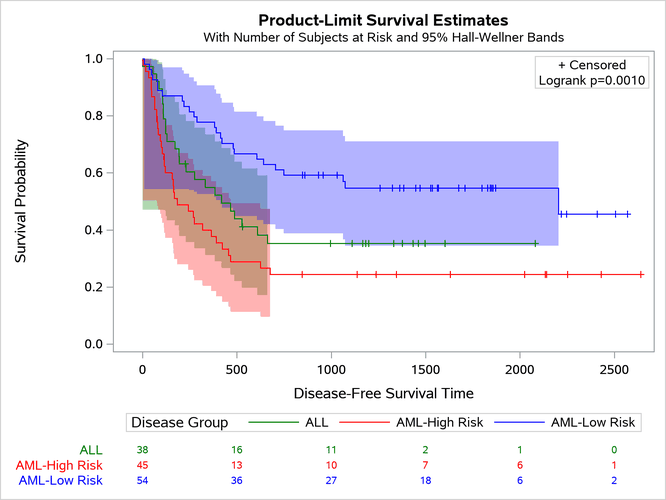
The original colors (as shown in Figure 47) are more subtle than those shown in Figure 24. If you want to change the order of the original colors by using this approach, then you need to know what they are so that you can specify them. The graph colors for the HTMLBlue and Statistical styles are extracted from the style in the section Displaying a Style and Extracting Color Lists and displayed in Figure 50. The section Modifying Color Lists shows you how to change the graph template to specify the original colors in a different order. The section Swapping Colors among Style Elements shows you how to use a macro to change a style template to specify the original colors in a different order (without having to extract and specify the color names).