Customizing the Kaplan-Meier Survival Plot
Changing How the Censored Points Are Displayed
Begin by including the macros that you copied in the section The Modularized Templates.
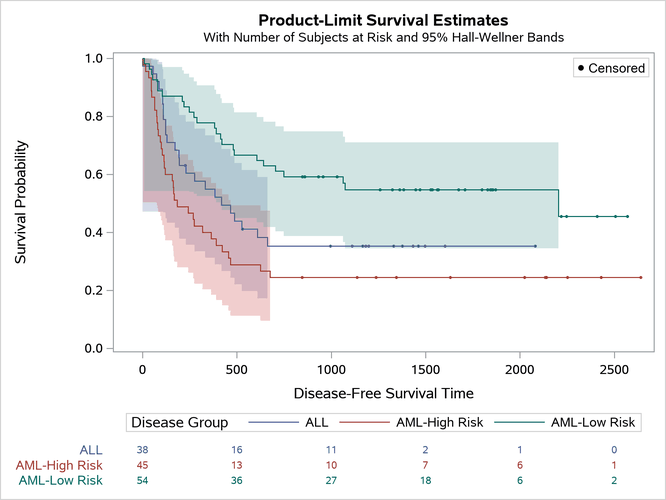
By default, PROC LIFETEST displays a plus sign to indicate censoring. This example illustrates how to change the plus sign to a small filled circle in both the step plots and the inset box. The following steps change the template and create Figure 28:
/*-- Original Macro Variable Definitions ----------------------------------
%let Censored   = markerattrs=(symbol=plus);
%let CensorStr  = "+ Censored";
-------------------------------------------------------------------------*/

%ProvideSurvivalMacros

%let censored  = markerattrs=(symbol=circlefilled size=3px);
%let censorstr = "(*ESC*){Unicode '25cf'x} Censored"
                 / textattrs=GraphValueText(family=GraphUnicodeText:FontFamily);

%CompileSurvivalTemplates

proc lifetest data=sashelp.BMT plots=survival(cb=hw atrisk(outside maxlen=13));
   time T * Status(0);
   strata Group;
run;
Figure 28: Survival Plot with a Modified Display of Censoring
The Unicode Consortium (http://unicode.org/) provides a list of character codes. Also see Output 25.2.7 in Chapter 25, ODS Graphics Template Modification, for information about the Unicode specification for other markers. Although some Unicode characters are supported in some fonts, you should always specify a Unicode font when using special characters.