Customizing the Kaplan-Meier Survival Plot
Changing the Homogeneity Test Inset
Begin by including the macros that you copied in the section The Modularized Templates.
This example modifies the contents of the %pValue macro. The original %pValue macro definition is as follows:
%macro pValue;
   if (PVALUE < .0001)
      entry TESTNAME " p " eval (PUT(PVALUE, PVALUE6.4));
   else
      entry TESTNAME " p=" eval (PUT(PVALUE, PVALUE6.4));
   endif;
%mend;
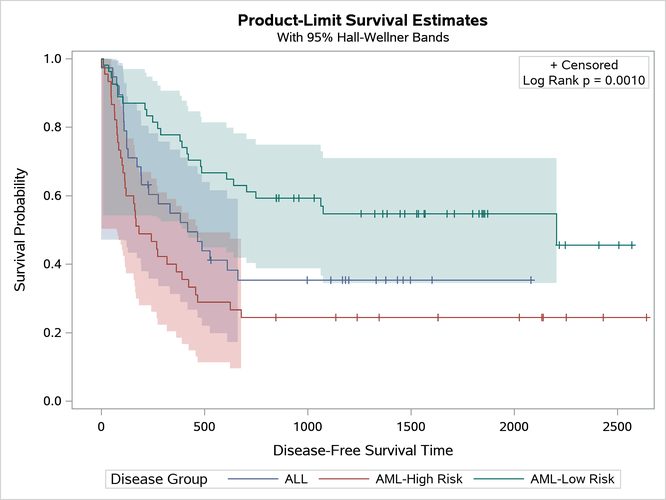
The following example directly specifies the test name (replacing the internal name 'Logrank' with 'Log Rank') and adds blank spaces around the equal sign:
%ProvideSurvivalMacros

%macro pValue;
   if (PVALUE < .0001)
      entry "Log Rank p "   eval (PUT(PVALUE, PVALUE6.4));
   else
      entry "Log Rank p = " eval (PUT(PVALUE, PVALUE6.4));
   endif;
%mend;

%CompileSurvivalTemplates

proc lifetest data=sashelp.BMT plots=survival(cb=hw test);
   time T * Status(0);
   strata Group;
run;
The results are displayed in Figure 31.
Figure 31: Cosmetic Inset Entry Change
Because this template modification replaces a character string that is more appropriately set by PROC LIFETEST, you should clean up afterward as follows:
%ProvideSurvivalMacros

proc template;
   delete Stat.Lifetest.Graphics.ProductLimitSurvival  /
          store=sasuser.templat;
   delete Stat.Lifetest.Graphics.ProductLimitSurvival2 /
          store=sasuser.templat;
run;
Last updated: December 09, 2022