The LIFEREG Procedure
BAYES Statement
BAYES <options> ;
The BAYES statement requests a Bayesian analysis of the regression model by using Gibbs sampling. The Bayesian posterior samples (also known as the chain) for the regression parameters are not tabulated. The Bayesian posterior samples (also known as the chain) for the model parameters can be output to a SAS data set.
Table 2 summarizes the options available in the BAYES statement.
Table 2: BAYES Statement Options
| Option | Description |
|---|---|
| Monte Carlo Options | |
| INITIAL= | Specifies initial values of the chain |
| INITIALMLE | Specifies that maximum likelihood estimates be used as initial values of the chain |
| METROPOLIS= | Specifies the use of a Metropolis step |
| NBI= | Specifies the number of burn-in iterations |
| NMC= | Specifies the number of iterations after burn-in |
| SEED= | Specifies the random number generator seed |
| THINNING= | Controls the thinning of the Markov chain |
| Model and Prior Options | |
| COEFFPRIOR= | Specifies the prior of the regression coefficients |
| EXPONENTIALSCALEPRIOR= | Specifies the prior of the exponential scale parameter |
| GAMMASHAPEPRIOR= | Specifies the prior of the three-parameter gamma shape parameter |
| SCALEPRIOR= | Specifies the prior of the scale parameter |
| WEIBULLSCALEPRIOR= | Specifies the prior of the Weibull scale parameter |
| WEIBULLSHAPEPRIOR= | Specifies the prior of the Weibull shape parameter |
| Summary Statistics and Convergence Diagnostics | |
| DIAGNOSTICS= | Displays convergence diagnostics |
| PLOTS= | Displays diagnostic plots |
| STATISTICS= | Displays summary statistics of the posterior samples |
| Posterior Samples | |
| OUTPOST= | Names a SAS data set for the posterior samples |
The following list describes these options and their suboptions.
-
COEFFPRIOR=UNIFORM | NORMAL <(normal-options)>
CPRIOR=UNIFORM | NORMAL <(option)>
COEFF=UNIFORM | NORMAL <(option)> -
specifies the prior distribution for the regression coefficients. The default is COEFFPRIOR=UNIFORM. The available prior distributions are as follows:
- NORMAL<(normal-option)>
-
specifies a normal distribution. The normal-options include the following:
- CONDITIONAL
specifies that the normal prior, conditional on the current Markov chain value of the location-scale model precision parameter
 , is
, is  , where
  and
and  are the mean and covariance of the normal prior specified by other normal options.
 - INPUT= SAS-data-set
specifies a SAS data set that contains the mean and covariance information of the normal prior. The data set must have a
_TYPE_variable to represent the type of each observation and a variable for each regression coefficient. If the data set also contains a_NAME_variable, the values of this variable are used to identify the covariances for the_TYPE_=’COV’ observations; otherwise, the_TYPE_=’COV’ observations are assumed to be in the same order as the explanatory variables in the MODEL statement. PROC LIFEREG reads the mean vector from the observation with_TYPE_=’MEAN’ and reads the covariance matrix from observations with_TYPE_=’COV’. For an independent normal prior, the variances can be specified with_TYPE_=’VAR’; alternatively, the precisions (inverse of the variances) can be specified with_TYPE_=’PRECISION’.- RELVAR<=c>
specifies the normal prior
 , where
  is a diagonal matrix with diagonal elements equal to the variances of the corresponding ML estimator. By default,
  .
. - VAR<=c>
specifies the normal prior
 , where
  is the identity matrix.
If you do not specify an option, the normal prior
 , where is the identity matrix, is used. See the section Normal Prior for more details.
 - UNIFORM
specifies a flat prior—that is, the prior that is proportional to a constant (
 for all
  ).
).
-
DIAGNOSTICS=ALL | NONE | (keyword-list)
DIAG=ALL | NONE | (keyword-list) -
controls the number of diagnostics produced. You can request all the following diagnostics by specifying DIAGNOSTICS=ALL. If you do not want any of these diagnostics, specify DIAGNOSTICS=NONE. If you want some but not all of the diagnostics, or if you want to change certain settings of these diagnostics, specify a subset of the following keywords. The default is DIAGNOSTICS=(AUTOCORR ESS GEWEKE).
- AUTOCORR <(LAGS= numeric-list)>
computes the autocorrelations of lags given by LAGS= list for each parameter. Elements in the list are truncated to integers and repeated values are removed. If the LAGS= option is not specified, autocorrelations of lags 1, 5, 10, and 50 are computed for each variable. See the section Autocorrelations in Chapter 8, Introduction to Bayesian Analysis Procedures, for details.
- ESS
computes Carlin’s estimate of the effective sample size, the correlation time, and the efficiency of the chain for each parameter. See the section Effective Sample Size in Chapter 8, Introduction to Bayesian Analysis Procedures, for details.
- GELMAN <(gelman-options)>
-
computes the Gelman and Rubin convergence diagnostics. You can specify one or more of the following gelman-options:
See the section Gelman and Rubin Diagnostics in Chapter 8, Introduction to Bayesian Analysis Procedures, for details.
- GEWEKE <(geweke-options)>
-
computes the Geweke spectral density diagnostics, which are essentially a two-sample t test between the first
 portion and the last
  portion of the chain. The default is
  and
and  , but you can choose other fractions by using the following geweke-options:
 - FRAC1=value
specifies the fraction
for the first window. - FRAC2=value
specifies the fraction
for the second window.
See the section Geweke Diagnostics in Chapter 8, Introduction to Bayesian Analysis Procedures, for details.
- HEIDELBERGER <(heidel-options)>
-
computes the Heidelberger and Welch diagnostic for each variable, which consists of a stationarity test of the null hypothesis that the sample values form a stationary process. If the stationarity test is not rejected, a halfwidth test is then carried out. Optionally, you can specify one or more of the following heidel-options:
- SALPHA=value
specifies the
 level
level  for the stationarity test.
 - HALPHA=value
specifies the
level for the halfwidth test. - EPS=value
specifies a positive number
 such that if the halfwidth is less than times the sample mean of the retained iterates, the halfwidth test is passed.
See the section Heidelberger and Welch Diagnostics in Chapter 8, Introduction to Bayesian Analysis Procedures, for details.
-
MCSE
MCERROR computes the Monte Carlo standard error for each parameter. The Monte Caro standard error, which measures the simulation accuracy, is the standard error of the posterior mean estimate and is calculated as the posterior standard deviation divided by the square root of the effective sample size. See the section Standard Error of the Mean Estimate in Chapter 8, Introduction to Bayesian Analysis Procedures, for details.
- RAFTERY<(raftery-options)>
-
computes the Raftery and Lewis diagnostics that evaluate the accuracy of the estimated quantile (
 for a given
  ) of a chain. can achieve any degree of accuracy when the chain is allowed to run for a long time. A stopping criterion is when the estimated probability
  reaches within
  of the value Q with probability S; that is,
  . The following raftery-options enable you to specify
  , and a precision level for the test:
 See the section Raftery and Lewis Diagnostics in Chapter 8, Introduction to Bayesian Analysis Procedures, for details.
-
EXPSCALEPRIOR=GAMMA<(options)> | IMPROPER
ESCALEPRIOR=GAMMA<(options)> | IMPROPER
ESCPRIOR=GAMMA<(options)> | IMPROPER -
specifies that Gibbs sampling be performed on the exponential distribution scale parameter and the prior distribution for the scale parameter. This prior distribution applies only when the exponential distribution and no covariates are specified.
A gamma prior
 with density
 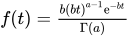 is specified by EXPSCALEPRIOR=GAMMA, which can be followed by one of the following gamma-options enclosed in parentheses. The hyperparameters a and b are the shape and inverse-scale parameters of the gamma distribution, respectively. See the section Gamma Prior for more details. The default is
 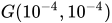 .
. - RELSHAPE<=c>
specifies independent
 distribution, where
  is the MLE of the exponential scale parameter. With this choice of hyperparameters, the mean of the prior distribution is and the variance is
  . By default, c=
 .
. -
SHAPE=a
ISCALE=b when both specified, results in a
prior. - SHAPE=c
when specified alone, results in a
 prior.
 - ISCALE=c
when specified alone, results in a
prior.
An improper prior with density
 proportional to
  is specified with EXPSCALEPRIOR=IMPROPER.
 -
GAMMASHAPEPRIOR=NORMAL<(options)>
GAMASHAPEPRIOR=NORMAL<(options)>
SHAPE1PRIOR=NORMAL<(options)> -
specifies the prior distribution for the gamma distribution shape parameter. If you do not specify any options in a gamma model, the
 prior for the shape is used. You can specify MEAN= and VAR= or RELVAR= options, either alone or together, to specify the mean and variance of the normal prior for the gamma shape parameter.
 - MEAN=a
specifies a normal prior
 . By default, a=0.
 - RELVAR<=b>
specifies the normal prior
 , where J is the variance of the MLE of the shape parameter. By default, b=
 .
. - VAR=c
specifies the normal prior
 . By default, c=.
- INITIAL=SAS-data-set
specifies the SAS data set that contains the initial values of the Markov chains. The INITIAL= data set must contain all the variables of the model. You can specify multiple rows as the initial values of the parallel chains for the Gelman-Rubin statistics, but posterior summaries, diagnostics, and plots are computed only for the first chain. If the data set also contains the variable
_SEED_, the value of the_SEED_variable is used as the seed of the random number generator for the corresponding chain.- INITIALMLE
specifies that maximum likelihood estimates of the model parameters be used as initial values of the Markov chain. If this option is not specified, estimates of the mode of the posterior distribution obtained by optimization are used as initial values.
- METROPOLIS=YES | NO
specifies the use of a Metropolis step to generate Gibbs samples for posterior distributions that are not log concave. The default value is METROPOLIS=YES.
- NBI=number
specifies the number of burn-in iterations before the chains are saved. The default is 2000.
- NMC=number
specifies the number of iterations after the burn-in. The default is 10000.
-
OUTPOST=SAS-data-set
OUT=SAS-data-set -
names the SAS data set that contains the posterior samples. See the section OUTPOST= Output Data Set for more information. Alternatively, you can create the output data set by specifying an ODS OUTPUT statement as follows:
ODS OUTPUT POSTERIORSAMPLE=SAS-data-set
-
PLOTS<(global-plot-options)>= plot-request
PLOTS<(global-plot-options)>= (plot-request < …plot-request>) -
controls the display of diagnostic plots. Three types of plots can be requested: trace plots, autocorrelation function plots, and kernel density plots. By default, the plots are displayed in panels unless the global plot option UNPACK is specified. Also, when specifying more than one type of plots, the plots are displayed by parameters unless the global plot option GROUPBY is specified. When you specify only one plot request, you can omit the parentheses around the plot request. For example:
 plots=none
 plots(unpack)=trace
 plots=(trace autocorr)
ODS Graphics must be enabled before plots can be requested. For example:
ods graphics on;
proc lifereg;
   model y=x;
   bayes plots=trace;
run;
ods graphics off;
For more information about enabling and disabling ODS Graphics, see the section Enabling and Disabling ODS Graphics in Chapter 24, Statistical Graphics Using ODS.
The global-plot-options are as follows:
The plot-requests include the following:
- SCALEPRIOR=GAMMA<(options)>
-
specifies that Gibbs sampling be performed on the location-scale model scale parameter and the prior distribution for the scale parameter.
A gamma prior
with density is specified by SCALEPRIOR=GAMMA, which can be followed by one of the following gamma-options enclosed in parentheses. The hyperparameters a and b are the shape and inverse-scale parameters of the gamma distribution, respectively. See the section Gamma Prior for details. The default is . - RELSHAPE<=c>
specifies independent
 distribution, where
  is the MLE of the scale parameter. With this choice of hyperparameters, the mean of the prior distribution is and the variance is
  . By default, c=.
 -
SHAPE=a
ISCALE=b when both specified, results in a
prior. - SHAPE=c
when specified alone, results in a
prior. - ISCALE=c
when specified alone, results in a
prior.
- SEED=number
specifies an integer seed in the range 1 to
 for the random number generator in the simulation. Specifying a seed enables you to reproduce identical Markov chains for the same specification. If the SEED= option is not specified, or if you specify a nonpositive seed, a random seed is derived from the time of day.
 -
STATISTICS <(global-options)> = ALL | NONE | keyword | (keyword-list)
STATS <(global-statoptions)> = ALL | NONE | keyword | (keyword-list) -
controls the number of posterior statistics produced. Specifying STATISTICS=ALL is equivalent to specifying STATISTICS= (SUMMARY INTERVAL COV CORR). If you do not want any posterior statistics, you specify STATISTICS=NONE. The default is STATISTICS=(SUMMARY INTERVAL). See the section Summary Statistics in Chapter 8, Introduction to Bayesian Analysis Procedures, for details. The global-options include the following:
The list of keywords includes the following:
-
THINNING=number
THIN=number -
controls the thinning of the Markov chain. Only one in every k samples is used when THINNING=k, and if NBI=
 and NMC=n, the number of samples kept is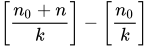
where [a] represents the integer part of the number a. The default is THINNING=1.
-
WEIBULLSCALEPRIOR=GAMMA<(options)>
WSCALEPRIOR=GAMMA<(options)>
WSCPRIOR=GAMMA<(options)> -
specifies that Gibbs sampling be performed on the Weibull model scale parameter and the prior distribution for the scale parameter. This option applies only when a Weibull distribution and no covariates are specified. When this option is specified, PROC LIFEREG performs Gibbs sampling on the Weibull scale parameter, which is defined as
 , where
  is the intercept term.
 A gamma prior
is specified by WEIBULLSCALEPRIOR=GAMMA, which can be followed by one of the following gamma-options enclosed in parentheses. The gamma probability density is given by  . The hyperparameters a and b are the shape and inverse-scale parameters of the gamma distribution, respectively. See the section Gamma Prior for details about the gamma prior. The default is .
 - RELSHAPE<=c>
specifies independent
distribution, where is the MLE of the Weibull scale parameter. With this choice of hyperparameters, the mean of the prior distribution is and the variance is  . By default, c=.
 -
SHAPE=a
ISCALE=b when both specified, results in a
prior. - SHAPE=c
when specified alone, results in a
prior. - ISCALE=c
when specified alone, results in a
prior.
-
WEIBULLSHAPEPRIOR=GAMMA<(options)>
WSHAPEPRIOR=GAMMA<(options)>
WSHPRIOR=GAMMA<(options)> -
specifies that Gibbs sampling be performed on the Weibull model shape parameter and the prior distribution for the shape parameter. When this option is specified, PROC LIFEREG performs Gibbs sampling on the Weibull shape parameter, which is defined as
 , where
  is the location-scale model scale parameter.
 A gamma prior
with density is specified by WEIBULLSHAPEPRIOR=GAMMA, which can be followed by one of the following gamma-options enclosed in parentheses. The hyperparameters a and b are the shape and inverse-scale parameters of the gamma distribution, respectively. See the section Gamma Prior for details about the gamma prior. The default is . - RELSHAPE<=c>
specifies independent
 distribution, where
  is the MLE of the Weibull shape parameter. With this choice of hyperparameters, the mean of the prior distribution is and the variance is
  . By default, c=.
 -
SHAPE<=a>
ISCALE=b when both specified, results in a
prior. - SHAPE=c
when specified alone, results in a
prior. - ISCALE=c
when specified alone, results in a
prior.