The MIXED Procedure
Example 84.4 Known G and R
(View the complete code for this example.)
This animal breeding example from Henderson (1984, p. 48) considers multiple traits. The data are artificial and consist of measurements of two traits on three animals, but the second trait of the third animal is missing. Assuming an additive genetic model, you can use PROC MIXED to predict the breeding value of both traits on all three animals and also to predict the second trait of the third animal. The data are as follows:
data h;
   input Trait Animal Y;
   datalines;
1 1 6
1 2 8
1 3 7
2 1 9
2 2 5
2 3 .
;
Both  and
and  are known.
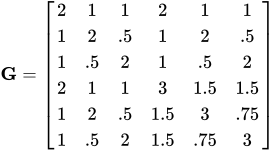
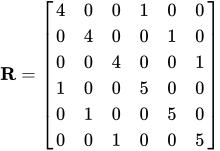
In order to read into PROC MIXED by using the GDATA= option in the RANDOM statement, perform the following DATA step:
data g;
   input Row Col1-Col6;
   datalines;
1  2  1  1  2   1     1
2  1  2 .5  1   2    .5
3  1 .5  2  1    .5  2
4  2  1  1  3   1.5  1.5
5  1  2 .5  1.5 3     .75
6  1 .5  2  1.5  .75 3
;
The preceding data are in the dense representation for a GDATA= data set. You can also construct a data set with the sparse representation by using Row, Col, and Value variables, although this would require 21 observations instead of 6 for this example.
The PROC MIXED statements are as follows:
proc mixed data=h mmeq mmeqsol;
   class Trait Animal;
   model Y = Trait / noint s outp=predicted;
   random Trait*Animal / type=un gdata=g g gi s;
   repeated / type=un sub=Animal r ri;
   parms (4) (1) (5) / noiter;
run;
proc print data=predicted;
run;
The MMEQ and MMEQSOL options request the mixed model equations and their solution. The variables Trait and Animal are classification variables, and Trait defines the entire  matrix for the fixed-effects portion of the model, since the intercept is omitted with the NOINT option. The fixed-effects solution vector and predicted values are also requested by using the S and OUTP= options, respectively.
The random effect Trait*Animal leads to a  matrix with six columns, the first five corresponding to the identity matrix and the last consisting of 0s. An unstructured matrix is specified by using the TYPE=UN option, and it is read into PROC MIXED from a SAS data set by using the GDATA=G specification. The G and GI options request the display of and
  , respectively. The S option requests that the random-effects solution vector be displayed.
Note that the preceding matrix is block diagonal if the data are sorted by animals. The REPEATED statement exploits this fact by requesting to have unstructured 2 2 blocks corresponding to animals, which are the subjects. The R and RI options request that the estimated 22 blocks for the first animal and its inverse be displayed. The PARMS statement lists the parameters of this 22 matrix. Note that the parameters from are not specified in the PARMS statement because they have already been assigned by using the GDATA= option in the RANDOM statement. The NOITER option prevents PROC MIXED from computing residual (restricted) maximum likelihood estimates; instead, the known values are used for inferences.
The results from this analysis are shown in Figure 63–Output 84.4.1.
The "Unstructured" covariance structure (Figure 63) applies to both and here. The levels of Trait and Animal have been specified correctly.
Figure 63: Model and Class Level Information
| Model Information | |
|---|---|
| Data Set | WORK.H |
| Dependent Variable | Y |
| Covariance Structure | Unstructured |
| Subject Effect | Animal |
| Estimation Method | REML |
| Residual Variance Method | None |
| Fixed Effects SE Method | Model-Based |
| Degrees of Freedom Method | Containment |
| Class Level Information | ||
|---|---|---|
| Class | Levels | Values |
| Trait | 2 | 1 2 |
| Animal | 3 | 1 2 3 |
The three covariance parameters indicated in Figure 64 correspond to those from the matrix. Those from are considered fixed and known because of the GDATA= option.
Figure 64: Model Dimensions and Number of Observations
| Dimensions | |
|---|---|
| Covariance Parameters | 3 |
| Columns in X | 2 |
| Columns in Z | 6 |
| Subjects | 1 |
| Max Obs per Subject | 5 |
| Number of Observations | |
|---|---|
| Number of Observations Read | 6 |
| Number of Observations Used | 5 |
| Number of Observations Not Used | 1 |
Because starting values for the covariance parameters are specified in the PARMS statement, the MIXED procedure prints the residual (restricted) log likelihood at the starting values. Because of the NOITER option in the PARMS statement, this is also the final log likelihood in this analysis (Figure 65).
Figure 65: REML Log Likelihood
| Parameter Search | ||||
|---|---|---|---|---|
| CovP1 | CovP2 | CovP3 | Res Log Like | -2 Res Log Like |
| 4.0000 | 1.0000 | 5.0000 | -7.3731 | 14.7463 |
The block of corresponding to the first animal and the inverse of this block are shown in Figure 66.
Figure 66: Inverse R Matrix
| Estimated R Matrix for Animal 1 | ||
|---|---|---|
| Row | Col1 | Col2 |
| 1 | 4.0000 | 1.0000 |
| 2 | 1.0000 | 5.0000 |
| Estimated Inv(R) Matrix for Animal 1 |
||
|---|---|---|
| Row | Col1 | Col2 |
| 1 | 0.2632 | -0.05263 |
| 2 | -0.05263 | 0.2105 |
The matrix as specified in the GDATA= data set and its inverse are shown in Figure 67 and Figure 68.
Figure 67: G Matrix
| Estimated G Matrix | |||||||||
|---|---|---|---|---|---|---|---|---|---|
| Row | Effect | Trait | Animal | Col1 | Col2 | Col3 | Col4 | Col5 | Col6 |
| 1 | Trait*Animal | 1 | 1 | 2.0000 | 1.0000 | 1.0000 | 2.0000 | 1.0000 | 1.0000 |
| 2 | Trait*Animal | 1 | 2 | 1.0000 | 2.0000 | 0.5000 | 1.0000 | 2.0000 | 0.5000 |
| 3 | Trait*Animal | 1 | 3 | 1.0000 | 0.5000 | 2.0000 | 1.0000 | 0.5000 | 2.0000 |
| 4 | Trait*Animal | 2 | 1 | 2.0000 | 1.0000 | 1.0000 | 3.0000 | 1.5000 | 1.5000 |
| 5 | Trait*Animal | 2 | 2 | 1.0000 | 2.0000 | 0.5000 | 1.5000 | 3.0000 | 0.7500 |
| 6 | Trait*Animal | 2 | 3 | 1.0000 | 0.5000 | 2.0000 | 1.5000 | 0.7500 | 3.0000 |
Figure 68: Inverse G Matrix
| Estimated Inv(G) Matrix | |||||||||
|---|---|---|---|---|---|---|---|---|---|
| Row | Effect | Trait | Animal | Col1 | Col2 | Col3 | Col4 | Col5 | Col6 |
| 1 | Trait*Animal | 1 | 1 | 2.5000 | -1.0000 | -1.0000 | -1.6667 | 0.6667 | 0.6667 |
| 2 | Trait*Animal | 1 | 2 | -1.0000 | 2.0000 | 0.6667 | -1.3333 | ||
| 3 | Trait*Animal | 1 | 3 | -1.0000 | 2.0000 | 0.6667 | -1.3333 | ||
| 4 | Trait*Animal | 2 | 1 | -1.6667 | 0.6667 | 0.6667 | 1.6667 | -0.6667 | -0.6667 |
| 5 | Trait*Animal | 2 | 2 | 0.6667 | -1.3333 | -0.6667 | 1.3333 | ||
| 6 | Trait*Animal | 2 | 3 | 0.6667 | -1.3333 | -0.6667 | 1.3333 | ||
The table of covariance parameter estimates in Figure 69 displays only the parameters in . Because of the GDATA= option in the RANDOM statement, the G-side parameters do not participate in the parameter estimation process. Because of the NOITER option in the PARMS statement, however, the R-side parameters in this output are identical to their starting values.
Figure 69: R-Side Covariance Parameters
| Covariance Parameter Estimates | ||
|---|---|---|
| Cov Parm | Subject | Estimate |
| UN(1,1) | Animal | 4.0000 |
| UN(2,1) | Animal | 1.0000 |
| UN(2,2) | Animal | 5.0000 |
The coefficients of the mixed model equations in Figure 70 agree with Henderson (1984, p. 55). Recall from Figure 63 that there are 2 columns in and 6 columns in . The first 8 columns of the mixed model equations correspond to the and components. Column 9 represents the Y border.
Figure 70: Mixed Model Equations with Y Border
| Mixed Model Equations | ||||||||||||
|---|---|---|---|---|---|---|---|---|---|---|---|---|
| Row | Effect | Trait | Animal | Col1 | Col2 | Col3 | Col4 | Col5 | Col6 | Col7 | Col8 | Col9 |
| 1 | Trait | 1 | 0.7763 | -0.1053 | 0.2632 | 0.2632 | 0.2500 | -0.05263 | -0.05263 | 4.6974 | ||
| 2 | Trait | 2 | -0.1053 | 0.4211 | -0.05263 | -0.05263 | 0.2105 | 0.2105 | 2.2105 | |||
| 3 | Trait*Animal | 1 | 1 | 0.2632 | -0.05263 | 2.7632 | -1.0000 | -1.0000 | -1.7193 | 0.6667 | 0.6667 | 1.1053 |
| 4 | Trait*Animal | 1 | 2 | 0.2632 | -0.05263 | -1.0000 | 2.2632 | 0.6667 | -1.3860 | 1.8421 | ||
| 5 | Trait*Animal | 1 | 3 | 0.2500 | -1.0000 | 2.2500 | 0.6667 | -1.3333 | 1.7500 | |||
| 6 | Trait*Animal | 2 | 1 | -0.05263 | 0.2105 | -1.7193 | 0.6667 | 0.6667 | 1.8772 | -0.6667 | -0.6667 | 1.5789 |
| 7 | Trait*Animal | 2 | 2 | -0.05263 | 0.2105 | 0.6667 | -1.3860 | -0.6667 | 1.5439 | 0.6316 | ||
| 8 | Trait*Animal | 2 | 3 | 0.6667 | -1.3333 | -0.6667 | 1.3333 | |||||
The solution to the mixed model equations also matches that given by Henderson (1984, p. 55). After solving the augmented mixed model equations, you can find the solutions for fixed and random effects in the last column (Figure 71).
Figure 71: Solutions of the Mixed Model Equations with Y Border
| Mixed Model Equations Solution | ||||||||||||
|---|---|---|---|---|---|---|---|---|---|---|---|---|
| Row | Effect | Trait | Animal | Col1 | Col2 | Col3 | Col4 | Col5 | Col6 | Col7 | Col8 | Col9 |
| 1 | Trait | 1 | 2.5508 | 1.5685 | -1.3047 | -1.1775 | -1.1701 | -1.3002 | -1.1821 | -1.1678 | 6.9909 | |
| 2 | Trait | 2 | 1.5685 | 4.5539 | -1.4112 | -1.3534 | -0.9410 | -2.1592 | -2.1055 | -1.3149 | 6.9959 | |
| 3 | Trait*Animal | 1 | 1 | -1.3047 | -1.4112 | 1.8282 | 1.0652 | 1.0206 | 1.8010 | 1.0925 | 1.0070 | 0.05450 |
| 4 | Trait*Animal | 1 | 2 | -1.1775 | -1.3534 | 1.0652 | 1.7589 | 0.7085 | 1.0900 | 1.7341 | 0.7209 | -0.04955 |
| 5 | Trait*Animal | 1 | 3 | -1.1701 | -0.9410 | 1.0206 | 0.7085 | 1.7812 | 1.0095 | 0.7197 | 1.7756 | 0.02230 |
| 6 | Trait*Animal | 2 | 1 | -1.3002 | -2.1592 | 1.8010 | 1.0900 | 1.0095 | 2.7518 | 1.6392 | 1.4849 | 0.2651 |
| 7 | Trait*Animal | 2 | 2 | -1.1821 | -2.1055 | 1.0925 | 1.7341 | 0.7197 | 1.6392 | 2.6874 | 0.9930 | -0.2601 |
| 8 | Trait*Animal | 2 | 3 | -1.1678 | -1.3149 | 1.0070 | 0.7209 | 1.7756 | 1.4849 | 0.9930 | 2.7645 | 0.1276 |
The solutions for the fixed and random effects in Figure 72 correspond to the last column in Figure 71. Note that the standard errors for the fixed effects and the prediction standard errors for the random effects are the square root values of the diagonal entries in the solution of the mixed model equations (Figure 71).
Figure 72: Solutions for Fixed and Random Effects
| Solution for Fixed Effects | ||||||
|---|---|---|---|---|---|---|
| Effect | Trait | Estimate | Standard Error |
DF | t Value | Pr > |t| |
| Trait | 1 | 6.9909 | 1.5971 | 3 | 4.38 | 0.0221 |
| Trait | 2 | 6.9959 | 2.1340 | 3 | 3.28 | 0.0465 |
| Solution for Random Effects | |||||||
|---|---|---|---|---|---|---|---|
| Effect | Trait | Animal | Estimate | Std Err Pred | DF | t Value | Pr > |t| |
| Trait*Animal | 1 | 1 | 0.05450 | 1.3521 | 0 | 0.04 | . |
| Trait*Animal | 1 | 2 | -0.04955 | 1.3262 | 0 | -0.04 | . |
| Trait*Animal | 1 | 3 | 0.02230 | 1.3346 | 0 | 0.02 | . |
| Trait*Animal | 2 | 1 | 0.2651 | 1.6589 | 0 | 0.16 | . |
| Trait*Animal | 2 | 2 | -0.2601 | 1.6393 | 0 | -0.16 | . |
| Trait*Animal | 2 | 3 | 0.1276 | 1.6627 | 0 | 0.08 | . |
The estimates for the two traits are nearly identical, but the standard error of the second trait is larger because of the missing observation.
The Estimate column in the "Solution for Random Effects" table lists the best linear unbiased predictions (BLUPs) of the breeding values of both traits for all three animals. The p-values are missing because the default containment method for computing degrees of freedom results in zero degrees of freedom for the random effects parameter tests.
Figure 73: Significance Test Comparing Traits
| Type 3 Tests of Fixed Effects | ||||
|---|---|---|---|---|
| Effect | Num DF | Den DF | F Value | Pr > F |
| Trait | 2 | 3 | 10.59 | 0.0437 |
The two estimated traits are significantly different from zero at the 5% level (Figure 73).
Output 84.4.1 displays the predicted values of the observations based on the trait and breeding value estimates—that is, the fixed and random effects.
Output 84.4.1: Predicted Observations
| Obs | Trait | Animal | Y | Pred | StdErrPred | DF | Alpha | Lower | Upper | Resid |
|---|---|---|---|---|---|---|---|---|---|---|
| 1 | 1 | 1 | 6 | 7.04542 | 1.33027 | 0 | 0.05 | . | . | -1.04542 |
| 2 | 1 | 2 | 8 | 6.94137 | 1.39806 | 0 | 0.05 | . | . | 1.05863 |
| 3 | 1 | 3 | 7 | 7.01321 | 1.41129 | 0 | 0.05 | . | . | -0.01321 |
| 4 | 2 | 1 | 9 | 7.26094 | 1.72839 | 0 | 0.05 | . | . | 1.73906 |
| 5 | 2 | 2 | 5 | 6.73576 | 1.74077 | 0 | 0.05 | . | . | -1.73576 |
| 6 | 2 | 3 | . | 7.12015 | 2.99088 | 0 | 0.05 | . | . | . |
The predicted values are not the predictions of future records in the sense that they do not contain a component corresponding to a new observational error. See Henderson (1984) for information about predicting future records. The Lower and Upper columns usually contain confidence limits for the predicted values; they are missing here because the random-effects parameter degrees of freedom equals 0.