The PHREG Procedure
PROC PHREG Statement
PROC PHREG <options>;
The PROC PHREG statement invokes the PHREG procedure. Table 1 summarizes the options available in the PROC PHREG statement.
Table 1: PROC PHREG Statement Options
| Option | Description |
|---|---|
| ALPHA= | Specifies the level of significance |
| ATRISK | Displays a table that contains the number of units and the corresponding number of events in the risk sets |
| CONCORDANCE | Computes concordance statistics |
| COVM | Uses the model-based covariance matrix in the analysis |
| COVOUT | Adds the estimated covariance matrix to the OUTEST= data set |
| COVSANDWICH | Requests the robust sandwich estimate for the covariance matrix |
| DATA= | Names the SAS data set to be analyzed |
| EV | Requests the Schemper-Henderson predictive measures |
| FAST | Uses a fast algorithm for large data with start/stop input |
| INEST= | Names the SAS data set that contains initial estimates |
| MULTIPASS | Recompiles the risk sets |
| NAMELEN= | Specifies the length of effect names |
| NOPRINT | Suppresses all displayed output |
| NOSUMMARY | Suppresses the summary display observation frequencies |
| OUTEST= | Creates an output SAS data set containing estimates of the regression coefficients |
| PLOTS= | Controls the plots that are produced through ODS Graphics |
| ROCOPTIONS | Specifies options for receiver operating characteristic analysis |
| SIMPLE | Displays simple descriptive statistics |
| TAU= | Specifies upper time limit for Uno’s concordance statistic and the integrated area under the curve |
| ZPH | Requests diagnostics based on weighted residuals for checking the proportional hazards assumption |
You can specify the following options in the PROC PHREG statement.
- ALPHA=number
specifies the level of significance
 for
for  % confidence intervals. The value number must be between 0 and 1; the default value is 0.05, which results in 95% intervals. This value is used as the default confidence level for limits computed by the BASELINE, BAYES, CONTRAST, HAZARDRATIO, and MODEL statements. You can override this default by specifying the ALPHA= option in the separate statements.
 - ATRISK
-
displays a table that contains the number of units at risk at each event time and the corresponding number of events in the risk sets. For example, the following risk set information is displayed if the ATRISK option is specified in the example in the section Getting Started: PHREG Procedure.
Risk Set Information Number of Units Days At Risk Event 142 40 1 143 39 1 156 38 1 
296 5 2 304 3 1 323 2 1 - CONCORDANCE <=method<(options)>>
-
computes concordance statistics for the model specified in the MODEL statement (unless the NOFIT option is specified) and for each model specified in an ROC statement. For more information, see the section Concordance Statistics. You can specify the following methods:
Specifying the CONCORDANCE option without any suboptions is equivalent to specifying CONCORDANCE=HARRELL.
- COVOUT
adds the estimated covariance matrix of the parameter estimates to the OUTEST= data set. The COVOUT option has no effect unless the OUTEST= option is specified.
- COVM
requests that the model-based covariance matrix (which is the inverse of the observed information matrix) be used in the analysis if the COVS option is also specified. The COVM option has no effect if the COVS option is not specified.
-
COVSANDWICH <(AGGREGATE)>
COVS <(AGGREGATE)> requests the robust sandwich estimate of Lin and Wei (1989) for the covariance matrix. When this option is specified, this robust sandwich estimate is used in the Wald tests for testing the global null hypothesis, null hypotheses of individual parameters, and the hypotheses in the CONTRAST and TEST statements. In addition, a modified score test is computed in the testing of the global null hypothesis, and the parameter estimates table has an additional StdErrRatio column, which contains the ratios of the robust estimate of the standard error relative to the corresponding model-based estimate. Optionally, you can specify the keyword AGGREGATE enclosed in parentheses after the COVSANDWICH (or COVS) option, which requests a summing up of the score residuals for each distinct ID pattern in the computation of the robust sandwich covariance estimate. This AGGREGATE option has no effect if the ID statement is not specified.
- DATA=SAS-data-set
names the SAS data set that contains the data to be analyzed. If you omit the DATA= option, the procedure uses the most recently created SAS data set.
- EV
requests the Schemper-Henderson measure (Schemper and Henderson 2000) of the proportion of variation that is explained by a Cox regression. This measure of explained variation (EV) is the ratio of distance measures between the 1/0 survival processes and the fitted survival curves with and without covariates information. The distance measure is referred to as the predictive inaccuracy, because the smaller the predictive inaccuracy, the better the prediction. When you specify this option, PROC PHREG creates a table that has three columns: one presents the predictive inaccuracy without covariates (D); one presents the predictive inaccuracy with covariates (
 ); and one presents the EV measure, computed according to
  .
. - FAST
uses an alternative algorithm to speed up the fitting of the Cox regression for a large data set that has the counting process style of input. Simonsen (2014) has demonstrated the efficiency of this algorithm when the data set contains a large number of observations and many distinct event times. The algorithm requires only one pass through the data to compute the Breslow or Efron partial log-likelihood function and the corresponding gradient and Hessian. PROC PHREG ignores the FAST option if you specify a TIES= option value other than BRESLOW or EFRON, or if you specify programming statements for time-varying covariates. You might not see much improvement in the optimization time if your data set has only a moderate number of observations.
- INEST=SAS-data-set
names the SAS data set that contains initial estimates for all the parameters in the model. BY-group processing is allowed in setting up the INEST= data set. For more information, see the section INEST= Input Data Set.
- MULTIPASS
requests that, for each Newton-Raphson iteration, PROC PHREG recompile the risk sets that correspond to the event times for the (start,stop) style of response and recomputes the values of the time-dependent variables defined by the programming statements for each observation in the risk sets. If the MULTIPASS option is not specified, PROC PHREG computes all risk sets and all the variable values and saves them in a utility file. The MULTIPASS option decreases required disk space at the expense of increased execution time; however, for very large data, it might actually save time, because it is time-consuming to write and read large utility files. This option has an effect only when the (start,stop) style of response is used or when there are time-dependent explanatory variables.
- NAMELEN=n
specifies the length of effect names in tables and output data sets to be n characters, where n is a value between 20 and 200. The default length is 20 characters.
- NOPRINT
suppresses all displayed output. Note that this option temporarily disables the Output Delivery System (ODS); for more information about ODS, see Chapter 23, Using the Output Delivery System.
- NOSUMMARY
suppresses the summary display of the event and censored observation frequencies.
- OUTEST=SAS-data-set
creates an output SAS data set that contains estimates of the regression coefficients. The data set also contains the convergence status and the log likelihood. If you use the COVOUT option, the data set also contains the estimated covariance matrix of the parameter estimators. For more information, see the section OUTEST= Output Data Set.
-
PLOTS<(global-plot-options)> = plot-request
PLOTS<(global-plot-options)> = (plot-request <…<plot-request>>) -
controls the plots that are produced through ODS Graphics. Two types of plots can be produced: plots related to the receiver operating characteristic curves (such as AUC, AUCDIFF, and ROC) and the baseline function plots (such as CIF, CUMHAZ, MCF, and SURVIVAL).
For the baseline function plots, each observation in the COVARIATES= data set in the BASELINE statement represents a set of covariates for which a curve is produced for each plot-request and for each stratum. You can use the ROWID= option in the BASELINE statement to specify a variable in the COVARIATES= data set for identifying the curves that are produced for the covariate sets. If the ROWID= option is not specified, the produced curves are identified by the covariate values if there is only a single covariate or by the observation numbers of the COVARIATES= data set if the model has two or more covariates. If the COVARIATES= data set is not specified, a reference set of covariates that consists of the reference levels for the CLASS variables and the average values for the continuous variables is used. For plotting more than one curve, you can use the OVERLAY= global-plot-option to group the curves in separate plots.
When you specify one plot-request, you can omit the parentheses around the plot request. Here are some examples:
plots=survival
plots=(survival auc)
ODS Graphics must be enabled before plots can be requested. For example:
ods graphics on;
proc phreg plots(cl)=survival;
   model Time*Status(0)=X1-X5;
   baseline covariates=One;
run;
For more information about enabling and disabling ODS Graphics, see the section Enabling and Disabling ODS Graphics in Chapter 24, Statistical Graphics Using ODS.
The global-plot-options include the following:
You can specify the following plot-requests:
- ROCOPTIONS (options)
-
specifies options that apply to the analysis of receiver operating characteristic (ROC) curves for the model that is specified in the MODEL statement (unless the NOFIT option is specified) and for each model specified in a ROC statement. You can specify the following options:
- SIMPLE
displays simple descriptive statistics (mean, standard deviation, minimum, and maximum) for each explanatory variable in the MODEL statement.
- TAU=value
specifies the upper time limit for computing the integrated area under the curve (IAUC) statistic and Uno’s concordance statistic. Only event times that do not exceed the specified value are used in the calculation. The default value is the largest event time.
- ZPH<(zph-options)>
-
requests diagnostics based on the weighted Schoenfeld residuals for checking the proportional hazards assumption (for more information, see the section ZPH Diagnostics). For each predictor, PROC PHREG presents a plot of the time-varying coefficients in addition to a correlation test between the weighted residuals and failure times in a given scale. You can specify the following zph-options:
- FIT=NONE | LOESS | SPLINE
displays a fitted smooth curve in a plot of time-varying coefficients. FIT=LOESS displays a loess curve. FIT=SPLINE fits a penalized B-spline curve. If you do not want to display a fitted curve, specify FIT=NONE. By default, FIT=SPLINE.
- GLOBAL
computes the global correlation test.
- NOPLOT
suppresses the plots of the time-varying coefficients
 .
. - NOTEST
suppresses the correlation tests.
- OUT=SAS-data-set
names the output data set that contains the time-varying coefficients
 , one row per event time. The variables that contain have the same names as the predictors. The data set also contains the transformed event times
  .
. - TRANSFORM=IDENTITY | KM | LOG | RANK
-
specifies how the failure times should be transformed in the diagnostic plots and correlation tests. You can choose from the following transformations:
- IDENTITY
specify the identity transformation,
 .
. - KM
specifies the complement of the Kaplan-Meier estimate transformation,
 .
. - LOG
specifies the log transformation,
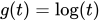 .
. - RANK
specifies the rank transformation,
 .
.
By default, TRANSFORM=RANK.