The PHREG Procedure
MODEL Statement
MODEL response <*censor (list)> = effects </ options>;
MODEL (t1, t2)<*censor(list)> = effects </ options>;
The MODEL statement identifies the variables to be used as the failure time variables, the optional censoring variable, and the explanatory effects, including covariates, main effects, interactions, nested effects; for more information, see the section Specification of Effects in Chapter 53, The GLM Procedure. A note of caution: specifying the effect T*A in the MODEL statement, where T is the time variable and A is a CLASS variable, does not make the effect time-dependent. For more information, see the section Time and CLASS Variables Usage.
Two forms of MODEL syntax can be specified; the first form allows one time variable, and the second form allows two time variables for the counting process style of input (for more information, see the section Counting Process Style of Input).
In the first MODEL statement, the name of the failure time variable precedes the equal sign. This name can optionally be followed by an asterisk, the name of the censoring variable, and a list of censoring values (separated by blanks or commas if there is more than one) enclosed in parentheses. If the censoring variable takes on one of these values, the corresponding failure time is considered to be censored. Following the equal sign are the explanatory effects (sometimes called independent variables or covariates) for the model.
Instead of a single failure-time variable, the second MODEL statement identifies a pair of failure-time variables. Their names are enclosed in parentheses, and they signify the endpoints of a semiclosed interval  during which the subject is at risk. If the censoring variable takes on one of the censoring values, the time t2 is considered to be censored.
The censoring variable must be numeric and the failure-time variables must contain nonnegative values. Any observation with a negative failure time is excluded from the analysis, as is any observation with a missing value for any of the variables listed in the MODEL statement. Failure-time variables with a SAS date format are not recommended because the dates might be translated into negative numbers and consequently the corresponding observation would be discarded.
Table 9 summarizes the options available in the MODEL statement. These options can be specified after a slash (/). Four convergence criteria are allowed for the maximum likelihood optimization: ABSFCONV=, FCONV=, GCONV=, and XCONV=. If you specify more than one convergence criterion, the optimization is terminated as soon as one of the criteria is satisfied. If none of the criteria is specified, the default is GCONV=1E–8.
Table 9: MODEL Statement Options
| Option | Description |
|---|---|
| Model Specification Options | |
| EVENTCODE= | Requests an analysis of competing-risks data |
| NOFIT | Suppresses model fitting |
| OFFSET= | Specifies offset variable |
| SELECTION= | Specifies effect selection method |
| Effect Selection Options | |
| BEST= | Controls the number of models displayed for best subset selection |
| DETAILS | Requests detailed results at each step |
| HIERARCHY= | Specifies whether and how hierarchy is maintained and whether a single effect or multiple effects are allowed to enter or leave the model per step |
| INCLUDE= | Specifies number of effects included in every model |
| MAXSTEP= | Specifies maximum number of steps for stepwise selection |
| SEQUENTIAL | Adds or deletes effects in sequential order |
| SLENTRY= | Specifies significance level for entering effects |
| SLSTAY= | Specifies significance level for removing effects |
| START= | Specifies number of variables in first model |
| STOP= | Specifies number of variables in final model |
| STOPRES | Adds or deletes variables by residual chi-square criterion |
| Maximum Likelihood Optimization Options | |
| ABSFCONV= | Specifies absolute function convergence criterion |
| FCONV= | Specifies relative function convergence criterion |
| FIRTH | Specifies Firth’s penalized likelihood method |
| GCONV= | Specifies relative gradient convergence criterion |
| XCONV= | Specifies relative parameter convergence criterion |
| MAXITER= | Specifies maximum number of iterations |
| RIDGEINIT= | Specifies the initial ridging value |
| RIDGING= | Specifies the technique to improve the log likelihood function when its value is worse than that of the previous step |
| SINGULAR= | Specifies tolerance for testing singularity |
| Confidence Interval Options | |
| ALPHA= | Specifies  for the for the 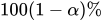 confidence intervals confidence intervals |
| PLCONV= | Specifies profile-likelihood convergence criterion |
| RISKLIMITS= | Computes confidence intervals for hazard ratios |
| Display Options | |
| CORRB | Displays correlation matrix |
| COVB | Displays covariance matrix |
| ITPRINT | Displays iteration history |
| NODUMMYPRINT | Suppresses "Class Level Information" table |
| TYPE1 | Displays Type 1 analysis |
| TYPE3 | Displays Type 3 tests or joint tests of effects |
| Miscellaneous Options | |
| ENTRYTIME= | Specifies the delayed entry time variable |
| ROCLABEL= | Specifies a label to identify the model that is specified in the MODEL statement model for an ROC analysis |
| TIES= | Specifies the method of handling ties in failure times |
- ALPHA=value
sets the significance level used for the confidence limits for the hazard ratios. The quantity value must be between 0 and 1. The default is the value of the ALPHA= option in the PROC PHREG statement, or 0.05 if that option is not specified. This option has no effect unless the RISKLIMITS option is specified.
-
ABSFCONV=value
CONVERGELIKE=value -
specifies the absolute function convergence criterion. Termination requires a small change in the objective function (log partial likelihood function) in subsequent iterations,

where
 is the value of the objective function at iteration k.
 - BEST=n
-
requests that n models with the highest score chi-square statistics be displayed for each model size. This option is used exclusively with the best subset selection (SELECTION=SCORE). If the option is omitted and there are no more than 10 explanatory variables, then all possible models are listed for each model size. If the option is omitted and there are more than 10 explanatory variables, then the number of models selected for each model size is at most equal to the number of explanatory variables listed in the MODEL statement.
See Example 92.2 for an illustration of the best subset selection method and the BEST= option.
- CORRB
displays the estimated correlation matrix of the parameter estimates.
- COVB
displays the estimated covariance matrix of the parameter estimates.
- DETAILS
-
produces a detailed display at each step of the model-building process. It produces an "Analysis of Variables Not in the Model" table before displaying the variable selected for entry for forward or stepwise selection. For each model fitted, it produces the "Analysis of Maximum Likelihood Estimates" table.
See Example 92.1 for a discussion of these tables.
-
ENTRYTIME=variable
ENTRY=variable specifies the name of the variable that represents the left-truncation time. This option has no effect when the counting process style of input is specified. For more information, see the section Left-Truncation of Failure Times.
-
EVENTCODE<(compete-risk-option)>=number
FAILCODE<(compete-risk-option)>=number -
requests an analysis of competing-risks data. You can specify one of the following compete-risk-options to choose between two commonly used regression approaches to analyze the competing-risks data:
If you do not specify a compete-risk-option, PROC PHREG fits the proportional subdistribution hazard model of Fine and Gray (1999).
The number after the equal sign specifies the value of the censoring variable that represents the event of interest for the competing-risks analysis. The following specification requests a cause-specific analysis of which cumulative incidence curves of
Status=2 can be requested for specific covariate values:model T*Status(0)= X1-X5 / eventcode(COX)=2;The following specification fits a proportional subdistribution hazard model for Status=2:
model T*Status(0)= X1-X5 / eventcode=2; - FCONV=value
-
specifies the relative function convergence criterion. Termination requires a small relative change in the objective function (log partial likelihood function) in subsequent iterations,

where
is the value of the objective function at iteration k. - FIRTH
performs Firth’s penalized maximum likelihood estimation to reduce bias in the parameter estimates (Heinze and Schemper 2001; Firth 1993). This method is useful when the likelihood is monotone—that is, the likelihood converges to finite value while at least one estimate diverges to infinity.
- GCONV=value
-
specifies the relative gradient convergence criterion. Termination requires that the normalized prediction function reduction is small,
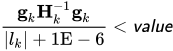
where
is the log partial likelihood,  is the gradient vector (first partial derivatives of the log partial likelihood), and
  is the negative Hessian matrix (second partial derivatives of the log partial likelihood), all at iteration k.
 -
HIERARCHY=keyword
HIER=keyword -
specifies whether and how the model hierarchy requirement is applied and whether a single effect or multiple effects are allowed to enter or leave the model in one step. You can specify that only CLASS variable effects, or both CLASS and continuous variable effects, be subject to the hierarchy requirement. The HIERARCHY= option is ignored unless you also specify the forward, backward, or stepwise selection method.
Model hierarchy refers to the requirement that, for any term to be in the model, all effects contained in the term must be present in the model. For example, in order for the interaction A*B to enter the model, the main effects A and B must be in the model. Likewise, neither effect A nor B can leave the model while the interaction A*B is in the model.
You can specify any of the following keywords in the HIERARCHY= option:
The default value is HIERARCHY=SINGLE, which means that model hierarchy is to be maintained for all effects (that is, both CLASS and continuous variable effects) and that only a single effect can enter or leave the model at each step.
- INCLUDE=n
includes the first n effects in the MODEL statement in every model. By default, INCLUDE=0. The INCLUDE= option has no effect when SELECTION=NONE.
- ITPRINT
displays the iteration history, including the last evaluation of the gradient vector.
- MAXITER=n
specifies the maximum number of iterations allowed. The default value for n is 25. If convergence is not attained in n iterations, the displayed output and all data sets created by PROC PHREG contain results that are based on the last maximum likelihood iteration.
- MAXSTEP=n
specifies the maximum number of times the explanatory variables can move in and out of the model before the stepwise model-building process ends. The default value for n is twice the number of explanatory variables in the MODEL statement. The option has no effect for other model selection methods.
-
NODUMMYPRINT
NODESIGNPRINT
NODP suppresses the "Class Level Information" table, which shows how the design matrix columns for the CLASS variables are coded.
- NOFIT
performs the global score test, which tests the joint significance of all the explanatory variables in the MODEL statement. No parameters are estimated. If the NOFIT option is specified along with other MODEL statement options, NOFIT takes precedence, and all other options are ignored except the TIES= option.
- OFFSET=name
specifies the name of an offset variable, which is an explanatory variable with a regression coefficient fixed as one. You can also use the OFFSET= option to restrict parameters to a fixed value. For example, if you want to restrict the parameter for variable
X1to 1 and the parameter forX2to 2, computeRestrict=X1+ 2 *X2in a DATA step, specify the option offset=Restrict, and leaveX1andX2out of the model. This option can be used to incorporate risk weights for the likelihood function.- PLCONV=value
controls the convergence criterion for confidence intervals based on the profile-likelihood function. The quantity value must be a positive number, with a default value of 1E–4. The PLCONV= option has no effect if profile-likelihood based confidence intervals are not requested.
- RIDGING=keyword
-
specifies the technique to improve the log likelihood when its value is worse than that of the previous step. The available keywords are as follows:
The default is RIDGING=RELATIVE.
- RIDGEINIT=value
specifies the initial ridge value. The maximum ridge value is 2000 times the maximum of 1 and the initial ridge value. The initial ridge value is raised to 1E–4 if it is less than 1E–4. By default, RIDGEINIT=1E–4. This option has no effect for RIDGING=ABSOLUTE.
-
RISKLIMITS<=keyword>
RL<=keyword> -
produces confidence intervals for hazard ratios of main effects not involved in interactions or nestings. Computation of these confidence intervals is based on the profile likelihood or based on individual Wald tests. The confidence coefficient can be specified with the ALPHA= option. You can specify one of the following keywords:
Classification main effects that use parameterizations other than REF, EFFECT, or GLM are ignored. If you need to compute hazard ratios for an effect involved in interactions or nestings, or using some other parameterization, then you should specify a HAZARDRATIO statement for that effect.
- ROCLABEL='label'
specifies a label to identify the model that is specified in the MODEL statement (or the final model if a selection method is used) when a concordance analysis or an ROC analysis is conducted. By default, ROCLABEL='Model'.
- SELECTION=method
-
specifies the method used to select the model. The methods available are as follows:
For more information, see the section Effect Selection Methods.
- SEQUENTIAL
forces variables to be added to the model in the order specified in the MODEL statement or to be eliminated from the model in the reverse order of that specified in the MODEL statement.
- SINGULAR=value
specifies the singularity criterion for determining linear dependencies in the set of explanatory variables. The default value is 1E–12.
-
SLENTRY=value
SLE=value specifies the significance level (a value between 0 and 1) for entering an explanatory variable into the model in the FORWARD or STEPWISE method. For all variables not in the model, the one with the smallest p-value is entered if the p-value is less than or equal to the specified significance level. The default value is 0.05.
- SLSTAY=value
- SLS=value
specifies the significance level (a value between 0 and 1) for removing an explanatory variable from the model in the BACKWARD or STEPWISE method. For all variables in the model, the one with the largest p-value is removed if the p-value exceeds the specified significance level. The default value is 0.05.
- START=n
begins the FORWARD, BACKWARD, or STEPWISE selection process with the first n effects listed in the MODEL statement. The value of n ranges from 0 to s, where s is the total number of effects in the MODEL statement. The default value of n is s for the BACKWARD method and 0 for the FORWARD and STEPWISE methods. Note that START=n specifies only that the first n effects appear in the first model, while INCLUDE=n requires that the first n effects be included in every model. For the SCORE method, START=n specifies that the smallest models contain n effects, where n ranges from 1 to s; the default value is 1. The START= option has no effect when SELECTION=NONE.
- STOP=n
specifies the maximum (FORWARD method) or minimum (BACKWARD method) number of effects to be included in the final model. The effect selection process is stopped when n effects are found. The value of n ranges from 0 to s, where s is the total number of effects in the MODEL statement. The default value of n is s for the FORWARD method and 0 for the BACKWARD method. For the SCORE method, STOP=n specifies that the smallest models contain n effects, where n ranges from 1 to s; the default value of n is s. The STOP= option has no effect when SELECTION=NONE or STEPWISE.
- STOPRES
- SR
specifies that the addition and deletion of variables be based on the result of the likelihood score test for testing the joint significance of variables not in the model. This score chi-square statistic is referred to as the residual chi-square. In the FORWARD method, the STOPRES option enters the explanatory variables into the model one at a time until the residual chi-square becomes insignificant (that is, until the p-value of the residual chi-square exceeds the SLENTRY= value). In the BACKWARD method, the STOPRES option removes variables from the model one at a time until the residual chi-square becomes significant (that is, until the p-value of the residual chi-square becomes less than the SLSTAY= value). The STOPRES option has no effect for the STEPWISE method.
- TYPE1
requests that a Type 1 (sequential) analysis of likelihood ratio test be performed. This consists of sequentially fitting models, beginning with the null model and continuing up to the model specified in the MODEL statement. The likelihood ratio statistic for each successive pair of models is computed and displayed in a table.
- TYPE3 <(keywords)>
-
requests a Type 3 test or a joint test for each effect that is specified in the MODEL statement. For more information, see the section Type 3 Tests and Joint Tests. The default is to use the Wald statistic, but you can requests other statistics by specifying one or more of the following keywords:
- TIES=method
-
specifies how to handle ties in the failure time. The following methods are available:
- BRESLOW
uses the approximate likelihood of Breslow (1974). This is the default value.
- DISCRETE
-
replaces the proportional hazards model by the discrete logistic model

- EFRON
uses the approximate likelihood of Efron (1977).
- EXACT
computes the exact conditional probability under the proportional hazards assumption that all tied event times occur before censored times of the same value or before larger values. This is equivalent to summing all terms of the marginal likelihood for
 that are consistent with the observed data (Kalbfleisch and Prentice 1980; DeLong, Guirguis, and So 1994).
TIES=EXACT can take a considerable amount of computer resources. If ties are not extensive, TIES=EFRON and TIES=BRESLOW methods provide satisfactory approximations to TIES=EXACT for the continuous time-scale model. In general, Efron’s approximation gives results that are much closer to the exact method results than Breslow’s approximation does. If the time scale is genuinely discrete, you should use TIES=DISCRETE. TIES=DISCRETE is also required in the analysis of case-control studies when there is more than one case in a matched set. If there are no ties, all four methods result in the same likelihood and yield identical estimates. The default, TIES=BRESLOW, is the most efficient method when there are no ties.
-
XCONV=value
CONVEREPARM=value -
specifies the relative parameter convergence criterion. Termination requires a small relative parameter change in subsequent iterations,
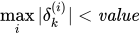
where
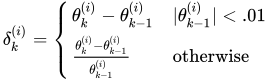
where
 is the estimate of the ith parameter at iteration k.

