The PSMATCH Procedure
Matching Process
Except for matching with replacement in which multiple control units are matched to each treated unit, propensity score matching creates mutually exclusive sets of observations that have similar propensity scores. Each set has at least one treated unit and at least one control unit. The distribution of observed variables will be similar between treated units and control units in the matched sample.
For propensity score matching, Stuart (2010) reviews matching methods and provides guidance on their use. Austin (2014) provides a detailed comparison of algorithms for matching.
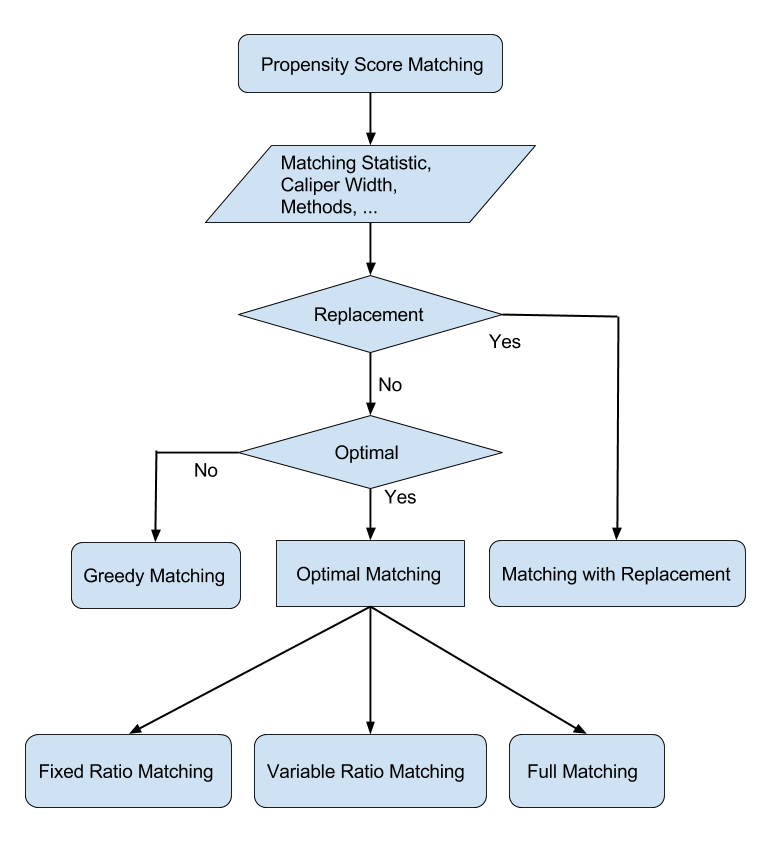
The flowchart in Figure 14 summarizes the steps in propensity score matching.
Figure 14: Steps in Propensity Score Matching
The PSMATCH procedure provides the following strategies for matching observations in the control group to observations in the treatment group:
greedy nearest neighbor matching, which sequentially and without replacement selects the control unit whose propensity score is closest to that of the particular treated unit
optimal matching, which selects all matches simultaneously and without replacement to minimize the total absolute difference in propensity score across all matches (this approach includes fixed ratio matching, variable ratio matching, and full matching)
matching with replacement, which selects with replacement the control unit whose propensity score is closest to that of each treated unit
In addition to the propensity score, you can also use the logit of the propensity score and Mahalanobis distance as the matching metric that is used to compare the closeness of two units. For more information, see the section Matching Methods.
You can use the CALIPER= option in the MATCH statement to request that the difference in the propensity scores for a matched pair be less than or equal to a specified caliper width.
You can request exact matches of the levels of classification variables for treated and control units by specifying the EXACT= option in the MATCH statement.