The PSMATCH Procedure
MATCH Statement
MATCH <options>;
The MATCH statement matches observations in the control group to observations in the treatment group. The MATCH statement is not allowed if you specify a FREQ statement. The EWEIGHT, PSWEIGHT, and STRATA statements are ignored if you specify a MATCH statement.
Table 4 summarizes the options in the MATCH statement.
Table 4: MATCH Statement Options
| Option | Description |
|---|---|
| CALIPER= | Specifies the caliper width requirement for matching |
| DISTANCE= | Specifies the distance for comparing treated units and control units |
| EXACT= | Requests exact matching for specified classification variables |
| METHOD= | Specifies the method to use for matching |
| NMATCHMOST= | Displays observations that have the greatest numbers of matches |
| WEIGHT= | Specifies the type of weight for matched observations |
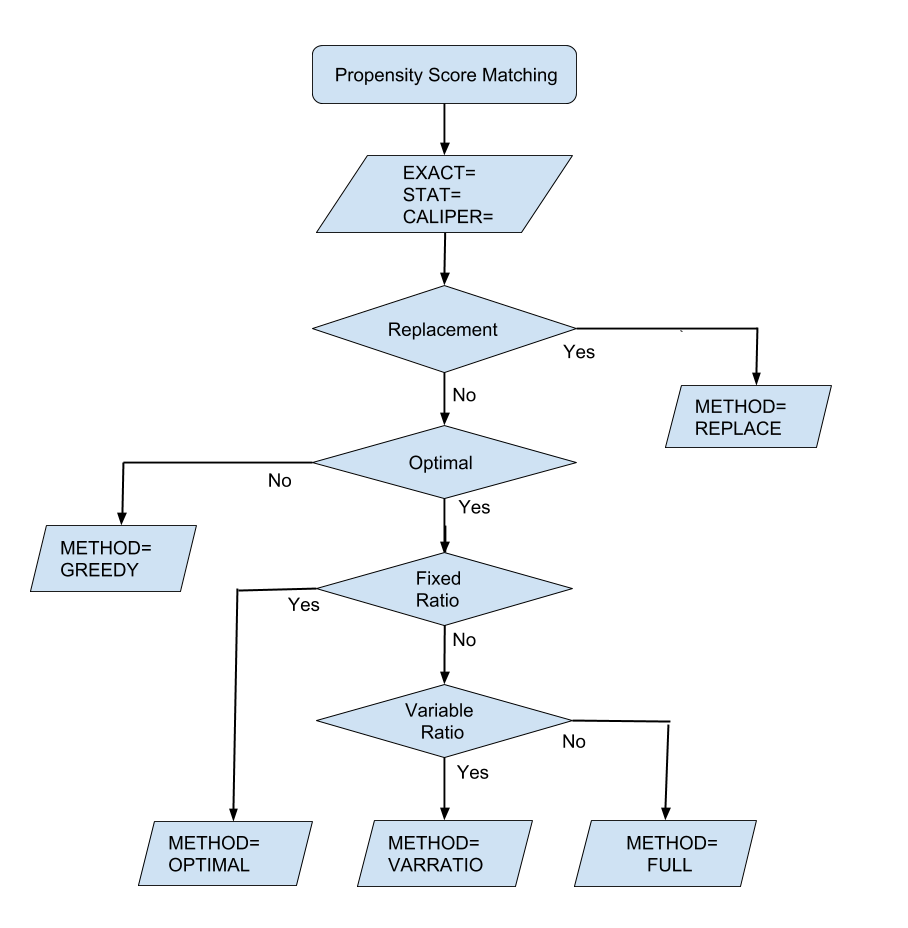
The flowchart in Figure 13 displays the steps in the propensity score matching process.
Figure 13: Propensity Score Matching Options
You can specify the following options in the MATCH statement:
- CALIPER <(caliper-options)> = r
-
specifies the caliper width requirement for matching, where r is either missing or greater than 0. The difference in propensity scores (or logits of propensity scores) between the treated unit and its matching control unit must be less than or equal to r. If you specify CALIPER=., then the caliper requirement is ignored. By default, CALIPER=0.25 (Rosenbaum and Rubin 1985, p. 37). Austin (2011a) has shown that CALIPER=0.20 is optimal in many settings.
You can use the following two caliper-options to prescribe the caliper requirement:
- DISTANCE=distance
-
specifies the type of distance to be compared when treated units are matched to control units. If you specify the DISTANCE=LPS or DISTANCE=PS option, the specified type of distance is also used in the caliper width computation. By default, DISTANCE=LPS. You can specify the following values for distance:
- EXACT=variable | (variables)
specifies classification variables that are to be matched exactly. That is, observations in each matched set must have the same values for these variables. The variables must be specified in the CLASS statement.
- METHOD=method <(method-options)>
-
specifies the method for the matching. You can specify the following methods and method-options. By default, METHOD=OPTIMAL.
- METHOD=FULL (KMAX=kmax <full-options>)
-
requests optimal full matching. Each treated unit is matched with one or more control units, and each control unit (if matched) is matched with one or more treated units. If the specified total number of control units to be matched is less than the number of available control units, then constrained full matching is performed—that is, not all observations are matched.
You must specify the following suboption:
You can also specify the following full-options:
-
KMAXTREATED=kmaxtrt
KMAXTRT=kmaxtrt specifies the maximum number of treated units for each control, where kmaxtrt
 1. By default, KMAXTREATED=2.
 - KMEAN=kmean
specifies the average number of control units to be matched with each treated unit. If the resulting number of control units is greater than the number of control units in the support region, the number of control units in the support region is used.
- NCONTROL=m
specifies the number of control units to be matched. If m is greater than the number of control units in the support region, the number of control units in the support region is used.
- PCTCONTROL=p
specifies the percentage of the total number of control units to be matched. If the resulting number of control units is greater than the total number of control units in the support region, the number of control units in the support region is used.
You can specify only one of the KMEAN=, NCONTROL=, and PCTCONTROL= options for the number of control units in the matched data set. If you do not specify any of the KMEAN=, NCONTROL=, and PCTCONTROL= options, KMEAN= (kmax + 1 / kmaxtrt) / 2 is used.
-
KMAXTREATED=kmaxtrt
- METHOD=GREEDY <(K=k ORDER=order-option)>
-
requests greedy nearest neighbor matching, in which each treated unit is sequentially matched with the k nearest control units. Matching depends on the ordering of the treated units, which you can specify in the ORDER= suboption.
You can specify the following suboptions:
- METHOD=OPTIMAL <(K=k)>
requests optimal fixed ratio matching. The K=k suboption specifies the number of matching control units, where k > 0, for each treated unit. By default, K=1 (one control unit is matched with each treated unit).
- METHOD=REPLACE <(K=k)>
requests a fixed number k of unique matching control units for each treated unit, where the matched control units are selected with replacement. This means that each control unit can be matched to more than one treated unit, but it can only be matched once to the same treated unit. The K=k suboption specifies the number of matching control units, where k > 0, for each treated unit. By default, K=1 (one control unit is matched with each treated unit).
- METHOD=VARRATIO (KMAX=kmax <vr-options>)
-
requests optimal variable ratio matching. Each treated unit is matched with one or more control units.
You must specify the following suboption:
You can also specify the following vr-options:
You can specify only one of the KMEAN=, NCONTROL=, and PCTCONTROL= options for the number of control units in the matched data set. If you do not specify any of the KMEAN=, NCONTROL=, and PCTCONTROL= options, then KMEAN= (kmin + kmax) / 2 is used.
- NMATCHMOST=n
displays a table of the observations that have the greatest numbers of matches, where n
 50. This option displays observation numbers and numbers of matches for the n observations that have the greatest numbers of matches in the treated and control groups. If an ID statement is also specified, the corresponding values of the ID variables are also displayed identify the observations. The option is not applicable to greedy matching (METHOD=GREEDY) and optimal fixed ratio matching (METHOD=OPTIMAL), where a fixed number of control units are matched to each treated unit. By default, n = 0 and the table is not displayed.
 - WEIGHT=ATEWGT | ATTWGT | EQUAL | MATCHATEWGT | MATCHATTWGT | MATCHWGT | NONE
-
specifies the type of weight for matched observations.
By default, WEIGHT=ATTWGT.