The QUANTSELECT Procedure
Displayed Output
The following sections describe the output that is displayed by PROC QUANTSELECT. The output is organized into various tables, which are discussed in the order of appearance. The contents of a table might change depending on the options you specify.
Model Information
The "Model Information" table displays basic information about the data sets and the settings used to control effect selection. These settings include the following:
the selection method
the criteria used to select effects, stop the selection, and choose the selected model
the effect hierarchy enforced
The ODS name of the "Model Information" table is ModelInfo.
Number of Observations
The "Number of Observations" table displays the number of observations read from the input data set and the number of observations used in the analysis. If you use a PARTITION statement, the table also displays the number of observations used for each data role. If you specify TESTDATA= or VALDATA= data sets in the PROC QUANTSELECT statement, then "Number of Observations" tables are also produced for these data sets. The ODS name of the "Number of Observations" table is NObs.
Class Level Information
The "Class Level Information" table lists the levels of every variable specified in the CLASS statement. The ODS name of the "Class Level Information" table is ClassLevelInfo.
Class Level Coding
The "Class Level Coding" table shows the coding used for every variable specified in the CLASS statement. The ODS name of the "Class Level Coding" table is ClassLevelCoding.
Dimensions
The "Dimensions" table displays information about the number of effects and the number of parameters from which the selected model is chosen. If you use split classification variables, then this table also includes the number of effects after splitting is taken into account. The ODS name of the "Dimensions" table is Dimensions.
Candidates
The "Candidates" table displays the effect name and value of the criterion used to select entering or departing effects at each step of the selection process. The effects are displayed in sorted order from best to worst of the selection criterion. You request this table with the DETAILS= option in the MODEL statement. The ODS name of the "Candidates" table is either EntryCandidates for addition candidates or RemovalCandidates for removal candidates.
Selection Summary
The "Selection Summary" table displays details about the sequence of steps of the selection process. For each step, the effect that entered or dropped out is displayed along with the statistics used to select the effect, stop the selection, and choose the selected model. You can request that additional statistics be displayed with the STATS= option in the MODEL statement. For all criteria that you can use for effect selection, the steps at which the optimal values of these criteria occur are also indicated. The ODS name of the "Selection Summary" table is SelectionSummary.
Stop Reason
The "Stop Reason" table displays the reason why the selection stopped. To facilitate programmatic use of this table, an integer code is assigned to each reason and is included if you output this table by using an ODS OUTPUT statement. The reasons and their associated codes follow:
| Code | Stop Reason |
|---|---|
| 1 | All eligible effects are in the model. |
| 2 | All eligible effects have been removed. |
| 3 | Specified maximum number of steps done. |
| 4 | The model contains the specified maximum number of effects. |
| 5 | The model contains the specified minimum number of effects (for backward selection). |
| 6 | The stopping criterion is at a local optimum. |
| 7 | No suitable add or drop candidate could be found. |
| 8 | Adding or dropping any effect does not improve the selection criterion. |
| 9 | No candidate meets the appropriate SLE or SLS significance level. |
| 10 | Stepwise selection is cycling. |
| 11 | The model is an exact fit. |
| 12 | Dropping an effect would result in an empty model. |
The ODS name of the "Stop Reason" table is StopReason.
Selection Reason
The "Selection Reason" table displays how the final selected model is determined. Table 14 shows the possible selection reasons:
Table 14: Selection Reasons
| Selection Reason | Description |
|---|---|
| 1 | The last valid model that occurs in the selection process is the final model. |
| 2 | The first model with the minimum CHOOSE= criterion value in the selection process is the final model. |
The ODS name of the "Selection Reason" table is SelectionReason.
Selected Effects
The "Selected Effects" table displays a string that contains the list of effects in the selected model. The ODS name of the "Selected Effects" table is SelectedEffects.
Fit Statistics
The "Fit Statistics" table displays fit statistics for the selected model. The statistics displayed include the following:
OBJ, the sum of check losses. It is calculated as the minimized objective function value for the fit.
R1, a measure between 0 and 1 that indicates the portion of the (corrected) total variation attributed to the fit rather than left to residual error. It is calculated as one minus OBJ(Model) divided by OBJ(Total).
-
Adj R1, the adjusted
 , a version of that has been adjusted for degrees of freedom. It is calculated as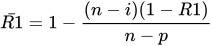
where i is equal to 1 if there is an intercept and 0 otherwise, n is the number of observations used to fit the model, and p is the number of parameters in the model.
fit criteria AIC, AICC, and SBC.
the average check losses (ACL) on the training, validation, and test data. See the section Using Validation and Test Data for details.
You can request "Fit Statistics" tables for the models at each step of the selection process with the DETAILS= option in the MODEL statement. The ODS name of the "Fit Statistics" table is FitStatistics.
Parameter Estimates
The "Parameter Estimates" table displays the parameters in the selected model and their estimates. The following information is displayed for each parameter in the selected model:
the parameter label that includes the effect name and level information for effects that contain classification variables
the degrees of freedom (DF) for the parameter. There is one degree of freedom unless the model is not full rank.
the parameter estimate
-
the standard parameter estimate, which is computed on a standardized design matrix. Let
 denote the original design matrix, where
  is the submatrix for all the forced-in effects, and
  is the submatrix for the rest of the effects that are subject to selection. Let
where
 is the rank of and
 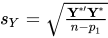 with
with  .
. Then standard parameter estimates are defined as
 , where
  are the parameter estimates computed on the standardized design matrix
  .
.
You can also use the DETAILS= option in the MODEL statement to request "Parameter Estimates" tables for the models at each step of the selection process. The ODS name of the "Parameter Estimates" table is ParameterEstimates.
Parameter Estimates for Quantile Process
The "Parameter Estimates for Quantile Process" table contains the parameter estimates for the quantile process of the final selected model. The following statements show how you can request the output data set of this table by using the ODS OUTPUT statement:
proc quantselect data=Data;
   ods output ProcessEst=outProcessEst;
   model y=x1-x10 / selection=forward quantile=process;
run;
proc print data=outProcessEst;
run;
The output data set contains the following variables:
QuantileLabel, the label of quantile levelsQuantileLevel, the quantile levelsvariables for parameter estimates
Given the quantile-level grid for the quantile process,

The ith observation in the "Parameter Estimates for Quantile Process" table corresponds to the optimal solution of the ith quantile level in the quantile-level grid. The ith QuantileLabel value is in the form of ti, and the ith QuantileLevel value is equal to  . For more information about the quantile-level grid, see the section Quantile Process Regression.