The QUANTSELECT Procedure
Example 104.1 Simulation Study
(View the complete code for this example.)
This simulation study exemplifies the unity of motive and effect for the PROC QUANTSELECT procedure. The following statements generate a data set that is based on a naive instrumental model (Chernozhukov and Hansen 2008):
%let seed=321;
%let p=20;
%let n=3000;

data analysisData;
   array x{&p} x1-x&p;
   do i=1 to &n;
      U  = ranuni(&seed);
      x1 = ranuni(&seed);
      x2 = ranexp(&seed);
      x3 = abs(rannor(&seed));
      y  = x1*(U-0.1) + x2*(U*U-0.25) + x3*(exp(U)-exp(0.9));
      do j=4 to &p;
         x{j} = ranuni(&seed);
      end;
      output;
   end;
run;
Variable U of the data set indicates the true quantile level of the response y conditional on  .
.
Let  denote the underlying quantile regression model, where
  . Then, the true parameter functions are
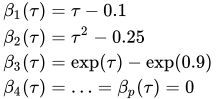
It is easy to see that, at  , only
  and
and  are nonzero parameters. Therefore, an effective effect selection method should select
  and
and  and drop all the other effects in this data set at . By the same rationale,
  and should be selected at
  with
with  and
and  , and and should be selected at
  with
with  and
and  .
.
The following statements use PROC QUANTSELECT with the adaptive LASSO method:
proc quantselect data=analysisData;
   model y= x1-x&p / quantile=0.1 0.5 0.9
         selection=lasso(adaptive);
   output out=out p=pred;
run;
Output 104.1.1 shows that, by default, the CHOOSE= and STOP= options are both set to SBC.
Output 104.1.1: Model Information
| Model Information | |
|---|---|
| Data Set | WORK.ANALYSISDATA |
| Dependent Variable | y |
| Selection Method | Adaptive LASSO |
| Quantile Type | Single Level |
| Stop Criterion | SBC |
| Choose Criterion | SBC |
The selected effects and the relevant estimates are shown in Output 104.1.2 for , Output 104.1.3 for , and Output 104.1.4 for . You can see that the adaptive LASSO method correctly selects active effects for all three quantile levels.
Output 104.1.2: Parameter Estimates at
| Selected Effects: | Intercept x2 x3 |
|---|
| Parameter Estimates | |||
|---|---|---|---|
| Parameter | DF | Estimate | Standardized Estimate |
| Intercept | 1 | 0.011793 | 0 |
| x2 | 1 | -0.228709 | -0.218287 |
| x3 | 1 | -1.379907 | -0.784520 |
Output 104.1.3: Parameter Estimates at
| Selected Effects: | Intercept x1 x3 |
|---|
| Parameter Estimates | |||
|---|---|---|---|
| Parameter | DF | Estimate | Standardized Estimate |
| Intercept | 1 | 0.011778 | 0 |
| x1 | 1 | 0.425843 | 0.118792 |
| x3 | 1 | -0.863316 | -0.490822 |
Output 104.1.4: Parameter Estimates at
| Selected Effects: | Intercept x1 x2 |
|---|
| Parameter Estimates | |||
|---|---|---|---|
| Parameter | DF | Estimate | Standardized Estimate |
| Intercept | 1 | -0.007738 | 0 |
| x1 | 1 | 0.782942 | 0.218407 |
| x2 | 1 | 0.576445 | 0.550177 |
The QUANTSELECT procedure can perform effect selection not only at a single quantile level but also for the entire quantile process. You can specify the QUANTILE=PROCESS option to do effect selection for the entire quantile process. With the QUANTILE=PROCESS option specified, the ParameterEstimates table produced by the QUANTSELECT procedure actually shows the mean prediction model of y conditional on  . In this simulation study, the true mean model is
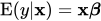
where
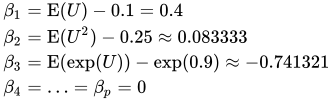
The following statements perform effect selection for the quantile process with the forward selection method.
proc quantselect data=analysisData;
   model y= x1-x&p / quantile=process(n=all)
         selection=forward;
run;
Output 104.1.5 shows that, by default, the SELECT= and STOP= options are both set to SBC. The selected effects and the relevant estimates for the conditional mean model are shown in Output 104.1.6.
Output 104.1.5: Model Information
| Model Information | |
|---|---|
| Data Set | WORK.ANALYSISDATA |
| Dependent Variable | y |
| Selection Method | Forward |
| Quantile Type | Process |
| Select Criterion | SBC |
| Stop Criterion | SBC |
| Choose Criterion | SBC |
Output 104.1.6: Parameter Estimates
| Parameter Estimates | |||
|---|---|---|---|
| Parameter | DF | Estimate | Standardized Estimate |
| Intercept | 1 | 0.007833 | 0 |
| x1 | 1 | 0.418825 | 0.116834 |
| x2 | 1 | 0.094791 | 0.090472 |
| x3 | 1 | -0.785686 | -0.446687 |
Linear regression is the most popular method for estimating conditional means. The following statements show how to select effects with the GLMSELECT procedure, and Output 104.1.7 shows the resulting selected effects and their estimates. You can see that the mean estimates from the QUANTSELECT procedure are similar to those from the GLMSELECT procedure. However, quantile regression can provide detailed distribution information, which is not available from linear regression.
proc glmselect data=analysisData;
   model y= x1-x3 / selection=forward(select=sbc stop=sbc choose=sbc);
run;
Output 104.1.7: Parameter Estimates
| Parameter Estimates | ||||
|---|---|---|---|---|
| Parameter | DF | Estimate | Standard Error |
t Value |
| Intercept | 1 | -0.010143 | 0.043129 | -0.24 |
| x1 | 1 | 0.434553 | 0.057385 | 7.57 |
| x2 | 1 | 0.114183 | 0.016771 | 6.81 |
| x3 | 1 | -0.797194 | 0.028156 | -28.31 |