The ROBUSTREG Procedure

M Estimation

M estimation in the context of regression was first introduced by Huber (1973) as a result of making the least squares approach robust. Although M estimators are not robust with respect to leverage points, they are popular in applications where leverage points are not an issue.

Instead of minimizing a sum of squares of the residuals, a Huber-type M estimator ModifyingAbove bold-italic theta With caret Subscript upper M of bold-italic theta minimizes a sum of less rapidly increasing functions of the residuals:
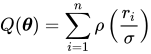
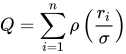
upper Q left-parenthesis bold-italic theta right-parenthesis equals sigma-summation Underscript i equals 1 Overscript n Endscripts rho left-parenthesis StartFraction r Subscript i Baseline Over sigma EndFraction right-parenthesis

where bold r equals bold y minus bold upper X bold-italic theta. For the ordinary least squares estimation, rho is the square function, rho left-parenthesis z right-parenthesis equals z squared.

If sigma is known, then when derivatives are taken with respect to bold-italic theta, ModifyingAbove bold-italic theta With caret Subscript upper M is also a solution of the system of p equations:
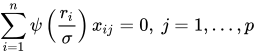
sigma-summation Underscript i equals 1 Overscript n Endscripts psi left-parenthesis StartFraction r Subscript i Baseline Over sigma EndFraction right-parenthesis x Subscript i j Baseline equals 0 comma j equals 1 comma ellipsis comma p

where psi equals StartFraction partial-differential rho Over partial-differential z EndFraction. If rho is convex, ModifyingAbove bold-italic theta With caret Subscript upper M is the unique solution.

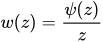
The ROBUSTREG procedure solves this system by using iteratively reweighted least squares (IRLS). The weight function w left-parenthesis x right-parenthesis is defined as

w left-parenthesis z right-parenthesis equals StartFraction psi left-parenthesis z right-parenthesis Over z EndFraction

The ROBUSTREG procedure provides 10 kinds of weight functions through the WEIGHTFUNCTION= option in the MODEL statement. Each weight function corresponds to a rho function. For a complete discussion, see the section Weight Functions. You can specify the scale parameter sigma by using the SCALE= option in the PROC ROBUSTREG statement.

If sigma is unknown, both bold-italic theta and sigma are estimated by minimizing the function

upper Q left-parenthesis bold-italic theta comma sigma right-parenthesis equals sigma-summation Underscript i equals 1 Overscript n Endscripts left-bracket rho left-parenthesis StartFraction r Subscript i Baseline Over sigma EndFraction right-parenthesis plus a right-bracket sigma comma a greater-than 0

The algorithm proceeds by alternately improving ModifyingAbove bold-italic theta With caret in a location step and ModifyingAbove sigma With caret in a scale step.

For the scale step, the following three methods are available to estimate sigma, which you can select by specifying the SCALE= option:

  1. (SCALE=HUBER <(D=d)>) Compute ModifyingAbove sigma With caret by the iteration

    left-parenthesis ModifyingAbove sigma With caret Superscript left-parenthesis m plus 1 right-parenthesis Baseline right-parenthesis squared equals StartFraction 1 Over n h EndFraction sigma-summation Underscript i equals 1 Overscript n Endscripts chi Subscript d Baseline left-parenthesis StartFraction r Subscript i Baseline Over ModifyingAbove sigma With caret Superscript left-parenthesis m right-parenthesis Baseline EndFraction right-parenthesis left-parenthesis ModifyingAbove sigma With caret Superscript left-parenthesis m right-parenthesis Baseline right-parenthesis squared

    where

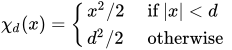
    chi Subscript d Baseline left-parenthesis x right-parenthesis equals StartLayout Enlarged left-brace 1st Row 1st Column x squared slash 2 2nd Column if StartAbsoluteValue x EndAbsoluteValue less-than d 2nd Row 1st Column d squared slash 2 2nd Column otherwise EndLayout

    is the Huber function and h equals StartFraction n minus p Over n EndFraction left-parenthesis d squared plus left-parenthesis 1 minus d squared right-parenthesis normal upper Phi left-parenthesis d right-parenthesis minus 0.5 minus StartFraction d Over StartRoot 2 pi EndRoot EndFraction e Superscript minus one-half d squared Baseline right-parenthesis is the Huber constant (Huber 1981, p. 179). You can use the D=d option to specify d. By default, D=2.5.

  2. (SCALE=TUKEY <(D=d)>) Compute ModifyingAbove sigma With caret by the iteration

    left-parenthesis ModifyingAbove sigma With caret Superscript left-parenthesis m plus 1 right-parenthesis Baseline right-parenthesis squared equals StartFraction 1 Over left-parenthesis n minus p right-parenthesis beta EndFraction sigma-summation Underscript i equals 1 Overscript n Endscripts chi Subscript d Baseline left-parenthesis StartFraction r Subscript i Baseline Over ModifyingAbove sigma With caret Superscript m Baseline EndFraction right-parenthesis left-parenthesis ModifyingAbove sigma With caret Superscript left-parenthesis m right-parenthesis Baseline right-parenthesis squared

    where

    chi Subscript d Baseline left-parenthesis x right-parenthesis equals StartLayout Enlarged left-brace 1st Row 1st Column StartFraction 3 x squared Over d squared EndFraction minus StartFraction 3 x Superscript 4 Baseline Over d Superscript 4 Baseline EndFraction plus StartFraction x Superscript 6 Baseline Over d Superscript 6 Baseline EndFraction 2nd Column if StartAbsoluteValue x EndAbsoluteValue less-than d 2nd Row 1st Column 1 2nd Column otherwise EndLayout

    is the Tukey bisquare function and beta equals integral chi Subscript d Baseline left-parenthesis s right-parenthesis d normal upper Phi left-parenthesis s right-parenthesis is the constant such that the solution ModifyingAbove sigma With caret is asymptotically consistent when upper L left-parenthesis dot slash sigma right-parenthesis equals normal upper Phi left-parenthesis dot right-parenthesis (Hampel et al. 1986, p. 149). You can use the D=d option to specify d. By default, D=2.5.

  3. (SCALE=MED) Compute ModifyingAbove sigma With caret by the iteration

    ModifyingAbove sigma With caret Superscript left-parenthesis m plus 1 right-parenthesis Baseline equals median StartSet StartAbsoluteValue y Subscript i Baseline minus bold x prime Subscript i Baseline ModifyingAbove bold-italic theta With caret Superscript left-parenthesis m right-parenthesis Baseline EndAbsoluteValue slash beta 0 comma i equals 1 comma ellipsis comma n EndSet

    where beta 0 equals normal upper Phi Superscript negative 1 Baseline left-parenthesis 0.75 right-parenthesis is the constant such that the solution ModifyingAbove sigma With caret is asymptotically consistent when upper L left-parenthesis dot slash sigma right-parenthesis equals normal upper Phi left-parenthesis dot right-parenthesis (Hampel et al. 1986, p. 312).

SCALE=MED is the default.

Algorithm

The basic algorithm for computing M estimates for regression is iteratively reweighted least squares (IRLS). As the name suggests, a weighted least squares fit is carried out inside an iteration loop. For each iteration, a set of weights for the observations is used in the least squares fit. The weights are constructed by applying a weight function to the current residuals. Initial weights are based on residuals from an initial fit. The ROBUSTREG procedure uses the unweighted least squares fit as a default initial fit. The iteration terminates when a convergence criterion is satisfied. The maximum number of iterations is set to 1,000. You can specify both the weight function and the convergence criteria.

Weight Functions

You can specify the weight function for M estimation by using the WEIGHTFUNCTION= option. The ROBUSTREG procedure provides 10 weight functions. By default, the procedure uses the bisquare weight function. In most cases, M estimates are more sensitive to the parameters of these weight functions than to the type of weight function. The median weight function is not stable and is seldom recommended in data analysis; it is included in the ROBUSTREG procedure for completeness. You can specify the parameters for these weight functions. Except for the Hampel and median weight functions, default values for these parameters are defined such that the corresponding M estimates have 95% asymptotic efficiency in the location model with the Gaussian distribution (Holland and Welsch 1977).

The following list shows the weight functions available. See Table 5 for the default values of the constants in these weight functions.

Andrews upper W left-parenthesis x comma c right-parenthesis equals StartLayout Enlarged left-brace 1st Row 1st Column StartFraction sine left-parenthesis x slash c right-parenthesis Over x slash c EndFraction 2nd Column if StartAbsoluteValue x EndAbsoluteValue less-than-or-equal-to pi c 2nd Row 1st Column asterisk 0 2nd Column otherwise EndLayout
Bisquare upper W left-parenthesis x comma c right-parenthesis equals StartLayout Enlarged left-brace 1st Row 1st Column left-parenthesis 1 minus left-parenthesis x slash c right-parenthesis squared right-parenthesis squared 2nd Column if StartAbsoluteValue x EndAbsoluteValue less-than c 2nd Row 1st Column 0 2nd Column otherwise EndLayout
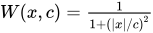
Cauchy upper W left-parenthesis x comma c right-parenthesis equals StartFraction 1 Over 1 plus left-parenthesis StartAbsoluteValue x EndAbsoluteValue slash c right-parenthesis squared EndFraction
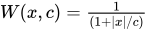
Fair upper W left-parenthesis x comma c right-parenthesis equals StartFraction 1 Over left-parenthesis 1 plus StartAbsoluteValue x EndAbsoluteValue slash c right-parenthesis EndFraction
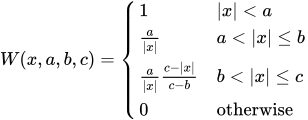
Hampel upper W left-parenthesis x comma a comma b comma c right-parenthesis equals StartLayout Enlarged left-brace 1st Row 1st Column 1 2nd Column StartAbsoluteValue x EndAbsoluteValue less-than a 2nd Row 1st Column StartFraction a Over StartAbsoluteValue x EndAbsoluteValue EndFraction 2nd Column a less-than StartAbsoluteValue x EndAbsoluteValue less-than-or-equal-to b 3rd Row 1st Column StartFraction a Over StartAbsoluteValue x EndAbsoluteValue EndFraction StartFraction c minus StartAbsoluteValue x EndAbsoluteValue Over c minus b EndFraction 2nd Column b less-than StartAbsoluteValue x EndAbsoluteValue less-than-or-equal-to c 4th Row 1st Column 0 2nd Column otherwise EndLayout
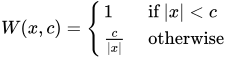
Huber upper W left-parenthesis x comma c right-parenthesis equals StartLayout Enlarged left-brace 1st Row 1st Column 1 2nd Column if StartAbsoluteValue x EndAbsoluteValue less-than c 2nd Row 1st Column StartFraction c Over StartAbsoluteValue x EndAbsoluteValue EndFraction 2nd Column otherwise EndLayout
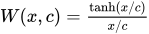
Logistic upper W left-parenthesis x comma c right-parenthesis equals StartFraction hyperbolic tangent left-parenthesis x slash c right-parenthesis Over x slash c EndFraction
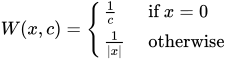
Median upper W left-parenthesis x comma c right-parenthesis equals StartLayout Enlarged left-brace 1st Row 1st Column StartFraction 1 Over c EndFraction 2nd Column if x equals 0 2nd Row 1st Column StartFraction 1 Over StartAbsoluteValue x EndAbsoluteValue EndFraction 2nd Column otherwise EndLayout
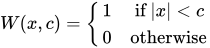
Talworth upper W left-parenthesis x comma c right-parenthesis equals StartLayout Enlarged left-brace 1st Row 1st Column 1 2nd Column if StartAbsoluteValue x EndAbsoluteValue less-than c 2nd Row 1st Column 0 2nd Column otherwise EndLayout
Welsch upper W left-parenthesis x comma c right-parenthesis equals exp left-parenthesis minus StartFraction left-parenthesis x slash c right-parenthesis squared Over 2 EndFraction right-parenthesis

Convergence Criteria

The following convergence criteria are available in PROC ROBUSTREG:

  • relative change in the coefficients (CONVERGENCE=COEF)

  • relative change in the scaled residuals (CONVERGENCE=RESID)

  • relative change in weights (CONVERGENCE=WEIGHT)

You can specify the criteria by using the CONVERGENCE= option in the PROC ROBUSTREG statement. The default is CONVERGENCE=COEF.

You can specify the precision of the convergence criterion by using the EPS= suboption. The default is EPS=1E–8.

In addition to these convergence criteria, a convergence criterion that is based on a scale-independent measure of the gradient is always checked. For more information, see Coleman et al. (1980). A warning is issued if this additional criterion is not satisfied.

Asymptotic Covariance and Confidence Intervals

The following three estimators of the asymptotic covariance of the robust estimator are available in PROC ROBUSTREG:


upper H 1 colon upper K squared StartFraction left-bracket 1 slash left-parenthesis n minus p right-parenthesis right-bracket sigma-summation left-parenthesis psi left-parenthesis r Subscript i Baseline right-parenthesis right-parenthesis squared Over left-bracket left-parenthesis 1 slash n right-parenthesis sigma-summation left-parenthesis psi prime left-parenthesis r Subscript i Baseline right-parenthesis right-parenthesis right-bracket squared EndFraction left-parenthesis bold upper X prime bold upper X right-parenthesis Superscript negative 1
upper H 2 colon upper K StartFraction left-bracket 1 slash left-parenthesis n minus p right-parenthesis right-bracket sigma-summation left-parenthesis psi left-parenthesis r Subscript i Baseline right-parenthesis right-parenthesis squared Over left-bracket left-parenthesis 1 slash n right-parenthesis sigma-summation left-parenthesis psi prime left-parenthesis r Subscript i Baseline right-parenthesis right-parenthesis right-bracket EndFraction bold upper W Superscript negative 1
upper H 3 colon upper K Superscript negative 1 Baseline StartFraction 1 Over left-parenthesis n minus p right-parenthesis EndFraction sigma-summation left-parenthesis psi left-parenthesis r Subscript i Baseline right-parenthesis right-parenthesis squared bold upper W Superscript negative 1 Baseline left-parenthesis bold upper X prime bold upper X right-parenthesis bold upper W Superscript negative 1

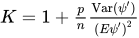
where upper K equals 1 plus StartFraction p Over n EndFraction StartFraction Var left-parenthesis psi Superscript prime Baseline right-parenthesis Over left-parenthesis upper E psi prime right-parenthesis squared EndFraction is a correction factor and upper W Subscript j k Baseline equals sigma-summation psi prime left-parenthesis r Subscript i Baseline right-parenthesis x Subscript i j Baseline x Subscript i k. For more information, see Huber (1981, p. 173).

You can specify the asymptotic covariance estimate by using the ASYMPCOV= option. The ROBUSTREG procedure uses H1 as the default because of its simplicity and stability. Confidence intervals are computed from the diagonal elements of the estimated asymptotic covariance matrix.

R Square and Deviance

The robust version of R square is defined as
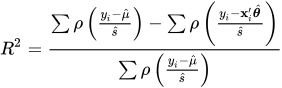
upper R squared equals StartStartFraction sigma-summation rho left-parenthesis StartFraction y Subscript i Baseline minus ModifyingAbove mu With caret Over ModifyingAbove s With caret EndFraction right-parenthesis minus sigma-summation rho left-parenthesis StartFraction y Subscript i Baseline minus bold x prime Subscript i Baseline ModifyingAbove bold-italic theta With caret Over ModifyingAbove s With caret EndFraction right-parenthesis OverOver sigma-summation rho left-parenthesis StartFraction y Subscript i Baseline minus ModifyingAbove mu With caret Over ModifyingAbove s With caret EndFraction right-parenthesis EndEndFraction

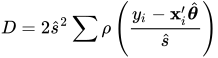
The robust deviance is defined as the optimal value of the objective function on the sigma squared scale,

upper D equals 2 ModifyingAbove s With caret squared sigma-summation rho left-parenthesis StartFraction y Subscript i Baseline minus bold x prime Subscript i Baseline ModifyingAbove bold-italic theta With caret Over ModifyingAbove s With caret EndFraction right-parenthesis

where rho prime equals psi, ModifyingAbove bold-italic theta With caret is the M estimator of bold-italic theta, ModifyingAbove mu With caret is the M estimator of location, and ModifyingAbove s With caret is the M estimator of the scale parameter in the full model.

Linear Tests

Two tests are available in PROC ROBUSTREG for the canonical linear hypothesis

upper H 0 colon theta Subscript j Baseline equals 0 comma j equals i 1 comma ellipsis comma i Subscript q Baseline

where q is the total number of parameters of the tested effects. The first test is a robust version of the F test, which is referred to as the rho test. Denote the M estimators in the full and reduced models as ModifyingAbove bold-italic theta With caret left-parenthesis 0 right-parenthesis element-of normal upper Omega 0 and ModifyingAbove bold-italic theta With caret left-parenthesis 1 right-parenthesis element-of normal upper Omega 1, respectively. Let

StartLayout 1st Row 1st Column upper Q 0 2nd Column equals 3rd Column upper Q left-parenthesis ModifyingAbove bold-italic theta With caret left-parenthesis 0 right-parenthesis right-parenthesis equals min left-brace upper Q left-parenthesis bold-italic theta right-parenthesis vertical-bar bold-italic theta element-of normal upper Omega 0 right-brace 2nd Row 1st Column upper Q 1 2nd Column equals 3rd Column upper Q left-parenthesis ModifyingAbove bold-italic theta With caret left-parenthesis 1 right-parenthesis right-parenthesis equals min left-brace upper Q left-parenthesis bold-italic theta right-parenthesis vertical-bar bold-italic theta element-of normal upper Omega 1 right-brace EndLayout

with

upper Q equals sigma-summation Underscript i equals 1 Overscript n Endscripts rho left-parenthesis StartFraction r Subscript i Baseline Over sigma EndFraction right-parenthesis

The robust F test is based on the test statistic
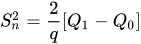
upper S Subscript n Superscript 2 Baseline equals StartFraction 2 Over q EndFraction left-bracket upper Q 1 minus upper Q 0 right-bracket

Asymptotically upper S Subscript n Superscript 2 Baseline tilde lamda chi Subscript q Superscript 2 under upper H 0, where the standardization factor is lamda equals integral psi squared left-parenthesis s right-parenthesis d normal upper Phi left-parenthesis s right-parenthesis slash integral psi prime left-parenthesis s right-parenthesis d normal upper Phi left-parenthesis s right-parenthesis and normal upper Phi is the cumulative distribution function of the standard normal distribution. Large values of upper S Subscript n Superscript 2 are significant. This test is a special case of the general tau test of Hampel et al. (1986, Section 7.2).

The second test is a robust version of the Wald test, which is referred to as the upper R Subscript n Superscript 2 test. This test uses a test statistic

upper R Subscript n Superscript 2 Baseline equals n left-parenthesis ModifyingAbove theta With caret Subscript i 1 Baseline comma ellipsis comma ModifyingAbove theta With caret Subscript i Sub Subscript q Subscript Baseline right-parenthesis bold upper H 22 Superscript negative 1 Baseline left-parenthesis ModifyingAbove theta With caret Subscript i 1 Baseline comma ellipsis comma ModifyingAbove theta With caret Subscript i Sub Subscript q Subscript Baseline right-parenthesis prime

where StartFraction 1 Over n EndFraction bold upper H 22 is the q times q block (corresponding to theta Subscript i 1 Baseline comma ellipsis comma theta Subscript i Sub Subscript q Subscript Baseline) of the asymptotic covariance matrix of the M estimate ModifyingAbove bold-italic theta With caret Subscript upper M of bold-italic theta in a p-parameter linear model.

Under upper H 0, the statistic upper R Subscript n Superscript 2 has an asymptotic chi squared distribution with q degrees of freedom. Large values of upper R Subscript n Superscript 2 are significant. For more information, see Hampel et al. (1986, Chapter 7).

Model Selection

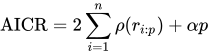
When M estimation is used, two criteria are available in PROC ROBUSTREG for model selection. The first criterion is a counterpart of Akaike’s (1974) information criterion for robust regression (AICR); it is defined as
AICR equals 2 sigma-summation Underscript i equals 1 Overscript n Endscripts rho left-parenthesis r Subscript i colon p Baseline right-parenthesis plus alpha p

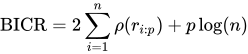
where r Subscript i colon p Baseline equals left-parenthesis y Subscript i Baseline minus bold x prime Subscript i Baseline ModifyingAbove bold-italic theta With caret right-parenthesis slash ModifyingAbove sigma With caret, ModifyingAbove sigma With caret is a robust estimate of sigma and ModifyingAbove bold-italic theta With caret is the M estimator with the p-dimensional design matrix.

As with AIC, alpha is the weight of the penalty for dimensions. The ROBUSTREG procedure uses alpha equals 2 upper E psi squared slash upper E psi prime (Ronchetti 1985) and estimates it by using the final robust residuals.

The second criterion is a robust version of the Schwarz information criteria (BICR); it is defined as
BICR equals 2 sigma-summation Underscript i equals 1 Overscript n Endscripts rho left-parenthesis r Subscript i colon p Baseline right-parenthesis plus p log left-parenthesis n right-parenthesis
Last updated: December 09, 2022