The SEQDESIGN Procedure
Example 110.7 Creating Whitehead’s Triangular Designs
(View the complete code for this example.)
This example requests three 4-stage Whitehead’s triangular designs for normally distributed statistics. Each design has a one-sided alternative hypothesis  with early stopping to reject or accept the null hypothesis
  . Note that Whitehead’s triangular designs are different from unified family triangular designs.
The following statements invoke the SEQDESIGN procedure and specify three Whitehead’s triangular designs:
ods graphics on;
proc seqdesign altref=0.693147
               bscale=score
               plots=combinedboundary
               ;
   BoundaryKeyNone:  design nstages=4
                            method=whitehead
                            boundarykey=none
                            alt=upper   stop=both
                            alpha=0.05  beta=0.20
                            ;
   BoundaryKeyAlpha: design nstages=4
                            method=whitehead
                            boundarykey=alpha
                            alt=upper   stop=both
                            alpha=0.05  beta=0.20
                            ;

   BoundaryKeyBeta:  design nstages=4
                            method=whitehead
                            boundarykey=beta
                            alt=upper   stop=both
                            alpha=0.05  beta=0.20
                            ;
run;
Whitehead methods with early stopping to reject or accept the null hypothesis create boundaries that approximately satisfy the Type I and Type II error probability specification. The BOUNDARYKEY=NONE option specifies no adjustment to the boundary value at the final stage to maintain either a Type I or a Type II error probability level.
The "Design Information" table in Output 110.7.1 displays design specifications and maximum information. Note that with the BOUNDARYKEY=NONE option, the derived errors  and
and  are not the same as the specified errors
  and
and  .
.
Output 110.7.1: Whitehead Design Information
| Design Information | |
|---|---|
| Statistic Distribution | Normal |
| Boundary Scale | Score |
| Alternative Hypothesis | Upper |
| Early Stop | Accept/Reject Null |
| Method | Whitehead |
| Boundary Key | None |
| Alternative Reference | 0.693147 |
| Number of Stages | 4 |
| Alpha | 0.05071 |
| Beta | 0.19771 |
| Power | 0.80229 |
| Max Information (Percent of Fixed Sample) | 129.6815 |
| Max Information | 16.70639 |
| Null Ref ASN (Percent of Fixed Sample) | 62.48184 |
| Alt Ref ASN (Percent of Fixed Sample) | 73.82535 |
The "Method Information" table in Output 110.7.2 displays the derived  and
and  errors and the derived drift parameter. The derived errors and are not exactly the same as the specified errors and with the BOUNDARYKEY=NONE option.
Output 110.7.2: Method Information
| Method Information | |||||||
|---|---|---|---|---|---|---|---|
| Boundary | Method | Alpha | Beta | Whitehead | Alternative Reference |
Drift | |
| Tau | C | ||||||
| Upper Alpha | Whitehead | 0.05071 | . | 0.25 | 4.60517 | 0.693147 | 2.833131 |
| Upper Beta | Whitehead | . | 0.19771 | 0.25 | 4.60517 | 0.693147 | 2.833131 |
The "Boundary Information" table in Output 110.7.3 displays information level, alternative reference, and boundary values. With the specified BOUNDARYSCALE=SCORE option, the alternative reference and boundary values are displayed with the score statistics scale.
Output 110.7.3: Boundary Information
| Boundary Information (Score Scale) Null Reference = 0 |
|||||
|---|---|---|---|---|---|
| _Stage_ | Alternative | Boundary Values | |||
| Information Level | Reference | Upper | |||
| Proportion | Actual | Upper | Beta | Alpha | |
| 1 | 0.2500 | 4.176597 | 2.89500 | -0.95755 | 4.78775 |
| 2 | 0.5000 | 8.353195 | 5.78999 | 1.91510 | 5.74530 |
| 3 | 0.7500 | 12.52979 | 8.68499 | 4.78775 | 6.70285 |
| 4 | 1.0000 | 16.70639 | 11.57998 | 7.66039 | 7.66039 |
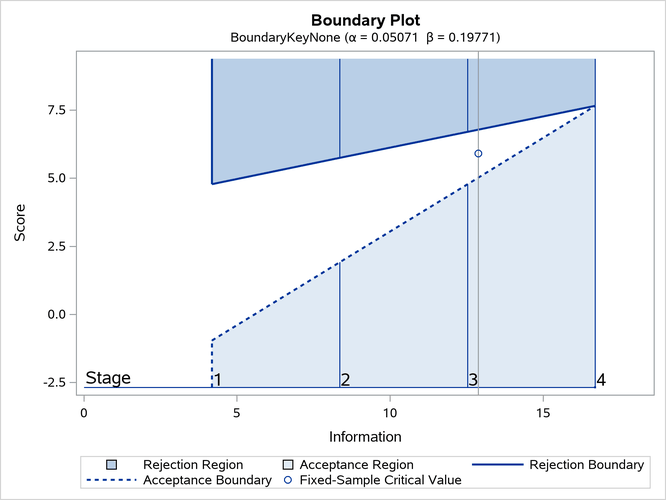
With ODS Graphics enabled, a detailed boundary plot with the rejection and acceptance regions is displayed, as shown in Output 110.7.4.
Output 110.7.4: Boundary Plot
The second design uses the BOUNDARYKEY=ALPHA option to adjust the boundary value at the final stage to maintain the Type I error probability level.
The "Design Information" table in Output 110.7.5 displays design specifications and the derived maximum information. Note that with the BOUNDARYKEY=ALPHA option, the specified Type I error probability is maintained.
Output 110.7.5: Whitehead Design Information
| Design Information | |
|---|---|
| Statistic Distribution | Normal |
| Boundary Scale | Score |
| Alternative Hypothesis | Upper |
| Early Stop | Accept/Reject Null |
| Method | Whitehead |
| Boundary Key | Alpha |
| Alternative Reference | 0.693147 |
| Number of Stages | 4 |
| Alpha | 0.05 |
| Beta | 0.20044 |
| Power | 0.79956 |
| Max Information (Percent of Fixed Sample) | 129.9894 |
| Max Information | 16.70639 |
| Null Ref ASN (Percent of Fixed Sample) | 62.6302 |
| Alt Ref ASN (Percent of Fixed Sample) | 74.00064 |
The "Method Information" table in Output 110.7.6 displays the specified and derived and errors and the derived drift parameter. The derived Type I error probability is the same as the specified and the derived Type II error probability  is not the same as the specified with the BOUNDARYKEY=ALPHA option.
Output 110.7.6: Method Information
| Method Information | |||||||
|---|---|---|---|---|---|---|---|
| Boundary | Method | Alpha | Beta | Whitehead | Alternative Reference |
Drift | |
| Tau | C | ||||||
| Upper Alpha | Whitehead | 0.05000 | . | 0.25 | 4.60517 | 0.693147 | 2.833131 |
| Upper Beta | Whitehead | . | 0.20044 | 0.25 | 4.60517 | 0.693147 | 2.833131 |
The "Boundary Information" table in Output 110.7.7 displays information level, alternative reference, and boundary values.
Output 110.7.7: Boundary Information
| Boundary Information (Score Scale) Null Reference = 0 |
|||||
|---|---|---|---|---|---|
| _Stage_ | Alternative | Boundary Values | |||
| Information Level | Reference | Upper | |||
| Proportion | Actual | Upper | Beta | Alpha | |
| 1 | 0.2500 | 4.176597 | 2.89500 | -0.95755 | 4.78775 |
| 2 | 0.5000 | 8.353195 | 5.78999 | 1.91510 | 5.74530 |
| 3 | 0.7500 | 12.52979 | 8.68499 | 4.78775 | 6.70285 |
| 4 | 1.0000 | 16.70639 | 11.57998 | 7.81300 | 7.81300 |
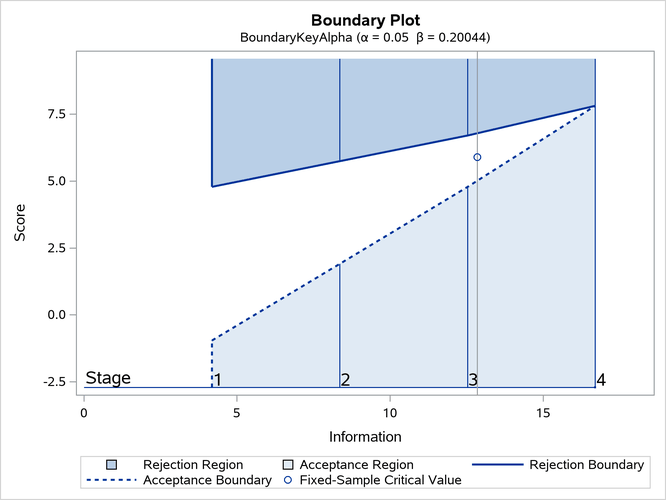
With ODS Graphics enabled, a detailed boundary plot with the rejection and acceptance regions is displayed, as shown in Output 110.7.8.
Output 110.7.8: Boundary Plot
The third design specifies the BOUNDARYKEY=BETA option to derive the boundary values to maintain the Type II error probability level .
The "Design Information" table in Output 110.7.9 displays design specifications and the derived maximum information. Note that with the BOUNDARYKEY=BETA option, the specified Type II error probability is maintained.
Output 110.7.9: Whitehead Design Information
| Design Information | |
|---|---|
| Statistic Distribution | Normal |
| Boundary Scale | Score |
| Alternative Hypothesis | Upper |
| Early Stop | Accept/Reject Null |
| Method | Whitehead |
| Boundary Key | Beta |
| Alternative Reference | 0.693147 |
| Number of Stages | 4 |
| Alpha | 0.05011 |
| Beta | 0.2 |
| Power | 0.8 |
| Max Information (Percent of Fixed Sample) | 129.9364 |
| Max Information | 16.70639 |
| Null Ref ASN (Percent of Fixed Sample) | 62.60462 |
| Alt Ref ASN (Percent of Fixed Sample) | 73.97042 |
The "Method Information" table in Output 110.7.10 displays the and errors and the derived drift parameter. The derived Type II error probability is the same as the specified and the derived Type I error probability  is not the same as the specified with the BOUNDARYKEY=BETA option.
Output 110.7.10: Method Information
| Method Information | |||||||
|---|---|---|---|---|---|---|---|
| Boundary | Method | Alpha | Beta | Whitehead | Alternative Reference |
Drift | |
| Tau | C | ||||||
| Upper Alpha | Whitehead | 0.05011 | . | 0.25 | 4.60517 | 0.693147 | 2.833131 |
| Upper Beta | Whitehead | . | 0.20000 | 0.25 | 4.60517 | 0.693147 | 2.833131 |
The "Boundary Information" table in Output 110.7.11 displays information level, alternative reference, and boundary values.
Output 110.7.11: Boundary Information
| Boundary Information (Score Scale) Null Reference = 0 |
|||||
|---|---|---|---|---|---|
| _Stage_ | Alternative | Boundary Values | |||
| Information Level | Reference | Upper | |||
| Proportion | Actual | Upper | Beta | Alpha | |
| 1 | 0.2500 | 4.176597 | 2.89500 | -0.95755 | 4.78775 |
| 2 | 0.5000 | 8.353195 | 5.78999 | 1.91510 | 5.74530 |
| 3 | 0.7500 | 12.52979 | 8.68499 | 4.78775 | 6.70285 |
| 4 | 1.0000 | 16.70639 | 11.57998 | 7.78899 | 7.78899 |
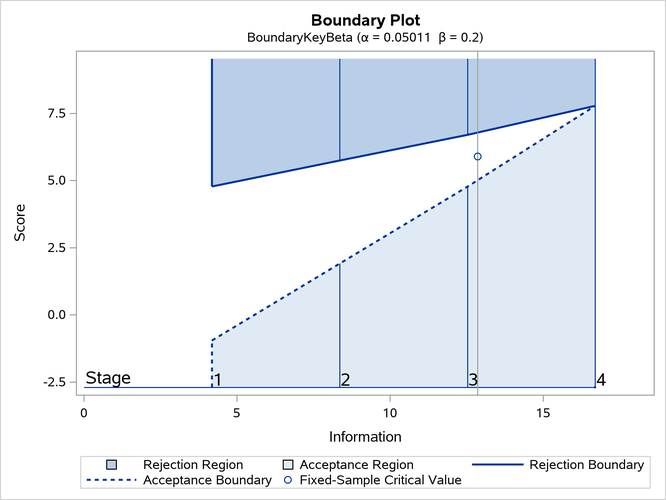
With ODS Graphics enabled, a detailed boundary plot with the rejection and acceptance regions is displayed, as shown in Output 110.7.12.
Output 110.7.12: Boundary Plot
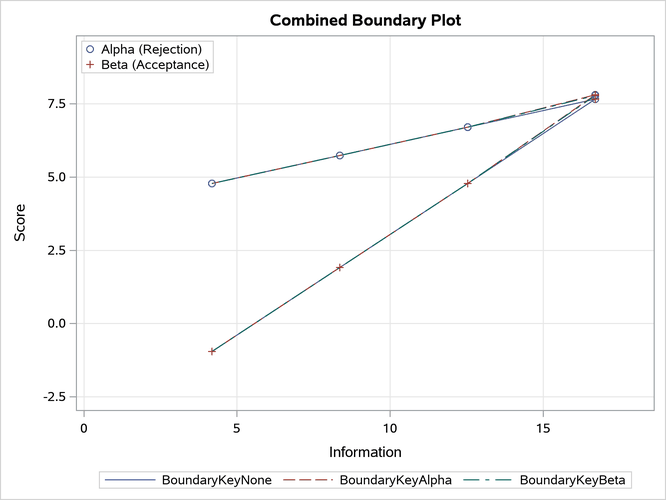
With the PLOTS=COMBINEDBOUNDARY option, a combined plot of group sequential boundaries for all designs is displayed, as shown in Output 110.7.13. It shows that three designs are similar, with a slightly smaller boundary value at the final stage for the design with the BOUNDARYKEY=NONE option.
Output 110.7.13: Combined Boundary Plot