The SURVEYFREQ Procedure
Risks and Risk Difference
The RISK option provides estimates of risks (binomial proportions) and risk differences for  tables, together with their standard errors and confidence limits. Risk statistics include the row 1 risk, row 2 risk, overall risk, and risk difference.
When you specify the RISK option, PROC SURVEYFREQ provides both column 1 and column 2 risks by default. You can request only column 1 (or only column 2) risks by specifying the RISK(COLUMN=) option. To display only the risk difference (and suppress display of the row 1, row 2, and overall risks), you can specify the RISKDIFF(ONLY) option.
The column 1 risk for row 1 is the row 1 proportion for table cell (1,1). The column 1 risk estimate is computed as the ratio of the estimated total for table cell (1,1) to the estimated total for row 1,

where the total estimates are computed as described in the section Totals. The column 1 risk for row 2 is the row 2 proportion for table cell (2,1), which is estimated as

The overall column 1 risk is the overall proportion in column 1, and its estimate is computed as
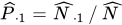
The column 2 risk estimates are computed similarly.
The row 1 and row 2 risks are the same as the row proportions for a table, and their variances are computed as described in the section Row and Column Proportions. The overall risk is the overall proportion in the column, and its variance computation is described in the section Proportions. Confidence limits for the column 1 risk for row 1 are computed as

where 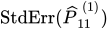 is the standard error of the risk estimate and
  is the
 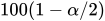 th percentile of the t distribution with df degrees of freedom. (For more information, see the section Degrees of Freedom.) The value of the confidence coefficient
  is determined by the ALPHA= option; by default, ALPHA=0.05, which produces 95% confidence limits. Confidence limits for the other risks are computed similarly.
The risk difference is defined as the row 1 risk minus the row 2 risk. The estimate of the column 1 risk difference  is computed as

The column 2 risk difference is computed similarly.
PROC SURVEYFREQ estimates the variance of the risk difference by using the variance estimation method that you request. If you request a replication method (bootstrap, BRR, jackknife, or replicate weights), the procedure estimates the variance as described in the section Replication Variance Estimation. By default, PROC SURVEYFREQ estimates the variance by using the Taylor series method.
By using Taylor series linearization, the variance estimate for the column 1 risk difference  can be expressed as

where  is the covariance matrix of
  ,
,

and  is an array that contains the partial derivatives of the risk difference with respect to the elements of ,

For more information, see Wolter (1985, pp. 239–242). The variance estimate for the column 2 risk difference is computed similarly.
The standard error of the column 1 risk difference is

Confidence limits for the column 1 risk difference are computed as

where is the th percentile of the t distribution with df degrees of freedom. (For more information, see the section Degrees of Freedom.) The value of the confidence coefficient is determined by the ALPHA= option; by default, ALPHA=0.05, which produces 95% confidence limits. Confidence limits for the column 2 risk difference are computed in the same way.