Introduction to SAS/ACCESS Interface to JDBC
Overview
For available SAS/ACCESS features, see JDBC supported features. For more information about JDBC, see your JDBC documentation.
SAS/ACCESS Interface to JDBC includes SAS Data Connector to JDBC. The data connector enables you to load large amounts of data into the CAS server for parallel processing. For more information, see these sections:
- Where to Specify Data Connector Options in SAS Cloud Analytic Services: User’s Guide
- JDBC Data Connector in SAS Cloud Analytic Services: User’s Guide
JDBC Concepts
Overview
Java Database Connectivity (JDBC) standards provide a common interface to a variety of data sources, including PostgreSQL, MySQL, and other data sources that are compliant with JDBC. The goal of JDBC is to enable access to data from any application, regardless of which DBMS handles the data. JDBC accomplishes this by inserting a middle layer—which includes a JDBC driver—between an application and the target DBMS. The purpose of this layer is to translate application data queries into commands that the DBMS understands. Specifically, JDBC standards specify application programming interfaces (APIs) that enable applications such as SAS software to access a database. For all of this to work, both the application and the DBMS must be compliant with JDBC. This means that the application must be able to issue JDBC commands, and the DBMS must be able to respond to these.
Here are the basic components and features of JDBC.
The components provide JDBC functionality: the client interface and the JDBC driver for the data source that you want to access, as shown below.
The JDBC Interface to SAS
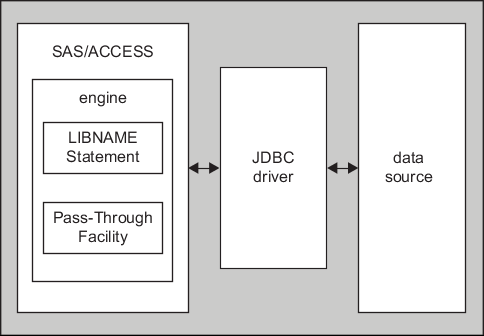
JDBC Details
JDBC uses SQL syntax for queries and statement execution, or for statements that are executed as commands. However, all databases that support JDBC are not necessarily SQL databases. For example, many databases do not have system tables. Also, the term table can describe a variety of items–including a file, a part of a file, a group of files, a typical SQL table, generated data, or any potential source of data. This is an important distinction. All JDBC data sources respond to a base set of SQL statements such as SELECT, INSERT, UPDATE, DELETE, CREATE, and DROP in their simplest forms. However, some databases do not support other statements and more complex forms of SQL statements.
To maximize your chances of success, your JDBC driver must support the call sequences that SAS/ACCESS Interface to JDBC sends to the driver. Specifically, your JDBC driver must support these JDBC classes:
| java.sql.Connection |
| java.sql.Driver |
| java.sql.DriverManager (getConnection method) |
| java.sql.PreparedStatement |
| java.sql.ResultSet |
| java.sql.ResultSetMetaData |
| java.sql.SQLException |
| java.sql.Statement |
SAS/ACCESS Interface to JDBC sends a sequence of JDBC calls to the JDBC driver that you have chosen. The types and sequence in which these calls are made are compliant with the JDBC specification. If your JDBC driver fails to return the correct result or fails to work with SAS/ACCESS Interface to JDBC, try these suggestions:
- Be sure to run the current versions of your JDBC client components.
- Try to connect using a query tool that is not SAS. Most third-party JDBC driver sources include such a query tool with their offerings. However, keep in mind that in some cases you might be able to connect using a query tool (that is not SAS) but not with SAS/ACCESS Interface to JDBC. This is because SAS calls might make a wider range of JDBC calls than a JDBC query tool other than SAS would make.
- Contact SAS Technical Support. SAS Technical Support offers additional tools that can help you identify the root of the problems that are related to your JDBC client and subsequently debug them.
- Attempt to use certain SAS/ACCESS Interface to JDBC options or alternative engines to SAS/ACCESS Interface to JDBC.
- If you have determined that your JDBC client issues are not related to SAS, report your debugging results to your JDBC client providers. If you received your JDBC client components from a commercial JDBC driver vendor, you can work through that vendor’s technical support. If you use freeware or open-source JDBC client components—where formal technical support is not always available—your only recourse might be to communicate with the freeware user community.
SAS has not validated all JDBC drivers on the market and therefore makes no claims of certification or support.