PUTLOG Statement
Writes a message to the SAS log.
| Valid in: | DATA step |
|---|---|
| Categories: | Action |
| CAS | |
| Type: | Executable |
| Tip: | You can precede your message text with the keyword ERROR, WARNING, or NOTE to better identify the output in the SAS log. This feature is available in both the PUT statement and the %PUT macro statement. |
Table of Contents
Syntax
Optional Arguments
text
specifies the custom message that you want to write to the SAS log. Text can include character literals (enclosed in single or double quotation marks), variable names, formats, and pointer controls.
| Requirement | The text must be enclosed in single or double quotation marks. |
|---|
ERROR: text
displays the keyword ERROR followed by your custom log message in red text in the SAS log.
data L;
   putlog 'ERROR:   This is my error message in red text';
run;
Keywords can also be used as part of the string value in a character variable assignment statement:
data L;
   x = 'ERROR:   Red text';
   y = 'NOTE:    Blue text';
   z = 'WARNING: Green text';
   put x; put y; put z;
run;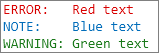
| Requirements | The keyword and text must be enclosed in single or double quotation marks. |
|---|---|
| The keyword ERROR must be in all uppercase characters and followed immediately by a colon ( : ). |
ERROR- text
displays a message in the SAS log in red text, without including the keyword ERROR.
data L;
   putlog 'ERROR:   This is my error message in red text';
   putlog 'ERROR-   This is the second line of my error message';
run;

Keywords can also be used as part of the string value in a character variable assignment statement:
data L;
   x = 'ERROR-   Red text';
   y = 'NOTE-    Blue text';
   z = 'WARNING- Green text';
   put x; put y; put z;
run;
| Requirements | The keyword and text must be enclosed in single or double quotation marks. |
|---|---|
| The keyword ERROR must be in all uppercase characters and followed immediately by a hyphen ( - ). |
NOTE: text
displays the keyword NOTE followed by your custom log message in blue text in the SAS log.
data L;
   putlog 'NOTE:    This is my note in blue text';
run;
Keywords can also be used as part of the string value in a character variable assignment statement:
data L;
   x = 'ERROR:   Red text';
   y = 'NOTE:    Blue text';
   z = 'WARNING: Green text';
   put x; put y; put z;
run;| Requirements | The keyword and text must be enclosed in single or double quotation marks. |
|---|---|
| The keyword NOTE must be in all uppercase characters and followed immediately by a colon ( : ). |
NOTE- text
displays a message in the SAS log in blue text, without including the keyword NOTE.
data L;
   putlog 'NOTE:   This is my note message in blue text';
   putlog 'NOTE-   This is the second line of my note message';
run;
Keywords can also be used as part of the string value in a character variable assignment statement:
data L;
   x = 'ERROR-   Red text';
   y = 'NOTE-    Blue text';
   z = 'WARNING- Green text';
   put x; put y; put z;
run;| Requirements | The keyword and text must be enclosed in single or double quotation marks. |
|---|---|
| The keyword NOTE must be in all uppercase characters and followed immediately by a hyphen ( - ). |
WARNING: text
displays the keyword WARNING followed by your custom log message in green text in the SAS log.
data L;
   putlog 'WARNING: This is my warning in green text';
run;
Keywords can also be used as part of the string value in a character variable assignment statement:
data L;
   x = 'ERROR:   Red text';
   y = 'NOTE:    Blue text';
   z = 'WARNING: Green text';
   put x; put y; put z;
run;| Requirements | The keyword and text must be enclosed in single or double quotation marks. |
|---|---|
| The keyword WARNING must be in all uppercase characters and followed immediately by a colon ( : ). |
WARNING- text
displays a message in the SAS log in green text, without including the keyword WARNING.
data L;
   putlog 'WARNING:   This is my warning message in green text';
   putlog 'WARNING-   This is the second line of my warning message';
run;
Keywords can also be used as part of the string value in a character variable assignment statement:
data L;
   x = 'ERROR-   Red text';
   y = 'NOTE-    Blue text';
   z = 'WARNING- Green text';
   put x; put y; put z;
run;| Requirements | The keyword and text must be enclosed in single or double quotation marks. |
|---|---|
| The keyword WARNING must be in all uppercase characters and followed immediately by a hyphen ( - ). |
Details
The PUTLOG statement writes a message that you specify to the SAS log. The PUTLOG statement is also helpful when you use macro-generated code because you can send output to the SAS log without affecting the current file destination.
Comparisons
The PUTLOG statement is similar to the ERROR statement, except that PUTLOG does not set _ERROR_ to 1.
Example: Writing Messages to the SAS Log Using the PUTLOG Statement
This program creates the computeAverage92 macro, which computes the average score, validates input data, and uses the PUTLOG statement to write error messages to the SAS log. The DATA step uses the PUTLOG statement to write a warning message to the SAS log.
data ExamScores;
   input Name $ 1-16 Score1 Score2 Score3;
   datalines;
Sullivan, James   86 92 88
Martinez, Maria   95 91 92
Guzik, Eugene     99 98 .
Schultz, John     90 87 93
van Dyke, Sylvia  98 . 91
Tan, Carol        93 85 85
;

filename outfile 'path-to-your-output-file';
   /* Create a macro that computes the average score, validates  */
   /* input data, and uses PUTLOG to write error messages to the */
   /* SAS log.                                                   */
%macro computeAverage92(s1, s2, s3, avg);
   if &s1 < 0 or &s2 < 0 or &s3 < 0 then
      do;
	        putlog 'ERROR: Invalid score data ' &s1= &s2= &s3=;
         &avg = .;
	     end;
	  else
	     &avg = mean(&s1, &s2, &s3);
%mend;
data _null_;
set ExamScores;
   file outfile;
   %computeAverage92(Score1, Score2, Score3, AverageScore);
   put name Score1 Score2 Score3 AverageScore;
      /* Use PUTLOG to write a warning message to the SAS log. */
   if AverageScore < 92 then
     	 putlog 'WARNING: Score below the minimum ' name= AverageScore= 5.2;
run;

proc print;
run;
The program writes these lines to the SAS log:
WARNING: Score below the minimum Name=Sullivan, James AverageScore=88.67
ERROR: Invalid score data Score1=99 Score2=98 Score3=.
WARNING: Score below the minimum Name=Guzik, Eugene AverageScore=.
WARNING: Score below the minimum Name=Schultz, John AverageScore=90.00
ERROR: Invalid score data Score1=98 Score2=. Score3=91
WARNING: Score below the minimum Name=van Dyke, Sylvia AverageScore=.
WARNING: Score below the minimum Name=Tan, Carol AverageScore=87.67
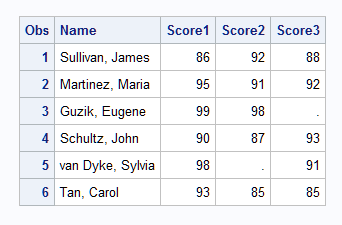
SAS creates this output file.
Individual Examination Scores
See Also
-
Statements: