FORMAT Statement
Associates formats with variables.
| Valid in: | DATA step or PROC step |
|---|---|
| Categories: | CAS |
| Information | |
| Type: | Declarative |
Table of Contents
Syntax
Arguments
variable
names one or more variables for SAS to associate with a format. You must specify at least one variable.
| Tip | To disassociate a format from a variable, use the variable in a FORMAT statement without specifying a format in a DATA step or in PROC DATASETS. In a DATA step, place this FORMAT statement after the SET statement. See Removing a Format. You can also use PROC DATASETS. |
|---|
format
specifies the format that is listed for writing the values of the variables.
| Tip | Formats that are associated with variables by using a FORMAT statement behave like formats that are used with a colon modifier in a subsequent PUT statement. For more information about using a colon modifier, see PUT Statement: List. |
|---|---|
| See | SAS Formats and Informats: Reference |
DEFAULT=default-format
specifies a temporary default format for displaying the values of variables that are not listed in the FORMAT statement. These default formats apply only to the current DATA step; they are not permanently associated with variables in the output data set.
A DEFAULT= format specification applies to
- variables that are not named in a FORMAT or ATTRIB statement
- variables that are not permanently associated with a format within a SAS data set
- variables that are not written with the explicit use of a format.
| Default | If you omit DEFAULT=, SAS uses BESTw. as the default numeric format and $w. as the default character format. |
|---|---|
| Restriction | Use this option only in a DATA step. |
| Tip | A DEFAULT= specification can occur anywhere in a FORMAT statement. It can specify either a numeric default, a character default, or both. |
| Example | Assigning Formats and Defaults |
Details
The FORMAT statement can use standard SAS formats or user-written formats that have been previously defined in PROC FORMAT. A single FORMAT statement can associate the same format with several variables, or it can associate different formats with different variables. If a variable appears in multiple FORMAT statements, SAS uses the format that is assigned last.
You use a FORMAT statement in the DATA step to permanently associate a format with a variable. SAS changes the descriptor information of the SAS data set that contains the variable. You can use a FORMAT statement in some PROC steps, but the rules are different. For more information, see Base SAS Procedures Guide.
Comparisons
Both the ATTRIB and FORMAT statements can associate formats with variables, and both statements can change the format that is associated with a variable. You can use the FORMAT statement in PROC DATASETS to change or remove the format that is associated with a variable. You can also associate, change, or disassociate formats and variables in existing SAS data sets through the windowing environment.
Examples
Example 1: Assigning Formats and Defaults
This example uses a FORMAT statement to assign formats and default formats for numeric and character variables. The default formats are not associated with variables in the data set but affect how the PUT statement writes the variables in the current DATA step.
data tstfmt;
   format W $char3.
   Y 10.3
   default=8.2 $char8.;
   W='Good morning.';
   X=12.1;
   Y=13.2;
   Z='Howdy-doody';
   put W/X/Y/Z;
run;
proc contents data=tstfmt;
run;
proc print data=tstfmt;
run;
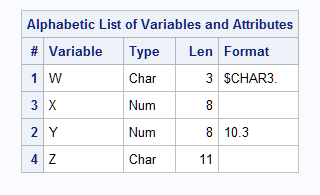
This output shows a partial listing from PROC CONTENTS, as well as the report that PROC PRINT generates.
Partial Listing from PROC CONTENTS and the PROC PRINT Report
PROC PRINT Report
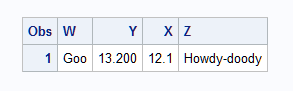
The default formats apply to variables X and Z while the assigned formats apply to the variables W and Y.
The PUT statement produces this result:
----+----1----+----2
Goo
12.10
13.200
Howdy-do
Example 2: Associating Multiple Variables with a Single Format
This example uses the FORMAT statement to assign a single format to multiple variables.
data report;
   input Item $ 1–6 Material $ 8–14 Investment 16–22 Profit 24–31;
   format Item Material $upcase9. Investment  Profit  dollar15.2;
   datalines;
shirts cotton  2256354 83952175
ties   silk    498678  2349615
suits  silk    9482146 69839563
belts  leather 7693    14893
shoes  leather 7936712 22964
;
run;
options pageno=1 nodate ls=80 ps=64;
proc print data=report;
   title 'Profit Summary: Kellam Manufacturing Company';
run;
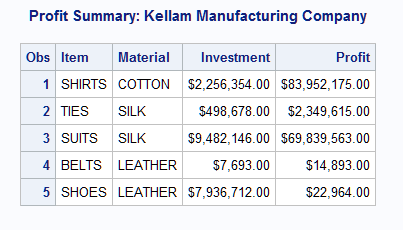
Results from Associating Multiple Variables with a Single Format
Example 3: Removing a Format
This example disassociates an existing format from a variable in a SAS data set. The order of the FORMAT statement and the SET statements is important.
data rtest;
   set rtest;
   format x;
run;
See Also
-
DATASETS Procedure in Base SAS Procedures Guide
-
Statements: