LABEL Statement
Assigns descriptive labels to variables.
| Valid in: | DATA step or PROC step |
|---|---|
| Categories: | CAS |
| Information | |
| Type: | Declarative |
Table of Contents
Syntax
Form 1: Creates a descriptive label for one or more variables.
Form 2: Removes the label from one or more variables.
Arguments
variable
specifies the variable that you want to label. You can specify labels for multiple variables in a single LABEL statement:
data test;
   L = 5;
   W = 10;
   label L = 'Length' W = 'Width';
run;
text-string
specifies a label of up to 256 bytes.
data test;
   L = 5;
   label L = 'Length';
run;| Restrictions | If the label includes a semicolon (;) or an equal sign
(=), you must enclose the label in either single or double quotation
marks.
|
|---|---|
| There is partial support for variable name substitution with the ActiveX and Java devices. When the label text for the variable exceeds the space allowed, the variable name is used instead by procedures that are labeling an axis or a legend title. With the exception of the SAS/GRAPH GPLOT procedure, the variable name is not used when ActiveX or Java devices are specified. | |
| Notes | Quotation marks are not required unless the label includes a semicolon, quotation marks, or an equal sign. |
The LABEL statement expects an equal sign (=) after the
first variable. If any other character is found, an error occurs.
The LABEL statement considers everything after the equal sign, following
the first variable, as part of the label until the statement comes
to another variable followed by an equal sign, regardless of quotation
marks. In this example, the label for x is this is
x y 4 = this is y because the next variable that is
followed by an equal sign is z.
|
|
| See | Character Constants and Character Variables in SAS Programmer’s Guide: Essentials. |
' '
removes a label from a variable. Enclose a single blank space in quotation marks to remove an existing label. You can remove labels from multiple variables in a single LABEL statement:
data test;
   L=5; W=10;
   label L = ' '  W = ' ';
run;
Alternatively, you can remove a label by specifying nothing after the equal sign:
data test;
   L=5; W=10;
   label L =  W = ;
run;
Details
Using a LABEL statement in a DATA step permanently associates labels with variables by affecting the descriptor information of the SAS data set that contains the variables. You can associate any number of variables with labels in a single LABEL statement.
Comparisons
Both the ATTRIB and LABEL statements can associate labels with variables and change a label that is associated with a variable.
Label statements can be used in a DATA step and within some PROC steps. If a label is assigned to a variable in a DATA step or in PROC DATASETS, the label is permanently assigned in the output data set descriptor. Some PROCs, such as PROC PRINT, can temporarily associate a label with a variable for use during the procedure.
This example demonstrates the use of labels during the creation of a report. By using the PROC PRINT label option, you can display labels in place of variable names in the output report.
data work.cars;                   /* DATA step */
   set sashelp.cars;
   label MSRP=Sticker Price;      /* Assigns a permanent label to the
                                     variable MSRP */
run;

proc datasets library=work;       /* PROC DATASETS */
   modify cars;
   label Invoice=Dealer Cost;     /* Assigns a permanent label to the
                                     variable Invoice */
quit;

proc print data=work.cars label; /* PROC PRINT - LABEL option displays
                                    label names */
   label Type=Style;             /* Assigns a temporary label to the Type
                                    variable  */
   var Make Model MSRP Invoice Type;
run;
The output report contains the three new labels. Sticker Price is assigned with the DATA step LABEL statement. Dealer Cost is assigned with the PROC DATASETS LABEL statement, and Style is assigned with the PROC PRINT LABEL statement.

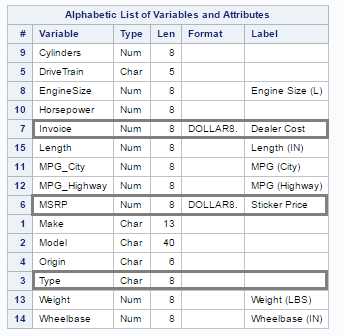
You can use PROC CONTENTS to display labels that are permanently assigned in the output data set.
proc contents data=work.cars;  /* Displays data set descriptor information
                                  variables and permanent labels */
run;
The new permanent labels Sticker Price and Dealer Cost are now assigned to the Invoice and MSRP variables. The Style label, assigned to the Type variable during the execution of the PROC PRINT statement, is not retained in the output data set.
For more information about using a LABEL statement within a PROC step, see Base SAS Procedures Guide.
Examples
Example 1: Specifying Labels
Here are several LABEL statements.
label compound=Type of Drug;label date="Today's Date";label n='Mark''s Experiment Number';label score1="Grade on April 1 Test"
score2="Grade on May 1 Test";Example 2: Removing a Label
This example removes an existing label.
data rtest;
   set rtest;
   label x=' ';
run;
See Also
-
Statements: