LENGTH Statement
Specifies the number of bytes for storing character and numeric variables, or the number of characters for storing VARCHAR variables.
| Valid in: | DATA step |
|---|---|
| Categories: | CAS |
| Information | |
| Type: | Declarative |
| UNIX specifics: | Valid numeric variable lengths |
| Windows specifics: | Valid numeric variable lengths; valid values for length; valid values for n |
| z/OS specifics: | Length of numeric variables |
| See: | LENGTH Statement under Windows, UNIX, and z/OS |
| CAUTION |
Avoid shortening numeric variables that contain fractions. The precision of a numeric variable is closely tied to its length, especially when the variable contains fractions. You can safely shorten variables that contain integers according to the rules that are given in the SAS documentation for your operating environment, but shortening variables that contain fractions might eliminate important precision. |
Table of Contents
Syntax
UNIX:
Windows:
z/OS:
Arguments
variable-specification
is a required argument and has this form:
variable(s) <$ length | length | VARCHAR(length) | VARCHAR(*)>
variable
specifies one or more variables that are to be assigned a length, including any variables in the DATA step. Variables that are dropped from the output data set are also included.
| Restriction | Array references are not allowed. |
|---|---|
| Tip | If the variable is character or varchar, the length applies to the program data vector and the output data set. If the variable is numeric, the length applies only to the output data set. |
$
specifies that the preceding variables are character variables of type CHAR.
length
specifies a numeric constant for storing variable values. For numeric and character variables, this constant is the maximum number of bytes stored in the variable.
| Range | For numeric variables, 2 to 8 bytes or 3 to 8 bytes, depending on your operating environment. For character variables, 1 to 32767 bytes under all operating environments. |
|---|---|
| Restriction | In CAS, numeric variables shorter than 8 bytes are treated as 8 bytes. |
| UNIX specifics | Numeric variables can range from 3 to 8 bytes. The minimum length that you can specify for a numeric variable depends on the floating-point format used by your system. Because most systems use the IEEE floating-point format, the minimum is 3 bytes. |
| Windows specifics | Numeric variables can range from 3 to 8 bytes. |
| z/OS specifics | Numeric variables can range from 2 to 8 bytes and character variables can range from 1 to 32,767 bytes. The minimum value for length for a numeric value might be greater than 2 when you create a SAS data set that is written in a data representation other than the native data representation for SAS on z/OS. |
VARCHAR
specifies that the preceding variables are of type VARCHAR.
length
specifies the maximum number of characters stored for VARCHAR variables.
For example, length
v varchar(100); means store up to 100 characters in the
V VARCHAR variable.
| Range | 1 to 536,870,911 characters for VARCHAR variables. |
|---|---|
| Restriction | When assigning a character constant to a VARCHAR variable, the character constant is limited to 32767 bytes. |
| Requirement | The CAS engine is required if you want to preserve a variable as a VARCHAR data type when reading it in or writing it out using the DATA step. |
| See | For more information about automatic declaration of variables, see Support for Implicit Declaration of Data Types in SAS Cloud Analytic Services: User’s Guide. |
| For more information about how VARCHAR variables are automatically converted to character values, see VARCHAR Support for Implicit and Explicit Data Type Conversion in SAS Cloud Analytic Services: User’s Guide and VARCHAR Length with Implicit Type Conversion in SAS Cloud Analytic Services: User’s Guide. |
*
specifies to support the maximum length allowed: 536,870,911 characters.
DEFAULT=n
changes the default number of bytes that SAS uses to store the values of any newly created numeric variables.
| Default | 8 bytes |
|---|---|
| Range | 2 to 8 bytes or 3 to 8 bytes, depending on your operating environment. |
| UNIX specifics | Can range from 3 to 8 bytes. |
| Windows specifics | Can range from 3 to 8 bytes. |
| z/OS specifics | Can range from 2 to 8 bytes. |
Details
General Information
In general, the length of a variable depends on this information:
- whether the variable is numeric or character
- how the variable was created
- whether a LENGTH statement or ATTRIB statement is present
- the SAS session encoding that is used to process your program
Subject to the rules for assigning lengths, character and numeric lengths that are assigned with the LENGTH statement can be changed in the ATTRIB statement and vice versa.
VARCHAR variables allocate memory as needed to hold their value. The maximum amount of memory used by a VARCHAR variable depends on the SAS session encoding. A variable declared as VARCHAR(100) can store up to 100 characters. In a single-byte SAS session encoding, such as LATIN1, the variable uses up to 100 bytes for its value.
For a UTF-8 SAS session encoding, where a character can take up to 4 bytes, up to 400 bytes might be used by the VARCHAR value.
For more information about assigning lengths to variables, see SAS Variables in SAS Language Reference: Concepts.
Windows Information
The LENGTH statement specifies the number of bytes SAS is to use for storing values of variables in each data set being created.
CAUTION
Any length less than 8 bytes can result in a loss of precision for the value of the variable.
Comparisons
The ATTRIB statement can assign the length as well as other attributes of character and numeric variables.
Example
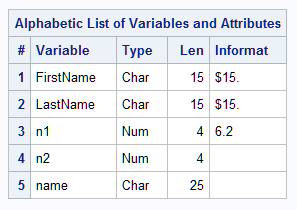
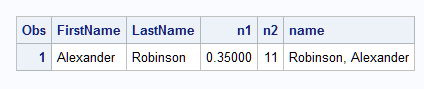
This example uses a LENGTH statement to set the length of the character variable NAME to 25 bytes. The LENGTH statement also changes the default number of bytes that SAS uses to store the values of newly created numeric variables from 8 to 4 bytes. The TRIM function removes trailing blanks from LASTNAME before it is concatenated with these items:
- a comma (,)
- a blank space
- the value of FIRSTNAME
If you omit the LENGTH statement, SAS sets the length of NAME to 32 bytes.
data testlength;
   informat FirstName LastName $15. n1 6.2;
   input firstname lastname n1 n2;
   length name $25 default=4;
   name=trim(lastname)||', '||firstname;
   datalines;
Alexander Robinson 35 11
;
proc contents data=testlength;
run;
proc print data=testlength;
run;
This output shows a partial listing from PROC CONTENTS, as well as the report that PROC PRINT generates.
Partial PROC CONTENTS for TESTLENGTH
Setting the Length of a Variable
See Also
-
For information about the use of the LENGTH statement in PROC steps, see Base SAS Procedures Guide.
-
How Many Characters Can I Use When I Measure SAS Name Lengths in Bytes? in SAS Language Reference: Concepts
-
Statements:
-
UNIX:
- Data Representation in SAS Companion for UNIX Environments
-
Windows:
- Length and Precision of Variables under Windows in SAS Companion for Windows
-
z/OS:
- Using the LENGTH Statement to Save Storage Space in SAS Companion for z/OS