The BGLIMM Procedure
MODEL Statement
MODEL response <(response-options)> = <fixed-effects> </ model-options>;
MODEL events / trials = <fixed-effects> </ model-options>;
The MODEL statement, which is required, names the dependent variable and the fixed effects. The fixed-effects determine the  matrix of the model (see the section Notation for the Generalized Linear Mixed Model for details). You specify effects in the same way as in other SAS procedures.
An intercept is included in the fixed-effects model by default. You can remove it by using the NOINT option.
You can specify the dependent variable by using either the response syntax or the events/trials syntax. The events/trials syntax is specific to models for binomial data. A binomial(n, ) variable is the sum of n independent Bernoulli trials with event probability . Each Bernoulli trial results in either an event or a nonevent (with probability
  ). You use the events/trials syntax to indicate to the BGLIMM procedure that the Bernoulli outcomes are grouped. The value of the second variable, trials, gives the number n of Bernoulli trials. The value of the first variable, events, is the number of events out of n. The values of both events and (trials–events) must be nonnegative, and the value of trials must be positive. Observations for which these conditions are not met are excluded from the analysis. If the events/trials syntax is used, PROC BGLIMM defaults to the binomial distribution. The response is then the events variable. The trials variable is accounted for in model fitting as an additional weight. If you use the response syntax, the procedure defaults to the normal distribution.
The MODEL statement uses two sets of options. The response-options determine how PROC BGLIMM models probabilities for binary, binomial, and multinomial data. The model-options control other aspects of model formation and inference. Table 3 summarizes these options, and subsequent sections describe them in detail.
Table 3: MODEL Statement Options
| Option | Description |
|---|---|
| Response Variable Options | |
| DESCENDING | Reverses the order of response categories |
| EVENT= | Specifies the event category in binary and binomial models |
| ORDER= | Specifies the sort order for the response variable |
| REF= | Specifies the reference category in generalized logit models |
| Model Options | |
| COEFFPRIOR= | Specifies the prior of the fixed-effects coefficients |
| DIST= | Specifies the response distribution |
| SCALE= | Specifies a fixed value for the scale parameter |
| INIT= | Controls the generation of initial values of the fixed-effects coefficients |
| LINK= | Specifies the link function |
| NOINT | Excludes the fixed-effects intercept from the model |
| NOOUTPOST | Suppresses storing the posterior samples of missing responses |
| in the OUTPOST= data set | |
| OFFSET= | Specifies the offset variable |
| SCALEPRIOR= | Specifies the prior of the scale parameter |
Response Variable Options
Response variable options determine how the BGLIMM procedure models probabilities for binary, binomial, and multinomial data.
You can specify the following response-options by enclosing them in parentheses after the response variable.
Model Options
You can specify the following model-options in the MODEL statement after a slash (/):
-
COEFFPRIOR=NORMAL <(options)> | CONSTANT
CPRIOR=NORMAL <(options)> | CONSTANT -
specifies the prior distribution for the fixed-effects coefficients. The default is COEFFPRIOR=CONSTANT, which specifies the noninformative and improper prior of a constant. If you specify COEFFPRIOR=NORMAL, it is
 , where
  is the identity matrix. You can specify the following options for the normal prior, enclosed in parentheses:
 - INPUT=SAS-data-set
specifies a SAS data set that contains the mean and covariance information of the normal prior. The data set must have a
_TYPE_variable to represent the type of each observation and a variable for each regression coefficient. If the data set also contains a_NAME_variable, the values of this variable are used to identify the covariance for the_TYPE_='COV' observations; otherwise, the_TYPE_='COV' observations are assumed to be in the same order as the explanatory variables in the MODEL statement. PROC BGLIMM reads the mean vector from the observation for which_TYPE_='MEAN' and reads the covariance matrix from observations for which_TYPE_='COV'. For an independent normal prior, the variances can be specified using_TYPE_='VAR'; alternatively, the precision (inverse of the variances) can be specified using_TYPE_='PRECISION'.- VAR <=c>
specifies the normal prior
 , where is the identity matrix and c is a scalar. By default, c=1e4.
This VAR=c option specifies a normal prior with a single variance value that is equal to "c", hence the covariance matrix is uncorrelated in the multivariate normal cases. If you want to have a specific mean and variance that are different from the default values, you can provide a SAS data set that contains the mean and variance of the normal prior through the INPUT=SAS-data-set in the CPRIOR= option. See an example below:
data Prior1;
   length _TYPE_ $4;
   input _TYPE_ $ Age Duration;
   datalines;
   Mean  1.0 -2.0
   Var   10  9
   ;

proc bglimm data=Neuralgia seed=123;
   model numPain = Age Duration / dist=binary cprior=normal(input=Prior1);
run;
Instead of just providing values for the variances, sometimes you may want to specify for the whole covariance matrix. Here is an example:
data Prior2;
   length _TYPE_ $4 _NAME_ $13;
   input _TYPE_ $ _NAME_ $ Intercept Age Treatment_A;
   datalines;
   Mean .           1.0 -2.0  1.0
   Cov Intercept    1    0.5  0.2
   Cov Age          0.5  2    0.5
   Cov Treatment_A  0.2  0.5  3
   ;

proc bglimm data=Neuralgia seed=123;
   class Treatment;
   model numPain = Age Duration Treatment / dist=binary
         cprior=normal(input=Prior2);
run;
If there exists a classification variable for which you want to specify a prior value, you need to name it by both the variable name and one of its levels. For example, The last parameter is called "Treatment_A" instead of "Treatment". If any model parameter is not specified in the prior data, its prior mean and variance use the default values.
-
DISTRIBUTION=keyword
DIST=keyword
ERROR=keyword
ERR=keyword -
specifies the response distribution for the model. The keywords and their associated distributions are shown in Table 5.
Table 5: Built-In Distribution Functions
Distribution DISTRIBUTION= Function BINARY Binary BINOMIAL Binary or binomial EXPONENTIAL | EXPO Exponential GAMMA | GAM Gamma GEOMETRIC | GEOM Geometric INVGAUSS | IG Inverse Gaussian MULTINOMIAL Multinomial NEGBINOMIAL | NEGBIN | NB Negative binomial NORMAL | GAUSSIAN | GAUSS Normal POISSON | POI Poisson
If you do not specify a distribution, PROC BGLIMM defaults to the normal distribution for continuous response variables and to the binomial or multinomial distribution for classification or character variables, unless you use the events/trial syntax in the MODEL statement. If you choose the events/trial syntax, the procedure defaults to the binomial distribution.
If you do not specify a link function in the LINK= option, a default link function is used. The default link function for each distribution and other commonly used link functions are shown in Table 6. You can also use the LINK= option to specify any link function shown in Table 7.
Table 6: Default and Commonly Used Link Functions
Default Other Commonly Used DISTRIBUTION= Link Function Link Functions BINARY Logit Probit, complementary log-log, log-log BINOMIAL Logit Probit, complementary log-log, log-log EXPONENTIAL | EXPO Log Reciprocal GAMMA | GAM Log Reciprocal GEOMETRIC | GEOM Log INVGAUSS | IG Reciprocal square MULTINOMIAL Cumulative logit Cumulative probit, cumulative log-log, generalized logit NEGBINOMIAL | NEGBIN | NB Log NORMAL | GAUSSIAN | GAUSS Identity Log POISSON | POI Log
- SCALE=options
-
specifies a fixed value for the scale parameter that is denoted by
 in the log likelihood functions. Not all exponential family distributions have a scale parameter. For the normal distribution, corresponds to the variance of the response. This option is only available to the normal distribution that has the identity link and has no repeated measurements.
 You can specify the following options:
The default is SCALE=1, which specifies the scale parameter to be fixed at 1 for all observations.
-
INIT=keyword-list | (numeric-list)
INITIAL=keyword-list | (numeric-list) -
specifies options for generating the initial values for the coefficients parameters that you specify as fixed-effects in the MODEL statement. You can specify the following keywords:
By default, INIT=POSTMODE.
- LINK=keyword
-
specifies the link function for the model. The keywords and the associated link functions are shown in Table 7. Default and commonly used link functions for the available distributions are shown in Table 6.
Table 7: Built-In Link Functions
LINK= Link Function 
CUMCLL | CCLL Cumulative 
Complementary log-log CUMLOGIT | CLOGIT Cumulative logit 
CUMLOGLOG Cumulative log-log 
CUMPROBIT | CPROBIT Cumulative probit 
CLOGLOG | CLL Complementary log-log 
GLOGIT | GENLOGIT Generalized logit IDENTITY | ID Identity 
INVERSE | RECIPROCAL Reciprocal 
LOG Logarithm 
LOGIT Logit 
LOGLOG Log-log 
POWERMINUS2 Power with exponent –2 
PROBIT Probit 
 in the probit and cumulative probit links denotes the quantile function of the standard normal distribution. For the other cumulative links, denotes a cumulative category probability. The cumulative and generalized logit link functions are appropriate only for the multinomial distribution. When you choose a cumulative link function, PROC BGLIMM assumes that the data are ordinal. When you specify LINK=GLOGIT, the procedure assumes that the data are nominal (not ordered).
 - NOINT
excludes the intercept from the fixed-effects model. An intercept is included by default.
- NOOUTPOST
suppresses storing the posterior samples of missing responses in the OUTPOST= data set. By default, PROC BGLIMM outputs the posterior samples of all missing responses to the OUTPOST= data set.
- OFFSET=variable
specifies a variable to use as an offset to the linear predictor. An offset plays the role of an effect whose coefficient is known to be 1. The offset variable cannot be a classification variable or appear elsewhere in the MODEL statement. Observations that have missing values for the offset variable are excluded from the analysis.
-
SCALEPRIOR=prior-distribution
SPRIOR=prior-distribution -
specifies the prior distribution for the scale parameter, if the model has a scale parameter. For models that do not have a dispersion parameter (the Poisson and binomial), this option is ignored.
You can specify the one of following prior-distributions:
- GAMMA<(options)>
-
specifies a gamma prior
 with the density
 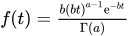 . The hyperparameters a and b are the shape and inverse-scale parameters of the gamma distribution, respectively. The default is
 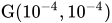 . You can set the parameters of the gamma distribution by specifying one or both of the following options, separated by a comma or a space:
 - IGAMMA<(options)>
-
specifies an inverse gamma prior
 with the density
  . The hyperparameters a and b are the shape and scale parameters of the inverse gamma distribution, respectively. The default is
  for the normal likelihood with an identity link, and
  for all other models. You can set the parameters of the inverse gamma distribution by specifying one or both of the following options, separated by a comma or a space:
 - IMPROPER
specifies an improper prior with the density
 proportional to
  .
. -
UNIFORM<(options)>
UNIF<(options)> -
specifies a uniform prior,
 , for the scale parameter. You can set the lower and upper bounds of the uniform distribution by specifying one or both of the following options, separated by a comma or a space:
For the normal likelihood with an identity link, the prior for the scale parameter is always an inverse gamma, and the default is
. Any other prior specification is ignored if the prior is not an inverse gamma. For any other likelihood or link function, you can choose a gamma prior, an inverse gamma prior, an improper prior, or a uniform prior. The default is the improper prior.