The CAUSALMED Procedure
Evaluating Causal Mediation Effects
In general, the CAUSALMED procedure computes causal mediation effects and decompositions that are conditioned on specific levels of covariates. In addition, some of the causal mediation effects are defined at specific levels (numerical or categorical) of treatment, control, and mediator variables. Therefore, it is important to understand how to set these variable levels for evaluating causal mediation effects that meet your research goals.
This section explains the roles of treatment, control, mediator, and covariate levels in defining and computing causal mediation effects. It shows how you can use the options in the EVALUATE statement to specify these levels, and it describes the default levels that the CAUSALMED procedure uses.
Suppose that T represents a treatment variable that has a causal effect on an outcome variable Y. Furthermore, suppose that M represents a mediator variable, which is affected by T and has a causal effect on Y, and that C represents a generic covariate that confounds the causal treatment and mediation effects.
The roles of the treatment, control, mediator, and covariate levels in defining causal mediation effects are as follows:
The level
 of the treatment variable T is the level that you designate as the treatment condition for all the effects and decompositions that are computed. For example, if the variable T represents the dosage level of a drug,
  mg is the dosage level that defines the treatment condition. For a binary treatment variable, researchers usually define as 1 to represent the presence of the treatment.
 The level
 of the treatment variable T is the level that you designate as the reference or control condition for all the effects and decompositions that are computed. For example, if the variable T represents the dosage level of a drug,
  mg is the dosage level that defines the control condition. For a binary treatment variable, researchers usually define as 0 to represent the absence of treatment.
 The level
 of the mediator variable M is the level that you designate to compute the controlled direct effect. For binary mediator variables, researchers usually define as 0 so that they can evaluate the controlled direct effect by holding the mediator value at the "absence" level.
 The levels c of the covariates are the conditional covariate values in the formulas for computing causal mediation effects.
In general, specifying covariate levels c, the treatment level (of the treatment variable), or the control level (of the treatment variable) changes the estimates of all mediation effects and decompositions. Specifying the controlled level  of the mediator variable does not change the estimates of the total effect (TE), the natural direct effect (NDE), or the natural indirect effect (NIE). But it does change the estimates of the controlled direct effect (CDE) and the reference interaction (IRF).
Default Settings of Treatment and Control Levels
For binary treatment variables, PROC CAUSALMED uses the first level of the variable as the default treatment level and the second (last) level of the variable as the default control level. In other words, the first level of a binary treatment variable takes the role of and the second level takes the role of .
For continuous or ordinal treatment variables, researchers habitually set levels of and in such a way that their difference is 1. Such a habitual setting serves well for linear models, including linear regression analysis and linear structural equation modeling. The associated regression coefficient (or effect) is defined as the change in the outcome Y for a unit change in the predictor T. In linear models, the effect on Y depends only on the difference between and but not on the levels of and themselves.
However, with nonlinear models, binary responses, and interaction effects, the computation of causal mediation effects and decompositions does, in general, depend on the levels of and . Using different sets of and (even if their difference remains constant) leads to numerically different estimates of causal mediation effects. By default, PROC CAUSALMED sets the treatment and control levels around the center of the distribution of the treatment variable. That is,
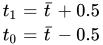
where  is the sample mean of the treatment variable. This sample mean value is treated as fixed when computing standard errors.
You can define your own treatment and control levels for evaluating causal mediation effects and decompositions. For example, instead of using a single unstandardized unit as the treatment amount, you can use one standard deviation,
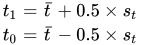
where  is the sample standard deviation of the treatment variable. This sample standard deviation is treated as fixed when computing standard errors.
PROC CAUSALMED enables you to set the treatment and control levels either on an unstandardized scale or on a standardized scale. Table 5 presents more options for setting these levels.
Default Settings of the Controlled Mediator Level
For binary mediator variables, PROC CAUSALMED uses the second (last) level of the variable as the default controlled (baseline) level, , of the mediator variable. This is consistent with the way that you specify the mediator model in the MEDIATOR statement. That is, by default, the procedure models the probability of the event indicated by the first level of the mediator variable.
For continuous or ordinal mediator variables, PROC CAUSALMED uses the sample mean of M as the default controlled mediator level, , when evaluating causal mediation effects. Table 5 presents more options for setting this level.
Covariate Levels and Their Default Settings
When you specify the effects of confounder covariates in the COVAR statement, the CAUSALMED procedure computes mediation effects conditionally at specific levels of the covariates. You can provide one or more EVALUATE statements to request that these effects be computed at specified settings that are of interest in your study. However, whether or not you provide an EVALUATE statement, the CAUSALMED procedure uses the sample means of the covariates to compute "overall" measures of causal mediation effects, which are displayed in the "Summary of Effects" table. For an illustration, see Example 38.2.
Although the means of ordinal and continuous covariates are well defined, less apparent is how to define the mean levels of categorical covariates and any interaction terms that might be included in the model.
To illustrate this, suppose that C1 is a continuous covariate and C2 is a categorical covariate that has three levels: 1, 2, and 3. Also suppose that there are six observations for C1 and C2:
C1    C2
1     1
2     1
3     2
4     2
5     3
6     3
All other variables are not shown.
The following design matrix for the linear predictor contains one column for C1, three columns for C2, and three columns for the interaction of the two variables:
C1    C2         C1 x C2
1     1  0  0    1  0  0
2     1  0  0    2  0  0
3     0  1  0    0  3  0
4     0  1  0    0  4  0
5     0  0  1    0  0  5
6     0  0  1    0  0  6
The parameterization shown here for C2 is represented internally in PROC CAUSALMED. You are not required to use this coding in the input.
The marginal means of the seven columns are 3.5, 1/3, 1/3, 1/3, 1.5, 3.5, and 5.5, respectively. By default, PROC CAUSALMED substitutes these means for covariate levels in the formulas for computing mediation effects and decompositions.
Substitution of marginal means makes intuitive sense when the models for Y and M are both linear. In this case, the computed causal mediated effects and decompositions can be interpreted as marginal effects. However, causal mediation effects that are computed in this way for nonlinear models (for example, binary responses with logit links) cannot be interpreted as marginal effects. Nonetheless, the default provides "overall" causal mediation effect estimates that are not entirely arbitrary. In a sense, the default method for categorical covariates provides an averaged categorical profile for evaluating causal mediation effects.
The default levels are not the only setting that you can consider. In this example, it would be interesting to conduct three causal mediation analyses, each of which is conditioned on a particular level of C2. You can request these analyses by specifying the following EVALUATE statements:
evaluate 'Conditional on Level 1 of C2' C1=mean C2='1';
evaluate 'Conditional on Level 2 of C2' C1=mean C2='2';
evaluate 'Conditional on Level 3 of C2' C1=mean C3='3';
Each EVALUATE statement generates a set of mediation analysis results.
In summary, you can use the EVALUATE statement to examine causal mediation effects that are conditional on the covariate levels that you specify. The CAUSALMED procedure displays these effects in the output together with overall effects that are conditioned on default settings; For illustrations, see Example 38.2 and Example 38.3. The next section describes the options for specifying treatment, control, mediator, and covariate levels.
Options for Setting Variables Levels
You use the EVALUATE statement to request the computation of causal mediation effects that are conditional on particular levels of variables. You can set the levels of variables by specifying an assignment of the following form:
var-key=value-key
Table 5 summarizes the options for var-key and value-key. The last two columns of Table 5 display the default value-key.
Table 5: EVALUATE Statement Options for Setting Variable Levels
| Level | var-key | value-key | Default value-key | ||
|---|---|---|---|---|---|
| Class Variable |
Count or Continuous Variable |
Class Variable |
Count or Continuous Variable |
||
| Treatment | |||||
| _TREATMENT | FIRST | MAX | FIRST | mean + 0.5 | |
| _A1 | LAST | MEAN | |||
| _T1 | 'level' | MIN | |||
| vname(TREATMENT) | value | ||||
| value(SD) | |||||
| Control | |||||
| _CONTROL | FIRST | MAX | LAST | mean – 0.5 | |
| _A0 | LAST | MEAN | |||
| _T0 | 'level' | MIN | |||
| vname(CONTROL) | value | ||||
| value(SD) | |||||
| Mediator | |||||
| _MEDIATOR | FIRST | MAX | LAST | mean | |
| _MSTAR | LAST | MEAN | |||
| vname | 'level' | MIN | |||
| value | |||||
| value(SD) | |||||
| Covariate | |||||
| vname | FIRST | MAX | mean | mean | |
| LAST | MEAN | or | |||
| MODE | MIN | MODE | |||
| 'level' | value | ||||
| value(SD) | |||||
In this table, vname represents an actual variable name, 'level' represents an actual level of a classification variable, and value represents an actual value of a numeric variable. In the last two columns, mean represents the sample mean of a continuous variable or the sample mean of a categorical variable (in dummy coding).
To specify an assignment, first look for the correct var-key in the second column. Different var-keys are used for the treatment, control, mediator, and covariate levels. In all cases, you can use the actual variable name of the variable. Next, select one of the value-keys in the third or fourth column to specify the desired variable level.
Repeat as many assignments as you need to specify the levels of various variables.
For example, suppose that there is a continuous treatment variable Exposure and a binary mediator variable PerceivedPain in your analysis. You identify the roles of these variables by using the following statements:
proc causalmed;
  class PerceivedPain;
  mediator PerceivedPain = Exposure;
  model outcome = PerceivedPain | Exposure;
To set the treatment level at the maximum sample value, the control level at the mean value, and the mediator at the level encoded as "none," you can use any of the following equivalent specifications:
evaluate 'Setting 1' _t1=max _t0=mean _mstar='none';
evaluate 'Setting 2' _treatment=max _control=mean _mediator='none';
evaluate 'Setting 3' Exposure(treatment)=max Exposure(control)=mean
                     PerceivedPain='none';
This example shows that you can specify a var-key either directly (by providing an actual variable name) or indirectly (by providing a keyword). Likewise, you can specify an value-key either directly (by providing an actual level) or indirectly (by providing a keyword). For a complete description of these options, see the EVALUATE statement.
Note that the default value-key for categorical covariates can be either the sample means (denoted as mean in the table) or MODE. If you do not assign any levels for categorical covariates in an EVALUATE statement, PROC CAUSALMED uses the sample means as the default levels for all unassigned categorical covariates that are specified in the COVAR statement. For example, the sample means of C1, C2, and C3 are the default levels used in the EVALUATE statement for the following specification:
proc causalmed;
  class C1 C2 C3;
  mediator M = T;
  model Y = T | M;
  covar C1 C2 C3 C4;
  evaluate 'Conditional on C4=max' C4=max M=mean;
If you assign the level of at least one categorical covariate in an EVALUATE statement, PROC CAUSALMED uses MODE as the default level for the unassigned categorical covariates that are specified in the COVAR statement. For example, the modal levels of C2 and C3 and the sample mean of C4 are the default levels used in the EVALUATE statement for the following specification:
proc causalmed;
  class C1 C2 C3;
  mediator M = T;
  model Y = T | M;
  covar C1 C2 C3 C4;
  evaluate 'Conditional on C1=1' C1='1' M=mean;
Multimodal Covariates
If you specify MODE as the value-key for a categorical covariate and it has multiple modes, an averaging process is used to compute the levels. To illustrate this, suppose that C1 is a continuous covariate and C2 and C3 are binary covariates. Also suppose that there are six observations with the following values for the three covariates:
C1    C2    C3
1     1     1
2     1     1
3     1     1
4     1     2
5     2     2
6     2     2
The design matrix for the linear predictor contains one column for C1 and two columns for each of C2 and C3:
C1    C2      C3
1     1  0    1  0
2     1  0    1  0
3     1  0    1  0
4     1  0    0  1
5     0  1    0  1
6     0  1    0  1
Suppose you specify the following EVALUATE statement:
evaluate 'Setting A' C1=mean C2=mode C3=mode;
The mean of C1 is 3.5. The modal class of C2 is '1', and hence the coding '1 0' is used as the covariate level for C2. However, because C3 has two modal classes,'1 0' and '0 1', these two modal class codings are averaged out with other levels. The final coding vector for the covariate levels is then the average of the following two vectors:
3.5   1  0  1  0
3.5   1  0  0  1
As a result, the averaged levels 3.5, 1, 0, 0.5, and 0.5 are used in the formulas for evaluating causal mediation effects and decompositions.
If an interaction between C1 and C3 is also modeled, then the average of the following two vectors is used:
3.5   1  0  1  0  3.5    0
3.5   1  0  0  1    0  3.5
Here the last two columns represent the interaction terms. As a result, the averaged levels 3.5, 1, 0, 0.5, 0.5, 1.75, and 1.75 are used in the formulas for evaluating causal mediation effects and decompositions.