The CAUSALTRT Procedure
PROC CAUSALTRT Statement
PROC CAUSALTRT <options>;
The PROC CAUSALTRT statement invokes the CAUSALTRT procedure. Table 2 summarizes the options available in the PROC CAUSALTRT statement.
Table 2: PROC CAUSALTRT Statement Options
| Option | Description |
|---|---|
| Input | |
| DATA= | Specifies the input data set |
| Response and Classification Variable Options | |
| DESCENDING | Sorts the outcome variable in reverse of the default order |
| NAMELEN= | Specifies the length of effect names |
| ORDER= | Specifies the sort order of the classification variables |
| RORDER= | Specifies the sort order of the outcome variable |
| Estimation and Analysis | |
| ATT | Estimates the average treatment effect for the treated |
| COVDIFFPS | Computes and displays standardized mean differences for the effects in the propensity score model |
| METHOD= | Specifies the estimation method |
| Displayed Output | |
| ALPHA= | Specifies the level for confidence limits |
| NOEFFECT | Suppresses all displayed output that involves the outcome variable |
| NOPRINT | Suppresses all displayed output |
| PALL | Displays all optional output |
| PLOTS | Produces ODS Graphics displays |
| POUTCOMEMOD | Displays outcome model parameter estimates |
| PPSMODEL | Displays propensity score model parameter estimates |
| Technical Details | |
| NLOPTIONS | Specifies optimization parameters for fitting the specified models |
| SINGULAR= | Specifies the singularity tolerance |
| THREADS= | Specifies the number of threads for the computation |
You can specify the following options.
- ALPHA=number
specifies a number to be used as the
 level for
  % confidence limits in the "Analysis of Causal Effect" table. The number must be between 0 and 1. This number is also used as the default level for propensity score and outcome model confidence limits. For the propensity score and outcome models, you can override this default level by specifying the ALPHA= options in the MODEL and PSMODEL statements, respectively. By default, ALPHA=0.05, which results in 95% confidence intervals.
 -
ATT
ATET estimates the average treatment effect for the treated. When this option is applied, it replaces the default estimation of the average treatment effect (ATE). For more information about the estimation methods implemented in the CAUSALTRT procedure and for comparisons between the average treatment effect and average treatment effect for the treated, see the sections Estimating the Average Treatment Effect for the Treated (ATT) and Causal Effects: Definitions, Assumptions, and Identification. This option can be used only when METHOD=IPWR or REGADJ.
- COVDIFFPS
-
computes weighted and unweighted standardized mean differences (between treatment and control conditions) and variance ratios (treatment to control) for the covariates (effects) in the propensity score model. This option is supported only for estimation methods that fit a propensity score model.
The results are displayed in the "Covariate Differences for Propensity Score Model" table. This table also includes columns for the weighted and unweighted mean and variance for propensity score model effects within each treatment condition; these columns are not displayed but are accessible if you save the table as an output data set by specifying the ODS OUTPUT statement. You can display these columns by modifying the corresponding template.
- DATA=SAS-data-set
names the SAS data set that contains the data to be analyzed. If you omit this option, the procedure uses the most recently created SAS data set.
-
DESCENDING
DESCEND
DESC sorts the levels of the outcome variable for a binary model in reverse of the specified order.
- METHOD= AIPW | IPW | IPWR | IPWS | REGADJ | IPWREG
-
specifies the method to use to estimate the potential outcomes and treatment effect. You can specify one of the following values:
- AIPW
performs a doubly robust estimation by using augmented inverse probability weighting. You must specify a model for the outcome variable in the MODEL statement and a model for the treatment assignment in the PSMODEL statement.
- IPW
uses a basic inverse probability weighting method. You must specify a model for the treatment assignment in the PSMODEL statement.
- IPWR
uses an inverse probability weighting method with ratio adjustment. You must specify a model for the treatment assignment in the PSMODEL statement.
- IPWS
uses an inverse probability weighting method with ratio and scale adjustments. You must specify a model for the treatment assignment in the PSMODEL statement.
- IPWREG
performs a doubly robust estimation by using inverse probability weighted regression adjustment. You must specify a model for the outcome variable in the MODEL statement and a model for the treatment assignment in the PSMODEL statement.
- REGADJ
uses regression adjustment. You must specify a model for the outcome variable in the MODEL statement.
For all estimation methods, you specify the outcome variable in the MODEL statement and the treatment variable in the PSMODEL statement. For more information about the estimation methods that the CAUSALTRT procedure implements, see the sections Estimating the Average Treatment Effect (ATE) and Estimating the Average Treatment Effect for the Treated (ATT).
- NAMELEN=n
specifies the maximum length of effect names in tables and output data sets to be n characters, where n is a value between 20 and 128. By default, NAMELEN=20.
- NLOPTIONS(nlo-options)
-
specifies options for the nonlinear optimization methods that are used for fitting the specified models. You can specify one or more of the following nlo-options separated by spaces:
-
ABSCONV=r
ABSTOL=r specifies an absolute function convergence criterion by which minimization stops when
 , where
  is the vector of parameters in the optimization and
  is the objective function. The default value of r is the negative square root of the largest double-precision value.
 -
ABSFCONV=r
ABSFTOL=r -
specifies an absolute function difference convergence criterion. Termination requires a small change of the function value in successive iterations,

where
denotes the vector of parameters that participate in the optimization and is the objective function. By default, ABSFCONV=0. -
ABSGCONV=r
ABSGTOL=r -
specifies an absolute gradient convergence criterion. Termination requires the maximum absolute gradient element to be small,
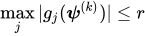
where
denotes the vector of parameters that participate in the optimization and  is the gradient of the objective function with respect to the jth parameter. By default, ABSGCONV=1E–7.
 -
FCONV=r
FTOL=r -
specifies a relative function convergence criterion. Termination requires a small relative change of the function value in successive iterations,
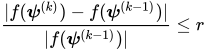
where
denotes the vector of parameters that participate in the optimization and is the objective function. By default, FCONV= , where by default FDIGITS is
  , where
  is the machine precision.
 -
GCONV=r
GTOL=r -
specifies a relative gradient convergence criterion. For all values of the TECHNIQUE= suboption except CONGRA, termination requires the normalized predicted function reduction to be small,
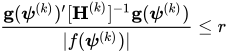
where
denotes the vector of parameters that participate in the optimization, is the objective function, and  is the gradient. When TECHNIQUE=CONGRA (for which a reliable Hessian estimate
  is not available), the following criterion is used:
By default, GCONV = 1E–8.
-
MAXFUNC=n
MAXFU=n -
specifies the maximum number of function calls in the optimization process. The default values are as follows, depending on the value of the TECHNIQUE= suboption:
TRUREG, NRRIDG, and NEWRAP: 125
QUANEW and DBLDOG: 500
CONGRA: 1,000
The optimization can terminate only after completing a full iteration. Therefore, the number of function calls that are actually performed can exceed n.
-
MAXITER=n
MAXIT=n -
specifies the maximum number of iterations in the optimization process. The default values are as follows, depending on the value of the TECHNIQUE= suboption:
TRUREG, NRRIDG, and NEWRAP: 50
QUANEW and DBLDOG: 200
CONGRA: 400
These default values also apply when n is specified as a missing value.
- MAXTIME=r
specifies an upper limit of r seconds of CPU time for the optimization process. Because the time is checked only at the end of each iteration, the actual run time might be longer than r. By default, CPU time is not limited.
- TECHNIQUE=CONGRA | DBLDOG | NEWRAP | NRRIDG | QUANEW | TRUREG
-
specifies the optimization technique to obtain maximum likelihood estimates. You can specify from the following values:
- CONGRA
performs a conjugate-gradient optimization.
- DBLDOG
performs a version of double-dogleg optimization.
- NEWRAP
performs a Newton-Raphson optimization that combines a line-search algorithm with ridging.
- NRRIDG
performs a Newton-Raphson optimization with ridging.
- QUANEW
performs a dual quasi-Newton optimization.
- TRUREG
performs a trust-region optimization.
By default, TECHNIQUE=NEWRAP.
For more information about these optimization methods, see the section Choosing an Optimization Algorithm in Chapter 20, Shared Concepts and Topics.
-
ABSCONV=r
- NOEFFECT
suppresses the display of all output that involves the outcome variable. This option is useful for investigating the balance of covariates between treatment conditions by exploring different propensity score models before displaying estimates for the causal effect. This option is effective only when METHOD=IPW, IPWR, or IPWS.
- NOPRINT
suppresses all displayed output. This option temporarily disables the Output Delivery System (ODS). For more information, see Chapter 23, Using the Output Delivery System.
- ORDER=DATA | FORMATTED | FREQ | INTERNAL
-
specifies the sort order for the levels of the classification variables (which are specified in the CLASS statement).
This option applies to the levels for all classification variables, except when you use the (default) ORDER=FORMATTED option with numeric classification variables that have no explicit format. In that case, the levels of such variables are ordered by their internal value.
The ORDER= option can take the following values:
Value of ORDER= Levels Sorted By DATA Order of appearance in the input data set FORMATTED External formatted value, except for numeric variables with no explicit format, which are sorted by their unformatted (internal) value FREQ Descending frequency count; levels with the most observations come first in the order INTERNAL Unformatted value By default, ORDER=FORMATTED. For ORDER=FORMATTED and ORDER=INTERNAL, the sort order is machine-dependent.
For more information about sort order, see the chapter on the SORT procedure in the Base SAS Procedures Guide and the discussion of BY-group processing in the "Grouping Data" section of SAS Programmers Guide: Essentials.
-
PALL
ALL -
PLOTS<(global-plot-options)><=plot-request>
PLOTS <(global-plot-options)>=(plot-request <…plot-request>) -
controls plots that are produced through ODS Graphics. For more information about controlling specific plots, see also the PLOTS options in the BOOTSTRAP and PSMODEL statements.
ODS Graphics must be enabled before plots can be requested. For example:
ods graphics on;

proc causaltrt plots=all method=ipwr;
   model y;
   psmodel trt = x1 x2;
run;

ods graphics off;
For more information about enabling and disabling ODS Graphics, see the section Enabling and Disabling ODS Graphics in Chapter 24, Statistical Graphics Using ODS.
You can specify the following plot-requests:
You can specify the following global-plot-options:
-
POUTCOMEMOD
PREGADJ displays parameter estimates for the outcome models for the control and treatment conditions.
-
PPSMODEL
PTREATMOD displays parameter estimates for the propensity score model.
- RORDER=DATA | FORMATTED | FREQ | INTERNAL
-
specifies the sort order for the levels of the outcome variable. In order for this option to apply, either the outcome variable must be specified in the CLASS statement or the DIST=BIN option must be specified in the MODEL statement. The following table shows how PROC CAUSALTRT interprets values of the RORDER= option.
Value of RORDER= Levels Sorted By DATA Order of appearance in the input data set. FORMATTED External formatted value, except for numeric variables that have no explicit format, which are sorted by their unformatted (internal) value. The sort order is machine-dependent. FREQ Descending frequency count. Levels that have the most observations come first in the order. INTERNAL Unformatted value. The sort order is machine-dependent. By default, RORDER=FORMATTED. The DESCENDING option in the PROC CAUSALTRT statement causes the response variable to be sorted in reverse of the order displayed in the previous table. For more information about sort order, see the chapter on the SORT procedure in the Base SAS Procedures Guide.
- SINGULAR=tolerance
specifies the tolerance for testing the singularity of a matrix, where tolerance must be between 0 and 1. By default, tolerance is 1E7 times the machine epsilon.
-
THREADS=n
NTHREADS=n specifies the number of threads for analytic computations and overrides the SAS system option THREADS | NOTHREADS. If you do not specify the THREADS= option or if you specify THREADS=0, the number of threads is determined from the number of CPUs in the host on which the analytic computations execute.