The HPLOGISTIC Procedure
MODEL Statement
MODEL response <(response-options)> = <effects> </ model-options>;
MODEL events / trials <(response-options)> = <effects> </ model-options>;
The MODEL statement defines the statistical model in terms of a response variable (the target) or an events/trials specification, model effects constructed from variables in the input data set, and options. An intercept is included in the model by default. You can remove the intercept with the NOINT option.
You can specify a single response variable that contains your binary, ordinal, or nominal response values. When you have binomial data, you can specify the events/trials form of the response, where one variable contains the number of positive responses (or events) and another variable contains the number of trials. Note that the values of both events and (trials – events) must be nonnegative and the value of trials must be positive.
For information about constructing the model effects, see the section Parameterization of Model Effects.
There are two sets of options in the MODEL statement. The response-options determine how the HPLOGISTIC procedure models probabilities for binary data. The model-options control other aspects of model formation and inference. Table 3 summarizes these options.
Table 3: MODEL Statement Options
| Option | Description |
|---|---|
| Response Variable Options | |
| DESCENDING | Reverses the response categories |
| EVENT= | Specifies the event category |
| ORDER= | Specifies the sort order |
| REF= | Specifies the reference category |
| Model Options | |
| ALPHA= | Specifies the confidence level for confidence limits |
| ASSOCIATION | Requests association statistics |
| CL | Requests confidence limits |
| CTABLE | Requests classification statistics |
| CUTPOINT= | Specifies a cutpoint for binary classification |
| DDFM= | Specifies the degrees-of-freedom method |
| INCLUDE= | Includes effects in all models for model selection |
| LACKFIT | Requests the Hosmer and Lemeshow goodness-of-fit test |
| LINK= | Specifies the link function |
| NOCHECK | Suppresses checking for infinite parameters |
| NOINT | Suppresses the intercept |
| OFFSET= | Specifies the offset variable |
| PRIOR= | Specifies prior probabilities |
| RSQUARE | Requests a generalized coefficient of determination |
| START= | Includes effects in the initial model for model selection |
| STB | Displays standardized estimates |
Response Variable Options
Response variable options determine how the HPLOGISTIC procedure models probabilities for binary and multinomial data.
You can specify the following response-options by enclosing them in parentheses after the response or trials variable.
Model Options
- ALPHA=number
requests that confidence intervals for each of the parameters be constructed with the confidence level 1–number. The value of number must be between 0 and 1. By default, number is equal to the value of the ALPHA= option in the PROC HPLOGISTIC statement, or 0.05 if you do not specify that option.
- ASSOCIATION
displays measures of association between predicted probabilities and observed responses for binary or binomial response models. These measures assess the predictive ability of the model. The displayed statistics are the concordance index c (the area under the ROC curve, AUC), Somers’ D statistic (Gini’s coefficient), the Goodman-Kruskal gamma statistic, and Kendall’s tau-a statistic. For more information, see the section Association Statistics.
- CL
requests that confidence limits be constructed for each of the parameter estimates. The confidence level is 0.95 by default; this can be changed with the ALPHA= option.
-
CTABLE<=SAS-data-set>
OUTROC<=SAS-data-set> -
displays a table for binary or binomial response models that contains the frequencies of observations that are correctly and incorrectly classified as events and nonevents, the sensitivity, the 1–specificity, the positive and negative predictive values, and the correct classification rate. For more information, see the section Classification Table and ROC Curves.
Classification is carried out by initially binning the predicted probabilities as discussed in the section The Hosmer-Lemeshow Goodness-of-Fit Test. The PRIOR= option does not change the reported predicted probabilities.
Because the number of cutpoints can be very large, you can store the table in an output data set. If you specify a PARTITION statement, then the statistics are computed by their roles, and a
Rolevariable indicates to which partition the computations belong. - CUTPOINT=value
specifies a value between 0 and 1 used for classifying observations when you have a binary or binomial response variable. If the predicted probability of an observation equals or exceeds the cutpoint, the observation is classified as an event; otherwise it is classified as a nonevent. This option affects computation of the misclassification rate and the true positive and true negative fractions in the "Partition Fit Statistics" table. By default, CUTPOINT=0.5.
- DDFM=RESIDUAL | NONE
-
specifies how degrees of freedom for statistical inference be determined in the "Parameter Estimates Table."
The HPLOGISTIC procedure always displays the statistical tests and confidence intervals in the "Parameter Estimates" tables in terms of a t test and a two-sided probability from a t distribution. With the DDFM= option, you can control the degrees of freedom of this t distribution and thereby switch between small-sample inference and large-sample inference based on the normal or chi-square distribution.
The default is DDFM=NONE, which leads to z-based statistical tests and confidence intervals. The HPLOGISTIC procedure then displays the degrees of freedom in the DF column as Infty, the p-values are identical to those from a Wald chi-square test, and the square of the t value equals the Wald chi-square statistic.
If you specify DDFM=RESIDUAL, the degrees of freedom are finite and determined by the number of usable frequencies (observations) minus the number of nonredundant model parameters. This leads to t-based statistical tests and confidence intervals. If the number of frequencies is large relative to the number of parameters, the inferences from the two degrees-of-freedom methods are almost identical.
-
INCLUDE=n
INCLUDE=single-effect
INCLUDE=(effects) forces effects to be included in all models. If you specify INCLUDE=n, then the first n effects that are listed in the MODEL statement are included in all models. If you specify INCLUDE=single-effect or if you specify a list of effects within parentheses, then the specified effects are forced into all models. The effects that you specify in the INCLUDE= option must be explanatory effects that are specified in the MODEL statement before the slash (/).
- LACKFIT<(DFREDUCE=r NGROUPS=G)>
-
performs the Hosmer and Lemeshow goodness-of-fit test (Hosmer and Lemeshow 2000) for binary response models.
The subjects are divided into at most G groups of roughly the same size, based on the percentiles of the estimated probabilities. You can specify G as any integer greater than or equal to 5; by default, G=10. Let the actual number of groups created be g. The discrepancies between the observed and expected number of observations in these g groups are summarized by the Pearson chi-square statistic, which is then compared to a chi-square distribution with g–r degrees of freedom. You can specify a nonnegative integer r that satisfies g–r
 1; by default, r=2.
 A small p-value suggests that the fitted model is not an adequate model. For more information, see the section The Hosmer-Lemeshow Goodness-of-Fit Test.
- LINK=keyword
-
specifies the link function for the model. The keywords and the associated link functions are shown in Table 5.
Table 5: Built-in Link Functions of the HPLOGISTIC Procedure
LINK= Link Function 
CLOGLOG | CLL Complementary log-log 
GLOGIT | GENLOGIT Generalized logit LOGIT Logit 
LOGLOG Log-log 
PROBIT Probit 
For the probit and cumulative probit links,
 denotes the quantile function of the standard normal distribution.
 If the response variable has more than two categories, the HPLOGISTIC procedure fits a model with a cumulative link function based on the specified link. However, if you specify LINK=GLOGIT, the procedure assumes a generalized logit model for nominal (unordered) data, regardless of the number of response categories.
- NOCHECK
disables the checking process that determines whether maximum likelihood estimates of the regression parameters exist. For more information, see the section Existence of Maximum Likelihood Estimates.
- NOINT
requests that no intercept be included in the model. An intercept is included by default. The NOINT option is not available in multinomial models.
- OFFSET=variable
specifies a variable to be used as an offset to the linear predictor. An offset plays the role of an effect whose coefficient is known to be 1. The offset variable cannot appear in the CLASS statement or elsewhere in the MODEL statement. Observations with missing values for the offset variable are excluded from the analysis.
-
PRIOR=SAS-data-set
PRIOR=number
PEVENT=number
PRIOR=ALLDATA -
specifies prior probabilities (prevalences) that are used for computing posterior predicted probabilities. When you know what percentage of the population has a rare event and you oversample that rare event, specifying the prior probabilities as the prevalence of events in your population enables you to produce posterior probabilities that reflect the population, not the data.
You can specify your priors in a SAS data set in which a _PRIOR_ column contains the prior probabilities. For events/trials MODEL statement syntax, this data set should also include an _OUTCOME_ variable that contains the values EVENT and NONEVENT; for single-trial syntax, this data set should include the response variable that contains the unformatted response categories. Each row of the data set contains a unique response variable level and its prior. For binary and binomial response models, you can instead specify the probability of an event as number. If you also specify a PARTITION statement, you can specify PRIOR=ALLDATA to compute the prevalences as the observed proportions of the response levels gathered across all the roles.
If your response Y takes values
 that have observed empirical probabilities
  , you specify priors
  , and your model predicted probabilities are
  , then the posterior predicted probabilities
  are computed as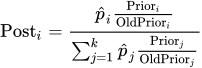
The POST= option in the OUTPUT statement writes the posterior to the output data set. If your priors are identical to the empirical probabilities, then the posteriors are identical to the model-predicted probabilities.
The priors do not affect the model-fitting process, but modify the "Classification" table statistics PPV, NPV, and Percent Correct as described in the section Classification Table and ROC Curves.
-
RSQUARE
R2 requests a generalized coefficient of determination (R square,
 ) and a scaled version thereof for the fitted model. The results are added to the "Fit Statistics" table. For more information about the computation of these measures, see the section Generalized Coefficient of Determination.
 -
START=n
START=single-effect
START=(effects) begins the selection process from the designated initial model for the FORWARD and STEPWISE selection methods. If you specify START=n, then the starting model includes the first n effects that are listed in the MODEL statement. If you specify START=single-effect or if you specify a list of effects within parentheses, then the starting model includes those specified effects. The effects that you specify in the START= option must be explanatory effects that are specified in the MODEL statement before the slash (/). The START= option is not available when you specify METHOD=BACKWARD in the SELECTION statement.
- STB
-
displays the standardized estimates for the parameters in the "Parameter Estimates" table. The standardized estimate of
 is given by
  , where
  is the total sample standard deviation for the ith explanatory variable and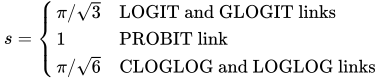
The sample standard deviations for parameters that are associated with CLASS variables are computed using their codings. The standardized estimates are not computed for the intercept parameters.