The HPPRINCOMP Procedure
PROC HPPRINCOMP Statement
PROC HPPRINCOMP <options>;
The PROC HPPRINCOMP statement invokes the HPPRINCOMP procedure. Optionally, it also identifies the input and output data sets, specifies the analyses to be performed, and controls displayed output. Table 1 summarizes the options available in the PROC HPPRINCOMP statement.
Table 1: PROC HPPRINCOMP Statement Options
| Option | Description |
|---|---|
| Specify Data Sets | |
| DATA= | Specifies the name of the input data set |
| OUT= | Specifies the name of the output data set |
| OUTSTAT= | Specifies the name of the output data set that contains various statistics |
| Specify Details of Analysis | |
| COV | Computes the principal components from the covariance matrix |
| METHOD= | Specifies the principal component extraction method to be used |
| N= | Specifies the number of principal components to be computed |
| NOINT | Omits the intercept from the model |
| PREFIX= | Specifies a prefix for naming the principal components |
| PARPREFIX= | Specifies a prefix for naming the residual variables |
| SINGULAR= | Specifies the singularity criterion |
| STD | Standardizes the principal component scores |
| VARDEF= | Specifies the divisor used in calculating variances and standard deviations |
| Suppress the Display of Output | |
| NOPRINT | Suppresses the display of all output |
The following list provides details about these options.
-
COVARIANCE
COV computes the principal components from the covariance matrix. If you omit the COV option, the correlation matrix is analyzed. The COV option causes variables that have large variances to be more strongly associated with components that have large eigenvalues, and it causes variables that have small variances to be more strongly associated with components that have small eigenvalues. You should not specify the COV option unless the units in which the variables are measured are comparable or the variables are standardized in some way.
- DATA=SAS-data-set
specifies the SAS data set to be analyzed. The data set can only be an ordinary SAS data set (raw data). If you omit the DATA= option, the HPPRINCOMP procedure uses the most recently created SAS data set.
- METHOD=EIG | ITERGS<(iter-options)> | NIPALS<(iter-options)>
-
specifies the principal component extraction method to be used. You can specify the following values:
By default, METHOD=EIG. If you specify METHOD=NIPALS or METHOD=ITERGS, the following options in the PROC HPPRINCOMP statement are ignored: COV, NOINT, OUT=, OUTSTAT=, PARPREFIX=, SINGULAR=, and STD.
- N=number
specifies the number of principal components to be computed. The default is the number of variables. The value of the N= option must be an integer greater than or equal to 0.
- NOINT
-
omits the intercept from the model. In other words, the NOINT option requests that the covariance or correlation matrix not be corrected for the mean. When you specify the NOINT option in the HPPRINCOMP procedure, the covariance matrix and, hence, the standard deviations are not corrected for the mean. If you want to obtain the standard deviations corrected for the mean, you can obtain them by using a procedure such as PROC MEANS.
If you use the NOINT option and also create an OUTSTAT= data set, the data set is TYPE=UCORR or TYPE=UCOV rather than TYPE=CORR or TYPE=COV.
- NOPRINT
suppresses the display of all output. This option temporarily disables the Output Delivery System (ODS). For more information, see Chapter 23, Using the Output Delivery System.
- OUT=SAS-data-set
-
creates an output SAS data set to contain observationwise principal component scores. To avoid data duplication when you have large data sets, the variables in the input data set are not included in the output data set; however, variables that are specified in the ID statement are included.
If you want to create a SAS data set in a permanent library, you must specify a two-level name. For more information about permanent libraries and SAS data sets, see SAS Programmers Guide: Essentials. For more information about OUT= data sets, see the section Output Data Sets.
- OUTSTAT=SAS-data-set
-
creates an output SAS data set to contain means, standard deviations, number of observations, correlations or covariances, eigenvalues, and eigenvectors. If you specify the COV option, the data set is TYPE=COV or TYPE=UCOV, depending on the NOINT option, and it contains covariances; otherwise, the data set is TYPE=CORR or TYPE=UCORR, depending on the NOINT option, and it contains correlations. If you specify the PARTIAL statement, the OUTSTAT= data set also contains R squares.
If you want to create a SAS data set in a permanent library, you must specify a two-level name. For more information about permanent libraries and SAS data sets, see SAS Programmers Guide: Essentials. For more information about OUTSTAT= data sets, see the section Output Data Sets.
- PREFIX=name
specifies a prefix for naming the principal components. By default, the names are
Prin1,Prin2, …,Prinn. If you specify PREFIX=Abc, the components are namedAbc1,Abc2,Abc3, and so on. The number of characters in the prefix plus the number of digits required to designate the variables should not exceed the current name length that is defined by the VALIDVARNAME= system option.-
PARPREFIX=name
PPREFIX=name
RPREFIX=name specifies a prefix for naming the residual variables in the OUT= data set and the OUTSTAT= data set. By default, the prefix is
R_. The number of characters in the prefix plus the maximum length of the variable names should not exceed the current name length that is defined by the VALIDVARNAME= system option.-
SINGULAR=p
SING=p specifies the singularity criterion, where
 . If a variable in a PARTIAL statement has an R square as large as
  when predicted from the variables listed before it in the statement, the variable is assigned a standardized coefficient of 0. By default, SINGULAR=1E–8.
 -
STANDARD
STD standardizes the principal component scores in the OUT= data set to unit variance. If you omit the STANDARD option, the scores have a variance equal to the corresponding eigenvalue. Note that the STANDARD option has no effect on the eigenvalues themselves.
- VARDEF=DF | N | WDF | WEIGHT | WGT
-
specifies the divisor to be used in calculating variances and standard deviations. By default, VARDEF=DF. The following table displays the values and associated divisors:
Table 2: continued
Value Divisor Formula DF Error degrees of freedom 
(before partialing) 
(after partialing) N Number of observations n WEIGHT | WGT Sum of weights 
WDF Sum of weights minus one 
(before partialing) 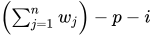
(after partialing)
In the formulas for VARDEF=DF and VARDEF=WDF, p is the number of degrees of freedom of the variables in the PARTIAL statement, and i is 0 if the NOINT option is specified and 1 otherwise.