The HPQUANTSELECT Procedure
MODEL Statement
MODEL dependent=<effects> / <options>;
The MODEL statement names the dependent variable and the explanatory effects, including covariates, main effects, interactions, and nested effects. If you omit the explanatory effects, PROC HPQUANTSELECT fits an intercept-only model.
After the keyword MODEL, the dependent (response) variable is specified, followed by an equal sign. The explanatory effects follow the equal sign. For information about constructing the model effects, see the section Parameterization of Model Effects.
You can specify the following options in the MODEL statement after a slash (/):
- CLB
requests the
 % upper and lower confidence limits for the parameter estimates. By default, the 95% limits are computed; you can use the ALPHA= option in the PROC HPQUANTSELECT statement to change the
  level.
 -
INCLUDE=n
INCLUDE=single-effect
INCLUDE=(effects) forces effects to be included in all models. If you specify INCLUDE=n, then the first n effects that are listed in the MODEL statement are included in all models. If you specify INCLUDE=single-effect or if you specify a list of effects within parentheses, then the specified effects are forced into all models. The effects that you specify in the INCLUDE= option must be explanatory effects that are defined in the MODEL statement.
- NOINT
suppresses the intercept term that is otherwise included in the model.
- ORDERSELECT
specifies that, for the selected model, effects be displayed in the order in which they first entered the model. If you do not specify this option, then effects in the selected model are displayed in the order in which they appear in the MODEL statement.
-
QUANTILES=number-list
QUANTILE=number-list specifies the quantile levels for the quantile regression. You can specify any number of quantile levels in
 . If you do not specify this option, the HPQUANTSELECT procedure performs median regression effect selection that corresponds to QUANTILE=0.5.
 - SPARSITY(<BF | HS> <IID>)
specifies the suboptions for estimating the sparsity function. You can specify the Bofinger method by using the BF suboption or the Hall-Sheather method by using the HS suboption. By default, the Hall-Sheather method is used. You can also specify the IID suboption to assume that the quantile regression errors satisfy the independently and identically distributed (iid) assumption. Let
 and
and  , respectively, denote the probability density function and the cumulative distribution function of the ith error for
  . The iid assumption means that there exist f and F such that
  and
and  . If you specify the IID option, the covariance matrix of the parameter estimates,
  , is adopted for computing the confidence limits and the Wald statistics, where
  . By default, the covariance matrix of the parameter estimates is non-iid and takes the sandwich form:
  where
where  For more information, see the section Details: HPQUANTSELECT Procedure.
 -
START=n
START=single-effect
START=(effects) begins the effect-selection process in the forward and stepwise selection methods from the initial model that you designate. If you specify START=n, then the starting model consists of the first n effects listed in the MODEL statement. If you specify START=single-effect or if you specify a list of effects within parentheses, then the starting model consists of these specified effects. The effects that you specify in the START= option must be explanatory effects defined in the MODEL statement. The START= option is not available when you specify METHOD=BACKWARD in the SELECTION statement.
- STB
-
produces standardized regression coefficients. A standardized regression coefficient is computed by dividing a parameter estimate by the ratio of the sample standard deviation of the dependent variable to the sample standard deviation of the regressor. If you use the INCLUDE= option to force some effects to be in the model, then the QTRSELECT procedure computes the sample standard deviation against all the effects that are forced in, as follows. Let
 denote the design submatrix of
  regressors that consists of all the effects that are forced in, and let
  denote the dependent variable or any regressor. Then the sample standard deviation of is computed as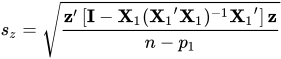
- TOL
produces tolerance values for the estimates. Tolerance for a parameter is defined as
 , where
  is obtained from the ordinary least squares regression of the parameter on all other parameters in the model.
 - VIF
produces variance inflation factors in the parameter estimates table. Variance inflation is the reciprocal of tolerance.