The MI Procedure
PROC MI Statement
PROC MI <options>;
The PROC MI statement invokes the MI procedure. Table 1 summarizes the options available in the PROC MI statement.
Table 1: Summary of Options in PROC MI Statement
| Option | Description |
|---|---|
| Data Sets | |
| DATA= | Specifies the input data set |
| OUT= | Specifies the output data set with imputed values |
| Imputation Details | |
| NIMPUTE= | Specifies the number of imputations |
| SEED= | Specifies the seed to begin random number generator |
| ROUND= | Specifies units to round imputed variable values |
| MAXIMUM= | Specifies maximum values for imputed variable values |
| MINIMUM= | Specifies minimum values for imputed variable values |
| MINMAXITER= | Specifies the maximum number of iterations to impute values in the specified range |
| SINGULAR= | Specifies the singularity criterion |
| Statistical Analysis | |
| ALPHA= | Specifies the level for the confidence interval,  |
| MU0= | Specifies means under the null hypothesis |
| Printed Output | |
| DISPLAYPATTERN= | Displays missing data patterns table |
| NOPRINT | Suppresses all displayed output |
| SIMPLE | Displays univariate statistics and correlations |
The following options can be used in the PROC MI statement. They are listed in alphabetical order.
-
ALPHA=

specifies that confidence limits be constructed for the mean estimates with confidence level
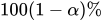 , where
  . The default is ALPHA=0.05.
 - DATA=SAS-data-set
names the SAS data set to be analyzed by PROC MI. By default, the procedure uses the most recently created SAS data set.
- DISPLAYPATTERN=ALL | NOMEANS | NONE
-
requests (except when DISPLAYPATTERN=NONE is specified) a missing data patterns table:
- ALL
displays both the missing data patterns and the group means in the table.
- NOMEANS
displays only the missing data patterns in the table.
- NONE
does not display the missing data patterns table.
By default, DISPLAYPATTERN=ALL.
- MAXIMUM=numbers
-
specifies maximum values for imputed variables. When an intended imputed value is greater than the maximum, PROC MI redraws another value for imputation. If only one number is specified, that number is used for all variables. If more than one number is specified, you must use a VAR statement, and the specified numbers must correspond to variables in the VAR statement. The default number is a missing value, which indicates no restriction on the maximum for the corresponding variable
The MAXIMUM= option is related to the MINIMUM= and ROUND= options, which are used to make the imputed values more consistent with the observed variable values. These options apply only if you use the MCMC method, the monotone regression method, or the FCS regression method. For more information about these methods, see the section Imputation Methods.
When you specify a maximum for the first variable only, you must also specify a missing value after the maximum. Otherwise, the maximum is used for all variables. For example, "MAXIMUM= 100 ." sets a maximum of 100 only for the first analysis variable and no maximum for the remaining variables. "MAXIMUM= . 100" sets a maximum of 100 only for the second analysis variable and no maximum for the other variables.
- MINIMUM=numbers
specifies the minimum values for imputed variables. When an intended imputed value is less than the minimum, PROC MI redraws another value for imputation. If only one number is specified, that number is used for all variables. If more than one number is specified, you must use a VAR statement, and the specified numbers must correspond to variables in the VAR statement. The default number is a missing value, which indicates no restriction on the minimum for the corresponding variable
- MINMAXITER=number
specifies the maximum number of iterations for imputed values to be in the specified range when the option MINIMUM or MAXIMUM is also specified. The default is MINMAXITER=100.
-
MU0=numbers
THETA0=numbers -
specifies the parameter values
 under the null hypothesis
  for the population means corresponding to the analysis variables. Each hypothesis is tested with a t test. If only one number is specified, that number is used for all variables. If more than one number is specified, you must use a VAR statement, and the specified numbers must correspond to variables in the VAR statement. The default is MU0=0.
 If a variable is transformed as specified in a TRANSFORM statement, then the same transformation for that variable is also applied to its corresponding specified MU0= value in the t test. If the parameter values
for a transformed variable are not specified, then a value of zero is used for the resulting after transformation. - NIMPUTE=n | PCTMISSING <( range-options )>
-
specifies the number of imputations. NIMPUTE=n specifies the number explicitly, and NIMPUTE=PCTMISSING uses the percentage of incomplete cases as the number of imputations. By default, NIMPUTE=25.
When you specify NIMPUTE=PCTMISSING, the number of imputations is the resulting percentage rounded up to an integer. You can use the following range-options to set the range for the number of imputations:
- MIN=min
specifies the minimum number of imputations, 2
 min 100. If the resulting number of imputations is less than min, then min is used. By default, MIN=5.
 - MAX=max
specifies the maximum number of imputations, 2
max 100. If the resulting number of imputations is greater than max, then max is used. By default, MAX=50.
The classic advice of using only a small number of imputations is based on considerations of relative efficiency. Recent studies, based on other aspects such as confidence intervals and p-values, recommend a much larger number of imputations. Thus, the default number of imputations has been increased from 5 to 25 in SAS/STAT 14.1. For more information, see the section Number of Imputations.
You can specify NIMPUTE=0 to skip the imputation. In this case, only tables of model information, missing data patterns, descriptive statistics (SIMPLE option), and the MLE from the EM algorithm (EM statement) are displayed.
- NOPRINT
suppresses the display of all output. Note that this option temporarily disables the Output Delivery System (ODS); see Chapter 23, Using the Output Delivery System, for more information.
- OUT=SAS-data-set
creates an output SAS data set that contains imputation results. The data set includes an index variable,
_Imputation_, to identify the imputation number. For each imputation, the data set contains all variables in the input data set with missing values being replaced by the imputed values. See the section Output Data Sets for a description of this data set.- ROUND=numbers
-
specifies the units to round variables in the imputation. If only one number is specified, that number is used for all continuous variables. If more than one number is specified, you must use a VAR statement, and the specified numbers must correspond to variables in the VAR statement. When the classification variables are listed in the VAR statement, their corresponding roundoff units are not used. The default number is a missing value, which indicates no rounding for imputed variables.
When specifying a roundoff unit for the first variable only, you must also specify a missing value after the roundoff unit. Otherwise, the roundoff unit is used for all variables. For example, the option "ROUND= 10 ." sets a roundoff unit of 10 for the first analysis variable only and no rounding for the remaining variables. The option "ROUND= . 10" sets a roundoff unit of 10 for the second analysis variable only and no rounding for other variables.
The ROUND= option sets the precision of imputed values. For example, with a roundoff unit of 0.001, each value is rounded to the nearest multiple of 0.001. That is, each value has three significant digits after the decimal point. See Example 82.3 for an illustration of this option.
- SEED=number
-
specifies a positive integer to start the pseudo-random number generator. The default is a value generated from reading the time of day from the computer’s clock. However, in order to duplicate the results under identical situations, you must use the same value of the seed explicitly in subsequent runs of the MI procedure.
The seed information is displayed in the "Model Information" table so that the results can be reproduced by specifying this seed with the SEED= option. You need to specify the same seed number in the future to reproduce the results.
- SIMPLE
displays simple descriptive univariate statistics and pairwise correlations from available cases. For a detailed description of these statistics, see the section Descriptive Statistics.
- SINGULAR=p
-
specifies the criterion for determining the singularity of a covariance matrix based on standardized variables, where
 . The default is SINGULAR=1E–8.
 Suppose that
 is a covariance matrix and v is the number of variables in . Based on the spectral decomposition
  , where
  is a diagonal matrix of eigenvalues
  ,
,  , v, where
  when
when  , and
, and  is a matrix with the corresponding orthonormal eigenvectors of as columns, is considered singular when an eigenvalue is less than
  , where the average
  .
.