Statistical Graphics Using ODS
Single Fit Function Using PROC SGPLOT
Polynomial Fit Function
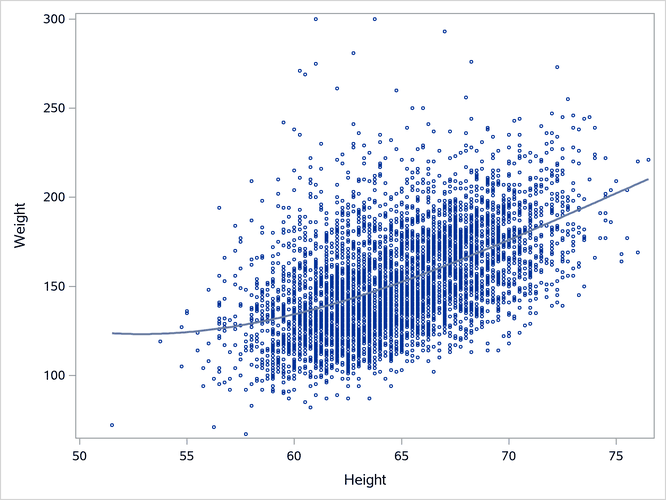
You can use PROC SGPLOT and the REG statement along with the DEGREE=3 option to fit a cubic polynomial function to your data. A cubic polynomial is smooth and has little freedom to follow nonlinear trends in the data. The model is

The following step creates the plot in Output 24.6.1:
proc sgplot data=sashelp.heart noautolegend;
   reg y=weight x=height / markerattrs=(size=3px) degree=3;
run;
Output 24.6.1: Cubic Polynomial Fit Plot
Penalized B-Spline Fit Function
You can use the PBSPLINE statement to fit penalized B-splines (Eilers and Marx 1996). Penalized B-splines draw a smooth curve through a scatter plot by using an automatic selection of the smoothing parameter. The following step creates the plot in Output 24.6.2:
ods graphics on / antialiasmax=6000;
proc sgplot data=sashelp.heart noautolegend;
   pbspline y=weight x=height / markerattrs=(size=3px);
run;
Output 24.6.2: Penalized B-Spline Fit Plot
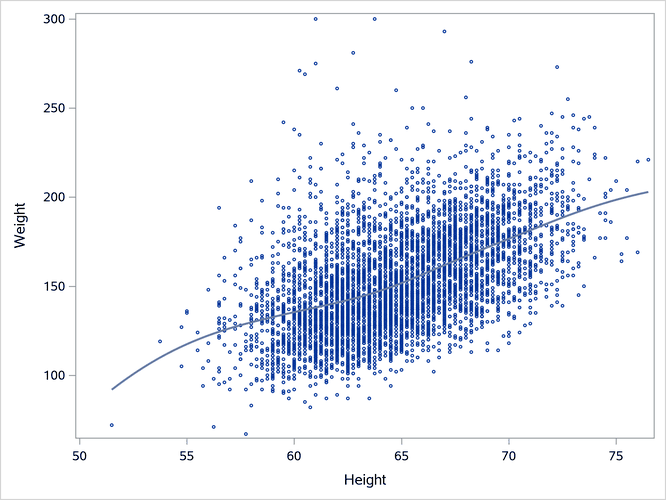
The resulting fit function is smooth and nonlinear. You do not need to know anything about the shape of the scatter plot. The PBSPLINE statement automatically finds a smooth fit while trying to guard against overfitting. It is not possible to write a simple equation for the model. For more information about how penalized B-splines work, see Chapter 126, The TRANSREG Procedure.
Note: Antialiasing smooths the elements of a graph. The ANTIALIASMAX=6000 option enables antialiasing through 6,000 elements. By default, antialiasing is disabled after 4,000 elements.
Loess Fit Function
You can use the LOESS statement to find a loess fit function (Cleveland, Devlin, and Grosse 1988). Loess is a locally weighted scatter plot smoothing. The following step creates the plot in Output 24.6.3:
ods graphics on / loessmaxobs=6000;
proc sgplot data=sashelp.heart noautolegend;
   loess y=weight x=height / markerattrs=(size=3px);
run;
Output 24.6.3: Loess Fit Plot
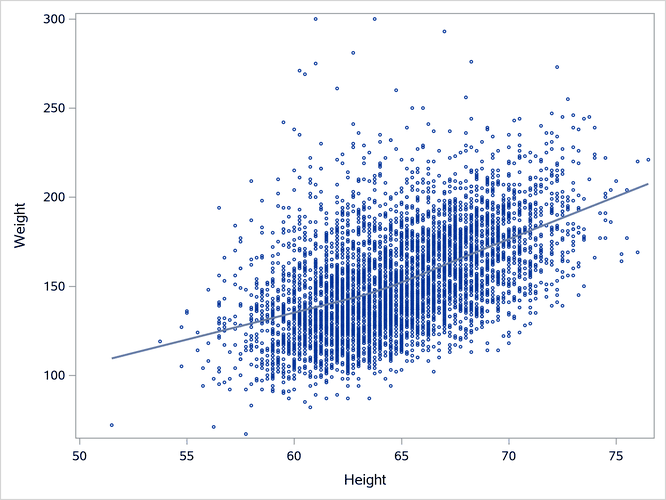
The loess fit is not a spline fit, but loess is similar to penalized B-splines in that it automatically tries to find a smooth fit while trying to guard against overfitting. It is not possible to write a simple equation for the model. For more information about loess, see Chapter 78, The LOESS Procedure.
Note: Loess becomes computationally expensive with larger data sets. The LOESSOBSMAX=6000 option enables loess fits through 6,000 observations. By default, loess fits are disabled after 5,000 observations.
B-Spline Fit Function
You can use the PBSPLINE statement along with the option SMOOTH=0 to fit B-splines (De Boor 1978), which are equivalent to piecewise-polynomial splines. You specify SMOOTH=0 to disable all automatic smoothing. You specify the number of knots in the NKNOTS= option.[13] You use fewer knots to create smoother plots and more knots to enable greater curvature. The following step creates the plot in Output 24.6.4:
proc sgplot data=sashelp.heart noautolegend;
   pbspline y=weight x=height / smooth=0 nknots=5 markerattrs=(size=3px);
run;
Output 24.6.4: B-Spline Fit Plot
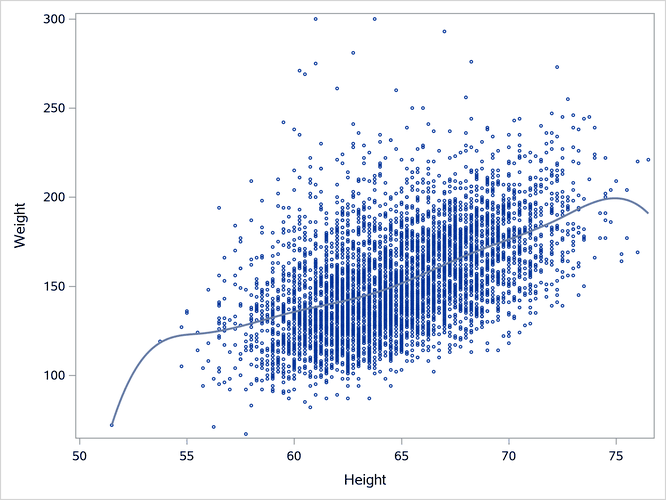
The resulting fit function is equivalent to those that you can obtain by using SPLINE (spline transformation), PSPLINE (polynomial-spline basis), or BSPLINE (B-spline basis) in the MODEL statement in PROC TRANSREG. Of all the functions shown in Output 24.6.2 through Output 24.6.4, the B-spline fit in Output 24.6.4 is most influenced by the extreme X values. The polynomial-spline model is

The values  through
  are the knots, which fall in the range of x. When
  is negative,
  ; otherwise,
  . The expression
  is called a truncated power function. Each knot term changes the cubic part of the polynomial as x advances beyond each knot.
For an introduction to piecewise-polynomial splines, see Smith (1979). For more information about how splines work, see Chapter 126, The TRANSREG Procedure.
[13] "Knots," without qualification, refer to interior knots—points inside the range of the x variable. Exterior knots, which are outside the range of the data, are explained in the section Interior and Exterior Knots.