The POWER Procedure
PAIREDMEANS Statement
PAIREDMEANS <options>;
The PAIREDMEANS statement performs power and sample size analyses for t tests, equivalence tests, and confidence interval precision involving paired samples.
Summary of Options
Table 19 summarizes the options available in the PAIREDMEANS statement.
Table 21: PAIREDMEANS Statement Options
| Option | Description |
|---|---|
| Define Analysis | |
| CI= | Specifies an analysis of precision of the confidence interval for the mean difference |
| DIST= | Specifies the underlying distribution assumed for the test statistic |
| TEST= | Specifies the statistical analysis |
| Specify Analysis Information | |
| ALPHA= | Specifies the significance level |
| LOWER= | Specifies the lower equivalence bound |
| NULLDIFF= | Specifies the null mean difference |
| NULLRATIO= | Specifies the null mean ratio |
| SIDES= | Specifies the number of sides and the direction of the statistical test or confidence interval |
| UPPER= | Specifies the upper equivalence bound |
| Specify Effects | |
| HALFWIDTH= | Specifies the desired confidence interval half-width |
| MEANDIFF= | Specifies the mean difference |
| MEANRATIO= | Specifies the geometric mean ratio, 
|
| PAIREDMEANS= | Specifies the two paired means |
| Specify Variability | |
| CORR= | Specifies the correlation between members of a pair |
| CV= | Specifies the common coefficient of variation |
| PAIREDCVS= | Specifies the coefficient of variation for each member of a pair |
| PAIREDSTDDEVS= | Specifies the standard deviation of each member of a pair |
| STDDEV= | Specifies the common standard deviation |
| Specify Sample Size | |
| NFRACTIONAL | Enables fractional input and output for sample sizes |
| NPAIRS= | Specifies the number of pairs |
| Specify Power and Related Probabilities | |
| POWER= | Specifies the desired power of the test |
| PROBTYPE= | Specifies the type of probability for the PROBWIDTH= option |
| PROBWIDTH= | Specifies the probability of obtaining a confidence interval half-width less than or equal to the value specified by the HALFWIDTH= |
| Control Ordering in Output | |
| OUTPUTORDER= | Controls the output order of parameters |
Table 22 summarizes the valid result parameters for different analyses in the PAIREDMEANS statement.
Table 22: Summary of Result Parameters in the PAIREDMEANS Statement
Dictionary of Options
- ALPHA=number-list
specifies the level of significance of the statistical test. The default is 0.05, which corresponds to the usual 0.05
 100% = 5% level of significance. For the TEST=EQUIV_DIFF and TEST=EQUIV_RATIO analyses, a value of
  corresponds to a 100(1 – 2 )% confidence interval. For all the other analyses, a value of corresponds to a 100(1 – )% confidence interval. If the CI= and SIDES=1 options are used, then the value must be less than 0.5. For information about specifying the number-list, see the section Specifying Value Lists in Analysis Statements.
 -
CI
CI=DIFF specifies an analysis of precision of the confidence interval for the mean difference. Instead of power, the relevant probability for this analysis is the probability of achieving a desired precision. Specifically, it is the probability that the half-width of the observed confidence interval will be at most the value specified by the HALFWIDTH= option. If neither the CI= option nor the TEST= option is used, the default is TEST=DIFF.
- CORR=number-list
-
specifies the correlation between members of a pair. For tests that assume lognormal data (DIST=LOGNORMAL, or TEST=RATIO or TEST=EQUIV_RATIO), values of the CORR= option are restricted to the range
 , where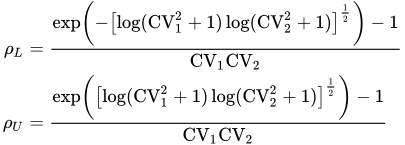
and
 are the
  coefficient of variation values specified by the CV= or PAIREDCVS= option. See Paired t Test for Mean Ratio with Lognormal Data (TEST=RATIO) for more information about this restriction on correlation values. For information about specifying the number-list, see the section Specifying Value Lists in Analysis Statements.
 - CV=number-list
specifies the coefficient of variation that is assumed to be common to both members of a pair. The coefficient of variation is defined as the ratio of the standard deviation to the mean on the original data scale. You can use this option only with DIST=LOGNORMAL. For information about specifying the number-list, see the section Specifying Value Lists in Analysis Statements.
- DIST=LOGNORMAL | NORMAL
specifies the underlying distribution assumed for the test statistic. NORMAL corresponds the normal distribution, and LOGNORMAL corresponds to the lognormal distribution. The default value (also the only acceptable value in each case) is NORMAL for TEST=DIFF, TEST=EQUIV_DIFF, and CI=DIFF; and LOGNORMAL for TEST=RATIO and TEST=EQUIV_RATIO.
- HALFWIDTH=number-list
specifies the desired confidence interval half-width. The half-width is defined as the distance between the point estimate and a finite endpoint. This option can be used only with the CI=DIFF analysis. For information about specifying the number-list, see the section Specifying Value Lists in Analysis Statements.
- LOWER=number-list
specifies the lower equivalence bound for the mean difference or mean ratio, in the original scale (whether DIST=NORMAL or DIST=LOGNORMAL). This option can be used only with the TEST=EQUIV_DIFF and TEST=EQUIV_RATIO analyses. For information about specifying the number-list, see the section Specifying Value Lists in Analysis Statements.
- MEANDIFF=number-list
specifies the mean difference, defined as the mean of the difference between the second and first members of a pair,
 . This option can be used only with the TEST=DIFF and TEST=EQUIV_DIFF analyses. When TEST=EQUIV_DIFF, the mean difference is interpreted as the treatment mean minus the reference mean. For information about specifying the number-list, see the section Specifying Value Lists in Analysis Statements.
 - MEANRATIO=number-list
specifies the geometric mean ratio, defined as
. This option can be used only with the TEST=RATIO and TEST=EQUIV_RATIO analyses. When TEST=EQUIV_RATIO, the mean ratio is interpreted as the treatment mean divided by the reference mean. For information about specifying the number-list, see the section Specifying Value Lists in Analysis Statements. -
NFRACTIONAL
NFRAC enables fractional input and output for sample sizes. See the section Sample Size Adjustment Options for information about the ramifications of the presence (and absence) of the NFRACTIONAL option.
- NPAIRS=number-list
specifies the number of pairs or requests a solution for the number of pairs by specifying a missing value (NPAIRS=.). For information about specifying the number-list, see the section Specifying Value Lists in Analysis Statements.
-
NULLDIFF=number-list
NULLD=number-list specifies the null mean difference. The default value is 0. This option can be used only with the TEST=DIFF analysis. For information about specifying the number-list, see the section Specifying Value Lists in Analysis Statements.
-
NULLRATIO=number-list
NULLR=number-list specifies the null mean ratio. The default value is 1. This option can be used only with the TEST=RATIO analysis. For information about specifying the number-list, see the section Specifying Value Lists in Analysis Statements.
- OUTPUTORDER=INTERNAL | REVERSE | SYNTAX
-
controls how the input and default analysis parameters are ordered in the output. OUTPUTORDER=INTERNAL (the default) arranges the parameters in the output according to the following order of their corresponding options:
The OUTPUTORDER=SYNTAX option arranges the parameters in the output in the same order in which their corresponding options are specified in the PAIREDMEANS statement. The OUTPUTORDER=REVERSE option arranges the parameters in the output in the reverse of the order in which their corresponding options are specified in the PAIREDMEANS statement.
- PAIREDCVS=grouped-number-list
specifies the coefficient of variation for each member of a pair. Unlike the CV= option, the PAIREDCVS= option supports different values for each member of a pair. The coefficient of variation is defined as the ratio of the standard deviation to the mean on the original data scale. Values must be nonnegative (unless both are equal to zero, which is permitted). This option can be used only with DIST=LOGNORMAL. For information about specifying the grouped-number-list, see the section Specifying Value Lists in Analysis Statements.
-
PAIREDMEANS=grouped-number-list
PMEANS=grouped-number-list specifies the two paired means, in the original scale. The means are arithmetic if DIST=NORMAL and geometric if DIST=LOGNORMAL. This option cannot be used with the CI=DIFF analysis. When TEST=EQUIV_DIFF, the means are interpreted as the reference mean (first) and the treatment mean (second). For information about specifying the grouped-number-list, see the section Specifying Value Lists in Analysis Statements.
-
PAIREDSTDDEVS=grouped-number-list
PAIREDSTDS=grouped-number-list
PSTDDEVS=grouped-number-list
PSTDS=grouped-number-list specifies the standard deviation of each member of a pair. Unlike the STDDEV= option, the PAIREDSTDDEVS= option supports different values for each member of a pair. This option can be used only with DIST=NORMAL. For information about specifying the grouped-number-list, see the section Specifying Value Lists in Analysis Statements.
- POWER=number-list
specifies the desired power of the test or requests a solution for the power by specifying a missing value (POWER=.). The power is expressed as a probability, a number between 0 and 1, rather than as a percentage. This option cannot be used with the CI=DIFF analysis. For information about specifying the number-list, see the section Specifying Value Lists in Analysis Statements.
- PROBTYPE=keyword-list
-
specifies the type of probability for the PROBWIDTH= option. A value of CONDITIONAL (the default) indicates the conditional probability that the confidence interval half-width is at most the value specified by the HALFWIDTH= option, given that the true mean difference is captured by the confidence interval. A value of UNCONDITIONAL indicates the unconditional probability that the confidence interval half-width is at most the value specified by the HALFWIDTH= option. you can use the alias GIVENVALIDITY for CONDITIONAL. The PROBTYPE= option can be used only with the CI=DIFF analysis. For information about specifying the keyword-list, see the section Specifying Value Lists in Analysis Statements.
- CONDITIONAL
width probability conditional on interval containing the mean
- UNCONDITIONAL
unconditional width probability
- PROBWIDTH=number-list
specifies the desired probability of obtaining a confidence interval half-width less than or equal to the value specified by the HALFWIDTH= option. A missing value (PROBWIDTH=.) requests a solution for this probability. The type of probability is controlled with the PROBTYPE= option. Values are expressed as probabilities (for example, 0.9) rather than percentages. This option can be used only with the CI=DIFF analysis. For information about specifying the number-list, see the section Specifying Value Lists in Analysis Statements.
- SIDES=keyword-list
-
specifies the number of sides (or tails) and the direction of the statistical test or confidence interval. For information about specifying the keyword-list, see the section Specifying Value Lists in Analysis Statements. Valid keywords and their interpretation for the TEST= analyses are as follows:
- 1
specifies a one-sided test, with the alternative hypothesis in the same direction as the effect.
- 2
specifies a two-sided test.
- U
specifies an upper one-sided test, with the alternative hypothesis indicating an effect greater than the null value.
- L
specifies a lower one-sided test, with the alternative hypothesis indicating an effect less than the null value.
For confidence intervals, SIDES=U refers to an interval between the lower confidence limit and infinity, and SIDES=L refers to an interval between minus infinity and the upper confidence limit. For both of these cases and SIDES=1, the confidence interval computations are equivalent. You cannot use the SIDES= option with the TEST=EQUIV_DIFF and TEST=EQUIV_RATIO analyses. By default, SIDES=2.
-
STDDEV=number-list
STD=number-list specifies the standard deviation assumed to be common to both members of a pair. This option can be used only with DIST=NORMAL. For information about specifying the number-list, see the section Specifying Value Lists in Analysis Statements.
-
TEST=DIFF | EQUIV_DIFF | EQUIV_RATIO | RATIO
TEST specifies the statistical analysis. TEST or TEST=DIFF (the default) specifies a paired t test on the mean difference. TEST=EQUIV_DIFF specifies an additive equivalence test of the mean difference by using a two one-sided tests (TOST) analysis (Schuirmann 1987). TEST=EQUIV_RATIO specifies a multiplicative equivalence test of the mean ratio by using a TOST analysis. TEST=RATIO specifies a paired t test on the geometric mean ratio. If neither the TEST= option nor the CI= option is used, the default is TEST=DIFF.
specifies the upper equivalence bound for the mean difference or mean ratio, in the original scale (whether DIST=NORMAL or DIST=LOGNORMAL). This option can be used only with the TEST=EQUIV_DIFF and TEST=EQUIV_RATIO analyses. For information about specifying the number-list, see the section Specifying Value Lists in Analysis Statements.
Restrictions on Option Combinations
To define the analysis, choose one of the following parameterizations:
To specify the means, choose one of the following parameterizations:
individual means (by using the PAIREDMEANS= option)
mean difference (by using the MEANDIFF= option)
mean ratio (by using the MEANRATIO= option)
To specify the coefficient of variation, choose one of the following parameterizations:
common coefficient of variation (by using the CV= option)
individual coefficients of variation (by using the PAIREDCVS= option)
To specify the standard deviation, choose one of the following parameterizations:
common standard deviation (by using the STDDEV= option)
individual standard deviations (by using the PAIREDSTDDEVS= option)
Option Groups for Common Analyses
This section summarizes the syntax for the common analyses that are supported in the PAIREDMEANS statement.
Paired t Test
You can express effects in terms of the mean difference and variability in terms of a correlation and common standard deviation, as in the following statements. Default values for the DIST=, SIDES=, NULLDIFF=, and ALPHA= options specify a two-sided test for no difference with a normal distribution and a significance level of 0.05.
proc power;
   pairedmeans test=diff
      meandiff = 7
      corr = 0.4
      stddev = 12
      npairs = 50
      power = .;
run;
You can also express effects in terms of individual means and variability in terms of correlation and individual standard deviations:
proc power;
   pairedmeans test=diff
      pairedmeans = 8 | 15
      corr = 0.4
      pairedstddevs = (7 12)
      npairs = .
      power = 0.9;
run;
Paired t Test of Mean Ratio with Lognormal Data
You can express variability in terms of correlation and a common coefficient of variation, as in the following statements. Defaults for the DIST=, SIDES=, NULLRATIO= and ALPHA= options specify a two-sided test of mean ratio = 1 assuming a lognormal distribution and a significance level of 0.05.
proc power;
   pairedmeans test=ratio
      meanratio = 7
      corr = 0.3
      cv = 1.2
      npairs = 30
      power = .;
run;
You can also express variability in terms of correlation and individual coefficients of variation:
proc power;
   pairedmeans test=ratio
      meanratio = 7
      corr = 0.3
      pairedcvs = 0.8 | 0.9
      npairs = 30
      power = .;
run;
Additive Equivalence Test for Mean Difference with Normal Data
The following statements demonstrate a sample size computation for a TOST equivalence test for a normal mean difference. Default values for the DIST= and ALPHA= options specify a normal distribution and a significance level of 0.05.
proc power;
   pairedmeans test=equiv_diff
      lower = 2
      upper = 5
      meandiff = 4
      corr = 0.2
      stddev = 8
      npairs = .
      power = 0.9;
run;
Multiplicative Equivalence Test for Mean Ratio with Lognormal Data
The following statements demonstrate a power computation for a TOST equivalence test for a lognormal mean ratio. Default values for the DIST= and ALPHA= options specify a lognormal distribution and a significance level of 0.05.
proc power;
   pairedmeans test=equiv_ratio
      lower = 3
      upper = 7
      meanratio = 5
      corr = 0.2
      cv = 1.1
      npairs = 50
      power = .;
run;
Confidence Interval for Mean Difference
By default CI=DIFF analyzes the conditional probability of obtaining the desired precision, given that the interval contains the true mean difference, as in the following statements. The defaults of SIDES=2 and ALPHA=0.05 specify a two-sided interval with a confidence level of 0.95.
proc power;
   pairedmeans ci = diff
      halfwidth = 4
      corr = 0.35
      stddev = 8
      npairs = 30
      probwidth = .;
run;