The PSMATCH Procedure
Propensity Score Weighting
The PSMATCH procedure provides the following methods for weighting observations when matching is not used:
inverse probability of treatment weighting (IPTW), which is used to estimate the ATE
stabilized IPTW-ATE weighting, which is used to estimate the ATE
ATT weighting (also called weighting by odds), which is used to estimate the ATT
If an observation has a propensity score close to 0 or 1, its large IPTW-ATE or ATT weight might incorrectly affect the results in the subsequent weighted outcome analysis. You can use the PSMATCH procedure to examine the observations that have extreme weights.
The PSMATCH procedure also provides methods for weighting matched observations when matching is used (see the section Weighting after Matching) and for weighting strata when stratification is used (see the section Weighting after Stratification).
Inverse Probability of Treatment Weighting
Inverse probability of treatment weighting (IPTW) computes the weight for the jth observation with propensity score  as
as

These weights can be used in an outcome analysis to estimate the average treatment effect,

by weighting the two groups up to the full population. For example, for a treated unit with  , the weight is 4, which represents four units in the full population.
Expected IPTW-ATE weights are given by

where  is the proportion of individuals in the treated group.
The PLOTS=WGTCLOUD option in the ASSESS statement requests cloud plots for weights. The plot displays a reference line at  for observations in the treated group and a reference line at
  for observations in the control group, where r=10 by default. You can specify a different value for r in the PLOTS=WGTCLOUD(REF=r) option.
You can request inverse probability of treatment weighting by specifying the WEIGHT=ATEWGT option in the PSWEIGHT statement, and then by specifying the WEIGHT= option in the OUTPUT statement to create a variable that contains these weights.
Stabilized IPTW-ATE Weighting
If a treated unit has a propensity score close to 0 or a control unit has a propensity score close to 1, the resulting IPTW-ATE weight can be large. If a few observations have very large weights, the resulting IPTW-ATE estimator has a large variance and is not approximately normally distributed (Robins, Hernan, and Brumback 2000, p. 554).
In order to reduce large variances of this type, Robins, Hernan, and Brumback (2000, p. 554) replace the IPTW-ATE weights with stabilized IPTW-ATE weights:

where is the proportion of individuals in the treated group.
That is, the stabilized IPTW-ATE weights are computed by multiplying the IPTW-ATE weights by the marginal probability of receiving the given treatment. Thus, the expected stabilized IPTW-ATE weight is 1 for observations in the treated group and for observations in the control group.
You can request stabilized inverse probability of treatment weighting by specifying the WEIGHT=ATEWGT(STABILIZE=YES) option in the PSWEIGHT statement, and then by specifying the WEIGHT= option in the OUTPUT statement to create a variable that contains these weights.
Observations that have large weights can be highly influential, and well-behaved stabilized weights should have a mean stabilized weight close to 1 and a maximum stabilized weight less than 10 (Stürmer et al. 2014, p. 578). That is, in each treatment group, ATE weights should have a mean IPTW-ATE weight close to their expected weight and a maximum IPTW-ATE weight less than 10 times their expected weight. For information about these expected weights, see the section Inverse Probability of Treatment Weighting.
ATT Weighting
ATT weighting (also called weighting by odds) computes the weight for the jth observation with propensity score as

These weights can be used in an outcome analysis to estimate the following average treatment effect for the treated units (individuals who actually receive treatment) by weighting the control group up to the treated group:

For example, for a control unit with  , the weight is 3, which represents three units in the treated population.
The expected weight for observations in the control group is given by
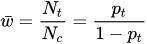
where is the proportion of individuals in the treated group.
The PLOTS=WGTCLOUD option in the ASSESS statement requests cloud plots for weights. The plot displays a reference line at  for observations in the control group, where r=10 by default. You can specify a different value for r with the PLOTS=WGTCLOUD(REF=r) option.
You can request ATT weighting by specifying the WEIGHT=ATTWGT option in the PSWEIGHT statement, and then by specifying the WEIGHT= option in the OUTPUT statement to create a variable that contains these weights.
Large Propensity Score Weights
For IPTW-ATE weighting, if a treated unit has a propensity score close to 0 or a control unit has a propensity score close to 1, the resulting weight can be large. Similarly, for ATT weighting, if a control unit has a propensity score close to 1, the resulting weight can also be large. If a few observations have very large weights, the resulting IPTW-ATE or ATT estimator has a large variance.
You can use the NLARGESTWGT=n option to request a table that displays the n largest IPTW-ATE or ATT weights in the treated and control groups. You can exclude observations that have extreme weights in the outcome analysis, and the inference is for the resulting subset of observations. You can examine the observations that have extreme weights, find the covariate values that are associated with these extreme weights, and exclude these observations based on covariate values for a more robust interpretation.
You can also specify the PSMIN= and PSMAX= suboptions in the REGION=ALLOBS option in the PROC PSMATCH statement and the OUT(OBS=REGION) option in the OUTPUT statement to exclude observations that have extreme weights from the output data set.