The RMSTREG Procedure
MODEL Statement
MODEL response <*censor (list)> = <effects> </ options>;
The MODEL statement specifies the response variables and the effects (explanatory variables). If you omit the explanatory variables, PROC RMSTREG fits an intercept-only model. An intercept term is included in the model by default. You can omit the intercept by specifying the NOINT option.
The name of the failure time variable precedes the equal sign. This name can optionally be followed by an asterisk, the name of the censoring variable, and a list of censoring values (separated by blanks or commas if there is more than one) enclosed in parentheses. If the censoring variable takes one of these values, the corresponding failure time is considered to be censored. Following the equal sign are the explanatory effects (sometimes called independent variables or covariates) for the model.
The censoring variable must be numeric, and the failure time variables must contain nonnegative values. Any observation that has a negative failure time is excluded from the analysis, as is any observation that has a missing value for any of the variables listed in the MODEL statement. Failure time variables in a SAS date format are not recommended, because the dates might be translated into negative numbers and consequently the corresponding observation would be discarded.
The effects in the MODEL statement consist of an explanatory variable or combination of variables. Explanatory variables can be continuous or classification variables. Classification variables can be character or numeric. Explanatory variables that represent nominal (classification) data must be declared in a CLASS statement. Interactions between variables can also be included as effects. Columns of the design matrix are automatically generated for classification variables and interactions. The syntax for specifying effects is the same as in the GLM procedure. For more information, see the section Specification of Effects in Chapter 53, The GLM Procedure.
Table 6 summarizes the options available in the MODEL statement.
Table 6: MODEL Statement Options
| Option | Description |
|---|---|
| ALPHA= | Sets the confidence coefficient |
| CONVERGE= | Sets the convergence criterion |
| CONVH= | Sets the relative Hessian convergence criterion |
| CORRB | Displays the parameter estimate correlation matrix |
| COVB | Displays the parameter estimate covariance matrix |
| LINK= | Specifies the link function |
| MAXITER= | Sets the maximum allowable number of iterations for all iterative computation processes |
| METHOD= | Specifies the estimation method for model fitting |
| NOFIT | Suppresses model fitting |
| NOINT | Excludes the intercept term from the model |
You can specify the following options after a slash (/).
- ALPHA=number
sets the confidence coefficient for parameter confidence intervals to 1–number. The value of number must be between 0 and 1. The default value of number is 0.05.
- CONVERGE=number
sets the convergence criterion for parameter estimation. If the maximum absolute difference between regression parameter estimates is less than the value of number in two successive iterations, convergence is declared. If the absolute value of a regression parameter estimate is greater than 0.08, then the absolute difference normalized by the regression parameter value is used instead of the absolute difference. The default value of number is 0.0001.
- CONVH=number
sets the relative Hessian convergence criterion. The value of number must be between 0 and 1. After convergence is determined by using the change in parameter criterion that is specified by the CONVERGE= option, the quantity
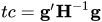 is computed and compared to number, where g is the gradient vector and H is the Hessian matrix for the model parameters. If tc is greater than number, a warning is issued that the relative Hessian convergence criterion has been exceeded. This criterion detects the occasional case where the change in parameter convergence criterion is satisfied but a global solution has not been attained. By default, CONVH=1E–4.
 - CORRB
- COVB
- LINK=keyword
-
specifies the link function in the model. You can specify the keywords shown in Table 7.
Table 7: Built-In Link Functions of the RMSTREG Procedure
Link LINK= Function 
IDENTITY | ID | LINEAR Identity 
LOG Log 
By default, LINK=LOG.
-
MAXITER=number
MAXIT=number sets the maximum allowable number of iterations for all iterative computation processes in PROC RMSTREG. By default, MAXITER=50.
- METHOD=method<(STRATA=variable)>
-
specifies the estimation method to fit the specified model. You can specify the methods shown in Table 8.
Table 8: Estimation Methods of the RMSTREG Procedure
By default, METHOD=PV. For METHOD=IPCW, you can compute stratified weights and use them in the iterative estimation process by specifying the STRATA=variable option. For more information about pseudovalue regression, see the section Pseudovalue Regression. For more information about the inverse probability censoring weighting techniques, see the section Inverse Probability Censoring Weighting Estimation.
- NOFIT
suppresses model fitting. If this option is specified along with other MODEL statement options, NOFIT takes precedence, and all other options are ignored.
- NOINT
excludes the intercept term from the model. An intercept is included unless you specify this option.