The SEQDESIGN Procedure
Example 110.10 Creating Two-Sided Error Spending Designs with and without Overlapping Lower and Upper  Boundaries
(View the complete code for this example.)
This example requests two three-stage group sequential designs for normally distributed statistics. Each design uses a power family error spending function with a specified two-sided alternative hypothesis  and early stopping only to accept the null hypothesis
  .
.
The first design uses the BETAOVERLAP=NOADJUST option to derive acceptance boundary values without adjusting for the possible overlapping of the lower and upper  boundaries computed from the two corresponding one-sided tests. The second design uses the BETAOVERLAP=ADJUST option to test the overlapping of the boundaries at each interim stage based on the two corresponding one-sided tests and then to set the boundary values at the stage to missing if overlapping occurs at that stage.
The following statements request a two-sided design with the BETAOVERLAP=NOADJUST option:
ods graphics on;
proc seqdesign altref=0.2 errspend;
   design nstages=3
          method=errfuncpow
          alt=twosided  stop=accept
          betaoverlap=noadjust
          beta=0.09
          ;
run;
The "Design Information" table in Output 110.10.1 displays design specifications and the derived statistics for the first design. With the specified alternative reference  , the maximum information is derived.
Output 110.10.1: Design Information
| Design Information | |
|---|---|
| Statistic Distribution | Normal |
| Boundary Scale | Standardized Z |
| Alternative Hypothesis | Two-Sided |
| Early Stop | Accept Null |
| Method | Error Spending |
| Boundary Key | Both |
| Alternative Reference | 0.2 |
| Number of Stages | 3 |
| Alpha | 0.05 |
| Beta | 0.09 |
| Power | 0.91 |
| Max Information (Percent of Fixed Sample) | 103.8789 |
| Max Information | 282.9328 |
| Null Ref ASN (Percent of Fixed Sample) | 79.20197 |
| Alt Ref ASN (Percent of Fixed Sample) | 102.1476 |
The "Boundary Information" table in Output 110.10.2 displays the information level, alternative reference, and boundary values. With a specified alternative reference  , the maximum information is derived from the procedure, and the actual information level at each stage is displayed in the table. By default (or equivalently if you specify BOUNDARYSCALE=STDZ), the alternative reference and boundary values are displayed with the standardized Z scale. The alternative reference at stage k is given by
  , where
  is the specified alternative reference and
  is the information level at stage k,
  .
.
Output 110.10.2: Boundary Information
| Boundary Information (Standardized Z Scale) Null Reference = 0 |
||||||
|---|---|---|---|---|---|---|
| _Stage_ | Alternative | Boundary Values | ||||
| Information Level | Reference | Lower | Upper | |||
| Proportion | Actual | Lower | Upper | Beta | Beta | |
| 1 | 0.3333 | 94.31094 | -1.94228 | 1.94228 | -0.08239 | 0.08239 |
| 2 | 0.6667 | 188.6219 | -2.74679 | 2.74679 | -0.90351 | 0.90351 |
| 3 | 1.0000 | 282.9328 | -3.36412 | 3.36412 | -1.92519 | 1.92519 |
The "Error Spending Information" table in Output 110.10.3 displays the cumulative error spending at each stage for each boundary.
Output 110.10.3: Error Spending Information
| Error Spending Information | |||||
|---|---|---|---|---|---|
| _Stage_ | Information Level |
Cumulative Error Spending | |||
| Lower | Upper | ||||
| Proportion | Alpha | Beta | Beta | Alpha | |
| 1 | 0.3333 | 0.00000 | 0.01000 | 0.01000 | 0.00000 |
| 2 | 0.6667 | 0.00000 | 0.04000 | 0.04000 | 0.00000 |
| 3 | 1.0000 | 0.02500 | 0.09000 | 0.09000 | 0.02500 |
With the STOP=ACCEPT option, the design does not stop at interim stages to reject  , and the
  spending at each interim stage is zero. For the power family error spending function with the default parameter
  , the beta spending at stage 1 is
  , and the cumulative beta spending at stage 2 is
  .
.
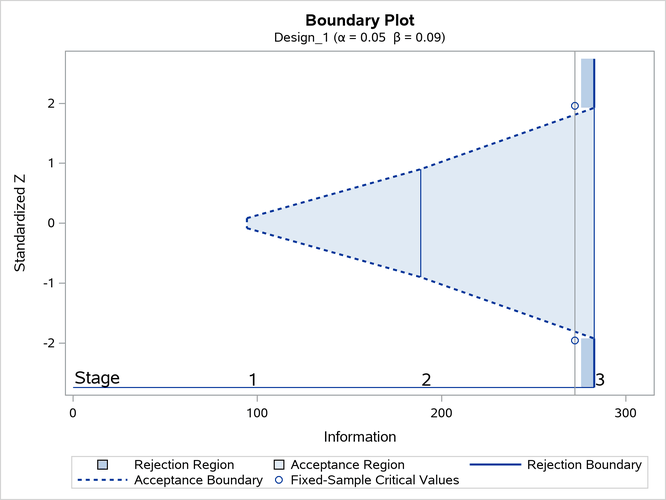
With ODS Graphics enabled, a detailed boundary plot with the acceptance and rejection regions is displayed, as shown in Output 110.10.4.
Output 110.10.4: Boundary Plot
The following statements request a two-sided design with the BETAOVERLAP=ADJUST option, which is the default:
ods graphics on;
proc seqdesign altref=0.2 errspend;
   design nstages=3
          method=errfuncpow
          alt=twosided
          stop=accept
          betaoverlap=adjust
          beta=0.09
          ;
run;
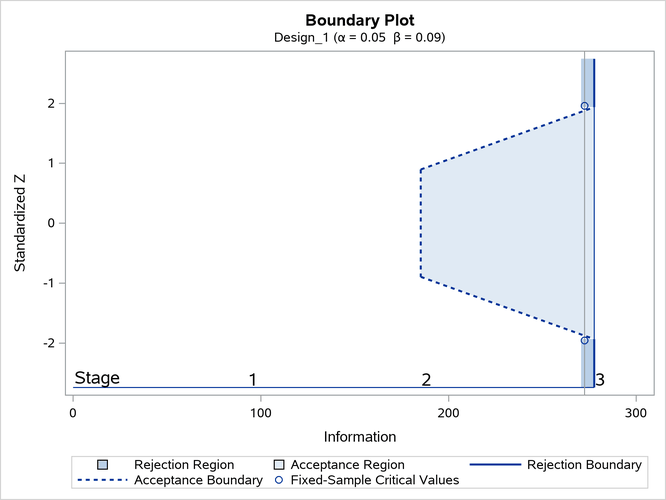
With the BETAOVERLAP=ADJUST option, the procedure first derives the usual boundary values for the two-sided design and then checks for overlapping of the boundaries for the two corresponding one-sided tests at each stage. If this type of overlapping occurs at a particular stage, the boundary values for that stage are set to missing, the spending values at that stage are reset to zero, and the spending values at subsequent stages are adjusted proportionally.
The boundary values without adjusting for the possible overlapping of the two one-sided boundaries are identical to the boundary values derived in the first design (with the BETAOVERLAP=NOADJUST option, as shown in Output 110.10.2). At stage 1, the upper boundary value for the corresponding one-sided test is

where is the upper alternative reference,  is the information level at stage 1, and
  is the spending at stage 1 (as shown in Output 110.10.3).
Similarly, the lower boundary value for the corresponding one-sided test is computed as 0.38407. Since the upper boundary value is less than the lower boundary at stage 1, overlapping occurs, and so the boundary values for the two-sided design are set to missing at stage 1.
With the boundary values set to missing at stage 1 and the spending  the spending values at subsequent interim stages are adjusted proportionally. In this example, the adjusted spending at stage 2 is computed as

where  is the cumulative spending at stage k before the adjustment,
  .
.
The "Design Information" table in Output 110.10.5 displays design specifications and derived statistics for the design.
Output 110.10.5: Design Information
| Design Information | |
|---|---|
| Statistic Distribution | Normal |
| Boundary Scale | Standardized Z |
| Alternative Hypothesis | Two-Sided |
| Early Stop | Accept Null |
| Method | Error Spending |
| Boundary Key | Both |
| Alternative Reference | 0.2 |
| Number of Stages | 3 |
| Alpha | 0.05 |
| Beta | 0.09 |
| Power | 0.91 |
| Max Information (Percent of Fixed Sample) | 101.9388 |
| Max Information | 277.649 |
| Null Ref ASN (Percent of Fixed Sample) | 80.56408 |
| Alt Ref ASN (Percent of Fixed Sample) | 100.792 |
The "Boundary Information" table in Output 110.10.6 displays the information levels, alternative references, and boundary values.
Output 110.10.6: Boundary Information
| Boundary Information (Standardized Z Scale) Null Reference = 0 |
||||||
|---|---|---|---|---|---|---|
| _Stage_ | Alternative | Boundary Values | ||||
| Information Level | Reference | Lower | Upper | |||
| Proportion | Actual | Lower | Upper | Beta | Beta | |
| 1 | 0.3333 | 92.54967 | -1.92405 | 1.92405 | . | . |
| 2 | 0.6667 | 185.0993 | -2.72102 | 2.72102 | -0.89469 | 0.89469 |
| 3 | 1.0000 | 277.649 | -3.33256 | 3.33256 | -1.93494 | 1.93494 |
The "Error Spending Information" table in Output 110.10.7 displays the cumulative error spending at each stage for each boundary.
Output 110.10.7: Error Spending Information
| Error Spending Information | |||||
|---|---|---|---|---|---|
| _Stage_ | Information Level |
Cumulative Error Spending | |||
| Lower | Upper | ||||
| Proportion | Alpha | Beta | Beta | Alpha | |
| 1 | 0.3333 | 0.00000 | 0.00000 | 0.00000 | 0.00000 |
| 2 | 0.6667 | 0.00000 | 0.03375 | 0.03375 | 0.00000 |
| 3 | 1.0000 | 0.02500 | 0.09000 | 0.09000 | 0.02500 |
With ODS Graphics enabled, a detailed boundary plot with the acceptance and rejection regions is displayed, as shown in Output 110.10.8.
Output 110.10.8: Boundary Plot