The SURVEYLOGISTIC Procedure
MODEL Statement
MODEL events/trials = <effects </ options>>;
MODEL variable <(v-options)> = <effects> </ options>;
The MODEL statement names the response variable and the explanatory effects, including covariates, main effects, interactions, and nested effects; see the section Specification of Effects in Chapter 53, The GLM Procedure, for more information. If you omit the explanatory variables, the procedure fits an intercept-only model. Model options can be specified after a slash (/).
Two forms of the MODEL statement can be specified. The first form, referred to as single-trial syntax, is applicable to binary, ordinal, and nominal response data. The second form, referred to as events/trials syntax, is restricted to the case of binary response data. The single-trial syntax is used when each observation in the DATA= data set contains information about only a single trial, such as a single subject in an experiment. When each observation contains information about multiple binary-response trials, such as the counts of the number of subjects observed and the number responding, then events/trials syntax can be used.
In the events/trials syntax, you specify two variables that contain count data for a binomial experiment. These two variables are separated by a slash. The value of the first variable, events, is the number of positive responses (or events), and it must be nonnegative. The value of the second variable, trials, is the number of trials, and it must not be less than the value of events.
In the single-trial syntax, you specify one variable (on the left side of the equal sign) as the response variable. This variable can be character or numeric. Options specific to the response variable can be specified immediately after the response variable with parentheses around them.
For both forms of the MODEL statement, explanatory effects follow the equal sign. Variables can be either continuous or classification variables. Classification variables can be character or numeric, and they must be declared in the CLASS statement. When an effect is a classification variable, the procedure enters a set of coded columns into the design matrix instead of directly entering a single column containing the values of the variable.
Response Variable Options
You specify the following options by enclosing them in parentheses after the response variable:
Model Options
Model options can be specified after a slash (/). Table 7 summarizes the options available in the MODEL statement.
Table 7: MODEL Statement Options
| Option | Description |
|---|---|
| Model Specification Options | |
| LINK= | Specifies link function |
| NOINT | Suppresses intercept(s) |
| OFFSET= | Specifies offset variable |
| Convergence Criterion Options | |
| ABSFCONV= | Specifies absolute function convergence criterion |
| FCONV= | Specifies relative function convergence criterion |
| GCONV= | Specifies relative gradient convergence criterion |
| XCONV= | Specifies relative parameter convergence criterion |
| MAXITER= | Specifies maximum number of iterations |
| NOCHECK | Suppresses checking for infinite parameters |
| RIDGING= | Specifies technique used to improve the log-likelihood function when its value is worse than that of the previous step |
| SINGULAR= | Specifies tolerance for testing singularity |
| TECHNIQUE= | Specifies iterative algorithm for maximization |
| Options for Adjustment to Variance Estimation | |
| VADJUST= | Chooses variance estimation adjustment method |
| Options for Confidence Intervals | |
| DF= | Specifies the degrees of freedom |
| ALPHA= | Specifies  for the for the 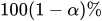 confidence intervals confidence intervals |
| CHISQ | Specifies the type of likelihood ratio chi-square test |
| CLPARM | Computes confidence intervals for parameters |
| CLODDS | Computes confidence intervals for odds ratios |
| Options for Display of Details | |
| CORRB | Displays correlation matrix |
| COVB | Displays covariance matrix |
| EXPB | Displays exponentiated values of estimates |
| GRADIENT | Displays gradients evaluated at null hypothesis |
| ITPRINT | Displays iteration history |
| NODUMMYPRINT | Suppresses "Class Level Information" table |
| PARMLABEL | Displays parameter labels |
| RSQUARE | Displays generalized  |
| STB | Displays standardized estimates |
The following list describes these options:
- ABSFCONV=value
-
specifies the absolute function convergence criterion. Convergence requires a small change in the log-likelihood function in subsequent iterations:

where
 is the value of the log-likelihood function at iteration i. See the section Convergence Criteria.
- ALPHA=value
sets the level of significance
for  %
confidence intervals for regression parameters or odds ratios. The value must be between 0 and 1. By default, is equal to the value of the ALPHA= option in the PROC SURVEYLOGISTIC statement, or
%
confidence intervals for regression parameters or odds ratios. The value must be between 0 and 1. By default, is equal to the value of the ALPHA= option in the PROC SURVEYLOGISTIC statement, or  if the ALPHA= option is not specified. This option has no effect unless confidence intervals for the parameters or odds ratios are requested.
 - CHISQ (FIRSTORDER | NOADJUST | SECONDORDER)
-
specifies the type of likelihood ratio chi-square test. If you specify CHISQ(FIRSTORDER) or CHISQ(SECONDORDER), PROC SURVEYLOGISTIC provides a first-order or second-order (Satterthwaite) Rao-Scott likelihood ratio chi-square test, which is a design-adjusted test. If you specify CHISQ(NOADJUST), the procedure computes a chi-square test without the Rao-Scott design correction.
If you do not specify the CHISQ option, the default test that PROC SURVEYLOGISTIC uses depends on the design and model as follows:
If you do not use a STRATA, CLUSTER, or REPWEIGHTS statement, then the default is CHISQ(NOADJUST).
If you use a STRATA, CLUSTER, or REPWEIGHTS statement, and you need to estimate only one parameter excluding the intercepts in the model, then the default is CHISQ(FIRSTORDER).
If you use a STRATA, CLUSTER, or REPWEIGHTS statement, and you need to estimate more than one parameter excluding the intercepts in the model, then the default is CHISQ(SECONDORDER).
For more information, see the section Rao-Scott Likelihood Ratio Chi-Square Test.
Note that unless you specify the DF=INFINITY option, PROC SURVEYLOGISTIC displays an F test instead of a chi-square test.
- CLODDS
requests confidence intervals for the odds ratios. Computation of these confidence intervals is based on individual t tests or Wald tests. The degrees of freedom for a t test is described in the section Degrees of Freedom. The confidence coefficient can be specified with the ALPHA= option. See the section Wald Confidence Intervals for Parameters for more information.
- CLPARM
requests confidence intervals for the parameters. Computation of these confidence intervals is based on the t tests or Wald tests. The degrees of freedom for a t test is described in the section Degrees of Freedom. You can specify the confidence level by using the ALPHA= option.
- CORRB
- COVB
- DF=types <(value)>
-
determines the denominator degrees of freedom (df) for F statistics in hypothesis testing, as well as the degrees of freedom in t tests for parameter estimates and odds ratio estimates, and for computing t distribution percentiles for confidence limits of these estimates.
You can specify type to be DESIGN, INFINITY, or PARMADJ. When you specify DF=DESIGN or DF=PARMADJ, you can optionally specify a positive value in parentheses to overwrite the default design degrees of freedom.
DF=PARMADJ is the default for the Taylor variance estimation method, and DF=DESIGN is the default for the replication variance estimation method.
For more information, see the section Degrees of Freedom.
If you specify both DF=DESIGN(value) in the MODEL statement and the DF= option in a REPWEIGHTS statement, PROC SURVEYLOGISTIC uses the value in DF=DESIGN(value) in the MODEL statement to determine the df and ignores the one in the REPWEIGHTS statement.
You can specify one of the following types:
-
EXPB
EXPEST displays the exponentiated values (e
 )
of the parameter estimates
)
of the parameter estimates  in the "Analysis of Maximum Likelihood Estimates" table for the logit model. These exponentiated values are the estimated odds ratios for the parameters corresponding to the continuous explanatory variables.
 - FCONV=value
-
specifies the relative function convergence criterion. Convergence requires a small relative change in the log-likelihood function in subsequent iterations:
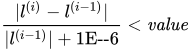
where
is the value of the log likelihood at iteration i. See the section Convergence Criteria for details. - GCONV=value
-
specifies the relative gradient convergence criterion. Convergence requires that the normalized prediction function reduction is small:
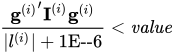
where
is the value of the log-likelihood function,  is the gradient vector, and
  the (expected) information matrix. All of these functions are evaluated at iteration i. This is the default convergence criterion, and the default value is 1E–8. For more information, see the section Convergence Criteria.
 - GRADIENT
displays the gradient vector, which is evaluated at the global null hypothesis.
- ITPRINT
displays the iteration history of the maximum-likelihood model fitting. The ITPRINT option also displays the last evaluation of the gradient vector and the final change in the
 .
. -
LINK=keyword
L=keyword -
specifies the link function that links the response probabilities to the linear predictors. You can specify one of the following keywords. The default is LINK=LOGIT.
- CLOGLOG
specifies the complementary log-log function. PROC SURVEYLOGISTIC fits the binary complementary log-log model for binary response and fits the cumulative complementary log-log model when there are more than two response categories. Aliases: CCLOGLOG, CCLL, CUMCLOGLOG.
- GLOGIT
specifies the generalized logit function. PROC SURVEYLOGISTIC fits the generalized logit model where each nonreference category is contrasted with the reference category. You can use the response variable option REF= to specify the reference category.
- LOGIT
specifies the cumulative logit function. PROC SURVEYLOGISTIC fits the binary logit model when there are two response categories and fits the cumulative logit model when there are more than two response categories. Aliases: CLOGIT, CUMLOGIT.
- PROBIT
specifies the inverse standard normal distribution function. PROC SURVEYLOGISTIC fits the binary probit model when there are two response categories and fits the cumulative probit model when there are more than two response categories. Aliases: NORMIT, CPROBIT, CUMPROBIT.
See the section Link Functions and the Corresponding Distributions for details.
- MAXITER=n
specifies the maximum number of iterations to perform. By default, MAXITER=25. If convergence is not attained in n iterations, the displayed output created by the procedure contains results that are based on the last maximum likelihood iteration.
- NOCHECK
disables the checking process to determine whether maximum likelihood estimates of the regression parameters exist. If you are sure that the estimates are finite, this option can reduce the execution time when the estimation takes more than eight iterations. For more information, see the section Existence of Maximum Likelihood Estimates.
- NODUMMYPRINT
suppresses the "Class Level Information" table, which shows how the design matrix columns for the CLASS variables are coded.
- NOINT
suppresses the intercept for the binary response model or the first intercept for the ordinal response model.
- OFFSET=name
names the offset variable. The regression coefficient for this variable is fixed at 1.
- PARMLABEL
displays the labels of the parameters in the "Analysis of Maximum Likelihood Estimates" table.
- RIDGING=ABSOLUTE | RELATIVE | NONE
specifies the technique used to improve the log-likelihood function when its value in the current iteration is less than that in the previous iteration. If you specify the RIDGING=ABSOLUTE option, the diagonal elements of the negative (expected) Hessian are inflated by adding the ridge value. If you specify the RIDGING=RELATIVE option, the diagonal elements are inflated by a factor of 1 plus the ridge value. If you specify the RIDGING=NONE option, the crude line search method of taking half a step is used instead of ridging. By default, RIDGING=RELATIVE.
- RSQUARE
-
requests a generalized
measure for the fitted model.
For more information, see the section Generalized Coefficient of Determination.
- SINGULAR=value
specifies the tolerance for testing the singularity of the Hessian matrix (Newton-Raphson algorithm) or the expected value of the Hessian matrix (Fisher scoring algorithm). The Hessian matrix is the matrix of second partial derivatives of the log likelihood. The test requires that a pivot for sweeping this matrix be at least this value times a norm of the matrix. Values of the SINGULAR= option must be numeric. By default, SINGULAR=
 .
. - STB
-
displays the standardized estimates for the parameters for the continuous explanatory variables in the "Analysis of Maximum Likelihood Estimates" table. The standardized estimate of
 is given by
  , where
  is the total sample standard deviation for the ith explanatory variable and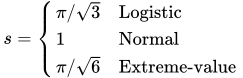
For the intercept parameters and parameters associated with a CLASS variable, the standardized estimates are set to missing.
-
TECHNIQUE=FISHER | NEWTON
TECH=FISHER | NEWTON specifies the optimization technique for estimating the regression parameters. NEWTON (or NR) is the Newton-Raphson algorithm and FISHER (or FS) is the Fisher scoring algorithm. Both techniques yield the same estimates, but the estimated covariance matrices are slightly different except for the case where the LOGIT link is specified for binary response data. The default is TECHNIQUE=FISHER. If the LINK=GLOGIT option is specified, then Newton-Raphson is the default and only available method. See the section Iterative Algorithms for Model Fitting for details.
- VADJUST=DF | MOREL <(Morel-options)> | NONE
-
specifies an adjustment to the variance estimation for the regression coefficients.
By default, PROC SURVEYLOGISTIC uses the degrees of freedom adjustment VADJUST=DF.
If you do not want to use any variance adjustment, you can specify the VADJUST=NONE option. You can specify the VADJUST=MOREL option for the variance adjustment proposed by Morel (1989).
You can specify the following Morel-options within parentheses after the VADJUST=MOREL option:
-
ADJBOUND=

sets the upper bound coefficient
in the variance adjustment. This upper bound must be positive. By default, the procedure uses  . See the section Adjustments to the Variance Estimation for more details on how this upper bound is used in the variance estimation.
 -
DEFFBOUND=

sets the lower bound of the estimated design effect in the variance adjustment. This lower bound must be positive. By default, the procedure uses
 . See the section Adjustments to the Variance Estimation for more details about how this lower bound is used in the variance estimation.
-
ADJBOUND=
- XCONV=value
-
specifies the relative parameter convergence criterion. Convergence requires a small relative parameter change in subsequent iterations:
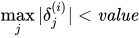
where
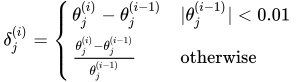
and
 is the estimate of the jth parameter at iteration i. See the section Convergence Criteria for details.