The SURVEYPHREG Procedure

Variance Ratios and Standard Error Ratios

PROC SURVEYPHREG provides options to compute the following variance ratios and standard error ratios:

  • If you specify the VARRATIO=MODEL option, then the procedure computes the variance ratio of the estimated regression parameter ModifyingAbove beta With caret Subscript j as StartFraction ModifyingAbove upper V With caret left-parenthesis ModifyingAbove beta With caret Subscript j Baseline right-parenthesis Over ModifyingAbove upper V With caret Subscript upper M Baseline left-parenthesis ModifyingAbove beta With caret Subscript j Baseline right-parenthesis EndFraction, where ModifyingAbove upper V With caret left-parenthesis ModifyingAbove beta With caret Subscript j Baseline right-parenthesis, the estimated variance of ModifyingAbove beta With caret Subscript j, uses the complete design information and ModifyingAbove upper V With caret Subscript upper M Baseline left-parenthesis ModifyingAbove beta With caret Subscript j Baseline right-parenthesis is the jth diagonal element of the observed information matrix script upper I Superscript negative 1 Baseline left-parenthesis ModifyingAbove bold-italic beta With caret right-parenthesis.

  • If you specify the VARRATIO=IND option, then the procedure computes the variance ratio of the estimated regression parameter ModifyingAbove beta With caret Subscript j as StartFraction ModifyingAbove upper V With caret left-parenthesis ModifyingAbove beta With caret Subscript j Baseline right-parenthesis Over ModifyingAbove upper V With caret Subscript IND Baseline left-parenthesis ModifyingAbove beta With caret Subscript j Baseline right-parenthesis EndFraction, where ModifyingAbove upper V With caret left-parenthesis ModifyingAbove beta With caret Subscript j Baseline right-parenthesis, the estimated variance of ModifyingAbove beta With caret Subscript j, uses the complete design information and ModifyingAbove upper V With caret Subscript IND Baseline left-parenthesis ModifyingAbove beta With caret Subscript j Baseline right-parenthesis is the jth diagonal element of ModifyingAbove upper V With caret Subscript IND Baseline left-parenthesis ModifyingAbove bold-italic beta With caret right-parenthesis. ModifyingAbove upper V With caret Subscript IND Baseline left-parenthesis ModifyingAbove bold-italic beta With caret right-parenthesis is the sandwich variance estimator, which ignores the strata and the clusters and is computed as

    ModifyingAbove upper V With caret Subscript IND Baseline left-parenthesis ModifyingAbove bold-italic beta With caret right-parenthesis equals script upper I Superscript negative 1 Baseline left-parenthesis ModifyingAbove bold-italic beta With caret right-parenthesis StartSet StartFraction n Over n minus 1 EndFraction left-parenthesis 1 minus f right-parenthesis sigma-summation Underscript h Endscripts sigma-summation Underscript i Endscripts sigma-summation Underscript j Endscripts left-parenthesis bold e Subscript h i j Baseline minus bold e overbar Subscript dot dot dot Baseline right-parenthesis prime left-parenthesis bold e Subscript h i j Baseline minus bold e overbar Subscript dot dot dot Baseline right-parenthesis EndSet script upper I Superscript negative 1 Baseline left-parenthesis ModifyingAbove bold-italic beta With caret right-parenthesis

    where e Subscript h i j are the weighted score residuals, f is the overall sampling fraction, and n is the number of observation units. The three sums are over the observation units (j) across the PSUs (i) and the strata (h).

  • If you specify the VARRATIO=SRSWR option, then the procedure computes the variance ratio of the estimated regression parameter ModifyingAbove beta With caret Subscript j as StartFraction ModifyingAbove upper V With caret left-parenthesis ModifyingAbove beta With caret Subscript j Baseline right-parenthesis Over ModifyingAbove upper V With caret Subscript SRSWR Baseline left-parenthesis ModifyingAbove beta With caret Subscript j Baseline right-parenthesis EndFraction, where ModifyingAbove upper V With caret left-parenthesis ModifyingAbove beta With caret Subscript j Baseline right-parenthesis, the estimated variance of ModifyingAbove beta With caret Subscript j, uses the complete design information and ModifyingAbove upper V With caret Subscript SRSWR Baseline left-parenthesis ModifyingAbove beta With caret Subscript j Baseline right-parenthesis is the jth diagonal element of ModifyingAbove upper V With caret Subscript SRSWR Baseline left-parenthesis ModifyingAbove bold-italic beta With caret right-parenthesis. ModifyingAbove upper V With caret Subscript SRSWR Baseline left-parenthesis ModifyingAbove bold-italic beta With caret right-parenthesis is given by

    ModifyingAbove upper V With caret Subscript SRSWR Baseline left-parenthesis ModifyingAbove bold-italic beta With caret right-parenthesis equals script upper I Superscript negative 1 Baseline left-parenthesis ModifyingAbove bold-italic beta With caret right-parenthesis sigma-summation Underscript h Endscripts sigma-summation Underscript i Endscripts sigma-summation Underscript j Endscripts w Subscript h i j Baseline slash n

    where w Subscript h i j is the observation weight for unit (h, i, j) and n is the number of observation units. The three sums are over the observation units (j) across the PSUs (i) and the strata (h). The matrix left-bracket ModifyingAbove upper V With caret Subscript SRSWR Baseline left-parenthesis ModifyingAbove bold-italic beta With caret right-parenthesis right-bracket Superscript negative 1 Baseline ModifyingAbove upper V With caret left-parenthesis ModifyingAbove bold-italic beta With caret right-parenthesis is often called the generalized design effect matrix (Rao, Scott, and Skinner 1998).

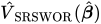
  • If you specify the VARRATIO=SRSWOR option, then the procedure computes the variance ratio of the estimated regression parameter ModifyingAbove beta With caret Subscript j as StartFraction ModifyingAbove upper V With caret left-parenthesis ModifyingAbove beta With caret Subscript j Baseline right-parenthesis Over ModifyingAbove upper V With caret Subscript SRSWOR Baseline left-parenthesis ModifyingAbove beta With caret Subscript j Baseline right-parenthesis EndFraction, where ModifyingAbove upper V With caret left-parenthesis ModifyingAbove beta With caret Subscript j Baseline right-parenthesis, the estimated variance of ModifyingAbove beta With caret Subscript j, uses the complete design information and ModifyingAbove upper V With caret Subscript SRSWOR Baseline left-parenthesis ModifyingAbove beta With caret Subscript j Baseline right-parenthesis is the jth diagonal element of ModifyingAbove upper V With caret Subscript SRSWOR Baseline left-parenthesis ModifyingAbove bold-italic beta With caret right-parenthesis. ModifyingAbove upper V With caret Subscript SRSWOR Baseline left-parenthesis ModifyingAbove bold-italic beta With caret right-parenthesis is given by

    ModifyingAbove upper V With caret Subscript SRSWR Baseline left-parenthesis ModifyingAbove bold-italic beta With caret right-parenthesis equals left-parenthesis 1 minus f right-parenthesis script upper I Superscript negative 1 Baseline left-parenthesis ModifyingAbove bold-italic beta With caret right-parenthesis sigma-summation Underscript h Endscripts sigma-summation Underscript i Endscripts sigma-summation Underscript j Endscripts w Subscript h i j Baseline slash n

    where w Subscript h i j is the observation weight for unit (h, i, j), f is the overall sampling fraction, and n is the number of observation units. The three sums are over the observation units (j) across the PSUs (i) and the strata (h).

For Taylor series or bootstrap variance estimation, PROC SURVEYPHREG determines the value of f, the overall sampling fraction, based on the RATE= or TOTAL= option. If you do not specify either of these options, PROC SURVEYPHREG assumes that the value of f is negligible and does not use a finite population correction in the analysis. If you specify RATE=value, PROC SURVEYPHREG uses value as the overall sampling fraction f. If you specify TOTAL=value, PROC SURVEYPHREG computes f as the ratio of the number of PSUs in the sample to the specified total.

If you specify stratum sampling rates by using the RATE=SAS-data-set option, then PROC SURVEYPHREG computes stratum totals based on these stratum sampling rates and the number of sample PSUs in each stratum. The procedure sums the stratum totals to form the overall total and then computes f as the ratio of the number of sample PSUs to the overall total. Alternatively, if you specify stratum totals with the TOTAL=SAS-data-set option, then PROC SURVEYPHREG sums these totals to compute the overall total. The overall sampling fraction f is then computed as the ratio of the number of sample PSUs to the overall total.

The replication methods do not use the finite population correction factor left-parenthesis 1 minus f right-parenthesis in the denominator.

Standard error ratios are computed as the square root of the variance ratios.

Last updated: December 09, 2022