The SURVEYPHREG Procedure
MODEL Statement
MODEL response <*censor (list)> = effects </ options>;
MODEL (t1, t2) <*censor(list)> = effects </ options>;
The MODEL statement identifies the variables to be used as the failure time variables, the optional censoring variable, and the explanatory effects, including covariates, main effects, and interactions. For more information about explanatory effects, see the section Specification of Effects in Chapter 53, The GLM Procedure. A note of caution: specifying the effect T*A in the MODEL statement, where T is the time variable and A is a CLASS variable, does not make the effect time-dependent.
You must specify exactly one MODEL statement. Specify either of two forms of MODEL syntax: the first form allows one time variable, and the second form allows two time variables for the counting process style of input. For more information on the counting process style of input, see the section Counting Process Style of Input.
For the first form of the MODEL statement, the name of the failure time variable (response) precedes the equal sign. This variable can optionally be followed by an asterisk, the name of the censoring variable, and a list of censoring values (separated by blanks or commas if there is more than one) enclosed in parentheses. If the censoring variable takes on one of these values, the corresponding failure time is considered to be censored. The variables following the equal sign (effects) are the explanatory variables (sometimes called independent variables or covariates) for the model.
Instead of using a single failure time variable, the second form of the MODEL statement identifies a pair of failure time variables. Their names are enclosed in parentheses, and they signify the endpoints of a semiclosed interval  during which the subject is at risk. If the censoring variable takes on one of the censoring values, the time t2 is considered to be censored.
The censoring variable must be numeric. The failure time variable must contain nonnegative values. Any observation that has a negative failure time is excluded from the analysis, as is any observation that has a missing value for any of the variables listed in the MODEL statement. For more information, see the section Missing Values. Failure time variables that have a SAS date format are not recommended because the dates might be translated into negative numbers and consequently the corresponding observation would be discarded.
Table 8 summarizes the options available in the MODEL statement, which can be specified after a slash (/).
Table 8: MODEL Statement Options
| Option | Description |
|---|---|
| ALPHA= | Specifies  for the for the 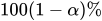 confidence limits confidence limits |
| CLPARM | Computes confidence limits for regression parameters |
| COVB | Displays covariance matrix |
| DF= | Specifies the denominator degrees of freedom |
| ENTRYTIME= | Specifies the delayed entry time variable |
| FIRTH | Specifies Firth’s penalized likelihood method |
| HESS | Displays the Hessian matrix |
| INVHESS | Displays the inverse of the Hessian matrix |
| RISKLIMITS | Computes confidence limits for the exponentials of the regression parameters |
| SERATIO= | Computes the ratio of two standard errors for the regression coefficients |
| SINGULAR= | Specifies tolerance for testing singularity |
| TIES= | Specifies the method of handling ties in failure times |
| VADJUST= | Specifies a variance adjustment factor |
| VARRATIO= | Computes the ratio of two variances for the regression coefficients |
-
ALPHA=
-
sets the level of the confidence limits for the estimated regression parameters and the hazard ratios. The value of alpha must be between 0 and 1, and the default is 0.05. A confidence level of
produces  % confidence limits. The default of ALPHA=0.05 produces 95% confidence limits.
 The ALPHA= option has no effect unless you also specify the CLPARM or RISKLIMITS option.
- CLPARM
produces confidence limits for regression parameters of Cox proportional hazards models. You can specify the confidence coefficient by using the ALPHA= option. Classification main effects that use parameterizations other than REF, EFFECT, or GLM are ignored. For more information, see the section Confidence Intervals.
- COVB
displays the estimated covariance matrix of the parameter estimates.
- DF=value | keyword <(value)>
-
specifies the denominator degrees of freedom for hypothesis tests, specifies the degrees of freedom for confidence limits, and requests adjustments to the Wald test statistics. If you specify a value, it must be a nonnegative number.
In the description that follows, d denotes the usual degrees of freedom computed from the survey data by using the number of strata, clusters, or replicate weights. For more information, see the section Degrees of Freedom.
By default, DF=PARMADJ when you use the Taylor series linearized variance estimator, and DF=DESIGN when you use the replication variance estimator. Alternatively, you can specify a nonnegative value for the degrees of freedom, or you can specify one of the following keywords:
-
ENTRYTIME=variable
ENTRY=variable specifies the name of the variable that represents the left-truncation time. This option has no effect when the counting process style of input is specified. For more information, see the section Left-Truncation of Failure Times.
- FIRTH
performs Firth’s penalized maximum likelihood estimation (Mukhopadhyay 2020; Heinze and Schemper 2001; Firth 1993). This method is useful when the likelihood is monotone—that is, the likelihood converges to a finite value, but at least one estimate diverges to infinity. This option is available only for the Breslow likelihood. When you specify this option, the likelihood ratio statistics are computed using the unadjusted likelihoods, and only the Wald test for the overall null hypothesis is available. For more information, see the section Firth’s Modification for Maximum Likelihood Estimation.
- HESS
- INVHESS
displays the inverse of the Hessian matrix that is evaluated at the estimated regression parameters.
-
RISKLIMITS
RL produces confidence limits for hazard ratios and related quantities. For more information, see the section Hazard Ratios. You can specify the confidence coefficient by using the ALPHA= option. You must take great care with any interpretation of the estimates and their confidence limits if interaction effects are involved in the model or if parameterizations other than REF, EFFECT, or GLM are used.
- SERATIO=ALL | MODEL | IND | SRSWOR | SRSWR
-
computes the ratio of two standard errors for the regression parameters. The standard error in the numerator uses the complete design information that you specify. You can specify the following options to compute different standard errors for the denominator:
- SINGULAR=value
specifies the singularity criterion for determining linear dependencies in the set of explanatory variables. The default value is
 .
. - TIES=method
-
specifies how to handle ties in the failure time. You can specify the following methods:
If there are no ties, both methods result in the same likelihood and yield identical estimates. By default, TIES=BRESLOW, which is the most efficient method when there are no ties.
- VADJUST=DF | PARMADJ | NONE | AVGREPSS
-
specifies variance adjustment factors. You can specify the following keywords:
-
DF
PARMADJ requests the degrees-of-freedom adjustment
 in the computation of the matrix
  for the Taylor series linearization variance estimation.
 - NONE
excludes the degrees-of-freedom adjustment
from the computation of the matrix for the Taylor series linearization variance estimation. By default, VADJUST=NONE. - AVGREPSS
use the average sum of squares from all the usable replicate samples for the unusable replicates. This option is applicable only for the jackknife replication method. VADJUST=AVGREPSS multiplies the default jackknife variance estimator by the factor
 , where
  is the number of usable replicates and R is the total number of replicates. For more information, see the section Variance Adjustment Factors.
-
DF
- VARRATIO=ALL | MODEL | IND | SRSWOR | SRSWR
-
computes the ratio of two variances for the regression parameters. The variance in the numerator uses the complete design information. You can specify the following options to compute different variances for the denominator: