The SURVEYREG Procedure
CONTRAST Statement
CONTRAST ’label’ effect values </ options>;
CONTRAST ’label’ effect values <…effect values> </ options>;
The CONTRAST statement provides custom hypothesis tests for linear combinations of the regression parameters  , where
  is the vector or matrix you specify and
  is the vector of regression parameters. Thus, to use this feature, you must be familiar with the details of the model parameterization used by PROC SURVEYREG. For information about the parameterization, see the section GLM Parameterization of Classification Variables and Effects in Chapter 20, Shared Concepts and Topics.
Each term in the MODEL statement, called an effect, is a variable or a combination of variables. You can specify an effect with a variable name or a special notation by using variable names and operators. For more details about how to specify an effect, see the section Specification of Effects in Chapter 53, The GLM Procedure.
For each CONTRAST statement, PROC SURVEYREG computes Wald’s F test. The procedure displays this value with the degrees of freedom, and identifies it with the contrast label. The numerator degrees of freedom for Wald’s F test equal rank(). The denominator degrees of freedom equal the number of clusters (or the number of observations if there is no CLUSTER statement) minus the number of strata. Alternatively, you can use the DF= option in the MODEL statement to specify the denominator degrees of freedom.
You can specify any number of CONTRAST statements, but they must appear after the MODEL statement.
In the CONTRAST statement,
- label
identifies the contrast in the output. A label is required for every contrast specified. Labels must be enclosed in single quotes.
- effect
identifies an effect that appears in the MODEL statement. You can use the INTERCEPT keyword as an effect when an intercept is fitted in the model. You do not need to include all effects that are in the MODEL statement.
- values
are constants that are elements of
associated with the effect.
You can specify the following options in the CONTRAST statement after a slash (/):
- E
- NOFILL
-
requests no filling in higher-order effects. When you specify only certain portions of
, by default PROC SURVEYREG constructs the remaining elements from the context. (For more information, see the section Specification of ESTIMATE Expressions in Chapter 53, The GLM Procedure.) When you specify the NOFILL option, PROC SURVEYREG does not construct the remaining portions and treats the vector or matrix
as it is defined in the CONTRAST statement. - SINGULAR=value
-
tunes the estimability checking. If
 is a vector, define ABS() to be the largest absolute value of the elements of . For a row vector
  of the matrix , define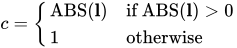
If ABS(
 ) is greater than c*value, then
  is declared nonestimable. Here,
  is the matrix
 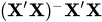 . The value must be between 0 and 1; the default is
  .
.
As stated previously, the CONTRAST statement enables you to perform hypothesis tests  .
.
If the matrix contains more than one contrast, then you can separate the rows of the matrix with commas.
For example, for the model
proc surveyreg;
   class A B;
   model Y=A B;
run;
with A at 5 levels and B at 2 levels, the parameter vector is

To test the hypothesis that the pooled A linear and A quadratic effect is zero, you can use the following matrix:

The corresponding CONTRAST statement is
contrast 'A Linear & Quadratic'
         a -2 -1  0  1  2,
         a  2 -1 -2 -1  2;