The SURVEYREG Procedure
MODEL Statement
MODEL dependent = <effects> </ options>;
The MODEL statement specifies the dependent (response) variable and the independent (regressor) variables or effects. The dependent variable must be numeric. Each term in a MODEL statement, called an effect, is a variable or a combination of variables. You can specify an effect with a variable name or with special notation by using variable names and operators. For more information about how to specify an effect, see the section Specification of Effects in Chapter 53, The GLM Procedure.
Only one MODEL statement is allowed for each PROC SURVEYREG statement. If you specify more than one MODEL statement, the procedure uses the first model and ignores the rest.
Table 8 summarizes the options available in the MODEL statement.
Table 8: MODEL Statement Options
| Option | Description |
|---|---|
| ADJRSQ | Compute the adjusted multiple R-square |
| ANOVA | Produces the ANOVA table |
| CLPARM | Requests confidence limits |
| COVB | Displays the estimated covariance matrix |
| DEFF | Displays design effects |
| DF= | Specifies the denominator degrees of freedom |
| I | Displays the inverse or the generalized inverse of the  matrix matrix |
| NOINT | Omits the intercept |
| PARMLABEL | Displays the labels of the parameters |
| SINGULAR= | Tunes the estimability checking |
| SOLUTION | Displays parameter estimates |
| STB | Displays standardized parameter estimates |
| VADJUST= | Specifies whether to use degrees of freedom adjustment |
| X | Displays the matrix, or the  matrix matrix |
You can specify the following options in the MODEL statement after a slash (/):
- ADJRSQ
requests the procedure compute the adjusted multiple R-square.
requests the ANOVA table be produced in the output. By default, the ANOVA table is not printed in the output.
- CLPARM
-
requests confidence limits for the parameter estimates. The SURVEYREG procedure determines the confidence coefficient by using the ALPHA= option, which by default equals 0.05 and produces 95% confidence bounds. The CLPARM option also requests confidence limits for all the estimable linear functions of regression parameters in the ESTIMATE statements.
Note that when there is a CLASS statement, you need to use the SOLUTION option with the CLPARM option to obtain the parameter estimates and their confidence limits.
- COVB
displays the estimated covariance matrix of the estimated regression estimates.
- DEFF
displays design effects for the regression coefficient estimates.
- DF=value
specifies the denominator degrees of freedom for the F tests and the degrees of freedom for the t tests. For details about the default denominator degrees of freedom, see the section Denominator Degrees of Freedom for details.
- I | INVERSE
displays the inverse or the generalized inverse of the
matrix. When there is a WEIGHT variable, the procedure displays the inverse or the generalized inverse of the matrix, where  is the diagonal matrix constructed from WEIGHT variable values.
 - NOINT
- PARMLABEL
displays the labels of the parameters in the "Estimated Regression Coefficients" table, if the effect contains a single continuous variable that has a label.
- SINGULAR=value
-
tunes the estimability checking. If
 is a vector, define ABS() to be the largest absolute value of the elements of . For a row vector
  of the matrix
  , define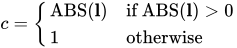
If ABS(
 ) is greater than c*value, then
  is declared nonestimable. Here,
  is the matrix
 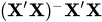 . The value must be between 0 and 1; the default is
  .
. - SOLUTION
displays a solution to the normal equations, which are the parameter estimates. The SOLUTION option is useful only when you use a CLASS statement. If you do not specify a CLASS statement, PROC SURVEYREG displays parameter estimates by default. But if you specify a CLASS statement, PROC SURVEYREG does not display parameter estimates unless you also specify the SOLUTION option.
- STB
produces standardized regression coefficients. A standardized regression coefficient is computed by dividing a parameter estimate by the ratio of the sample standard deviation of the dependent variable to the sample standard deviation of the regressor.
- VADJUST=DF | NONE
specifies whether to use degrees of freedom adjustment
 in the computation of the matrix
  for the variance estimation. If you do not specify the VADJUST= option, by default, PROC SURVEYREG uses the degrees-of-freedom adjustment that is equivalent to the VARADJ=DF option. If you do not want to use this variance adjustment, you can specify the VADJUST=NONE option.
 - X | XPX
displays the
matrix, or the matrix when there is a WEIGHT variable, where is the diagonal matrix constructed from WEIGHT variable values. The X option also displays the crossproducts vector  or
or  .
.