REMOVE Statement
Deletes an observation from a SAS data set.
| Valid in: | DATA step |
|---|---|
| Category: | Action |
| Type: | Executable |
| Restrictions: | This statement is not supported in a DATA step that runs in CAS. |
| Use only with a MODIFY statement. |
Table of Contents
Syntax
Without Arguments
If you specify no argument, the REMOVE statement deletes the current observation from all data sets that are named in the DATA statement.
Arguments
data-set-name
specifies the data set in which the observation is deleted.
| Restriction | The data set name must also appear in the DATA statement and in one or more MODIFY statements. |
|---|---|
| Tip | Instead of using a data set name, you can specify the physical pathname to the file, using syntax that your operating system understands. The pathname must be enclosed in single or double quotation marks. |
Details
The deletion of an observation can be physical or logical, depending on the engine that maintains the data set. Using REMOVE overrides the default replacement of observations. If a DATA step contains a REMOVE statement, you must explicitly program all output for the step.
Comparisons
- Using an OUTPUT, REPLACE, or REMOVE statement overrides the default write action at the end of a DATA step. (OUTPUT is the default action; REPLACE becomes the default action when a MODIFY statement is used.) If you use any of these statements in a DATA step, you must explicitly program all output for new observations.
- The OUTPUT, REPLACE, and REMOVE statements are independent of each other. More than one statement can apply to the same observation, as long as the sequence is logical.
- If both an OUTPUT and a REPLACE or REMOVE statement execute on a given observation, perform the OUTPUT action last to keep the position of the observation pointer correct.
- Because the REMOVE statement can perform a physical or a logical deletion, REMOVE is available with the MODIFY statement for all SAS data set engines. Both the DELETE and subsetting IF statements perform only physical deletions. Therefore, they are not available with the MODIFY statement for certain engines.
Example: Removing an Observation from a Data Set
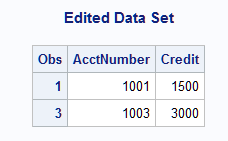
This example removes one observation from a SAS data set.
libname perm 'SAS-library';data perm.accounts;
input AcctNumber Credit;
datalines;
1001 1500
1002 4900
1003 3000
;
data perm.accounts;
modify perm.accounts;
if AcctNumber=1002 then remove;
run;
proc print data=perm.accounts;
title 'Edited Data Set';
run;Here are the results of the PROC PRINT statement:
Edited Data Set