MODIFY Statement
Replaces, deletes, and appends observations in an existing SAS data set in place but does not create an additional copy.
| Valid in: | DATA step |
|---|---|
| Category: | File-Handling |
| Type: | Executable |
| Restrictions: | This statement is not supported in a DATA step that runs in CAS. |
| This statement cannot modify the descriptor portion of a SAS data set, such as adding a variable. | |
| Notes: | If you modify a password-protected data set, specify the password with the appropriate data set option (ALTER= or PW=) in the MODIFY statement, and not in the DATA statement. |
| The variables read using the MODIFY statement are retained in the PDV. For more information, see Overview of DATA Step Processing in SAS Language Reference: Concepts and the RETAIN Statement. | |
| See: | Updating Data Using the MODIFY Statement and the KEY= Option in SAS Programmer’s Guide: Essentials |
| CAUTION |
Damage to the SAS data set can occur if the system terminates abnormally during a DATA step that contains the MODIFY statement. Observations in native SAS data files might have incorrect data values, or the data file might become unreadable. DBMS tables that are referenced by views are not affected. |
Table of Contents
- Syntax
- Arguments
- Details
- Matching Access (Form 1)
- Duplicate BY Values (Form 1)
- Direct Access by Indexed Values (Form 2)
- Duplicate Index Values (Form 2)
- Direct (Random) Access by Observation Number (Form 3)
- Sequential Access (Form 4)
- Preparing Your Data Sets Before Using MODIFY
- Automatic Variable _IORC_ and the SYSRC Autocall Macro
- Writing Observations When MODIFY Is Used in a DATA Step
- Missing Values and the MODIFY Statement
- Using MODIFY with Data Set Options
- Using MODIFY in a SAS/SHARE Environment
- Comparisons
- Examples
- Example 1: Input Data Set for Examples
- Example 2: Modifying All Observations
- Example 3: Modifying Observations Using a Transaction Data Set
- Example 4: Modifying Observations Located by Observation Number
- Example 5: Modifying Observations Located by an Index
- Example 6: Handling Duplicate Index Values
- Example 7: Controlling I/O
- Example 8: Replacing and Removing Observations and Writing Observations to Different SAS Data Sets
- See Also
Syntax
Form 1:
<CUROBS=variable> <NOBS=variable> <END=variable>
<UPDATEMODE=MISSINGCHECK | NOMISSINGCHECK>;
BY by-variable;
Form 2:
<KEYRESET=variable> <NOBS=variable> <END=variable>;
Form 3:
Form 4:
Arguments
master-data-set
specifies the SAS data set that you want to modify.
| Restrictions | This data set must also appear in the DATA statement. |
|---|---|
| For sequential and matching access, the master data set can be a SAS data file, a SAS/ACCESS view, an SQL view, or a DBMS engine for the LIBNAME statement. It cannot be a DATA step view or a pass-through view. | |
| For random access using POINT=, the master data set must be a SAS data file or an SQL view that references a SAS data file. | |
| For direct access using KEY=, the master data set can be a SAS data file or the DBMS engine for the LIBNAME statement. If it is a SAS file, it must be indexed and the index name must be specified on the KEY= option. | |
| For a DBMS, the KEY= is set to the keyword DBKEY and the column names to use as an index must be specified on the DBKEY= data set option. These column names are used in constructing a WHERE expression that is passed to the DBMS. | |
| Tip | Instead of using a data set name, you can specify the physical pathname to the file, using syntax that your operating system understands. The pathname must be enclosed in single or double quotation marks. |
(data-set-options)
specifies one or more SAS data set options in parentheses after a SAS data set name.
| Note | The data set options specify actions that SAS is to take when it reads observations into the DATA step for processing. For a list of data set options, see SAS Data Set Options: Reference |
|---|---|
| Tip | Data set options that apply to a data set list apply to all of the data sets in the list. |
transaction-data-set
specifies the SAS data set that provides the values for matching access. These values are the values that you want to use to update the master data set.
| Restriction | Specify this data set only when the DATA step contains a BY statement. |
|---|---|
| Tip | Instead of using a data set name, you can specify the physical pathname to the file, using syntax that your operating system understands. The pathname must be enclosed in single or double quotation marks. |
by-variable
specifies one or more variables by which you identify corresponding observations.
CUROBS=variable
creates and names a variable that contains the observation number that was just read from the data set.
END=variable
creates and names a temporary variable that contains an end-of-file indicator.
| Restriction | Do not use this argument in the same MODIFY statement with the POINT= argument. POINT= indicates that MODIFY uses random access. The value of the END= variable is never set to 1 for random access. |
|---|---|
| Notes | The variable, which is initialized to zero, is set to 1 when the MODIFY statement reads the last observation of the data set being modified (for sequential access ) or the last observation of the transaction data set (for matching access ). It is also set to 1 when MODIFY cannot find a match for a KEY= value (random access). |
| This variable is not added to any data set. |
KEY=index
specifies a simple or composite index of the SAS data file that is being modified. The KEY= argument retrieves observations from that SAS data file based on index values that are supplied by like-named variables in another source of information.
| Default | If the KEY= value is not found, the automatic variable _ERROR_ is set to 1, and the automatic variable _IORC_ receives the value corresponding to the SYSRC autocall macro's mnemonic _DSENOM. See Automatic Variable _IORC_ and the SYSRC Autocall Macro. |
|---|---|
| Restriction | KEY= processing is different for SAS/ACCESS engines. For more information, see the SAS/ACCESS documentation. |
| Tips | Use the KEYRESET= option to control whether a KEY= search should begin at the top of the index for the data set that is being read. |
| Examples of sources for index values include a separate SAS data set named in a SET statement and an external file that is read by an INPUT statement. | |
| If duplicates exist in the master file, only the first occurrence is updated unless you use a DO-LOOP to execute a SET statement for the data set that is listed on the KEY=option for all duplicates in the master data set. | |
| If duplicates exist in the transaction data set, and they are consecutive, use the UNIQUE option to force the search for a match in the master data set to begin at the top of the index. Write an accumulation statement to add each duplicate transaction to the observation in master. Without the UNIQUE option, only the first duplicate transaction observation updates the master. | |
| If the duplicates in the transaction data set are not consecutive, the search begins at the beginning of the index each time, so that each duplicate is applied to the master. Write an accumulation statement to add each duplicate to the master. | |
| See | KEYRESET=variable |
| UNIQUE | |
| Examples | Modifying Observations Located by an Index |
| Handling Duplicate Index Values | |
| Controlling I/O |
KEYRESET=variable
controls whether a KEY= search should begin at the top of the index for the data set that is being read. When the value of the KEYRESET variable is 1, the index lookup begins at the top of the index. When the value of the KEYRESET variable is 0, the index lookup is not reset and the lookup continues where the prior lookup ended.
| Interaction | The KEYRESET= option is similar to the UNIQUE option, except the KEYRESET= option enables you to determine when the KEY= search should begin at the top of the index again. |
|---|---|
| See | KEY=index |
| UNIQUE |
NOBS=variable
creates and names a temporary variable whose value is usually the total number of observations in the input data set. For certain SAS views and sequential engines such as the TAPE and XML engines, SAS cannot determine the number of observations. In these cases, SAS sets the value of the NOBS= variable to the largest positive integer value available in the operating environment.
| Note | At compilation time, SAS reads the descriptor portion of the data set and assigns the value of the NOBS= variable automatically. Thus, you can refer to the NOBS= variable before the MODIFY statement. The variable is available in the DATA step but is not added to the new data set. |
|---|---|
| Tip | The NOBS= and POINT= options are independent of each other. |
| Example | Modifying Observations Located by Observation Number |
POINT=variable
reads SAS data sets using random (direct) access by observation number. variable names a variable whose value is the number of the observation to read. The POINT= variable is available anywhere in the DATA step, but it is not added to any SAS data set.
| Restrictions | You cannot use the POINT= option with any of these items:
|
|---|---|
| You can use POINT= with compressed data sets only if the data set was created with the POINTOBS= data set option set to YES, the default value. | |
| You can use the random access method on compressed files only with SAS version 7 and beyond. | |
| Requirements | When using the POINT=
argument, include one or both of these programming constructs:
|
| Because POINT= reads only the specified observations, SAS cannot detect an end-of-file condition as it would if the file were being read sequentially. Because detecting an end-of-file condition terminates a DATA step automatically, failure to substitute another means of terminating the DATA step when you use POINT= can cause the DATA step to go into a continuous loop. | |
| Tip | If the POINT= value does not match an observation number, SAS sets the automatic variable _ERROR_ to 1. |
| Example | Modifying Observations Located by Observation Number |
UNIQUE
causes a KEY= search always to begin at the top of the index for the data file being modified.
| Restriction | UNIQUE can appear only with the KEY= option. |
|---|---|
| Tip | Use UNIQUE when there are consecutive duplicate KEY= values in the transaction data set, so that the search for a match in the master data set begins at the top of the index file for each duplicate transaction. You must include an accumulation statement or the duplicate values overwrite each other causing only the last transaction value to be the result in the master observation. |
| See | KEYRESET=variable |
| Example | Handling Duplicate Index Values |
UPDATEMODE=MISSINGCHECK | NOMISSINGCHECK
specifies whether missing variable values in a transaction data set are to be allowed to replace existing variable values in a master data set.
MISSINGCHECK
prevents missing variable values in a transaction data set from replacing values in a master data set.
NOMISSINGCHECK
allows missing variable values in a transaction data set to replace values in a master data set by preventing the check from being performed.
| Default | MISSINGCHECK |
|---|---|
| Requirement | The UPDATEMODE argument must be accompanied by a BY statement that specifies the variables by which observations are matched. |
| Tip | However, special missing values are the exception and they replace values in the master data set even when MISSINGCHECK is in effect. |
Details
- Matching Access (Form 1)
- Duplicate BY Values (Form 1)
- Direct Access by Indexed Values (Form 2)
- Duplicate Index Values (Form 2)
- Direct (Random) Access by Observation Number (Form 3)
- Sequential Access (Form 4)
- Preparing Your Data Sets Before Using MODIFY
- Automatic Variable _IORC_ and the SYSRC Autocall Macro
- Writing Observations When MODIFY Is Used in a DATA Step
- Missing Values and the MODIFY Statement
- Using MODIFY with Data Set Options
- Using MODIFY in a SAS/SHARE Environment
Matching Access (Form 1)
The matching access method uses the BY statement to match observations from the transaction data set with observations in the master data set. The BY statement specifies a variable that is in the transaction data set and the master data set.
When the MODIFY statement reads an observation from the transaction data set, it uses dynamic WHERE processing to locate the matching observation in the master data set. The observation in the master data set can be either
- replaced in the master data set with the value from the transaction data set
- deleted from the master data set
- appended to the master data set.
Modifying Observations Using a Transaction Data Set shows the matching access method.
Duplicate BY Values (Form 1)
Duplicates in the master and transaction data sets affect processing.
- If duplicates exist in the master data set, only the first occurrence is updated because the generated WHERE statement always finds the first occurrence in the master.
- If duplicates exist in the transaction data set, the duplicates are applied one on top of another unless you write an accumulation statement to add all of them to the master observation. Without the accumulation statement, the values in the duplicates overwrite each other so that only the value in the last transaction is the result in the master observation.
Direct Access by Indexed Values (Form 2)
This method requires that you use the KEY= option in the MODIFY statement to name an indexed variable from the data set that is being modified. Use another data source (typically a SAS data set named in a SET statement or an external file read by an INPUT statement) to provide a like-named variable whose values are supplied to the index. MODIFY uses the index to locate observations in the data set that is being modified.
Modifying Observations Located by an Index shows the direct-access-by-indexed-values method.
Duplicate Index Values (Form 2)
- If there are duplicate values of the indexed variable in the master data set, only the first occurrence is retrieved, modified, or replaced. Use a DO LOOP to execute a SET statement with the KEY= option multiple times to update all duplicates with the transaction value.
- If there are duplicate, nonconsecutive values in the like-named variable in the data source, MODIFY applies each transaction cumulatively to the first observation in the master data set whose index value matches the values from the data source. Therefore, only the value in the last duplicate transaction is the result in the master observation unless you write an accumulation statement to accumulate each duplicate transaction value in the master observation.
- If there are duplicate, consecutive values
in the variable in the data source, the values from the first observation
in the data source are applied to the master data set, but the DATA
step terminates with an error when it tries to locate an observation
in the master data set for the second duplicate from the data source.
To avoid this error, use the UNIQUE option in the MODIFY statement.
The UNIQUE option causes SAS to return to the top of the master data
set before retrieving a match for the index value. You must write
an accumulation statement to accumulate the values from all the duplicates.
If you do not, only the last one applied is the result in the master
observation.
Handling Duplicate Index Values shows how to handle duplicate index values.
- If there are duplicate index values in both data sets, you can use SQL to apply the duplicates in the transaction data set to the duplicates in the master data set in a one-to-one correspondence.
Direct (Random) Access by Observation Number (Form 3)
You can use the POINT= option in the MODIFY statement to name a variable from another data source (not the master data set), whose value is the number of an observation that you want to modify in the master data set. MODIFY uses the values of the POINT= variable to retrieve observations in the data set that you are modifying. (You can use POINT= on a compressed data set only if the data set was created with the POINTOBS= data set option.)
It is good programming practice to validate the value of the POINT= variable and to check the status of the automatic variable _ERROR_.
Modifying Observations Located by Observation Number shows the direct (random) access by observation number method.
CAUTION
POINT= can result in infinite looping. Be careful when you use POINT=, as failure to terminate the DATA step can cause the DATA step to go into a continuous loop. Use a STOP statement, programming logic that checks for an invalid value of the POINT= variable, or both.
Sequential Access (Form 4)
The sequential access method is the simplest form of the MODIFY statement, but it provides less control than the direct access methods. With the sequential access method, you can use the NOBS= and END= options to modify a data set; you do not use the POINT= or KEY= options.
Preparing Your Data Sets Before Using MODIFY
There are a number of things that you can do to improve performance and get the results that you want when using the MODIFY statement. For more information, see Combining SAS Data Sets: Basic Concepts in SAS Language Reference: Concepts.
Automatic Variable _IORC_ and the SYSRC Autocall Macro
The automatic variable _IORC_ contains the return code for each I/O operation that the MODIFY statement attempts to perform. The best way to test for values of _IORC_ is with the mnemonic codes that are provided by the SYSRC autocall macro. Each mnemonic code describes one condition. The mnemonics provide an easy method for testing problems in a DATA step program. These codes are useful:
- _DSENMR
-
specifies that the transaction data set observation does not exist on the master data set (used only with MODIFY and BY statements). If consecutive observations with different BY values do not find a match in the master data set, both of them return _DSENMR.
- _DSEMTR
-
specifies that multiple transaction data set observations with a given BY value do not exist on the master data set (used only with MODIFY and BY statements). If consecutive observations with the same BY values do not find a match in the master data set, the first observation returns _DSENMR and the subsequent observations return _DSEMTR.
- _DSENOM
-
specifies that the data set being modified does not contain the observation that is requested by the KEY= option or the POINT= option.
- _SENOCHN
-
specifies that SAS is attempting to execute an OUTPUT or REPLACE statement on an observation that contains a key value that duplicates one already existing on an indexed data set that requires unique key values.
- _SOK
-
specifies that the observation was located.
Controlling I/O shows how to use the automatic variable _IORC_ and the SYSRC autocall macro.
Writing Observations When MODIFY Is Used in a DATA Step
The way SAS writes observations to a SAS data set when the DATA step contains a MODIFY statement depends on whether certain other statements are present. The possibilities are
- no explicit statement
-
writes the current observation to its original place in the SAS data set. The action occurs as the last action in the step (as if a REPLACE statement were the last statement in the step).
- OUTPUT statement
-
if no data set is specified in the OUTPUT statement, writes the current observation to the end of all data sets that are specified in the DATA step. If a data set is specified, the statement writes the current observation to the end of the data set that is indicated. The action occurs at the point in the DATA step where the OUTPUT statement appears.
- REPLACE <data-set-name> statement
-
rewrites the current observation in the specified data set or data sets, or, if no argument is specified, rewrites the current observation in each data set specified in the DATA statement. The action occurs at the point of the REPLACE statement.
- REMOVE <data-set-name> statement
-
deletes the current observation in the specified data set or data sets, or, if no argument is specified, deletes the current observation in each data set specified in the DATA statement. The deletion can be a physical one or a logical one, depending on the characteristics of the engine that maintains the data set.
Remember the following as you work with these statements:
- When no OUTPUT, REPLACE, or REMOVE statement is specified, the default action is REPLACE.
- The OUTPUT, REPLACE,
and REMOVE statements are independent of each other. You can code
multiple OUTPUT, REPLACE, and REMOVE statements to apply to one observation.
However, once an OUTPUT, REPLACE, or REMOVE statement executes, the
MODIFY statement must execute again before the next REPLACE or REMOVE
statement executes.
You can use OUTPUT and REPLACE in this example of conditional logic because only one of the REPLACE or OUTPUT statements executes per observation.
data master;
   modify master trans; by key;
   if _iorc_=0 then replace;
   else
      output;
run;
You should not use multiple REPLACE operations on the same observation as in this example.
data master;
   modify master;
   x=1;
   replace;
   replace;
run;
You can code multiple OUTPUT statements per observation. However, be careful when you use multiple OUTPUT statements. It is possible to go into an infinite loop with just one OUTPUT statement.
data master; modify master; output; run; - Using OUTPUT, REPLACE, or REMOVE in a DATA step overrides the default replacement of observations. If you use any one of these statements in a DATA step, you must explicitly program each action that you want to take.
- If both an OUTPUT statement and a REPLACE or REMOVE statement execute on a given observation, perform the OUTPUT action last to keep the position of the observation pointer correct.
Replacing and Removing Observations and Writing Observations to Different SAS Data Sets shows how to use the OUTPUT, REMOVE, and REPLACE statements to write observations.
Missing Values and the MODIFY Statement
By default, the UPDATEMODE=MISSINGCHECK option is in effect, so missing values in the transaction data set do not replace existing values in the master data set. Therefore, if you want to update some but not all variables and if the variables that you want to update differ from one observation to the next, set to missing those variables that are not changing. If you want missing values in the transaction data set to replace existing values in the master data set, use UPDATEMODE=NOMISSINGCHECK.
Even when UPDATEMODE=MISSINGCHECK
is in effect, you can replace existing values with missing values
by using special missing value characters in the transaction data
set. To create the transaction data set, use the MISSING statement
in the DATA step. If you define one of the special missing values A through Z for
the transaction data set, SAS updates numeric variables in the master
data set to that value.
If you want the resulting value in the master data set to be a regular missing value, use a single underscore (_) to represent missing values in the transaction data set. The resulting value in the master data set is a period (.) for missing numeric values and a blank for missing character values.
For more information about defining and using special missing value characters, see MISSING Statement.
Using MODIFY with Data Set Options
If you use data set options (such as KEEP=) in your program, then use the options in the MODIFY statement for the master data set. Using data set options in the DATA statement might produce unexpected results.
Using MODIFY in a SAS/SHARE Environment
In a SAS/SHARE environment, the MODIFY statement accesses an observation in Update mode. That is, the observation is locked from the time MODIFY reads it until a REPLACE or REMOVE statement executes. At that point the observation is unlocked. It cannot be accessed until it is re-read with the MODIFY statement. The MODIFY statement opens the data set in Update mode, but the control level is based on the statement used. For example, KEY= and POINT= are member-level locking. For more information, see SAS/SHARE User’s Guide.
Comparisons
- When you use a MERGE,
SET, or UPDATE statement in a DATA step, SAS creates a new SAS data
set. The data set descriptor of the new copy can be different from
the old one (variables added or deleted, labels changed, and so on).
When you use a MODIFY statement in a DATA step, however, SAS does
not create a new copy of the data set. As a result, the data set descriptor
cannot change.
For information about DBMS replacement rules, see the SAS/ACCESS documentation.
- If you use a BY statement
with a MODIFY statement, MODIFY works much like the UPDATE statement,
except in these circumstances.
- neither the master data
set nor the transaction data set needs to be sorted or indexed. (The
BY statement that is used with MODIFY triggers dynamic WHERE processing.)
Note: Dynamic WHERE processing can be costly if the MODIFY statement modifies a SAS data set that is not in sorted order or has not been indexed. Having the master data set in sorted order or indexed and having the transaction data set in sorted order reduces processing overhead, especially for large files.
- both the master data set and the transaction data set can have observations with duplicate values of the BY variables. MODIFY treats the duplicates as described in Duplicate BY Values (Form 1).
- MODIFY cannot make any changes to the descriptor information of the data set as UPDATE can. Thus, it cannot add or delete variables, change variable labels, and so on.
- neither the master data
set nor the transaction data set needs to be sorted or indexed. (The
BY statement that is used with MODIFY triggers dynamic WHERE processing.)
Examples
Example 1: Input Data Set for Examples
The examples modify the INVTY.STOCK data set. INVTY.STOCK contains these variables:
- PARTNO
-
is a character variable with a unique value identifying each tool number.
- DESC
-
is a character variable with the text description of each tool.
- INSTOCK
-
is a numeric variable with a value describing how many units of each tool the company has in stock.
- RECDATE
-
is a numeric variable containing the SAS date value that is the day for which INSTOCK values are current.
- PRICE
-
is a numeric variable with a value that describes the unit price for each tool.
In addition, INVTY.STOCK contains a simple index on PARTNO. This DATA step creates INVTY.STOCK.
libname invty 'SAS-library';
data invty.stock(index=(partno));
   input PARTNO $ DESC $ INSTOCK @17
         RECDATE date7. @25 PRICE;
   format  recdate date7.;
   datalines;
K89R seal   34  27jul95 245.00
M4J7 sander 98  20jun95 45.88
LK43 filter 121 19may96 10.99
MN21 brace 43   10aug96 27.87
BC85 clamp 80   16aug96 9.55
NCF3 valve 198  20mar96 24.50
KJ66 cutter 6   18jun96 19.77
UYN7 rod  211   09sep96 11.55
JD03 switch 383 09jan97 13.99
BV1E timer 26   03jan97 34.50
;
Example 2: Modifying All Observations
This example replaces the date on all of the records in the data set INVTY.STOCK with the current date. It also replaces the value of the variable RECDATE with the current date for all observations in INVTY.STOCK.
data invty.stock;
   modify invty.stock;
   recdate=today();
run;
proc print data=invty.stock noobs;
   title 'INVTY.STOCK';
run;
Results of Updating the RECDATE Field
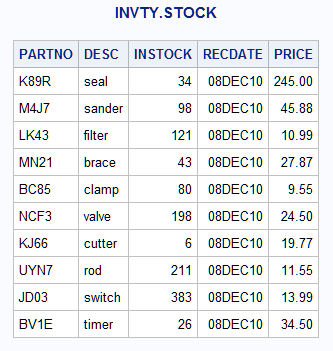
The MODIFY statement opens INVTY.STOCK for update processing. SAS reads one observation of INVTY.STOCK for each iteration of the DATA step and performs any operations that the code specifies. In this case, the code replaces the value of RECDATE with the result of the TODAY function for every iteration of the DATA step. An implicit REPLACE statement at the end of the step writes each observation to its previous location in INVTY.STOCK.
Example 3: Modifying Observations Using a Transaction Data Set
This example adds the quantity of newly received stock to its data set INVTY.STOCK as well as updating the date on which stock was received. The transaction data set ADDINV in the Work library contains the new data.
The ADDINV data set is the data set that contains the updated information. ADDINV contains these variables:
- PARTNO
-
is a character variable that corresponds to the indexed variable PARTNO in INVTY.STOCK.
- NWSTOCK
-
is a numeric variable that represents quantities of newly received stock for each tool.
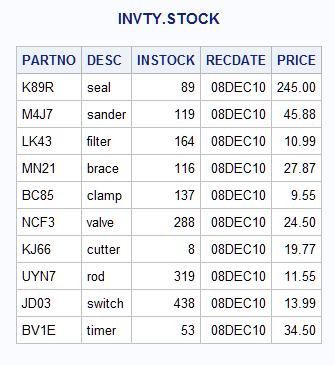
ADDINV is the second data set in the MODIFY statement. SAS uses it as the transaction data set and reads each observation from ADDINV sequentially. Because the BY statement specifies the common variable PARTNO, MODIFY finds the first occurrence of the value of PARTNO in INVTY.STOCK that matches the value of PARTNO in ADDINV. For each observation with a matching value, the DATA step changes the value of RECDATE to today's date and replaces the value of INSTOCK with the sum of INSTOCK and NWSTOCK (from ADDINV). MODIFY does not add NWSTOCK to the INVTY.STOCK data set because that would modify the data set descriptor. Thus, it is not necessary to put NWSTOCK in a DROP statement.
This example specifies ADDINV as the transaction data set that contains information to modify INVTY.STOCK. A BY statement specifies the shared variable whose values locate the observations in INVTY.STOCK.
This DATA step creates ADDINV.
data addinv;
   input PARTNO $ NWSTOCK;
   datalines;
K89R 55
M4J7 21
LK43 43
MN21 73
BC85 57
NCF3 90
KJ66 2
UYN7 108
JD03 55
BV1E 27
;
This DATA step uses values from ADDINV to update INVTY.STOCK.
libname invty 'SAS-library';
data invty.stock;
   modify invty.stock addinv;
   by partno;
   RECDATE=today();
   INSTOCK=instock+nwstock;
   if _iorc_=0 then replace;
run;

proc print data=invty.stock noobs;
   title 'INVTY.STOCK';
run;
Results of Updating the INSTOCK and RECDATE Fields
Example 4: Modifying Observations Located by Observation Number
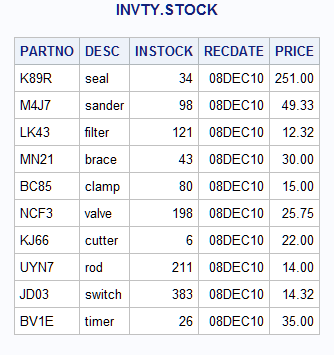
This example reads the data set NEWP, determines which observation number in INVTY.STOCK to update based on the value of TOOL_OBS, and performs the update. This example explicitly specifies the update activity by using an assignment statement to replace the value of PRICE with the value of NEWP.
The data set NEWP contains these two variables:
- TOOL_OBS
-
contains the observation number of each tool in the tool company's master data set, INVTY.STOCK.
- NEWP
-
contains the new price for each tool.
This DATA step creates NEWP.
data newp;
   input TOOL_OBS NEWP;
   datalines;
 1 251.00
 2 49.33
 3 12.32
 4 30.00
 5 15.00
 6 25.75
 7 22.00
 8 14.00
 9 14.32
10 35.00
;
This DATA step updates INVTY.STOCK.
libname invty 'SAS-library';
data invty.stock;
   set newp;
   modify invty.stock point=tool_obs
          nobs=max_obs;
   if _error_=1 then
      do;
        put 'ERROR occurred for TOOL_OBS=' tool_obs /
        'during DATA step iteration' _n_ /
        'TOOL_OBS value might be out of range.';
        _error_=0;
        stop;
      end;
   PRICE=newp;
   RECDATE=today();
run;

proc print data=invty.stock noobs;
   title 'INVTY.STOCK';
run;
Results of Updating the RECDATE and PRICE Fields
Example 5: Modifying Observations Located by an Index
This example uses the KEY= option to identify observations to retrieve by matching the values of PARTNO from ADDINV with the indexed values of PARTNO in INVTY.STOCK. ADDINV is created in Modifying Observations Using a Transaction Data Set.
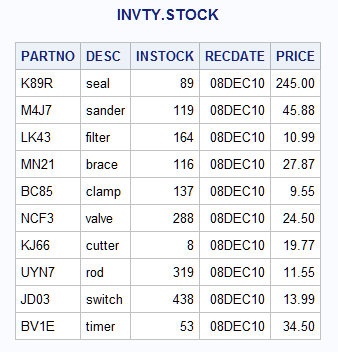
KEY= supplies index values that allow MODIFY to access directly the observations to update. No dynamic WHERE processing occurs. In this example, you specify that the value of INSTOCK in the master data set INVTY.STOCK increases by the value of the variable NWSTOCK from the transaction data set ADDINV.
libname invty 'SAS-library';data invty.stock;
set addinv;
modify invty.stock key=partno;
INSTOCK=instock+nwstock;
RECDATE=today();
if _iorc_=0 then replace;
run;proc print data=invty.stock noobs;
title 'INVTY.STOCK';
run;Results of Updating the INSTOCK and RECDATE Fields by Using an Index
Example 6: Handling Duplicate Index Values
This example shows how MODIFY handles duplicate values of the variable in the SET data set that is supplying values to the index on the master data set.
The NEWINV data set is the data set that contains the updated information. NEWINV contains these variables:
- PARTNO
-
is a character variable that corresponds to the indexed variable PARTNO in INVTY.STOCK. The NEWINV data set contains duplicate values for PARTNO;
M4J7appears twice. - NWSTOCK
-
is a numeric variable that represents quantities of newly received stock for each tool.
This DATA step creates NEWINV.
data newinv;
   input PARTNO $ NWSTOCK;
   datalines;
K89R 55
M4J7 21
M4J7 26
LK43 43
MN21 73
BC85 57
NCF3 90
KJ66 2
UYN7 108
JD03 55
BV1E 27
;
This DATA step terminates
with an error when it tries to locate an observation in INVTY.STOCK
to match with the second occurrence of M4J7 in
NEWINV.
libname invty 'SAS-library';
   /* This DATA step terminates with an error! */
data invty.stock;
   set newinv;
   modify invty.stock key=partno;
   INSTOCK=instock+nwstock;
   RECDATE=today();
run;
This message appears in the SAS log.
ERROR: No matching observation was found in MASTER data set.
PARTNO=M4J7 NWSTOCK=26 DESC=sander INSTOCK=166 RECDATE=08DEC10 PRICE=45.88 _ERROR_=1
_IORC_=1230015 _N_=3
NOTE: The SAS System stopped processing this step because of errors.
NOTE: There were 3 observations read from the data set WORK.NEWINV.
NOTE: The data set INVTY.STOCK has been updated.  There were 2 observations rewritten, 0
      observations added and 0 observations deleted.
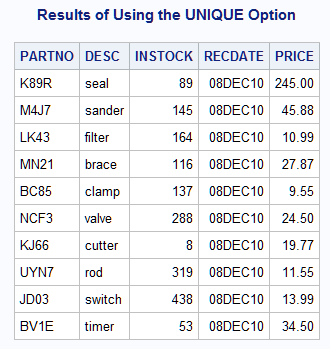
Adding the UNIQUE option
to the MODIFY statement avoids the error in the previous DATA step.
The UNIQUE option causes the DATA step to return to the top of the
index each time it looks for a match for the value from the SET data
set. Thus, it finds the M4J7 in the
MASTER data set for each occurrence of M4J7 in
the SET data set. The updated result for M4J7 in
the output shows that both values of NWSTOCK from NEWINV for M4J7 are
added to the value of INSTOCK for M4J7 in
INVTY.STOCK. An accumulation statement sums the values; without it,
only the value of the last instance of M4J7 would
be the result in INVTY.STOCK.
data invty.stock;
   set newinv;
   modify invty.stock key=partno / unique;
   INSTOCK=instock+nwstock;
   RECDATE=today();
   if _iorc_=0 then replace;
run;
proc print data=invty.stock noobs;
   title 'Results of Using the UNIQUE Option';
run;
Results of Updating the INSTOCK and RECDATE Fields by Using the UNIQUE Option
Example 7: Controlling I/O
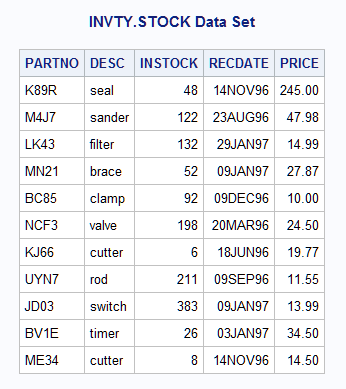
This example uses the SYSRC autocall macro and the _IORC_ automatic variable to control I/O condition. This technique helps prevent unexpected results that could go undetected. This example uses the direct access method with an index to update INVTY.STOCK. The data in the NEWSHIP data set updates INVTY.STOCK.
This DATA step creates NEWSHIP.
data newship;
   input PARTNO $ DESC $ NWSTOCK @17
         SHPDATE date7. @25 NWPRICE;
   datalines;
K89R seal 14    14nov96 245.00
M4J7 sander 24  23aug96 47.98
LK43 filter 11  29jan97 14.99
MN21 brace 9    09jan97 27.87
BC85 clamp 12   09dec96 10.00
ME34 cutter 8   14nov96 14.50
;
Each WHEN clause in the SELECT statement specifies actions for each input/output return code that is returned by the SYSRC autocall macro:
- _SOK indicates that the MODIFY statement executed successfully.
- _DSENOM indicates that no matching observation was found in INVTY.STOCK. The OUTPUT statement specifies that the observation be appended to INVTY.STOCK. See the last observation in the output.
- If any other code is returned by SYSRC, the DATA step terminates and the PUT statement writes the message to the SAS log.
libname invty 'SAS-library';data invty.stock;
set newship;
modify invty.stock key=partno;
select (_iorc_);
when (%sysrc(_sok)) do;
INSTOCK=instock+nwstock;
RECDATE=shpdate;
PRICE=nwprice;
replace;
end;
when (%sysrc(_dsenom)) do;
INSTOCK=nwstock;
RECDATE=shpdate;
PRICE=nwprice;
output;
_error_=0;
end;
otherwise do;
put
'An unexpected I/O error has occurred.'/
'Check your data and your program';
_error_=0;
stop;
end;
end;
run;proc print data=invty.stock noobs;
title 'INVTY.STOCK Data Set';
run;The Updated INVTY.STOCK Data Set
Example 8: Replacing and Removing Observations and Writing Observations to Different SAS Data Sets
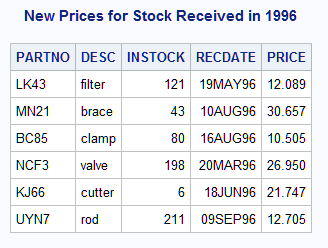
This example shows that you can replace and remove (delete) observations and write observations to different data sets. Further, this example shows that if an OUTPUT, REPLACE, or REMOVE statement is present, you must specify explicitly what action to take because no default statement is generated.
The parts that were received in 1997 are written to INVTY.STOCK97 and are removed from INVTY.STOCK. Likewise, the parts that were received in 1995 are written to INVTY.STOCK95 and are removed from INVTY.STOCK. Only the parts that were received in 1996 remain in INVTY.STOCK, and the PRICE is updated only in INVTY.STOCK.
libname invty 'SAS-library';
data invty.stock invty.stock95 invty.stock97;
   modify invty.stock;
   if recdate>'01jan97'd then do;
       output invty.stock97;
       remove invty.stock;
   end;
   else if recdate<'01jan96'd then do;
       output invty.stock95;
       remove invty.stock;
   end;
   else do;
      price=price*1.1;
      replace invty.stock;
   end;
run;

proc print data=invty.stock noobs;
   title 'New Prices for Stock Received in 1996';
run;
Output from Writing Observations to a Specific SAS Data Set
See Also
-
Reading, Combining, and Modifying SAS Data Sets in SAS Language Reference: Concepts
-
SAS SQL Procedure User’s Guide
-
Statements: