INFORMAT Statement
Associates informats with variables.
| Valid in: | DATA step or PROC step |
|---|---|
| Categories: | CAS |
| Information | |
| Type: | Declarative |
Table of Contents
Syntax
Arguments
variable
specifies one or more variables to associate with an informat. You must specify at least one variable when specifying an informat or when including no other arguments. Specifying a variable is optional when using a DEFAULT= informat specification.
| Tip | To disassociate an informat from a variable, use the variable's name in an INFORMAT statement without specifying an informat. Place the INFORMAT statement after the SET statement. See Removing an Informat. |
|---|
informat
specifies the informat for reading the values of the variables that are listed in the INFORMAT statement.
| Tip | If an informat is associated with a variable by using the INFORMAT statement, and that same informat is not associated with that same variable in the INPUT statement, then that informat behaves like informats that you specify with a colon (:) modifier in an INPUT statement. SAS reads the variables by using list input with an informat. For example, you can use the : modifier with an informat to read character values that are longer than eight bytes, or numeric values that contain nonstandard values. For more information, see INPUT Statement: List. |
|---|---|
| See | SAS Formats and Informats: Reference |
| Example | Specifying Numeric and Character Informats |
DEFAULT= default-informat
specifies a temporary default informat for reading values of the variables that are listed in the INFORMAT statement. If no variable is specified, then the DEFAULT= informat specification applies a temporary default informat for reading values of all the variables of that type included in the DATA step. Numeric informats are applied to numeric variables, and character informats are applied to character variables. These default informats apply only to the current DATA step.
A DEFAULT= informat specification applies to
- variables that are not named in an INFORMAT or ATTRIB statement
- variables that are not permanently associated with an informat within a SAS data set
- variables that are not read with an explicit informat in the current DATA step.
| Default | If you omit DEFAULT=, SAS uses w.d as the default numeric informat and $w. as the default character informat. |
|---|---|
| Restriction | Use this argument only in a DATA step. |
| Tip | A DEFAULT= specification can occur anywhere in an INFORMAT statement. It can specify either a numeric default, a character default, or both. |
| Example | Specifying Default Informats |
Details
The Basics
An INFORMAT statement in a DATA step permanently associates an informat with a variable. You can specify standard SAS informats or user-written informats, previously defined in PROC FORMAT. A single INFORMAT statement can associate the same informat with several variables, or it can associate different informats with different variables. If a variable appears in multiple INFORMAT statements, SAS uses the informat that is assigned last.
CAUTION
Because an INFORMAT statement defines the length of previously undefined character variables, you can truncate the values of character variables in a DATA step if an INFORMAT statement precedes a SET statement.
How SAS Treats Variables When You Assign Informats with the INFORMAT Statement
Informats that are associated with variables by using the INFORMAT statement behave like informats that are used with modified list input. SAS reads the variables by using the scanning feature of list input, but applies the informat. In modified list input, SAS
- does not use the value of w in an informat to specify column positions or input field widths in an external file
- uses the value of w in an informat to specify the length of previously undefined character variables
- ignores the value of w in numeric informats
- uses the value of d in an informat in the same way it usually does for numeric informats
- treats blanks that are embedded as input data as delimiters unless you change their status with a DLM= or DLMSTR= option specification in an INFILE statement.
If you have coded the INPUT statement to use another style of input, such as formatted input or column input, that style of input is not used when you use the INFORMAT statement.
Comparisons
- Both the ATTRIB and INFORMAT statements can associate informats with variables, and both statements can change the informat that is associated with a variable. You can also use the INFORMAT statement in PROC DATASETS to change or remove the informat that is associated with a variable. The SAS windowing environment enables you to associate, change, or disassociate informats and variables in existing SAS data sets.
- SAS changes the descriptor information of the SAS data set that contains the variable. You can use an INFORMAT statement in some PROC steps, but the rules are different. For more information, see FORMAT Procedure in Base SAS Procedures Guide.
Examples
Example 1: Specifying Default Informats
This example uses an INFORMAT statement to associate a default numeric informat:
data tstinfmt;
   informat default=3.1;
   input x;
   put x;
   datalines;
111
222
333
;
The PUT statement produces these results:
11.1
22.2
33.3
Example 2: Specifying Numeric and Character Informats
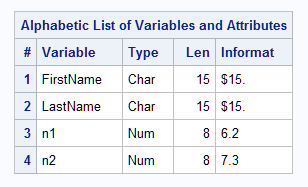
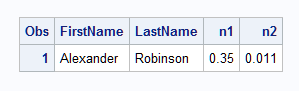
This example associates a character informat and a numeric informat with SAS variables. Although the character variables do not fully occupy 15 column positions, the INPUT statement reads the data records correctly by using modified list input:
data name;
   informat FirstName LastName $15. n1 6.2 n2 7.3;
   input firstname lastname n1 n2;
   datalines;
Alexander Robinson 35 11
;
proc contents data=name;
run;
proc print data=name;
run;
This output shows a partial listing from PROC CONTENTS, as well as the report PROC PRINT generates.
Associating Numeric and Character Informats with SAS Variables
PROC PRINT Report
Example 3: Removing an Informat
This example disassociates an existing informat. The order of the INFORMAT and SET statements is important.
data rtest;
   set rtest;
   informat x;
run;
See Also
-
Statements: